
Tcl LINKHUB 5G Home Router HH512LV User Manual
Content
TCL LINKHUB 5G Home Router HH512LV Overview
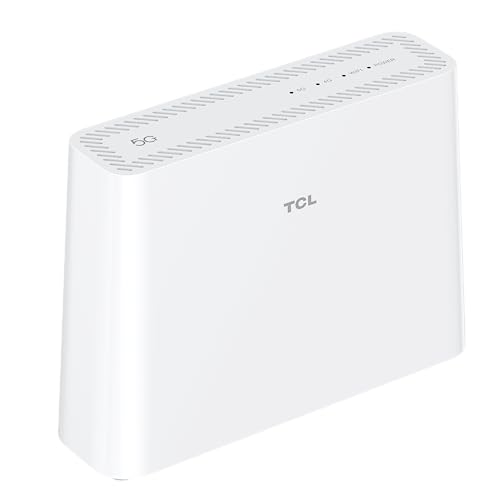
The TCL LINKHUB 5G Home Router HH512LV is a compact 5G CPE designed to deliver fast wireless broadband for homes, small offices, and temporary internet setups. Built for users who want a simple alternative to fixed-line broadband, this 5G home router combines cellular connectivity, Wi-Fi 6E, and wired Ethernet ports in one device. The TCL LINKHUB 5G Home Router HH512LV is especially useful in areas where fiber is unavailable, in second homes, and for families that need stable internet for streaming, gaming, video calls, and smart-home devices.
One of its biggest selling points is support for 5G sub-6GHz networks with strong peak wireless throughput and up to 32 connected devices. The inclusion of Wi-Fi 6E makes it more future-ready than many entry-level mobile routers, while the RJ11 telephone port adds voice-call capability over the mobile network. For users searching for a 5G Wi-Fi 6E router with SIM support, the HH512LV stands out as a flexible all-in-one solution.
Estimated pricing typically falls in the mid-range home-router category, often around the equivalent of budget-to-premium 5G routers depending on the retailer, region, and contract bundle. Availability varies by market, and it is commonly sold through electronics retailers and online stores. If you are comparing 5G CPE devices, the TCL LINKHUB 5G Home Router HH512LV offers a practical mix of speed, phone support, and easy setup.
Specifications for TCL LINKHUB 5G Home Router HH512LV
- Mobile connectivity: 5G Sub-6GHz support with NSA and SA modes
- Maximum mobile download speed: up to 3.47 Gbps
- Wi-Fi standard: Wi-Fi 6E with support for 2.4 GHz, 5 GHz, and 6 GHz bands
- Wireless throughput: up to 3600 Mbps class performance
- Connected devices: supports up to 32 simultaneous users
- Ethernet ports: 2 Gigabit ports, including 1 WAN/LAN and 1 LAN
- Voice port: RJ11 telephone port for making and receiving calls via the mobile network
- Additional functions: WPS, bridge mode, parental controls, VPN support, FOTA updates
- Management: TCL Connect app and browser-based administration
- Dimensions: 185 x 53.3 x 135 mm
- Weight: about 470 g
- Power: 12V input, 18W rated output power
Compared with standard 4G LTE routers, this model offers higher throughput and lower latency potential. Compared with many Wi-Fi 6 routers, the TCL LINKHUB 5G Home Router HH512LV adds mobile network flexibility and native voice support through RJ11, making it more versatile for home backup internet and primary wireless access.
How to Set Up TCL LINKHUB 5G Home Router HH512LV
Start by inserting a nano-SIM card into the SIM slot, then connect the power adapter and place the router near a window or elevated location for stronger mobile reception. Wait for the status light to stabilize before connecting any devices. You can connect by Wi-Fi using the default network details on the label or by Ethernet using the Gigabit ports.
For configuration, open the TCL Connect app or the web admin page in your browser. From there, set your Wi-Fi SSID, password, guest network, parental controls, and any bridge or VPN options you need. If you plan to use the telephone port, connect a compatible handset to the RJ11 jack and verify voice service with your carrier.
Troubleshooting setup issues is usually straightforward: reseat the SIM, confirm the SIM is active, check APN settings if required, and reboot the router after changes. Keep the device away from heat, moisture, and blocked ventilation. Use only the supplied power adapter and avoid opening the casing, since improper handling can damage the unit and void support eligibility.
Troubleshooting TCL LINKHUB 5G Home Router HH512LV Problems
Common issues include weak 5G signal, no internet access, Wi-Fi drops, and phone port problems. If the connection is slow, move the router closer to a window, reduce interference from walls or appliances, and check whether the network has switched between 5G and 4G fallback. If devices cannot join Wi-Fi, re-enter the password, test another band, or reset the network settings.
Typical fixes for error-like behavior include restarting the router, reinserting the SIM, verifying carrier compatibility, and checking whether firmware updates are available. If the phone line does not work, confirm that your service plan includes voice over the mobile network and that the RJ11 handset is properly connected. For persistent issues, perform a factory reset and reconfigure the device from scratch.
Preventive maintenance includes keeping firmware current, using a stable power source, and placing the router in a well-ventilated area. Warranty terms and support options depend on the retailer and region, but users should contact TCL customer support, the original seller, or the carrier for SIM and network-related problems.
Pros and Cons of TCL LINKHUB 5G Home Router HH512LV
Pros
- Fast 5G speeds for home internet without fixed-line installation
- Wi-Fi 6E support improves capacity for multiple devices
- Useful RJ11 phone port for voice calling on compatible mobile plans
- Dual Gigabit Ethernet ports add reliable wired connectivity
- Easy setup with app-based and browser-based management
Cons
- Performance depends heavily on local 5G signal quality
- Best results may require careful placement near a window
- Not ideal for users who only need basic low-cost internet access
- Availability and pricing can vary widely by region
As a value-for-money option, the TCL LINKHUB 5G Home Router HH512LV is appealing for users who need broadband replacement, mobile backup internet, or a router with phone support. Compared with simpler 4G hotspots, it offers a more capable home-network experience. Compared with premium 5G routers, it delivers strong core features without unnecessary complexity.
Customer Reviews for TCL LINKHUB 5G Home Router HH512LV
Customer feedback for the TCL LINKHUB 5G Home Router HH512LV is generally positive, with many users praising the easy installation, solid Wi-Fi coverage, and strong 5G speeds. Typical star ratings often land around 4 out of 5 stars, especially among buyers who use it as a replacement for fixed broadband or as a temporary connection in rural areas.
Common praise includes the compact design, dual Ethernet ports, and the convenience of having a telephone port on the HH512LV model. Common complaints usually focus on signal variability, dependence on carrier coverage, and the need to position the router carefully for the best performance. Buyers who expect fiber-like consistency in a weak coverage area may be less satisfied.
Overall, this router is a strong recommendation for users who want a straightforward 5G home router with Wi-Fi 6E, voice support, and simple management. For the best experience, it is most suitable in locations with reliable 5G coverage and for households that value flexibility over absolute wired-line stability.
Faqs
How do I set up tcl LINKHUB 5G Home Router HH512LV for the first time?
What should I do if tcl LINKHUB 5G Home Router HH512LV is not connecting to the 5G network?
Can tcl LINKHUB 5G Home Router HH512LV connect to Wi-Fi 6E devices and multiple users at once?
How do I use the RJ11 phone port on tcl LINKHUB 5G Home Router HH512LV?
What internet speeds can I expect from tcl LINKHUB 5G Home Router HH512LV in real use?
Which devices are compatible with tcl LINKHUB 5G Home Router HH512LV?
How can I improve weak signal or slow performance on tcl LINKHUB 5G Home Router HH512LV?
How should I maintain tcl LINKHUB 5G Home Router HH512LV for reliable long-term use?
Tags
More tcl manuals
Leave a Comment