
Tcl MOVEAUDIO S600 Wireless Earbuds TW30 User Manual
Content
tcl MOVEAUDIO S600 Wireless Earbuds TW30: Product Manual and Buyer Guide
Introduction
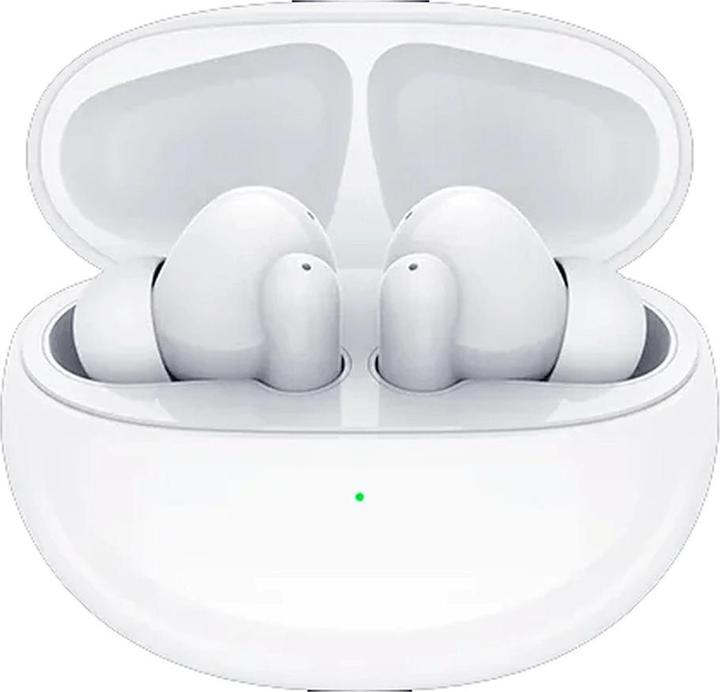
The tcl MOVEAUDIO S600 Wireless Earbuds TW30 are true wireless earbuds designed for users who want premium everyday listening without paying flagship prices. Built around hybrid active noise cancellation, transparency mode, and Google Fast Pair, these earbuds are positioned as a practical choice for commuting, office calls, workouts, and casual gaming. The design focuses on comfort, reliable Bluetooth connectivity, and a feature set that covers most modern use cases, including hands-free calling, voice assistant access, and quick pairing with Android and iOS devices.
One of the biggest strengths of the tcl MOVEAUDIO S600 Wireless Earbuds TW30 is battery life. The earbuds are commonly rated for up to 8 hours of playback on a single charge, with the charging case extending total listening time to around 32 hours. Support for wireless charging and USB-C makes topping up convenient, while the IP54 dust and water resistance rating adds confidence for daily wear and light exercise. The 10 mm dynamic drivers are tuned for a bold, consumer-friendly sound profile, making them suitable for pop, podcasts, calls, and streaming video.
This model is a strong fit for students, remote workers, travelers, and fitness users who want dependable wireless earbuds with ANC at an accessible price. In most markets, the estimated price range is typically budget-to-midrange, often around $50 to $100 depending on region, promotions, and retailer availability. The tcl MOVEAUDIO S600 Wireless Earbuds TW30 are widely available through TCL retail channels and third-party electronics stores, though stock can vary by country and color.
Specifications: tcl MOVEAUDIO S600 Wireless Earbuds TW30 Features and Technical Details
- Type: True wireless in-ear earbuds
- Bluetooth version: Bluetooth 5.0 BLE
- Codecs supported: SBC, AAC
- Drivers: 10 mm dynamic drivers
- Noise cancellation: Hybrid ANC with transparency mode
- Microphones: 6 total, 3 per earbud
- Battery life: Up to 8 hours per charge, up to 32 hours with case
- Charging: USB-C charging case with wireless charging support
- Battery capacity: 55 mAh per earbud, 500 mAh charging case
- Water resistance: IP54 dust and water resistance
- Controls: Touch controls with wear detection
- Compatibility: Android and iOS
- Fast pairing: Google Fast Pair support
In practical terms, the tcl MOVEAUDIO S600 Wireless Earbuds TW30 compare well with other budget ANC earbuds by offering a stronger feature set than many entry-level models, especially for battery life, wireless charging, and transparency mode. They are not aimed at audiophiles seeking advanced codecs or ultra-low latency gaming performance, but they provide solid everyday value for most listeners.
Setup Guide: How to Pair and Configure the Earbuds
Setting up the earbuds is straightforward. First, fully charge the case and earbuds using the supplied USB-C cable or a compatible wireless charger. Next, open the case lid and keep the earbuds inside to enter pairing mode. On Android devices, Google Fast Pair may appear automatically; on iPhone or other phones, open Bluetooth settings and select the earbuds from the available devices list. Once paired, the earbuds should reconnect automatically when removed from the case.
For best results, install the companion app if supported in your region so you can check battery levels, adjust touch controls, and manage ANC or transparency settings. If pairing fails, reset the earbuds by placing them in the case, closing the lid, then repeating the pairing process. If one earbud does not connect, make sure both are charged and clean the contact pins. Keep the earbuds away from moisture during setup and avoid charging them with damaged cables or wet hands.
Safety note: do not expose the case or earbuds to extreme heat, and avoid forcing the earbuds into the ear canal. If using them during exercise, confirm that the fit is secure before running or training.
Troubleshooting: Common Problems and Fixes
Most issues with the tcl MOVEAUDIO S600 Wireless Earbuds TW30 are easy to solve. If the earbuds do not power on, check the case charge and clean the charging contacts. If audio is only coming from one side, place both earbuds back in the case, wait a few seconds, and reconnect them through Bluetooth. If the sound is distorted or weak, lower the volume slightly, remove debris from the mesh, and test the earbuds with another device.
- Pairing issue: Forget the device in Bluetooth settings and pair again from the case.
- ANC not working: Confirm the correct mode is selected in the app or by touch controls.
- Touch controls unresponsive: Dry your hands and clean the outer surface of the earbuds.
- Battery drains too fast: Reduce ANC usage and keep firmware updated if available.
- Charging problem: Try another cable, USB port, or wireless pad.
Error codes are not commonly displayed on the earbuds themselves, so most troubleshooting relies on LED indicators and device Bluetooth menus. Preventive care includes regular cleaning, storing the earbuds in the case when not in use, and avoiding full discharge for long periods. Warranty coverage and service terms vary by region, so users should contact the original retailer or TCL support channel in their country for replacement or repair assistance. Keep your proof of purchase ready when requesting support.
Pros & Cons of the tcl MOVEAUDIO S600 Wireless Earbuds TW30
Pros
- Hybrid ANC and transparency mode improve everyday usability.
- Strong battery life with up to 32 hours total playback.
- Wireless charging plus USB-C adds convenience.
- Google Fast Pair makes setup quick on compatible Android phones.
- IP54 rating helps with workouts, commuting, and light rain.
- Good value for money compared with many budget ANC alternatives.
Cons
- Bluetooth 5.0 and SBC/AAC support are solid but not cutting-edge.
- Sound tuning favors mainstream listeners over audiophiles.
- Noise cancellation is useful, but not at the level of premium flagship earbuds.
- Touch controls may require a learning curve for some users.
- Feature access can vary depending on app and regional availability.
Compared with alternatives such as basic non-ANC earbuds or older TCL models, the tcl MOVEAUDIO S600 Wireless Earbuds TW30 offer a noticeably better all-around package. They are especially attractive for buyers who want ANC, wireless charging, and long battery life without spending premium-brand money.
Customer Reviews: What Users Say About the Earbuds
Most users rate the earbuds around 4 out of 5 stars for everyday performance, comfort, and battery life. Common praise includes easy setup, strong value, and the convenience of fast pairing. One typical testimonial is: “Great for work calls and commuting, and the battery lasts all week with light use.”
Frequent complaints focus on average noise cancellation in very loud environments and the fact that touch gestures can feel sensitive at first. Another common comment is: “The sound is enjoyable, but I wish the ANC were stronger on airplanes.” For shoppers who want a balanced, budget-friendly ANC earbud set, the tcl MOVEAUDIO S600 Wireless Earbuds TW30 remains a recommended option, especially for daily streaming, calls, and travel use.
Faqs
How do I set up TCL MOVEAUDIO S600 Wireless Earbuds TW30 for the first time?
What should I do if TCL MOVEAUDIO S600 Wireless Earbuds TW30 will not connect to my phone?
How do I reset TCL MOVEAUDIO S600 Wireless Earbuds TW30 when one earbud stops working?
Does TCL MOVEAUDIO S600 Wireless Earbuds TW30 support noise cancellation and transparency mode?
Can I use TCL MOVEAUDIO S600 Wireless Earbuds TW30 with Android and iPhone devices?
Why is the battery life on TCL MOVEAUDIO S600 Wireless Earbuds TW30 draining faster than expected?
How do I use touch controls on TCL MOVEAUDIO S600 Wireless Earbuds TW30 without triggering the wrong command?
How should I clean and maintain TCL MOVEAUDIO S600 Wireless Earbuds TW30 for long-term use?
More tcl manuals
Leave a Comment