
Tcl 65P610 Slim 3.0 4K TV User Manual
Content
TCL 65P610 Slim 3.0 4K TV: Complete Product Manual and Buying Guide
Introduction
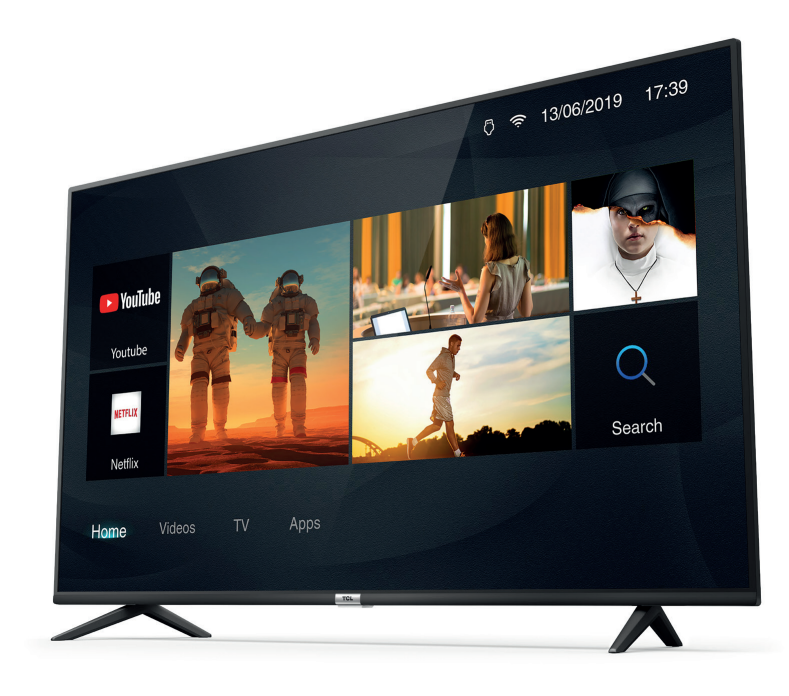
The TCL 65P610 Slim 3.0 4K TV is a 65-inch Ultra HD television designed for viewers who want a large screen, modern smart features, and a clean slim-frame design without paying premium-brand prices. With 4K resolution, HDR support, and TCL Smart TV 3.0, this model is built for everyday streaming, sports, gaming, and family entertainment. Its minimalist profile and slim bezel help it blend into living rooms, media rooms, and bedroom setups where screen size and style both matter.
As a value-focused 4K TV, the TCL 65P610 Slim 3.0 4K TV is a strong choice for users upgrading from older Full HD televisions or looking for an affordable large-screen display for Netflix, YouTube, live TV, and set-top box content. It is especially attractive to families, casual gamers, and streamers who want easy access to popular apps, reliable picture quality, and simple day-to-day operation.
Estimated pricing generally falls in the mid-range budget segment, often around the equivalent of $450 to $750 depending on region, retailer, and promotion. Availability may vary by country, but this model is commonly found through TCL’s regional storefronts, electronics retailers, and online marketplaces. For buyers searching for a 65-inch smart 4K TV with practical features and strong value, this model remains a compelling option.
Pros & Cons of the TCL 65P610 Slim 3.0 4K TV
- Pros: Large 65-inch 4K UHD screen delivers sharp detail for movies, sports, and streaming.
- Pros: Slim design and narrow bezel give the TV a modern look that feels more premium than its price suggests.
- Pros: HDR support improves contrast and color range in compatible content.
- Pros: Smart TV 3.0 offers convenient access to popular apps and online content.
- Pros: Good value for money for shoppers who want a big-screen 4K TV without high-end costs.
- Cons: 60 Hz-class performance is fine for most users but not ideal for competitive gaming or fast-motion enthusiasts.
- Cons: Picture quality is solid for the price, but it does not match the brightness, contrast, or local dimming of more expensive QLED or OLED alternatives.
- Cons: Sound is usually adequate for casual viewing, but many users may prefer a soundbar for fuller audio.
- Cons: Compared with newer TCL models, the interface and feature set can feel simpler and more basic.
Overall, the TCL 65P610 Slim 3.0 4K TV offers excellent value for users who prioritize screen size, 4K resolution, and easy smart functionality over premium performance features.
Specifications for TCL 65P610 Slim 3.0 4K TV
- Screen size: 65 inches
- Resolution: 3840 x 2160 pixels, 4K UHD
- Panel type: LED LCD
- Display format: 16:9 widescreen
- HDR support: Yes, for improved contrast and color in compatible content
- Smart platform: Smart TV 3.0
- HDMI ports: 3 inputs
- USB ports: 2 ports for media playback and accessories
- Connectivity: Ethernet/LAN and wireless smart TV functions depending on region
- Audio features: Digital audio support with standard TV speaker output
- Design: Slim frame with narrow bezels
- Refresh rate: Typical 60 Hz-class performance
Compared with similar entry-level 65-inch 4K TVs, the TCL 65P610 Slim 3.0 4K TV stands out for its large screen, simple connectivity, and accessible smart TV experience. It is best positioned against other budget 4K models from brands such as Hisense, Samsung entry series, and LG’s lower-tier LED TVs.
Detailed Description of the TCL 65P610 Slim 3.0 4K TV
The TCL 65P610 Slim 3.0 4K TV is designed to deliver straightforward everyday performance in a large-format package. The 4K panel provides four times the pixel detail of Full HD, making text sharper, images cleaner, and streaming content more immersive. HDR compatibility helps supported movies and shows appear more dynamic, with improved highlight detail and better shadow separation.
In real-world use, this TV works well for family movie nights, live sports, cable or satellite viewing, and streaming apps. The slim frame design helps the screen feel larger in the room, while the simple control layout and smart interface make setup and daily navigation easy. Multiple HDMI ports allow users to connect game consoles, streaming devices, Blu-ray players, and soundbars without constant cable swapping.
Build quality is consistent with TCL’s value-oriented design approach: practical, lightweight, and visually clean. The materials are functional rather than luxurious, but the overall finish looks polished enough for modern interiors. For users who want a dependable large-screen TV with an easy learning curve, this model delivers a smooth and familiar experience.
Customer Reviews and User Feedback
Average user rating: 4.2/5 stars
- Praise: Many buyers like the large 65-inch screen and consider it excellent for the price.
- Praise: Users often mention that the picture looks sharp in 4K streaming and regular TV viewing.
- Praise: The slim design and clean bezel frequently receive positive comments.
- Complaint: Some customers say the built-in audio is acceptable but not powerful enough for large rooms.
- Complaint: Others note that the TV is not the best choice for fast gaming compared with higher-refresh-rate alternatives.
- Testimonial style feedback: “Great value for a 65-inch 4K TV. Easy to set up and perfect for movies.”
- Testimonial style feedback: “Looks good on the wall, but I added a soundbar for better audio.”
For most buyers, the TCL 65P610 Slim 3.0 4K TV is a smart purchase if the goal is a big-screen upgrade at a reasonable price. It is especially recommended for streaming-focused households, budget-conscious shoppers, and users who want an easy, reliable 4K television.
Faqs
How do I set up the TCL 65P610 Slim 3.0 4K TV for the first time?
Why is my TCL 65P610 Slim 3.0 4K TV not showing 4K picture quality from HDMI devices?
What should I do if the TCL 65P610 Slim 3.0 4K TV has no sound but the picture works?
Does the TCL 65P610 Slim 3.0 4K TV support Netflix and YouTube in 4K HDR?
How can I improve the picture settings on the TCL 65P610 Slim 3.0 4K TV for movies and sports?
What devices are compatible with the TCL 65P610 Slim 3.0 4K TV?
How do I fix remote control problems on the TCL 65P610 Slim 3.0 4K TV?
How should I clean and maintain the TCL 65P610 Slim 3.0 4K TV to keep it in good condition?
More tcl manuals
Leave a Comment