
Tcl Onetouch 4043 SmartPhone User Manual
Content
TCL onetouch 4043 SmartPhone Overview
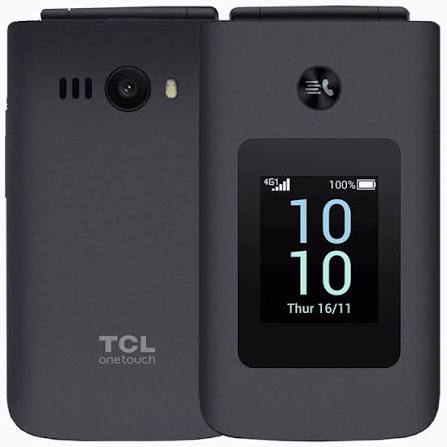
The TCL onetouch 4043 SmartPhone is a compact 4G feature phone designed for users who want simple communication, reliable battery life, and easy navigation without the complexity of a modern touchscreen smartphone. With its clamshell-style design, dual displays, physical keypad, and lightweight build, it serves as a practical everyday phone for seniors, minimalist users, and anyone seeking a dependable backup device. It is especially appealing for voice calls, SMS messaging, basic multimedia use, and travel, where straightforward operation matters more than advanced apps.
One of the biggest strengths of the TCL onetouch 4043 SmartPhone is its balance of classic usability and modern network support. It includes 4G connectivity, Bluetooth 5.0, USB-C charging, dual SIM support, and expandable storage, making it more capable than older basic phones. The device also features a 3.2-inch internal display and a 1.77-inch external screen for notifications, which improves convenience for quick checks without opening the phone. Its 1,380 mAh removable battery is another key selling point, offering long standby performance for users who need a phone that lasts.
This model is best suited for older adults, first-time mobile users, and people who want a secondary handset for calls and texts. It is also a smart choice for work environments, delivery use, or travel backup needs. The estimated price range is typically around the budget to low-mid range segment, roughly €57 to €70 depending on region and retailer availability. The TCL onetouch 4043 SmartPhone is widely available through carrier stores and online electronics retailers in select markets.
Specifications for TCL onetouch 4043 SmartPhone
- Display: 3.2-inch internal QVGA screen, 320 x 240 resolution
- Secondary display: 1.77-inch external screen for notifications
- Processor: Unisoc UMS9117-L / T107 platform
- Memory: 48 MB RAM and 128 MB internal storage
- Expandable storage: microSD support up to 128 GB
- Battery: 1,380 mAh removable Li-ion battery
- Connectivity: 4G LTE, 3G, 2G, Bluetooth 5.0, USB Type-C
- SIM support: Dual Nano-SIM
- Camera: VGA camera, marketed with 2 MP software support in some listings
- Audio: 3.5 mm headphone jack
- Dimensions: about 107.1 x 59.4 x 18.75 mm
- Weight: about 130 to 139 g depending on source
In terms of performance, this is not a benchmark-heavy device; it is optimized for calling, texting, contact management, and lightweight media playback. Compared with standard budget Android phones, it sacrifices app support and processor speed in exchange for simpler operation and longer standby time. Compared with older 2G-only feature phones, it offers a major upgrade in network compatibility and connectivity.
Detailed Description of the TCL onetouch 4043 SmartPhone
The TCL onetouch 4043 SmartPhone uses a classic flip-phone form factor that opens to reveal the main display and physical keypad. This design makes dialing, sending messages, and navigating menus easy for users who prefer tactile controls. The outer screen is especially useful for checking incoming calls, time, and alerts without flipping the device open every time.
In real-world use, the phone works well as a daily communication device for voice calls, SMS, emergency contact access, and simple multimedia playback. The 4G support improves call quality and network compatibility, while Bluetooth allows pairing with headsets or other accessories. The build quality is practical and sturdy, with a compact plastic housing designed for portability and easy handling. The removable battery is another useful feature because it simplifies replacement over time.
User experience is straightforward and intentionally minimal. Menus are simple, the keypad is responsive, and the display is large enough for essential information. The TCL onetouch 4043 SmartPhone is not designed for heavy browsing or modern app ecosystems, but it delivers exactly what many buyers want: reliable basics in an easy-to-use package.
Setup Guide for TCL onetouch 4043 SmartPhone
Setting up the TCL onetouch 4043 SmartPhone is quick and beginner-friendly. Start by removing the back cover, inserting the battery, and placing one or two Nano-SIM cards into the tray. If you plan to store music, photos, or contacts, insert a microSD card before powering on the phone.
- Press and hold the power key until the screen turns on.
- Select your preferred language, time zone, and date format.
- Configure network settings and allow the phone to register on the mobile network.
- Pair Bluetooth accessories such as headsets if needed.
- Check sound, ringtone, and accessibility settings for comfort.
For safe use, avoid overcharging, keep the phone away from heat and moisture, and use only compatible charging accessories. If the phone does not detect a SIM card, reinsert it carefully and restart the device. If Bluetooth pairing fails, delete the device entry and try again from the accessory side. Always power off the phone before removing the battery or SIM card.
Troubleshooting TCL onetouch 4043 SmartPhone Issues
Common problems are usually easy to fix. If the phone will not turn on, charge it for at least 20 minutes and confirm that the battery is seated properly. If there is no signal, check that the SIM card is active, inserted correctly, and supported by the local network bands. If calls sound weak or distorted, test with another SIM or headset to rule out accessory issues.
- Problem: Phone freezes or restarts. Solution: Remove the battery, wait 30 seconds, then restart.
- Problem: Storage is full. Solution: Delete old files or add a larger microSD card.
- Problem: Bluetooth will not connect. Solution: Clear paired devices and reconnect.
- Problem: Charging is slow. Solution: Use the original USB-C cable and a known-good charger.
- Problem: Camera will not save images. Solution: Check available storage and memory card status.
There are no widely published consumer-facing error codes for this model, so troubleshooting is typically based on symptoms rather than numeric alerts. For long-term reliability, keep the charging port clean, avoid dropping the device, and update settings only when needed. Warranty and support options depend on the retailer or carrier, and buyers should contact the point of purchase for service, replacement, or repair assistance.
Pros and Cons of the TCL onetouch 4043 SmartPhone
Pros
- Simple flip-phone design with physical keys for easy operation
- 4G connectivity for better network compatibility and call quality
- Dual displays improve convenience for notifications and quick checks
- Removable 1,380 mAh battery supports practical everyday use
- USB-C charging and Bluetooth 5.0 add modern convenience
- Expandable storage up to 128 GB increases flexibility
- Good value for users who need a basic communication device
Cons
- Very limited memory and no advanced app ecosystem
- Basic camera performance compared with smartphones
- Small screen size may feel cramped for some users
- Best suited to calls and texts rather than multimedia or browsing
- Not ideal for users who need large touchscreen productivity features
Compared with entry-level Android phones, the TCL onetouch 4043 SmartPhone is far simpler but easier to learn and maintain. For buyers who value clarity, battery efficiency, and tactile controls over app support, it offers strong value for money.
Customer Reviews of TCL onetouch 4043 SmartPhone
Customer feedback is generally positive, with many users giving it around 4 out of 5 stars for ease of use and compact design. Buyers often praise the physical keypad, 4G support, and the clear secondary display. One common testimonial style comment is: “Perfect for calling and texting without distractions.”
Frequent complaints focus on the limited memory, basic camera, and the lack of advanced smartphone functions. Some users also mention that the small internal display may feel too modest for longer reading sessions. Despite these drawbacks, the phone is often recommended for seniors, backup use, and anyone moving away from complicated smartphones.
Frequently mentioned buying advice is simple: choose this model if your priority is reliable calling, easy handling, and long standby time rather than apps, gaming, or heavy browsing.
Faqs
How do I set up the TCL Onetouch 4043 SmartPhone for the first time?
What should I do if my TCL Onetouch 4043 SmartPhone is not turning on?
How do I improve call quality on the TCL Onetouch 4043 SmartPhone?
Does the TCL Onetouch 4043 SmartPhone support dual SIM and memory cards?
How do I use the TCL Onetouch 4043 SmartPhone camera and save photos?
Why is the TCL Onetouch 4043 SmartPhone running slowly or freezing?
What accessories are compatible with the TCL Onetouch 4043 SmartPhone?
How should I maintain and care for the TCL Onetouch 4043 SmartPhone?
More tcl manuals
Leave a Comment