
Setup & Pairing: Treblab X-Open Wireless Headphones User Manual
Content
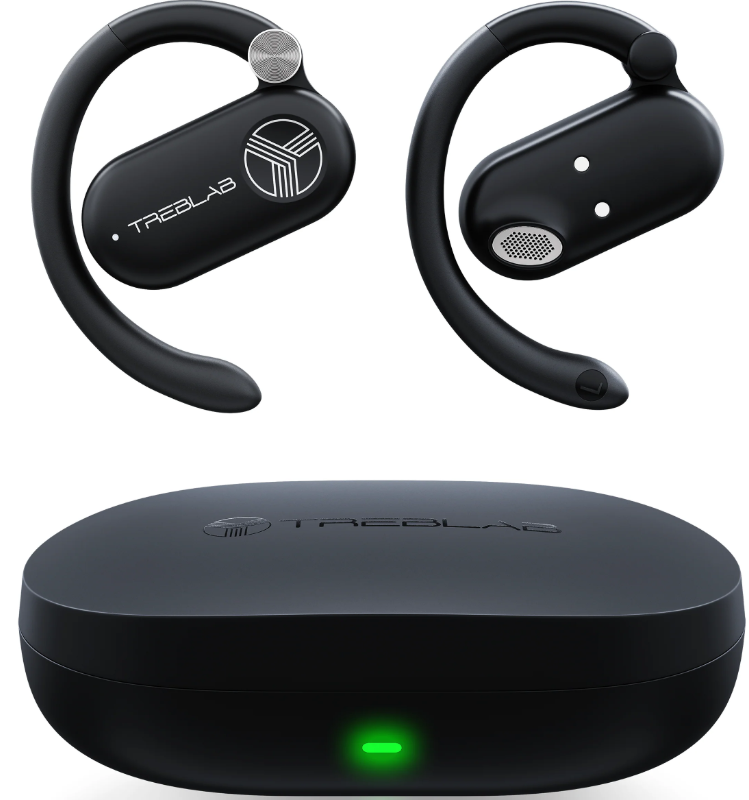
Treblab X-Open Wireless Headphones
Introduction
The treblab X-Open Wireless Headphones offer a revolutionary open-ear audio experience designed for users who want to stay connected to their surroundings while enjoying high-quality sound. Featuring precision-tuned 14.2mm drivers, these earbuds deliver rich, immersive audio suitable for music, podcasts, and calls without blocking ambient noise. Their open-ear design is ideal for outdoor enthusiasts, commuters, and fitness lovers who require situational awareness during workouts or daily activities.
Lightweight and comfortable, each earbud weighs just 8.9 grams and includes secure behind-the-ear hooks to ensure a stable fit even during intense exercise. The TREBLAB X-Open supports Bluetooth 5.4 for fast, reliable connectivity and offers up to 10 hours of continuous playtime on a single charge, which extends to 40 hours with the compact charging case. With IPX5 water resistance, these earbuds withstand sweat and light rain, making them perfect for active lifestyles.
Available primarily in black, the treblab X-Open Wireless Headphones typically retail in the mid-range price category, making them an affordable choice for those seeking advanced open-ear wireless earbuds. You can find them through popular online retailers and the official TREBLAB website, with support and warranty coverage included for peace of mind.
Technical Specifications and Features of treblab X-Open Wireless Headphones
- Driver Size: 14.2 mm precision-tuned drivers for immersive sound
- Bluetooth Version: 5.4 for stable and efficient wireless connectivity
- Battery Life: 10 hours per charge; 40 hours total with charging case (3 additional charges)
- Charging Options: USB-C fast charging and 5W wireless charging support
- Weight: 8.9 grams per earbud; 41 grams for charging case
- Water Resistance: IPX5 rated for sweat and light rain protection
- Microphones: Dual mics for crystal-clear calls and voice assistant compatibility (Siri and Google Assistant)
- Range: Effective wireless range up to 33 feet (10 meters)
- Dimensions: Earbuds - 51.7 x 43.5 x 12.8 mm; Charging case - 80.5 x 54.0 x 25.0 mm
- Controls: Multi-function buttons for power, volume, playback, calls, and voice assistant activation
Compared to similar open-ear wireless headphones, the treblab X-Open stands out with a combination of long battery life, lightweight comfort, and waterproofing, delivering excellent value for active users seeking situational awareness without sacrificing sound quality.
WHAT'S IN THE BOX
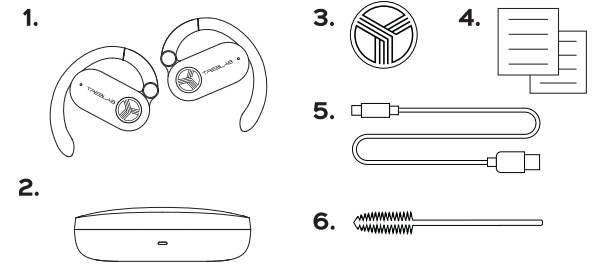
- TREBLAB X-Open earphones
- Charging case
- TREBLAB logo sticker
- User's manual & quick start guide
- Charging cable
- Cleaning brush
BUTTONS AND PARTS
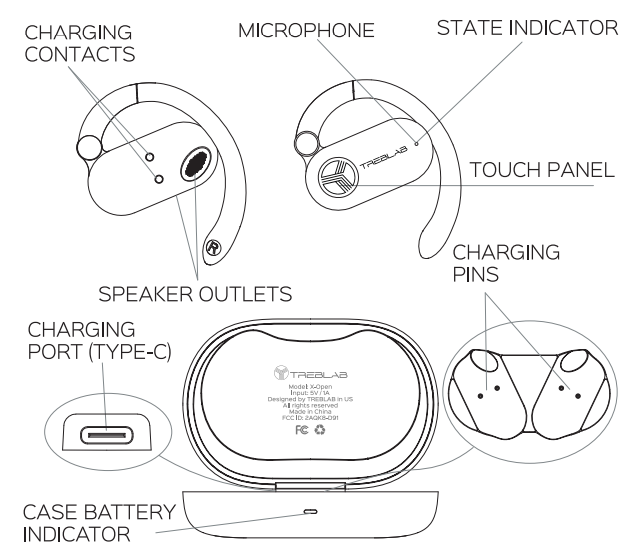
SETTING UP YOUR TREBLAB X-Open
To turn the earbuds on
- Take the earbuds out of the case, and he earbuds will turn on automatically.
- Another option to turn them on is to touch the Touch panels of both earbuds and hold for 2 seconds. You will hear several sound prompts indicating that the earbuds are turned on and ready for pairing. The white state indicator will light up on both earbuds,s and, a few seconds later, the state indicator will start flashing white on one of the earbuds.
- You will hear another sound prompt after connecting to the device.
To turn the earbuds off
- Put both earbuds into the slots in the charging case.
- Alternatively, touch the Touch panels of both earbuds and hold for 4 seconds when there is no media playing. You will hear the sound prompt indicating that the earbuds are being turned off. The white state indicator will light up for 1 second and go off on both earbuds.
PAIRING
You can pair the X-Open earbuds with your device either together or separately. Using only one earbud at a time will help you to extend the overall playtime. Please read the instructions below to make the pairing process smooth and easy.
To pair both earbuds
- Open the case lid and take the earbuds out of the case.
The white state indicator will light up on both earbuds, and, a few seconds later, the state indicator will start flashing white on one of the earbuds. - Activate the wireless communication function on your smart device, scan/search for TREBLAB X-Open, and click CONNECT.
- If prompted by your device to connect, select Yes.
- You will hear the sound prompt indicating that the earbuds are connected. The state indicator will start blinking white every 15 seconds.
When you turn the earbuds on, they will try to reconnect with the recently connected device. If the reconnection does not happen automatically, the earbuds will try to find the next device in the pairing list. You can only connect and play audio from one device at a time. But you can save up to 6 connected devices in the pairing list.
NOTE: The earbud, whose state indicator is flashing white during the pairing, is the main one. For better performance, keep your smart device closer to the main earbud.
To pair both earbuds
- Take one earbud out of the charging case. The state indicator should start flashing white,, indicating that it is in the pairing mode.
- Activate the wireless communication function on your smart device, scan/search for TREBLAB X-Open, and click CONNECT.
- If prompted by your device to connect, select Yes.
- You will hear the sound prompt indicating that the earbuds are connected. The state indicator will start blinking white every 15 seconds.
CLEANING
It is recommended to clean the earbuds once every two weeks, as dust can accumulate and clog the speaker protective screens located on the side and on the bottom of the earbuds.
To clean the earbuds, you will need three things:
- Eyelash brush or alike
- Alcohol
- Soak the eyelash brush (or alike) into the alcohol.
Clean the protective screens on the side and bottom of the earbuds with forward and backward movement.
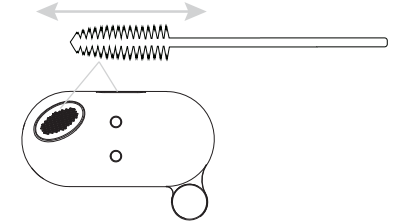
- Let the earbuds dry before repeated use.
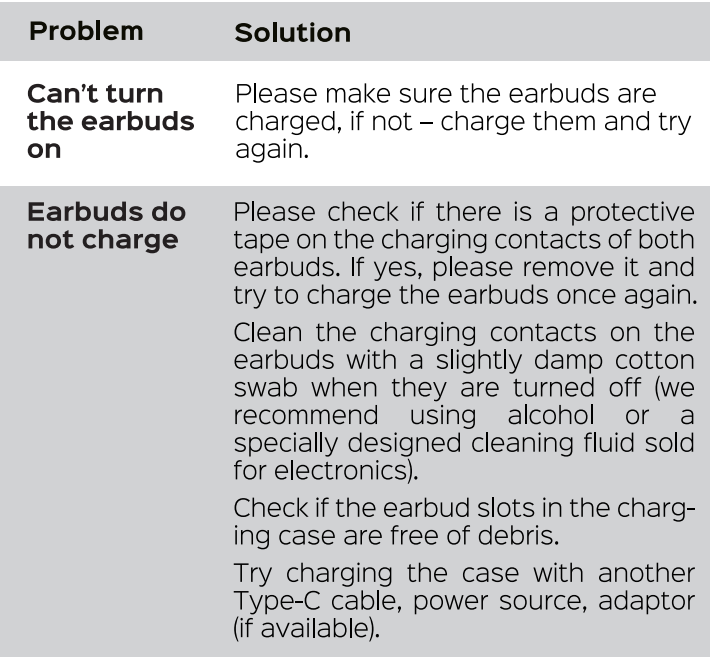
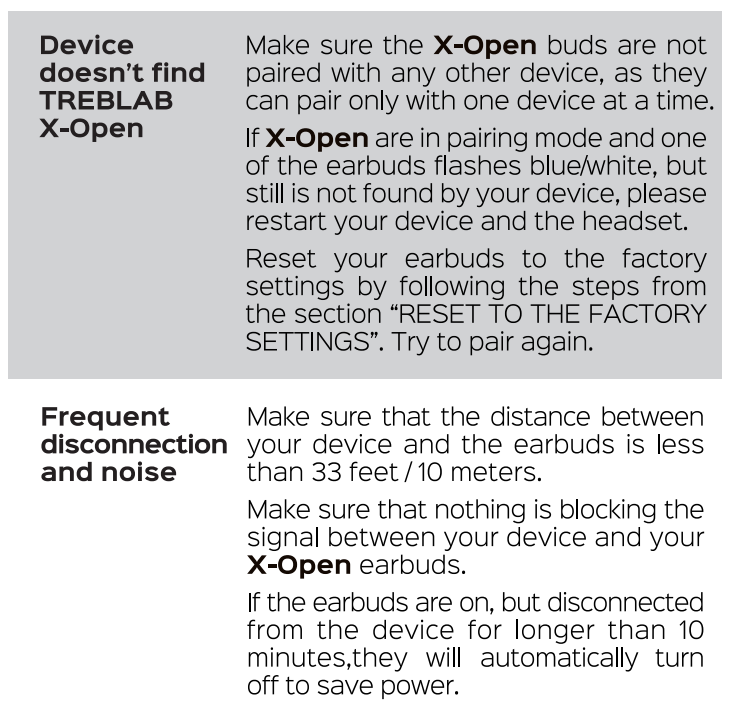
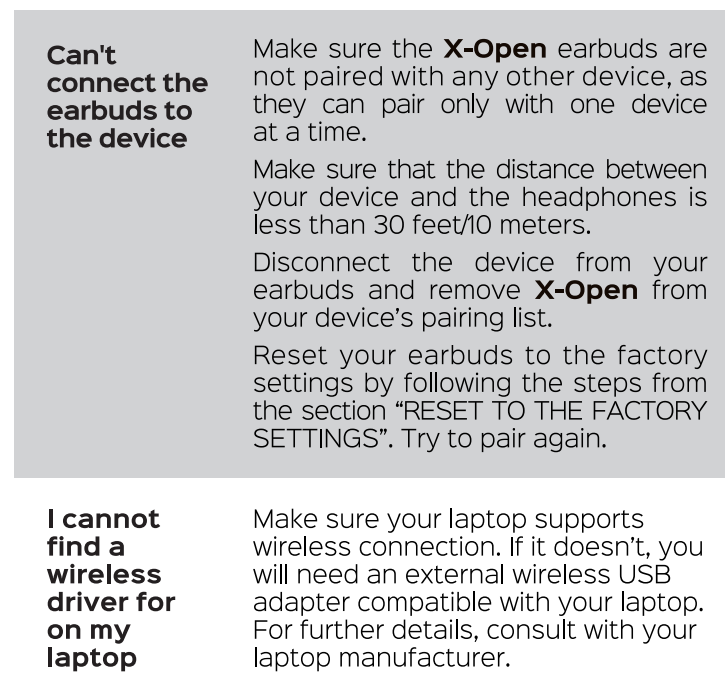
Troubleshooting Common Issues for treblab X-Open Wireless Headphones
1 YEAR WARRANTY
Parts and Labor Warranty
Pros & Cons of treblab X-Open Wireless Headphones
- Pros:
- Open-ear design allows ambient awareness, enhancing safety during outdoor activities..
- Lightweight (8.9 g per earbud) with secure behind-the-ear hooks for all-day comfort
- Long battery life with 10 hours per charge, plus 30 hours extra with the charging case
- Bluetooth 5.4 ensures stable, low-latency connectivity
- IPX5 water resistance suitable for sweat and rain
- Hands-free voice assistant support (Siri and Google Assistant)
- Cons:
- Open-ear design may let in environmental noise, reducing isolation in very noisy areas.
- Sound leakage could disturb people nearby in quiet settings
- Limited color options (only black available)
- No active noise cancellation (ANC), which some competitors offer
Overall, the Treblab X-Open Wireless Headphones deliver excellent value for users prioritizing comfort, situational awareness, and battery longevity in their wireless earbuds compared to alternatives like traditional in-ear noise-isolating models.
Customer Reviews and Feedback on treblab X-Open Wireless Headphones
Users praise the treblab X-Open Wireless Headphones for their comfortable fit and impressive battery life, often highlighting how the open-ear design allows them to stay aware of their surroundings during runs or commutes. Positive reviews frequently mention clear call quality thanks to dual microphones and reliable Bluetooth 5.4 connectivity.
Common complaints include minor sound leakage and a lack of active noise cancellation, which some users expected. A few users noted the earbuds could feel slightly loose during very vigorous activities, though the behind-the-ear hooks generally mitigate this. Star ratings often average between 4 and 4.5 out of 5, reflecting strong overall satisfaction.
Many reviewers recommend the Treblab X-Open for fitness enthusiasts, outdoor workers, and commuters seeking a safe, wireless listening experience without sacrificing sound quality or battery endurance.
Faqs
How do I set up my treblab X-Open Wireless Headphones for the first time?
What should I do if my treblab X-Open Wireless Headphones are not connecting to my phone?
Can the treblab X-Open Wireless Headphones be used during workouts or outdoor activities?
How long does the battery last on the treblab X-Open Wireless Headphones and how do I charge them?
What features make the treblab X-Open Wireless Headphones suitable for making clear phone calls?
Are the treblab X-Open Wireless Headphones compatible with voice assistants like Siri or Google Assistant?
How should I clean and maintain my treblab X-Open Wireless Headphones to ensure longevity?
What should I do if only one earbud of my treblab X-Open Wireless Headphones is working?
More treblab manuals
Leave a Comment