
Treblab X3 Pro Wireless Earbuds User Manual
Content
Treblab X3 Pro Wireless Earbuds
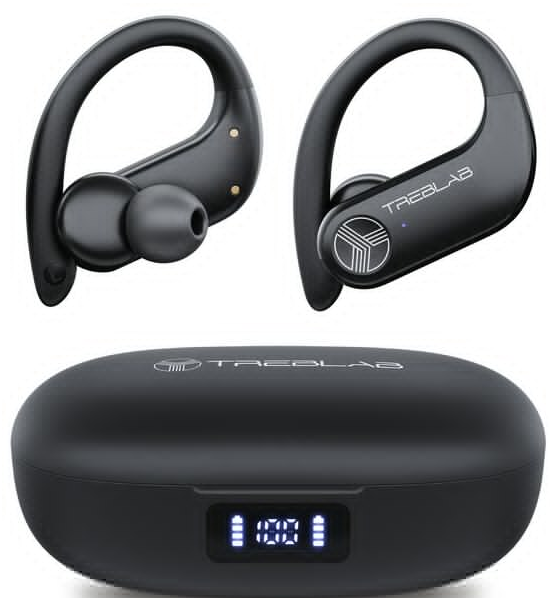
Introduction
The Treblab X3 Pro Wireless Earbuds are designed for athletes and fitness enthusiasts who demand both high-quality sound and durability. These earbuds feature a robust design with ear hooks for a secure fit, making them ideal for running, jogging, or intense workouts. Powered by Bluetooth 5.3 and equipped with 14.2 mm dynamic drivers, they deliver distortion-free Hi-Fi sound that enhances your training experience. The Treblab X3 Pro earbuds are available in the market for an estimated price range of $97 to $99, offering excellent value for those seeking a reliable and sound-rich listening experience during active use.
Whether you're a professional athlete or a casual fitness enthusiast, these earbuds provide a seamless listening experience with their ergonomic design and sweat-resistant IPX5 rating. They also support fast Type-C charging, ensuring you're always ready to go. The Treblab X3 Pro earbuds are a great choice for anyone looking for a balance between sound quality and durability in a budget-friendly package.
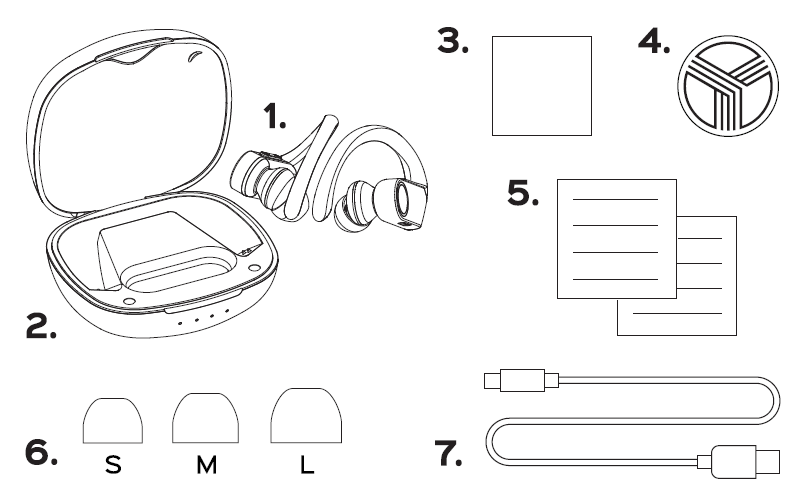
In Box
- TREBLAB X3 Pro earphones
- Charging case
- Insert card
- Round Treblab logo sticker
- User's manual
- Silicone ear-tips L, M, s
- Charging cable
Specifications of Treblab X3 Pro Wireless Earbuds
- Battery: Up to 9 hours playtime (moderate volume), Up to 7 hours (maximum volume). Earbuds battery capacity: 6 mAh.. Charging case battery capacity 65mAh
- Charging time: Up to 2 hours
- Speaker unit: 011mm,32o
- Bluetooth profiles: A2DP/HFP/AVRCP/HSP
- Bluetooth codecs: S BC/AAC/aptX
- Signal Range: 33ft/1Om
- Frequency response: 2OHz - 2OKHz
- Sensitivity: 95dB/1mW
- Rated power: 3mW
- Water resistance: IPX7
- Charging port: USB Type-C
- Dimensions: Earbuds: 48 x 38 x 30 mm/ 1.89 x 1.49 x 1.18in
- Case: 76 x 69 x 42 I 2.99 x 2.71 x 1.65 in
Compared to other wireless earbuds in the same price range, the Treblab X3 Pro offers exceptional sound quality and durability, making it a competitive choice for sports enthusiasts.
Features
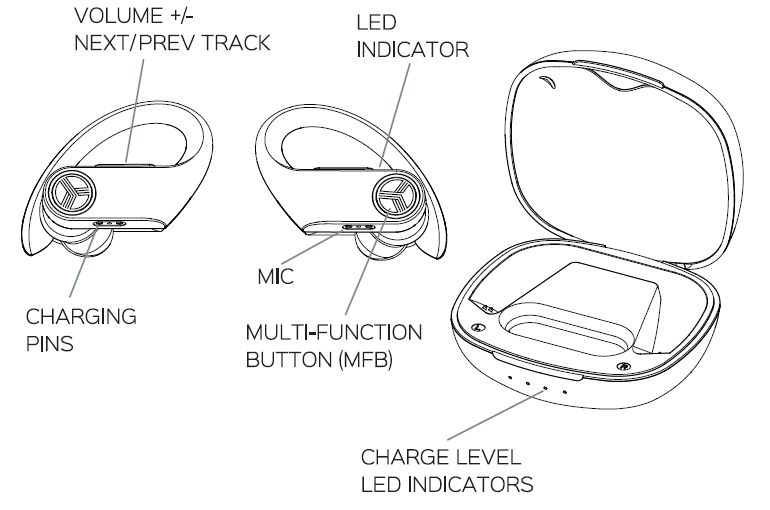
EARBUDS FUNCTION
HOW TO ENSURE A PROPER FIT
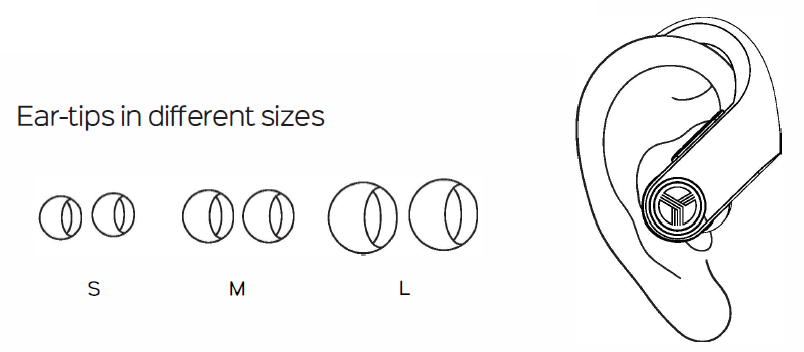
Using appropriately sized ear-tips is critical to isolate external noise and achieve a snug, secure fit. It is common for a user to have two different-sized ear canals, so try on one ear tip at a time to find the best fit for each ear.
To get the best possible fit with your X3 Pro earbuds, gently push the earbuds into your ears and adjust the headset until it fits comfortably. You should notice a drop in ambient noise when the ear tip has been placed correctly. With a proper fit, you'll notice more range when listening to music.
To change the silicone ear-tips:
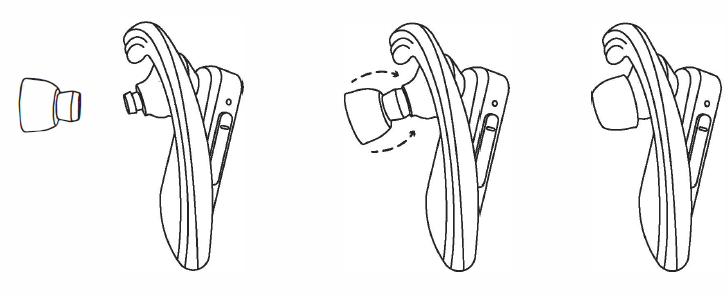
- Turn over the upper cover on the ear tip.
- Rotate and firmly push the ear-tip tube to cover the ear-tip pillar.
- Turn the upper cover of the ear-tip back on the nozzle.
CHARGING
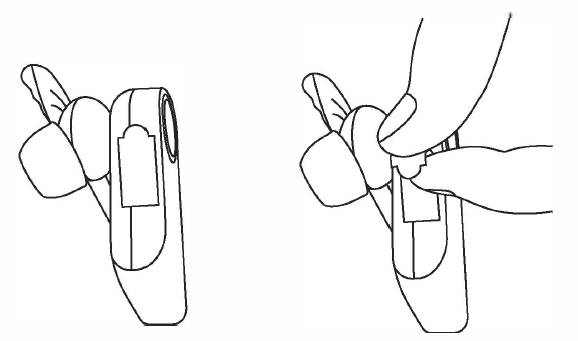
The X3 Pro model comes with protective stickers on the charging contacts of each earbud to prevent the battery from deteriorating prematurely. Please remove these stickers before charging the earbuds.
A fully charged case can recharge a pair of dead earbuds a total of four times. Once fully charged, your earbuds will provide you with 7 hours of playtime at maximum volume and up to 9 hours at medium volume. When the battery is running low, you will hear the "Battery Low· voice prompt.
To charge the case
Be sure to use a 5V DC, 0.5 -1A adapter or charger. Using a power source with lower power will increase the overall charge time. Connect the charging case to the power source with the USB Type-C cable. The case has 4 blue LED indicator lights. One indicator light will flash while charging. The indicator lights will show the charging level: 4 LED = full battery, 3 LED = 75% of the battery, 2 LED = 50% of the battery, 1 LED 25% of the battery. To check the charge level of the charging case, open or close the case lid. The case battery indicator will stay on for 3 seconds. It takes about 2 hours to fully charge the case.
To charge the earbuds with the charging case
When the earbuds' battery is low, you'll hear the "Battery Low" voice prompt.
Put the left and right earbuds into the slots in the charging case. The earbuds will turn OFF automatically. The case will immediately start charging the earbuds. The red indicator lights on the earbuds will turn on. It takes about 2 hours to charge the earbuds. When the earbuds are fully charged, the blue indicator lights will light up for 30 seconds and then turn off.
SETTING UP YOUR TREBLAB X3 Pro
To turn the earbuds ON
- Once removed from the charging case, your earbuds will turn on automatically.
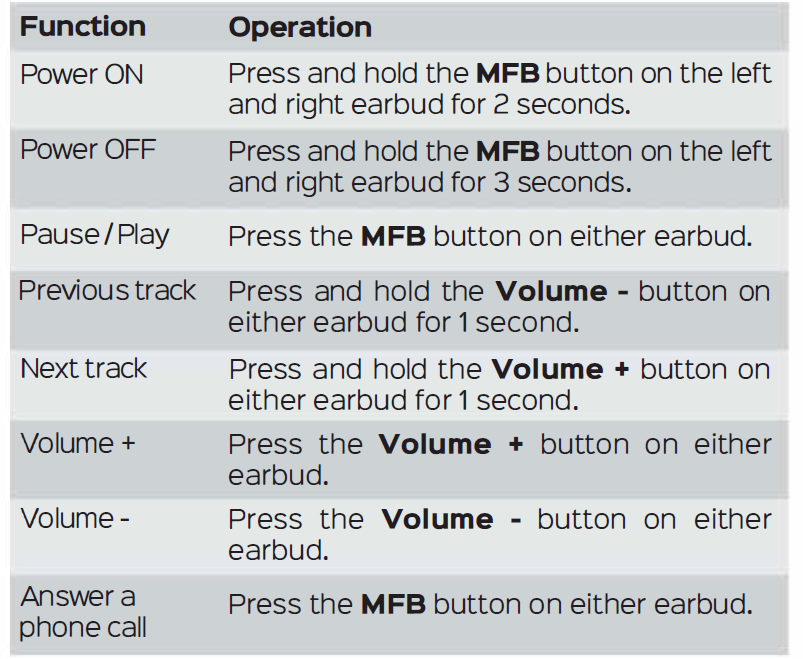
- You can also turn them on by holding the MFB button on both earbuds for 2 seconds.
- You will hear the "Power ON" voice prompt in both earbuds and the "Pairing" prompt in the right earbud. A few seconds later, the "Pairing" prompt will sound in the left earbud as well. The LED indicator light on the right earbud will blink blue every second,, and the light on the left earbud will flash blue and red.
- When the earbuds are connected to the source device, you will hear the "Connected" voice prompt.
To turn the earbuds OFF
- Put the left and right earbuds into the slots in the charging case. The earbuds will turn OFF automatically.
- Alternatively, press and hold the MFB on both earbuds for 3 seconds.
You will hear the "Power OFF" voice prompt, and the red LEDs will light up and then go off.
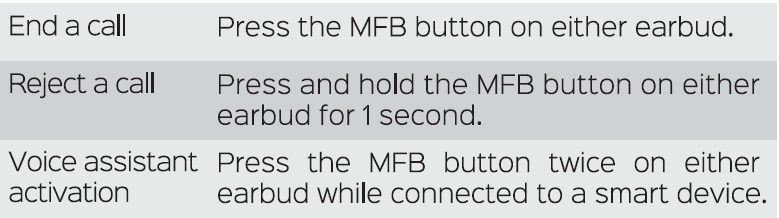
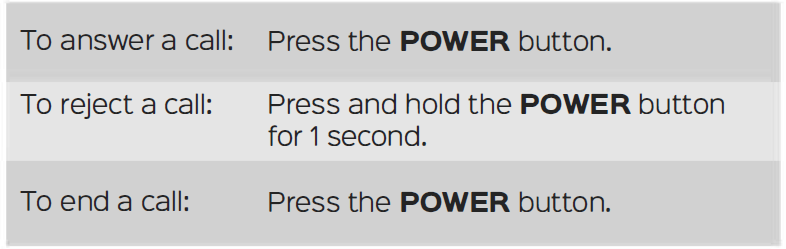
PHONE CALL MANAGEMENT
The TREBLAB X3 Pro can be used to make and receive phone calls when connected via Bluetooth. Audio playback will be paused during calls.
VOICE ASSISTANT SUPPORT
Your TREBLAB X3 Pro earphones are compatible with Siri, Alexa, Google Voice Assistant, and others. To use a voice assistant, press the MFB button twice on the right or left earbud.
RESTORE THE FACTORY SETTINGS
To restore the earbuds back to the factory settings:
- Turn the earbuds OFF.
- Press and hold the MFB button on both earbuds for 11 seconds. You will see the purple light and hear the sound prompt.
- Put them back into the charging case.
- Now the earphones are restored to the factory settings and ready for use.
SAFETY RULES
- Never disassemble or modify your X3 Pro for any reason. Doing this may cause the device to malfunction or even become combustible. The damage to your device can void your manufacturer's warranty.
- Do not charge the earbuds when they are wet. Make sure to dry off the earbuds before charging.
- Avoid exposing the TREBLAB X3 Pro to extreme temperatures (below 337°F/ 3°C or above 112°F / 45°C). Extreme temperatures can deform the components inside the X3 Pro, reducing the battery life and the lifespan of your new earbuds.
- Avoid putting the device's LED lights close to the eyes of children or animals.
- Do not use your X3 Pro during a thunderstorm. Thunderstorms could cause them to seriously malfunction and increase the risk of electric shock.
BATTERY INFORMATION
- Your device is powered by rechargeable batteries.
- Unplug the charging case from the electrical plug when not in use.
- If left unused, a fully charged battery will lose its charge over time.
- We recommend that you fully charge your earbuds twice a month to ensure the battery's integrity.
- Please do not leave the device (and the charging case) in hot or cold places, such as inside a closed car in the summer or winter, as this will reduce the capacity and life of the batteries.
- Do not expose the batteries to fire, as they may explode.
- Batteries may also explode if damaged.
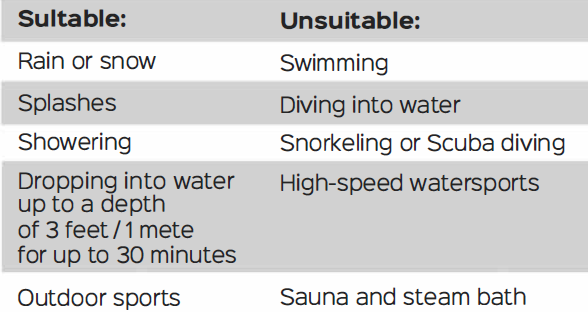
TREBLAB X3 PRO MEET IPX7 WATERPROOF STANDARD
Troubleshooting Treblab X3 Pro Wireless Earbuds
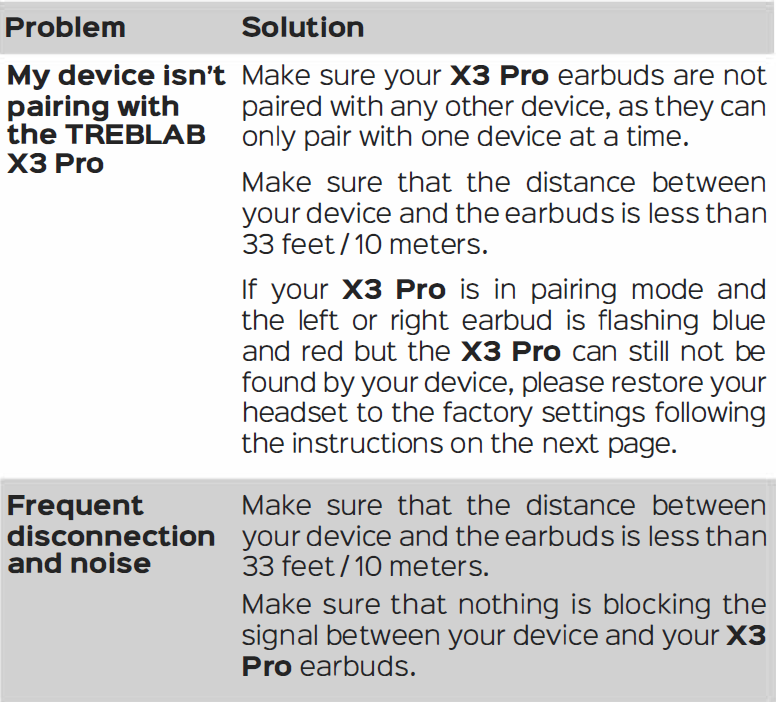
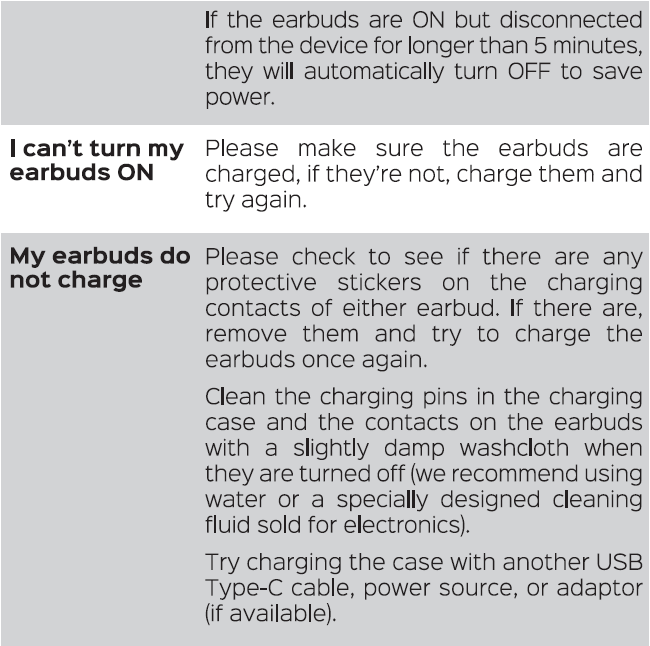
While the Treblab X3 Pro earbuds are designed to be reliable, issues can sometimes occur. Here are some common problems and solutions:
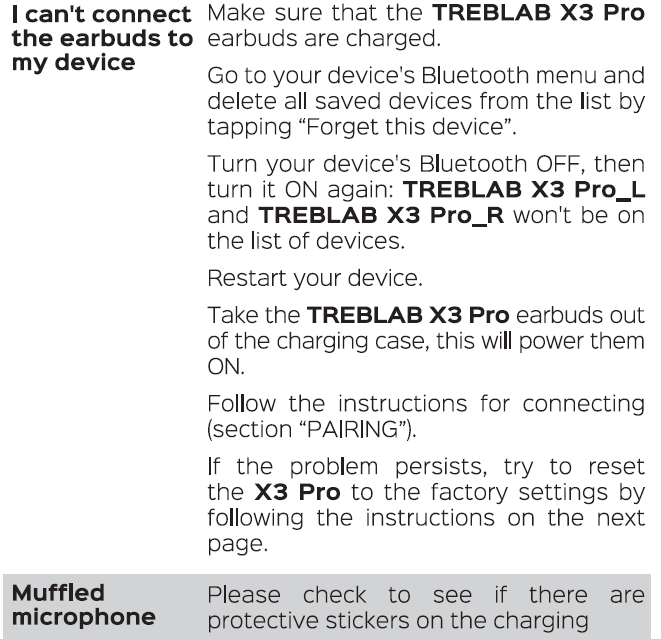
- Connection Issues: Restart both earbuds and the connected device.
- Sound Quality Issues: Ensure proper fit with the right eartip size.
- Charging Issues: Check the charging port for debris.
The Treblab X3 Pro earbuds come with a 1-year warranty. For any support or inquiries, you can contact Treblab's customer service team.

Pros & Cons of Treblab X3 Pro Wireless Earbuds
Pros:
- Superior Sound Quality: Offers Hi-Fi sound with aptX compatibility.
- Durable Design: IPX5 rated for sweat and rain protection.
- Long Battery Life: Up to 145 hours with the charging case.
- Secure Fit: Ergonomic ear hooks ensure a stable fit during workouts.
Cons:
- Usability Issues: Some users find the controls counterintuitive.
- Comfort: Ear hooks can be uncomfortable for some users.
- Customization: Limited customization options for controls.
Customer Reviews of Treblab X3 Pro Wireless Earbuds
Customers generally appreciate the sound quality and durability of the Treblab X3 Pro earbuds. However, some users have noted that the ear hooks can be uncomfortable and the controls are not very intuitive. Despite these drawbacks, the earbuds remain a popular choice for sports enthusiasts due to their reliability and value for money.
With a rating of around 4 out of 5 stars, the Treblab X3 Pro earbuds are recommended for those seeking a balance between sound quality, durability, and affordability in wireless earbuds.
Faqs
How do I set up my treblab X3 Pro Wireless Earbuds for the first time?
What can I do if my treblab X3 Pro Wireless Earbuds are not connecting to my phone?
What are the key features of treblab X3 Pro Wireless Earbuds that enhance workout sessions?
Are treblab X3 Pro Wireless Earbuds compatible with both Android and iOS devices?
How can I optimize the sound quality of my treblab X3 Pro Wireless Earbuds?
How do I maintain and clean my treblab X3 Pro Wireless Earbuds to ensure longevity?
What should I do if one earbud of my treblab X3 Pro Wireless Earbuds is not producing sound?
Can I use the treblab X3 Pro Wireless Earbuds for phone calls and voice commands?
More treblab manuals
Leave a Comment