
How to Pair: Treblab X5 Truly Wireless Earbuds User Guide
Content
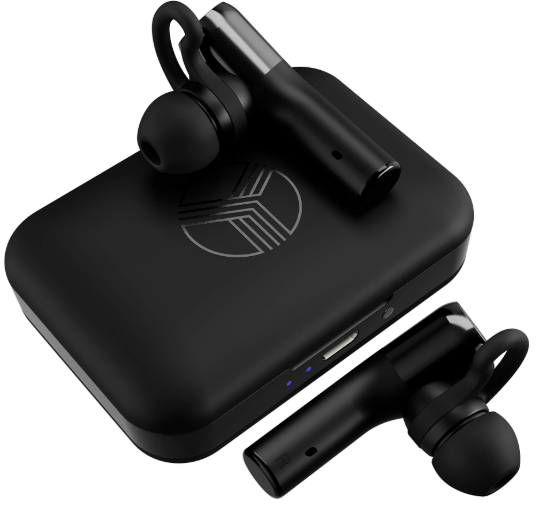
Treblab X5 Truly Wireless Earbuds
Introduction
The treblab X5 Truly Wireless Earbuds offer a premium audio experience designed for active lifestyles and everyday use. These earbuds are ideal for fitness enthusiasts, commuters, and casual listeners seeking high-quality sound combined with durability and comfort. Engineered with advanced beryllium drivers, they deliver clear, balanced sound with deep bass, making music, podcasts, and calls exceptionally enjoyable. With their IPX4 water-resistant rating, they withstand sweat and light rain, perfect for gym workouts and outdoor activities.
Offering a remarkable battery life of up to 6 hours on a single charge and an additional 4 charges via the compact charging case, these earbuds ensure extended playtime for long days on the go. They support Bluetooth 5.0 for stable and fast connectivity and feature passive noise cancellation for immersive listening. Integration with voice assistants like Siri and Google Assistant adds convenience to hands-free calls and media control.
Available at an estimated price range of $60 to $70, the treblab X5 earbuds provide excellent value within the mid-tier true wireless market. They are widely available through online retailers and select physical stores, appealing especially to users who want premium sound without the premium price. The combination of sport-friendly design, long battery life, and quality sound makes the treblab X5 a compelling choice for users demanding performance and affordability.
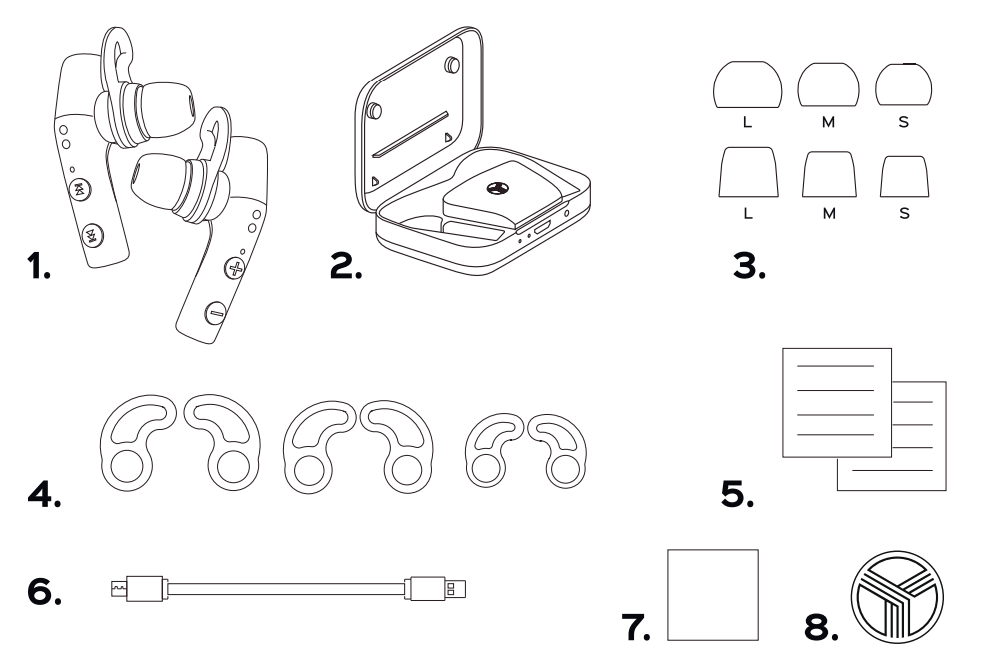
- Earbuds
- Charging case
- Silicone Ear-tips, Foam Ear-tips
- Ear-fins
- User's manual
- Micro USB charging cable
- Insert card
- Round TREBLAB sticker
PAIRING
You can pair the X5 earbuds with your device either together or separately. Using only one earbud at a time will help you extend the overall playtime. Please read the instructions below to make the pairing process smooth and easy.
Note: To ensure the best level of Bluetooth operation, we recommend that you to keep the distance between the Bluetooth device and the TREBLAB X5 as short as possible.
To pair both earbuds:
Note: You can only connect and play audio from one device at a time. The earbuds save up to 6 connected devices in the pairing list.
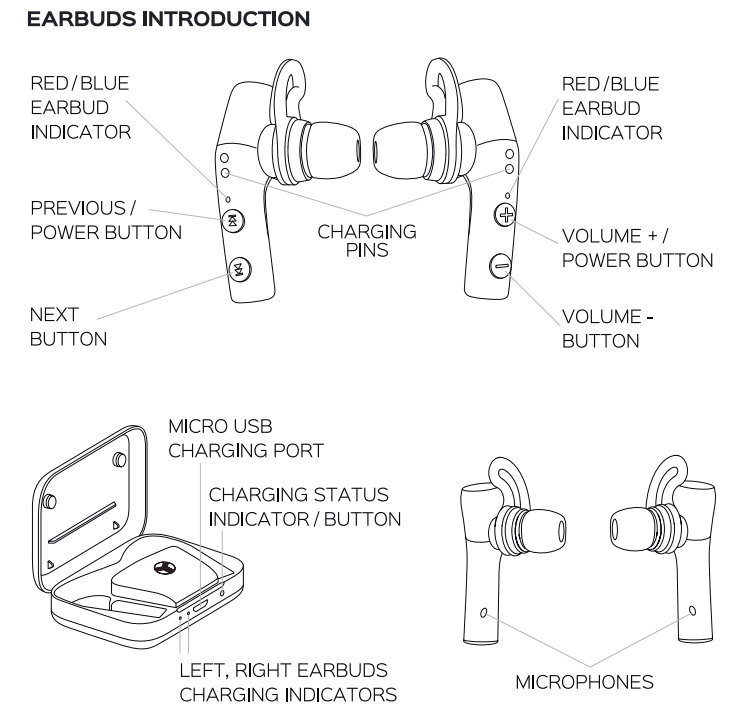
- Turn on the earbuds. You will hear the "Power ON", "Stereo mode", and "Connected" voice prompts when the earbuds are connected to each other via TWS, and then - the "Pairing" voice prompt a few seconds later (the LED will flash red and blue rapidly on the right earbud).
- Activate Bluetooth on the device and search for TREBLAB X5, and tap CONNECT.
- If prompted by your device to connect, select Yes.
- You will hear "Connected" from the right earbud.
The right earbud is the Master (main) one. For the better performance, keep your smart device in your right pocket, in the bag on your right side, on the right side of the table, etc.
When you turn on the earbuds, they will try to reconnect with the recently connected device. If the reconnection does not happen automatically, the earbuds will try to find the next device in the pairing. list
If the earbuds, are after turning , off, connecting to another device, you can disconnect them manually: tap 3 times both the VOLUME - button on the right earbud and the NEXT button on the left earbud to enable pairing mode manually. It will disconnect the earbuds from the current device to which ch XS were connected.
To pair the right earbud only:
Note: When you are using only the right earbud, switching tracks is not available. You will be able to switch tracks with your smart device.
- Press and hold the POWER button on the right earbud. You will hear the "Power ON" voice prompt and "Pairing" a few seconds later. (The LED will flash red and blue rapidly).
- Activate Bluetooth on the device, scan/search for TREBLAB XS, and tap CONNECT.
- If prompted by your device to connect, select Yes.
- You will hear "Connected" from the earbud after the successful connection.
To pair the left earbud only:
Note: When you are using only the left earbud, the volume adjustment is not available. You will be able to control the volume with your smart device.
- Press and hold the POWER button on the left earbud for 2 seconds until you hear "Power ON". (The blue LED light will flash rapidly.)
- After a few seconds. Press the NEXT button on the earbud 3 times. The LED will start flashing red and blue rapidly.
- Activate Bluetooth on the device, scan/search for TREBLAB X5, and tap CONNECT.
- If prompted by your device to connect, select Yes.
- You will hear "Connected" in the left earbud after connecting (the LED indicator on the left earbud will flash blue every 7 seconds).
PHONE CALLS
Note: When you use both earbuds, they will transmit the sound during phone and video calls.
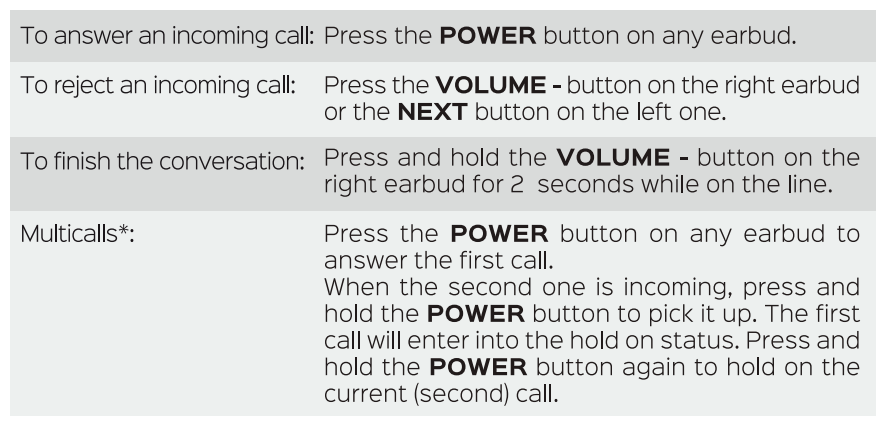
To be able to use this option, your device needs to support the multicall management.
VOICE ASSISTANTS SUPPORT
TREBLAB XS headphones are compatible with Siri, Alexa, Google Voice Assistant,, and others. To use a voice assistant, press and hold the VOLUME • button on the right earbud, or the NEXT button on the left earbud for 2 seconds.
TROUBLESHOOTING
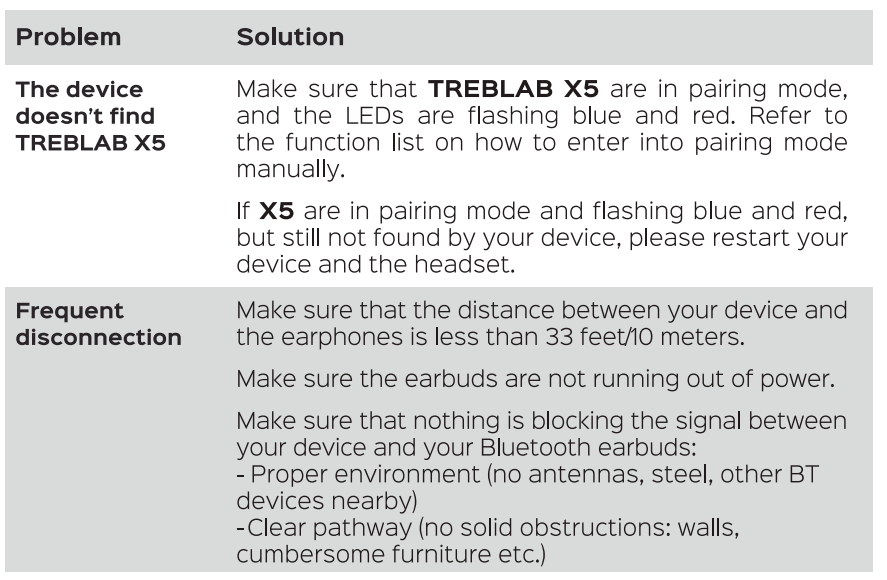
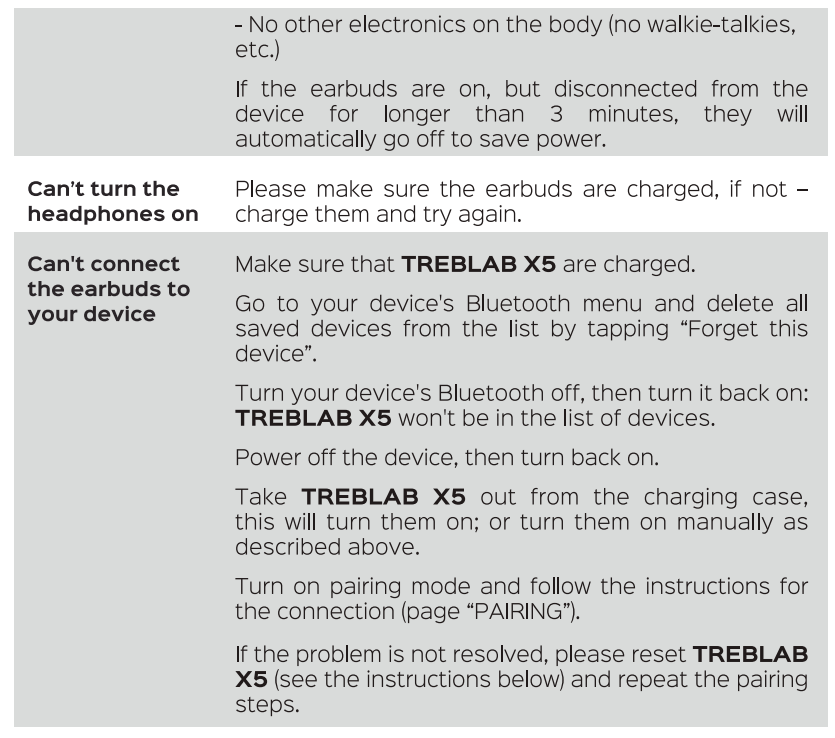
RESET TREBLAB X5
You can reset your earbuds to the factory default settings. It will delete all the information about any saved connected devices from the pairing list.
- Power off both earbuds.
- Press and hold both POWER buttons for 10 seconds. You will hear the "Power ON" voice prompt and sound notifications from the left earbud, and - the "Power ON", "Pairing" prompts and sound notifications from the right earbud.
- Power on the earbuds. They are now restored to the factory default settings.
Specifications and Key Features of treblab X5 Truly Wireless Earbuds
- Driver Type: 8.2mm beryllium dynamic drivers for rich, accurate sound
- Bluetooth Version: 5.0 with stable, low-latency connection
- Battery Life: Up to 6 hours per charge plus 4 additional charges via charging case (total ~35 hours)
- Charging Time: Approximately 2 hours for full recharge
- Water Resistance: IPX4 sweatproof and splash resistant
- Noise Cancellation: Passive noise isolation with memory foam and silicone ear tips
- Microphone: Built-in mic with cVc 8.0 noise reduction for clearer calls
- Controls: Physical buttons for play/pause, call management, volume, and voice assistant activation
- Accessories: Multiple ear tip sizes (silicone and foam), ear fins for secure fit, charging case, Micro USB charging cable
- Compatibility: Works with iOS, Android, and Windows devices; supports Siri and Google Assistant
Compared to other earbuds in the $60-$100 range, the treblab X5 stands out with its extended battery life, durable IPX4 rating, and the use of beryllium drivers that deliver superior sound clarity and bass response. Unlike many touch-control earbuds, the X5 uses physical buttons, providing reliable control during sports and workouts.
1 YEAR WARRANTY
- Parts and Labor Warranty.
- Manufactured by: Productech Corp
Pros and Cons of the Treblabb X5 Truly Wireless Earbuds
Pros
- Excellent Sound Quality: Beryllium drivers provide crisp highs and deep bass suitable for diverse music genres.
- Long Battery Life: Up to 35 hours total with the charging case, outperforming many competitors in this range.
- Secure and Comfortable Fit: Multiple ear tips and fins ensure earbuds stay in place during intense workouts.
- Water-Resistant Design: IPX4 rating protects against sweat and rain, ideal for active users.
- Affordable Price: Competitive pricing around $60-$70, offering great value for features and sound quality.
Cons
- Micro USB Charging: Uses Micro USB instead of the more modern USB-C, which may be less convenient.
- Call Quality: While decent, the call audio is not as clear as premium earbuds like Apple AirPods.
- Physical Buttons: Some users may prefer touch controls, though buttons provide better feedback during movement.
- Pairing Process: Slightly unusual initial pairing steps that may require consulting the manual.
Overall, the Treblab X5 offers exceptional value for users prioritizing sound quality, battery life, and durability. While it may lack some premium features found in higher-end earbuds, it compares favorably against similarly priced alternatives.
Customer Reviews and User Feedback on treblab X5 Truly Wireless Earbuds
Users consistently praise the treblab X5 Truly Wireless Earbuds for their comfortable fit and impressive sound quality, often highlighting the rich bass and clear midrange. Many reviews note the earbuds’ secure fit during running and workouts, attributing this to the variety of included ear tips and fins. The long battery life and reliable Bluetooth 5.0 connection are also common points of satisfaction.
Some customers mention occasional issues with call clarity and connection dropouts on the left earbud, but these are generally viewed as minor given the price point. The physical button controls receive mixed reactions: appreciated for tactile responsiveness but less favored by users accustomed to touch interfaces. The use of Micro USB for charging is occasionally criticized as outdated.
Overall ratings average around 4 out of 5 stars, with recommendations for buyers seeking affordable, durable earbuds for sports and daily use. Frequent purchasers recommend the Treblab X5 for those who want excellent sound at a budget-friendly price, particularly valuing the earbuds' sweat resistance and extended playtime.
Faqs
How do I set up my treblab X5 Truly Wireless Earbuds for the first time?
What can I do if my treblab X5 Truly Wireless Earbuds won't connect or pair properly?
How do I use the treblab X5 Truly Wireless Earbuds' call and voice assistant features?
Are treblab X5 Truly Wireless Earbuds compatible with all smartphones and devices?
What is the battery life of the treblab X5 Truly Wireless Earbuds and how do I maximize it?
How do I clean and maintain my treblab X5 Truly Wireless Earbuds to ensure longevity?
What should I do if my treblab X5 Truly Wireless Earbuds have audio issues like low volume or poor sound quality?
Can the treblab X5 Truly Wireless Earbuds be used during intense workouts or in rainy conditions?
More treblab manuals
Leave a Comment