
Setup: Trendnet Powerline 500 AV Adapter Kit TPL-407E User Manual
Content
Trendnet Powerline 500 AV Adapter Kit TPL-407E
Introduction
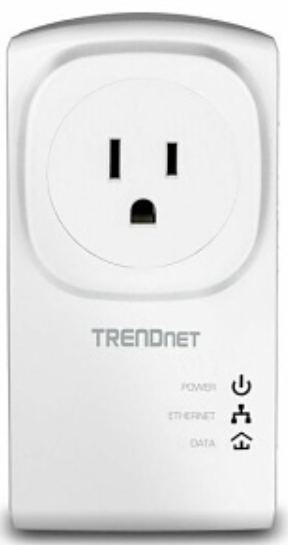
The Trendnet Powerline 500 AV Adapter Kit TPL-407E offers a powerful solution for extending your home or office network using existing electrical wiring. Designed to deliver high-speed internet connectivity without the hassle of new cabling, this adapter kit is perfect for users looking to enhance streaming, gaming, or general internet access in areas with weak Wi-Fi signals. Its unique built-in electrical outlet ensures you never lose a power socket, maintaining convenience while expanding network coverage.
Ideal for homeowners, small offices, and gamers, the TPL-407E kit supports seamless setup by simply plugging the adapters into power outlets — one near your router and the other in the desired room. With data transfer speeds up to 500 Mbps, it supports HD video streaming, online gaming, and large file transfers efficiently. The compact design saves space, while advanced features like power saving mode and noise filters optimize performance and reduce energy consumption by up to 80%.
Available typically in the $35-$45 price range, the Trendnet Powerline 500 AV Adapter Kit is widely accessible through major online and retail outlets. This kit combines ease of use, performance, and thoughtful design, making it an excellent choice for users seeking reliable wired networking without intrusive installations.
Package Contents
TPL‐407E package includes:
- 1 x TPL‐407E
- Quick Installation Guide
- Network cable (1.5 m / 5 ft.)
TPL‐407E2K package includes:
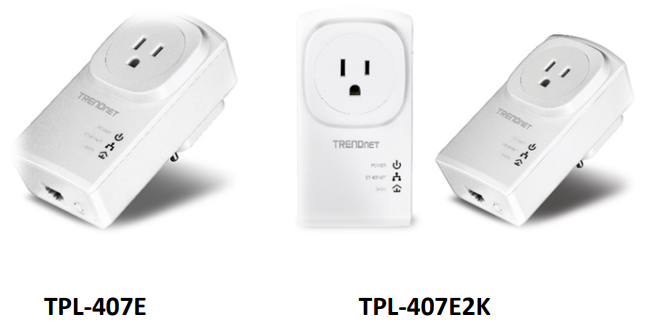
- 2 x TPL‐407E
- Quick Installation Guide
- 2 x Network cables (1.5 m / 5 ft.)
Specifications of the Trendnet Powerline 500 AV Adapter Kit TPL-407E
- Standards: IEEE 1901, HomePlug AV compliant
- Speed: Up to 500 Mbps over powerline
- Interface: 1 x 10/100 Mbps Auto-MDIX Ethernet port
- Built-in Outlet: Pass-through electrical socket to maintain power availability
- Encryption: 128-bit AES encryption for secure data transmission
- Power Saving: Reduces power consumption by up to 80% in idle mode
- QoS Support: Quality of Service prioritizes video, audio, and gaming traffic
- Form Factor: Compact nano design to save space
- Compatibility: Works with other TRENDnet Powerline AV adapters (up to 8 nodes per network)
- LED Indicators: Show device status and connectivity for easy troubleshooting
- Noise Filter: Advanced electrical noise filtering for improved stability
- Setup: Plug & Play with one-touch Sync button for encryption key changes
Compared to similar products, the TPL-407E stands out with its built-in outlet feature and energy-efficient design, making it preferable over standard adapters that block power access. Its 500 Mbps speed is sufficient for most consumer needs, though higher-end models may offer gigabit speeds at a higher price point.
Features
The Powerline 500 AV Adapter with Built‐In Outlet, model TPL‐407E, uses existing electrical lines to create a high-speed twnetwork . Two adapters are needed to start a network. Connect one adapter to your router and plug another adapter into an outlet on your electrical system for instant high-speed network access. The compact form factor saves space and offers an additional electrical outlet.
- Powerline 500
Powerline networking over existing electrical lines - Built‐In Outlet
Never lose an electrical outlet with the built‐in socket—Plug the adapter into an outlet, then plug in other devices. - Noise Filter
Advanced electrical noise filter boosts performance - Multiple Adapters
Two adapters are needed to start a network—use up to 8 adapters - Easy Installation
Simply plug in the adapters - Cross Compatible
TRENDnet Powerline Homeplug AV adapters work together - Sync Button
Press the Sync button to change existing encryption keys - Energy Savings
Power Save mode reduces electrical consumption by up to 80%
A maximum of 8 adapters (nodes) is recommended for streaming video across your network. 500Mbps is he maximum theoretical Powerline ATAte. Actual throughput will vary depending on the environment. Networked Powerline devices need to be plugged into power outlets that are on the same electrical system. GFCI outlets and AFCI circuit breakers may degrade Powerline network signals.
Product Hardware Features
Device Label
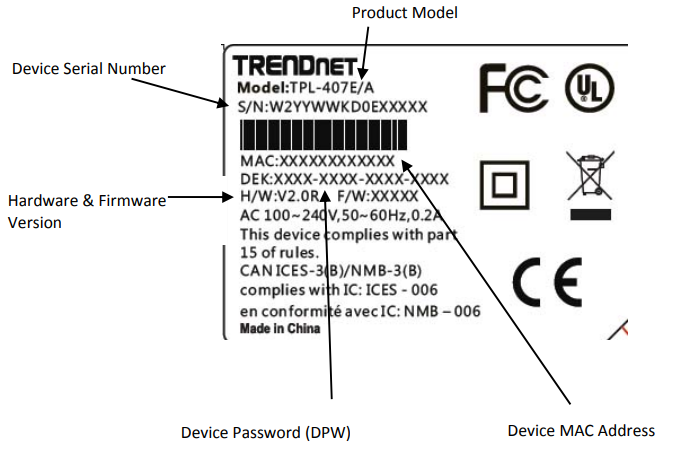
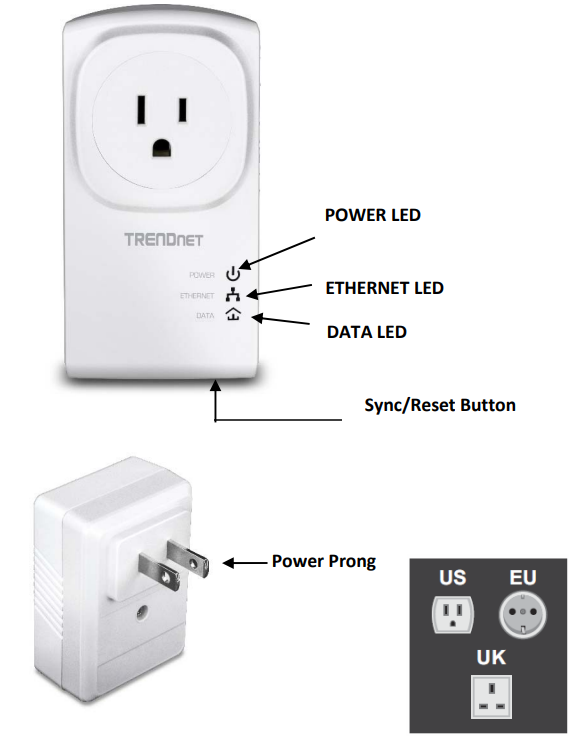
- Network Port ‐ Connect an Ethernet cable (also called network cable) from your Powerline adapter Ethernet port and to your computer or network device.
- Sync Button – Changes the default encryption key or resets the unit to factory defaults. See the table below for the function.
Product Overview
Installing your Powerline Adapters
Before you install
- Before you proceed with the installation, verify the following:
- You already have a router already installed.
- You already have Internet access through your existing network.
- An Ethernet port (also called a LAN port) is available on your router.
- Verify that you have at least two Powerline adapters. You will need at least two Powerline adapters to create a Powerline network.
- Note: The TPL‐407E package only includes a single Powerline adapter. Please ensure that your ther Powerline adapters are HomePlug® AV or IEEE 1901 compliant (e.g.,, TR, ENDnet models TPL‐407E, TPL‐410AP, o,r another TPL‐407)).
- Plan the location of where you will install your Powerline adapters.
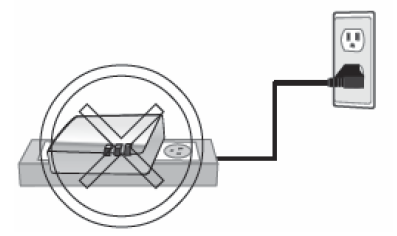
- Avoid plugging he adapters into power strips, extension cords, or surge protectors, as this may prevent the adapters from functioning correctly or degrade performance.
- Avoid plugging the adapters into wall power outlets that are controlled by a light switch to prevent the Powerline adapter from being turned off accidentally.
- Avoid plugging the adapters into wall power outlets at are located near appliances that consume a lot of power (e.g., re, refrigerators, washers, dryers), as this may degrade performance.
- Make sure there is an available wall power outlet in the room where the router is installed, and also near the router.
- Make sure there is an available wall power outlet in the room where you want to extend network connectivity.
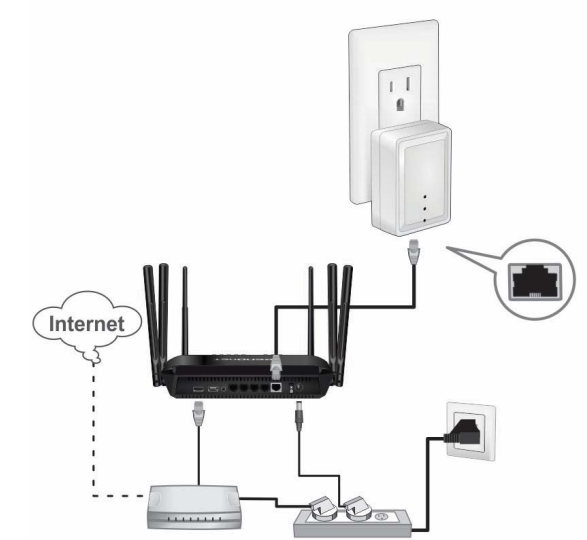
Connect a Powerline adapter to your router.
- Plug the Powerline adapter into an available wall power outlet near your router.
Note: This will allow devices connected to your Powerline network to access the Internet and other devices connected to your network. - Connect the included Ethernet cable (also called network cable) from the Ethernet port (also called network port) of your Powerline adapter to an available Ethernet port (also called LAN port) on your router.
- Once the Powerline adapter is installed and connected to your router, verify that the Power LED is on or blinking and the Ethernet LED is on or blinking.
Troubleshooting the Trendnet Powerline 500 AV Adapter Kit TPL-407E
Please reference the items below if you continue to experience difficulty with installing and using your Powerline adapters.
Do not plug the Powerline adapters into a power strip. Make sure to plug the adapters directly into a power outlet and not through a power strip. Using adapters through a power strip may negatively affect Powerline connectivity and performance.
- Do not use the Sync button for more than 2 Powerline adapters to connect simultaneously. Wait for each Powerline adapter to connect to your Powerline network one at a time before connecting the next adapter. Using more than one adapter to sync simultaneously may cause some of your adapters not to sync and establish a connection to your Powerline network.
- Power‐cycle the Powerline adapters by disconnecting them from their power outlets for 15 seconds and then reconnecting them.
- If you are having issues connecting the Powerline adapters after changing the encryption key using the Sync button or Powerline utility, reset the Powerline adapters to defaults using the physical Reset button.
- Using a pin or paperclip, press and hold the Reset button for 1 second on each Powerline adapter. All LEDs will turn off,, then turn back on. This will reset the Powerline adapters to their default settings. The default encryption key is HomePlugAV.
- The Powerline adapters can provide better connectivity and performance when plugged directly into a power outlet. Connecting the Powerline adapters to a power strip or surge protector may degrade or block Powerline signals.
- Avoid using the Powerline adapters on GFI-protected outlets and electrical systems with AFCI circuit breakers. They may degrade or block Powerline signals.
- The Powerline adapters should not be used in areas with excessive heat.
- Fluorescent and incandescent lighting can generate significant power line interference.
- If your building has more than one circuit breaker box, the Powerline adapter may not be able to establish connectivity between them. In this case, connect a Powerline adapter to a power outlet located on each of the circuit breaker boxes. Then connect an Ethernet cable between the Powerline adapters to bridge the two circuits together.
- Avoid using the Powerline adapters on GFI-protected outlets and electrical systems with AFCI circuit breakers. They may degrade or block Powerline signals.
- The Powerline adapters should not be used in areas with excessive heat.
- Fluorescent and incandescent lighting can generate significant power line interference.
- If your building has more than one circuit breaker box, the Powerline adapter may not be able to establish connectivity between them. In this case, connect a Powerline adapter to a power outlet located on each of the circuit breaker boxes. Then connect an Ethernet cable between the Powerline adapters to bridge the two circuits together.
In addition to this User’s Guide, you can find help below:
- http://www.trendnet.com/support (documentation, downloads, FAQs, how to contact technical support)
Limited Warranty
TRENDnet warrants its products against defects in material and workmanship, under normal use and service, for the following lengths of time from the date of purchase.
TPL‐407E / TPL‐407E2K – 3 Years Warranty
AC/DC Power Adapter, Cooling Fan, and Power Supply carry 1 1-year warranty.
If a product does ot operatas as warranted during he applicable warranty period, TRENDnet shall reserve the right, at its expense, to repair or replace the defective product or part and deliver an equivalent product or part to the customer. The repair/replacement unit’s warranty continues from the original date of purchase. All products that are replaced become the property of TRENDnet. Replacement products may be new or reconditioned. TRENDnet does not issue refunds or credits. The point of purchase ffor theirireturn ppolicies
TRENDnet shall not be responsible for any software, firmware, information, or memory data of the customer contained in, stored on, or integrated with any products returned to TRENDnet pursuant to any warranty.
There are no user-serviceable parts inside the product. Do not remove or attempt to service the product by any unauthorized service center. This warranty is voided if (i) the prodhasbeenebeen modifiedepaired by any unauthorized service center, (ii) the product was subject to accident, abuse, or improper use (iii) the product was subject to conditions more severe than those specified in the manual. Warranty service may be obtained by contacting RENDnet within the applicable warrantymarked y period and providing a copy of the dated proof of the purchase. Upon proper submission of required documentation,, a Return Material Authorization (RMA) number will be issued. An RMA number is required in order to initiate warranty service support for all TRENDnet products. Products that are sent to TRENDnet for RMA service must have the RMA number marked outside of return packages,, and the TRENDnet paid, insured, and packaged appropriately for safe shipment. Customers shipping from outside of the USA and Canada are responsible for return shipping. Customers shipping from outside of the USA are responsible for customs charges, including but not limited to, duty, tax, and other fees.
WARRANTIES EXCLUSIVE: IF THE TRENDNET PRODUCT DOES NOT OPERATE AS WARRANTED ABOVE, THE CUSTOMER’S SOLE REMEDY SHALL BE, AT TRENDNET’S OPTION, REPAIR OR REPLACE. THE FOREGOING WARRANTIES AND REMEDIES ARE EXCLUSIVE AND ARE INSTEAD OF ALL OTHER WARRANTIES, EXPRESSED OR IMPLIED, EITHER IN FACT OR BY OPERATION OF LAW, STATUTORY OR OTHERWISE, INCLUDING WARRANTIES OF MERCHANTABILITY AND FITNESS FOR A PARTICULAR PURPOSE. TRENDNET NEITHER ASSUMES NOR AUTHORIZES ANY OTHER PERSON TO ASSUME FOR IT ANY OTHER LIABILITY IN CONNECTION WITH THE SALE, INSTALLATION,, MAINTENANCE, OR USE OF TRENDNET’S PRODUCTS.
TRENDNET SHALL NOT BE LIABLE UNDER THIS WARRANTY IF ITS TESTING AND EXAMINATION DISCLOSE THAT THE ALLEGED DEFECT IN THE PRODUCT DOES NOT EXIST OR WAS CAUSED BY CUSTOMER’S OR ANY THIRD PERSON’S MISUSE, NEGLECT, IMPROPER INSTALLATION OR TESTING, UNAUTHORIZED ATTEMPTS TO REPAIR OR MODIFY, OR ANY OTHER CAUSE BEYOND THE RANGE OF THE INTENDED USE, OR BY ACCIDENT, FIRE, LIGHTNING, OR OTHER HAZARD.
LIMITATION OF LIABILITY: TO THE FULL EXTENT ALLOWED BY LAW TRENDNET ALSO EXCLUDES FOR ITSELF AND ITS SUPPLIERS ANY LIABILITY, WHETHER BASED IN CONTRACT OR TORT (INCLUDING NEGLIGENCE), FOR INCIDENTAL, CONSEQUENTIAL, INDIRECT, SPECIAL, OR PUNITIVE DAMAGES OF ANY KIND, OR FOR LOSS OF REVENUE OR PROFITS, LOSS OF BUSINESS, LOSS OF INFORMATION OR DATE, OR OTHER FINANCIAL LOSS ARISING OUT OF OR IN CONNECTION WITH THE SALE, INSTALLATION, MAINTENANCE, USE, PERFORMANCE, FAILURE, OR INTERRUPTION OF THE POSSIBILITY OF SUCH DAMAGES, AND LIMITS ITS LIABILITY TO REPAIR, REPLACEMENT, OR REFUND OF THE PURCHASE PRICE PAID, AT TRENDNET’S OPTION. THIS DISCLAIMER OF LIABILITY FOR DAMAGES WILL NOT BE AFFECTED IF ANY REMEDY PROVIDED HEREIN SHALL FAIL OF ITS ESSENTIAL PURPOSE.
Governing Law: This Limited Warranty shall be governed by the laws of the State of California.
Some TRENDnet products include software code written by third-party developers. These codes are subject to the GNU General Public License ("GPL") or GNU Lesser General Public License ("LGPL").
Go to http://www.trendnet.com/gpl or http://www.trendnet.com Download section and look for the desired TRENDnet product to access to the GPL Code or LGPL Code. These codes are distributed WITHOUT WARRANTY and are subject to the copyrights of the developers. TRENDnet does not provide technical support for these codes. Please go to http://www.gnu.org/licenses/gpl.txt or http://www.gnu.org/licenses/lgpl.txt for specific..
Pros & Cons of the Trendnet Powerline 500 AV Adapter Kit TPL-407E
- Pros:
- Easy plug-and-play installation with no additional software
- Built-in power outlet prevents loss of electrical sockets
- Energy-efficient with up to 80% power savings in idle mode
- Reliable speeds up to 500 Mbps for HD streaming and gaming
- Secure 128-bit AES encryption protects network data
- Compact design fits unobtrusively into any environment
- Cons:
- Limited to 10/100 Mbps Ethernet port, not a gigabit
- Performance can be affected by electrical wiring quality and household appliance noise
- Requires two adapters to establish a network (only one included in some kits)
- Speed may not meet the needs of very high-bandwidth users or large file transfers
Overall, the Trendnet Powerline 500 AV Adapter Kit TPL-407E offers excellent value for money, especially for users needing stable wired connections without rewiring. Competitors offering gigabit speeds might be preferable for advanced users, but at a significantly higher price.
Customer Reviews of the Trendnett Powerline 500 AV Adapter Kit TPL-407E
Users consistently praise the Trendnet Powerline 500 AV Adapter Kit TPL-407E for its ease of installation and reliable performance in improving internet coverage in difficult wireless environments. Many reviewers emphasize the convenience of the built-in outlet, which preserves power socket availability. Common praises include improved streaming quality and stable online gaming connectivity.
Frequent complaints include occasional speed drops due to electrical interference and the limitation of the 100 Mbps Ethernet port. Some users recommend placing the adapters on outlets on the same power circuit for optimum results. The average star rating hovers around 4.3 to 4.5 out of 5, with many recommending it as a cost-effective solution for home networking challenges.
Faqs
How do I set up the trendnet Powerline 500 AV Adapter Kit TPL-407E for the first time?
What should I do if my trendnet Powerline 500 AV Adapter Kit TPL-407E is not connecting or showing a red Powerline LED?
Can I expand my existing network by adding more adapters to the trendnet Powerline 500 AV Adapter Kit TPL-407E?
What devices are compatible with the trendnet Powerline 500 AV Adapter Kit TPL-407E?
How can I optimize the performance of my trendnet Powerline 500 AV Adapter Kit TPL-407E?
What are the key features of the trendnet Powerline 500 AV Adapter Kit TPL-407E that enhance its usability?
How do I maintain and care for my trendnet Powerline 500 AV Adapter Kit TPL-407E?
Is the trendnet Powerline 500 AV Adapter Kit TPL-407E compliant with any security or regulatory standards?
Tags
More trendnet manuals
Leave a Comment