
Setup: Truke Buds BTG 3 User Manual
Content
truke Buds BTG 3 True Wireless Earbuds
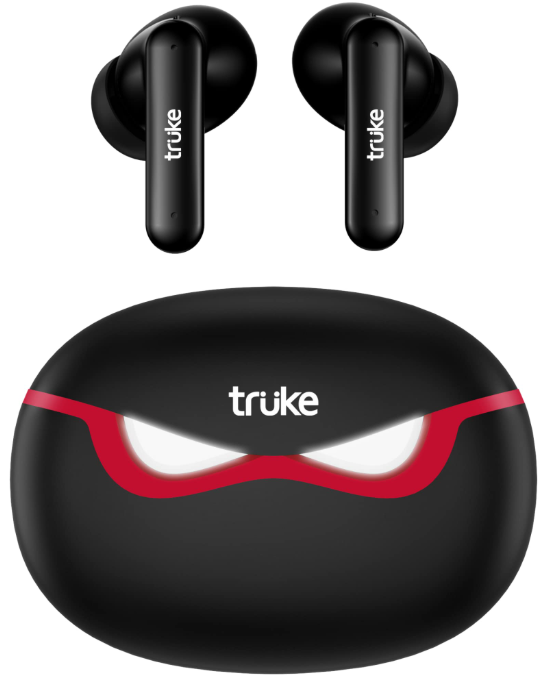
The truke Buds BTG 3 are a pair of true wireless earbuds designed to deliver immersive audio with advanced features tailored for consumers seeking quality sound, convenience, and value. These earbuds incorporate AI-powered noise cancellation, providing clear call quality even in noisy environments, and a 55ms ultra-low latency gaming mode optimized for gaming enthusiasts. With a compact and ergonomic in-ear canal design, they ensure a comfortable and secure fit, making them suitable for daily commutes, workouts, gaming sessions, and casual music listening.
Ideal for budget-conscious users who want premium features, the truke Buds BTG 3 offer up to 48 hours of total playback time with the included charging case, ensuring long-lasting use without frequent charging breaks. Their Bluetooth 5.1 connectivity ensures quick pairing and a stable wireless connection within an 11-meter range. Available in sleek black and red colors, these earbuds combine style, performance, and affordability.
Priced around INR 1,399 (~$18-20), the truke Buds BTG 3 are widely available through popular online retail platforms such as Amazon, Flipkart, and other e-commerce sites, making them accessible for a broad audience seeking value-packed true wireless audio solutions.
Specifications
- Driver Type: 10mm dynamic drivers delivering punchy bass and clear mids
- Bluetooth Version: 5.1 for fast, stable connections with up to 11 meters range
- Battery Life: 10 hours of playback on a single charge per earbud; up to 48 hours total with the charging case (300mAh)
- Charging: USB Type-C, 1.5 hours full charge time
- Latency: 55ms ultra-low latency gaming mode activated via triple tap, ideal for gaming and video streaming
- Noise Cancellation: AI-powered Deep Neural Network technology for call noise cancellation and enhanced voice clarity
- Controls: Touch-sensitive controls with multi-function taps for play/pause, track navigation, gaming mode toggle, and voice assistant activation
- Fit and Design: In-ear canalphones with replaceable ear tips and a lightweight design (approx. 43g combined weight)
- Additional Features: Auto in-ear detection for automatic play/pause, IPX4 splash and sweat resistance
- Comparison: Compared to other budget earbuds, the Truke Buds BTG 3 stand out with their AI noise cancellation and gaming mode, which most alternatives lack at this price point
Overview
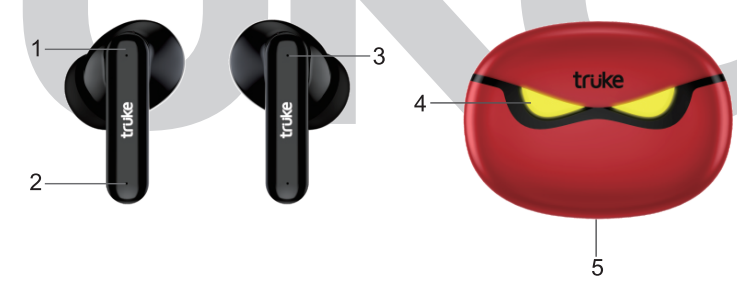
- Touch controls
- MEMS Mic
- Earbuds Led Indicator Green/White
- Charging Case Led Indicator
- Type-C Charging Port
Pairing and Connection Procedure
Pairing procedure
Take out the earbuds from the case at the same time, both earbuds indicators will start blinking with Green and white lights. In a few seconds, one of the earbuds will keep blinking Green and White light alternately, and the other will blink Green light every five seconds.
Connection procedure
- Turn on the mobile's Bluetooth and search for a new device. Then select "trüke Buds BTG 3*.
- Now your "trüke Buds BTG 3" will be connected to your mobile and ready to use. Once connected, both earbuds will stop blinking.
Troubleshooting Common Issues with truke Buds BTG 3 Earbuds
Unable to start
- Charge the earbuds for 30 minutes and take the earbuds out of the charging case; they will turn on automatically.
Earbuds cannot pair
- Go to the mobile's Bluetooth menu and forget/disconnect the trüke Buds BTG 3 and put the earbuds back in the charging case. Then take out the earbuds from the charging case and pair/ connect with the mobile again.
Cannot connect to the mobile device
- Turn off the earbuds by putting them in the charging case. Turn off the mobile device's Bluetooth function and turn it on again.
- Take out the earbuds from the case and connect.
The earbuds can't be charged.
- Make sure earbuds are placed in the case with the right orientation, gently press them, and clean the charging pins point.
- Only one earbud is working/both earbuds are not working simultaneously
- Go to the mobile's Bluetooth menu and forget/disconnect the trüke Buds BTG 3 and put the earbuds back in the charging case. Then take out the earbuds from the charging case and pair/ connect with the mobile again. I
Pros & Cons of truke Buds BTG 3 True Wireless Earbuds
Pros
- Excellent battery life: Up to 48 hours with the charging case offers extended usage without frequent recharging.
- AI-powered noise cancellation: Enhances call clarity in noisy environments, a rare feature in budget earbuds.
- Low-latency gaming mode: 55ms latency ensures smooth audio-visual sync for gamers and video watchers.
- Comfortable fit: In-ear canal design with multiple ear tip sizes for a secure and comfortable seal.
- Affordable price: Competitive pricing around INR 1,399 makes it a great value option.
Cons
- Call quality: While noise cancellation is effective, some users report that call voice clarity could be improved further.
- Limited advanced app features: Companion app offers basic controls but lacks extensive customization.
- Build weight: Slightly heavier than some competitors, which may affect long-term comfort for some users.
Customer Reviews and Feedback on truke Buds BTG 3
Users consistently praise the truke Buds BTG 3 for their impressive battery life and clear sound quality, especially appreciating the punchy bass and crisp audio output at various volume levels. The AI-powered noise cancellation receives positive remarks for improving call experiences, though a few customers note that call clarity can still fluctuate in very noisy environments. The gaming mode with 55ms latency is highlighted as an excellent feature for mobile gamers seeking minimal audio lag.
Common complaints include occasional pairing hiccups and the earbuds feeling slightly bulky during extended wear. Overall, ratings average around 4 out of 5 stars, with many recommending the earbuds as a budget-friendly, feature-rich option for casual listeners and gamers alike.
Faqs
How do I set up truke Buds BTG 3 for the first time with my smartphone?
What should I do if my truke Buds BTG 3 are not playing audio or not connecting?
What is the AI-powered noise cancellation feature on the truke Buds BTG 3 and how does it improve call quality?
Can I use truke Buds BTG 3 with all Bluetooth-enabled devices, including gaming consoles and PCs?
How do I activate and use the gaming mode on truke Buds BTG 3 for lower audio latency?
What are the best practices for maintaining and cleaning my truke Buds BTG 3 earbuds?
How does the auto in-ear detection feature work on truke Buds BTG 3 and how can I toggle it?
What should I do if the touch controls on my truke Buds BTG 3 are not responding correctly?
Tags
More truke manuals
Leave a Comment