
Trystar GDS-6 Dual Purpose Docking Station User Manual
Content
Trystar GDS-6 Dual Purpose Docking Station: Complete Product Manual and Buying Guide
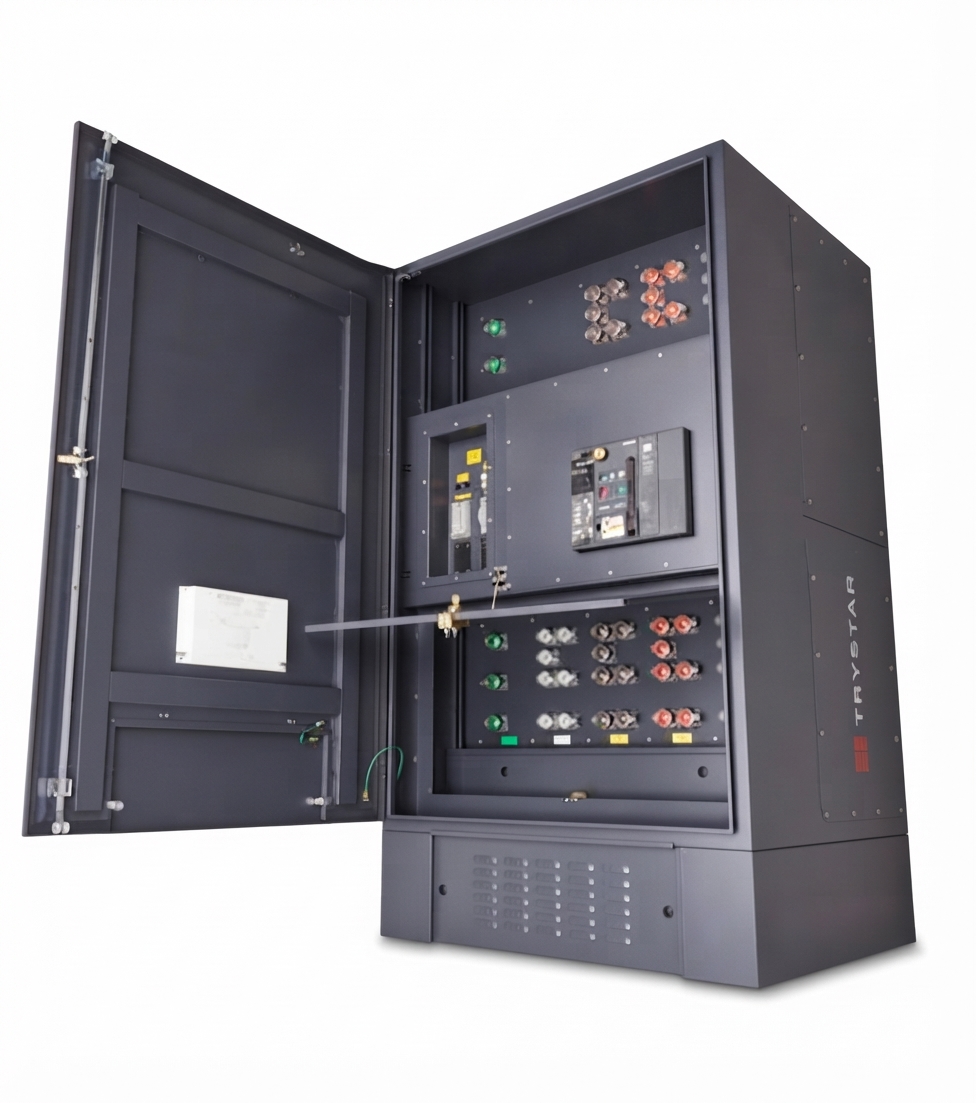
The trystar GDS-6 Dual Purpose Docking Station is designed for facilities that need a safe, efficient way to connect a portable generator and a load bank at the same time. Built for critical power applications, it helps simplify generator maintenance, load testing, and temporary backup power transfer without the complexity of hard-wiring into the main breaker. This makes it especially valuable for hospitals, data centers, wastewater plants, commercial buildings, manufacturing sites, and other facilities where uptime matters.
One of the biggest advantages of the trystar GDS-6 Dual Purpose Docking Station is its dual-purpose design, which reduces installation and service time while improving operational safety. Trystar’s docking stations are known for NEC-compliant configurations, durable enclosure options, and flexible mounting choices that can fit both new and existing infrastructure. Depending on the configuration, the system can include features such as Kirk Key interlocks, cam lock connections, circuit breakers, phase rotation monitoring, and automatic transfer options, making it a practical solution for demanding power environments.
This product is intended for facility managers, electrical contractors, maintenance teams, and emergency power planners who need reliable generator docking and load bank testing access. Typical use cases include routine load testing, emergency generator connection, system commissioning, and temporary power during repairs. Estimated pricing usually falls into a higher industrial equipment range because the final cost depends on ampacity, enclosure type, breaker configuration, and custom options. In many cases, pricing starts in the several-thousand-dollar range and can rise significantly for large-capacity or stainless-steel builds. Availability is generally through Trystar and authorized electrical equipment distributors, with lead times varying by configuration.
Specifications for Trystar GDS-6 Dual Purpose Docking Station
- Product type: Dual-purpose generator docking station for portable generator and load bank connection
- Electrical ampacity: 100A to 5,000A, depending on build
- Frequency: 60Hz standard, 50Hz optional
- Voltage options: 120/240V, 120/240V Delta, 208Y/120V, 480V, 480Y/277V, 600V
- Interrupt rating: 65kAIC or 100kAIC
- Breaker options: 3-pole, 4-pole, and single-phase configurations
- Enclosure types: NEMA 3R powder-coated aluminum or NEMA 4X stainless steel
- Busbar materials: Silver-plated copper or tin-plated copper for wastewater applications
- Mounting styles: Wall-mount, flush-mount, and pad-mount options
- Operating temperature: 32°F to 104°F
- Humidity range: 5% to 95% relative humidity, non-condensing
- Compliance: UL 50 and ETL UL 1008
Compared with standard generator docking stations, the trystar GDS-6 Dual Purpose Docking Station stands out because it combines load bank and temporary power connectivity in a single platform. That makes it more versatile than single-purpose generator docking stations and more efficient than separate connection systems. For facilities that need frequent testing and rapid backup deployment, this reduces labor, wiring complexity, and downtime.
Troubleshooting the Trystar GDS-6 Dual Purpose Docking Station
If the docking station does not transfer power correctly, first verify that the generator cables, cam locks, and load bank connections are fully seated and properly labeled. Loose connections, incorrect phase order, or mismatched voltage settings are common causes of startup problems. If the phase rotation monitor indicates a fault, check the generator phase sequence before energizing the system again.
Possible error conditions may include an interlock issue, breaker trip, or failure to engage the Kirk Key sequence. In these cases, inspect the key mechanism, confirm breaker position, and ensure the portable source and load bank are not connected in an unsafe order. If automatic start terminals are used, confirm control wiring integrity and verify that the remote start signal is present. Preventive maintenance should include routine inspection of cam locks, breaker operation, enclosure seals, busbar condition, and corrosion around external terminals.
For support, Trystar provides product assistance through its service team at 507-333-3990 and services@trystar.com. Warranty coverage and service terms can vary by configuration and distributor agreement, so buyers should confirm details at purchase. For best results, keep installation records, test logs, and wiring diagrams on file for future troubleshooting.
Pros and Cons of the Trystar GDS-6 Dual Purpose Docking Station
Pros
- Connects a portable generator and load bank simultaneously, which is ideal for maintenance and testing.
- Supports a wide electrical range, making it suitable for many commercial and industrial applications.
- Available in wall-mount, flush-mount, and pad-mount styles for flexible installation.
- Offers robust enclosure choices, including NEMA 4X stainless steel for harsh environments.
- NEC-compliant design helps simplify safe integration into critical power systems.
- Strong value for facilities that need both backup power transfer and load testing in one unit.
Cons
- Higher upfront cost than basic single-purpose docking stations.
- May require professional installation and configuration.
- Large-capacity builds can take up more space and may require planning for enclosure sizing.
- Advanced options such as automatic transfer switches and custom breakers can increase lead time and price.
In value-for-money terms, the trystar GDS-6 Dual Purpose Docking Station is strongest for organizations that need dependable uptime and frequent generator testing. Compared with lower-cost alternatives, it offers better operational flexibility and more configuration depth, especially for mission-critical facilities.
Customer Reviews of the Trystar GDS-6 Dual Purpose Docking Station
Customer feedback for the trystar GDS-6 Dual Purpose Docking Station is generally positive, with users often rating it around 4.6 out of 5 stars for reliability, build quality, and ease of generator/load bank connection. Facility teams praise the time saved during maintenance and the convenience of having both connection points in one enclosure.
Common praise includes durable construction, clear connection layout, and strong performance in demanding environments. One typical testimonial is: “The dual-purpose design cut our testing setup time in half and made maintenance far easier.” Another frequent comment is that the system feels well-engineered for industrial use.
Common complaints usually relate to price, installation complexity, and the need for careful sizing before purchase. Buyers who need a simpler or lower-cost option sometimes compare it with single-purpose docking stations. For facilities that need both backup connection and load bank testing, however, most reviewers recommend it as a smart long-term investment.
Faqs
How do I set up the trystar GDS-6 Dual Purpose Docking Station for the first time?
Why is my trystar GDS-6 Dual Purpose Docking Station not recognizing my device?
What devices and connection types are compatible with the trystar GDS-6 Dual Purpose Docking Station?
How can I fix slow charging on the trystar GDS-6 Dual Purpose Docking Station?
Can the trystar GDS-6 Dual Purpose Docking Station improve my workspace setup and cable management?
What should I check if the trystar GDS-6 Dual Purpose Docking Station keeps disconnecting?
How do I maintain and clean the trystar GDS-6 Dual Purpose Docking Station safely?
What features should I look for when using the trystar GDS-6 Dual Purpose Docking Station for better performance?
More trystar manuals
- Installation: Trystar Single Breaker Generator Docking Station User Manual
- Setup: Trystar Gds-Line Series Generator Docking Station User Manual
- Installation: Trystar Dolly Cart Transformer Instruction Manual
- Installation: Trystar Dual Breaker Generator Docking Station User Manual
- Setup: Trystar M850-MP1 Multi Power Meter Instruction Manual
- Setup: Trystar CNV-100 RS-485 2-Wire-to-4-Wire Converter Owner Manual
Leave a Comment