
Victron Energy BMV-702 Battery Monitor User Manual
Content
Victron Energy BMV-702 Battery Monitor: Complete Product Manual and Buyer Guide
Introduction
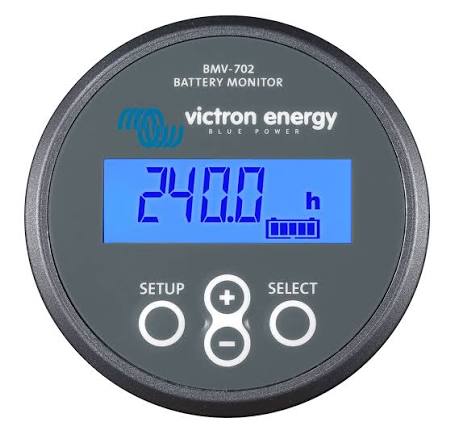
The Victron Energy BMV-702 Battery Monitor is a high-precision battery monitoring solution designed for users who need accurate insight into battery health, power usage, and charging performance. It is widely used in marine systems, RVs, off-grid solar setups, camper vans, and backup power installations where knowing the true state of charge matters. Unlike basic voltage meters, this battery monitor measures current, consumed ampere-hours, remaining runtime, and historical performance, helping users manage battery banks more efficiently.
One of the biggest advantages of the Victron Energy BMV-702 Battery Monitor is its ability to track both the main battery and a second battery input, which can be configured for voltage, temperature, or midpoint monitoring. This makes it especially useful in dual-battery systems and more advanced electrical installations. It also includes programmable alarms, relay control, and VE.Direct communication for integration with compatible Victron displays and monitoring tools.
The product is ideal for technically minded homeowners, boat owners, RV travelers, solar installers, and anyone relying on lead-acid or lithium battery banks. Its strong reputation comes from reliable performance, compact design, and low standby consumption. Estimated pricing typically falls in the mid-range monitor category, usually around $115 to $170 depending on version, finish, and seller availability. The BMV-702 is commonly available through marine, electrical, solar, and online retailers in both grey and black versions.
Specifications
- Model: Victron Energy BMV-702 Battery Monitor
- Supply voltage range: 6.5V to 95V DC
- Shunt rating: 500A/50mV standard shunt
- Expandable shunt support: up to 9999A with compatible larger shunts
- Battery capacity range: 1Ah to 9999Ah
- Current measurement resolution: 10mA
- Low power draw: approximately 2.9Ah per month at 12V and 2.2Ah per month at 24V
- Communication: VE.Direct port
- Additional input: second battery voltage, temperature, or midpoint voltage
- Alarm functions: visual and audible alarms with programmable thresholds
- Relay output: programmable relay for loads or generator control
- Operating temperature range: typically suitable for demanding mobile and marine environments
Compared with the simpler BMV-700, the BMV-702 adds a second auxiliary input for greater flexibility. Compared with Bluetooth-enabled monitors in Victron’s lineup, it focuses on proven wired monitoring rather than app-first connectivity, which appeals to users who want dependable panel-based control.
Detailed Description
The Victron Energy BMV-702 Battery Monitor works by measuring current flow through the included shunt and calculating battery state of charge using advanced monitoring logic. This gives a far more accurate picture than voltage-only gauges, especially when loads and charging sources fluctuate. The unit tracks battery voltage, current, consumed ampere-hours, depth of discharge, and estimated time remaining, making it a practical tool for systems where battery reliability matters.
In real-world use, the monitor is valuable for solar power systems, trolling motors, marine house banks, overland vehicles, and backup battery systems. Its historical data helps users identify patterns, detect undercharging, and protect expensive battery banks from deep discharge. The display unit is compact and designed for flush mounting, with a durable build suited to boats, cabins, and mobile environments. The black and grey versions offer the same core functionality, allowing installers to match the unit to different interiors.
User experience is generally strong because the display is easy to read and the alarms are practical rather than overwhelming. The interface is not flashy, but it is straightforward and functional, which suits technical users who want dependable data instead of unnecessary complexity. The BMV-702 is especially effective when paired with careful system calibration and proper shunt installation.
Setup Guide
Installing the Victron Energy BMV-702 Battery Monitor requires attention to wiring accuracy and battery safety. Begin by disconnecting all power sources before installation. Mount the display in a visible location and install the shunt close to the battery negative terminal. Connect the main negative cable through the shunt so all current passes through it. Then wire the display unit to the shunt and connect the positive sense wire to the battery bank.
Next, configure the battery capacity, charge efficiency, charged voltage, tail current, and alarm thresholds in the setup menu. If using the second input, select the correct function for voltage, temperature, or midpoint monitoring. The relay can be programmed for load shedding or generator start control depending on the system design. VE.Direct-compatible devices can be connected for extended monitoring in supported Victron setups.
Always confirm polarity before powering up the unit. Incorrect wiring can damage the monitor or produce false readings. Avoid mounting the display in areas exposed to direct water spray or excessive heat. If readings appear inaccurate, check shunt placement, loose terminal connections, and battery capacity settings. A properly configured system will provide highly dependable battery data.
Troubleshooting
Common issues with the Victron Energy BMV-702 Battery Monitor usually relate to wiring, calibration, or configuration. If the display shows no power, check the fuse, positive supply lead, and battery connection. If current readings are incorrect, confirm that all negative loads and charging sources pass through the shunt and that no bypass wiring exists. Incorrect state-of-charge readings often mean the battery capacity or charged parameters have not been set properly.
If the alarm sounds unexpectedly, review voltage thresholds, discharge limits, and relay settings. For auxiliary input problems, verify whether the input is configured for second battery voltage, midpoint voltage, or temperature sensing. The unit does not rely on complex error codes in the way some digital devices do, so most faults are solved through inspection and menu verification rather than code translation.
Preventive care includes tightening terminals regularly, protecting the unit from moisture, and periodically checking calibration after major battery changes. Warranty coverage and support are usually handled through Victron Energy’s distributor network, and customers can also contact the retailer for first-line assistance. For best results, keep installation documentation and product serial information available when requesting help.
Pros & Cons
Pros
- Highly accurate battery monitoring with shunt-based measurement
- Tracks voltage, current, amp-hours, remaining runtime, and historical data
- Auxiliary input adds flexibility for second battery, temperature, or midpoint monitoring
- Programmable alarms and relay improve system protection
- Low power draw makes it suitable for off-grid and marine use
- Strong value for users who need serious battery management without unnecessary extras
Cons
- No built-in Bluetooth in the standard BMV-702 model
- Installation is more involved than simple voltage meters
- Requires proper calibration for best accuracy
- Not ideal for users wanting app-only wireless monitoring
For buyers comparing alternatives, the BMV-702 is a strong middle-ground choice. It offers more flexibility than basic battery gauges and can be more cost-effective than premium smart monitors for users who prefer wired reliability over wireless convenience. It represents solid value for money in marine, RV, and solar applications.
Customer Reviews
Typical customer feedback for the Victron Energy BMV-702 Battery Monitor is very positive, especially among RV owners, boaters, and off-grid system users. Average sentiment often falls around 4.5 out of 5 stars, with praise focused on accuracy, build quality, and the usefulness of state-of-charge data.
Common praise includes comments such as, “Finally I can see exactly what my battery bank is doing,” and “The installation took time, but the readings are worth it.” Frequent complaints usually mention the need for careful setup and the lack of wireless connectivity in the base model. Some users also note that calibration is essential if the system includes multiple battery sources or unusual charge profiles.
Most buyers recommend the unit to anyone managing a serious battery system and advise reading the wiring instructions carefully before installation. For users who value reliable monitoring over app-based features, the BMV-702 remains a highly recommended purchase.
Frequently Asked Buying Considerations
- Best for: marine, RV, solar, and backup battery systems
- Not best for: users who want simple plug-and-play voltage-only monitoring
- Preferred use case: accurate state-of-charge tracking with relay and alarm support
- Key decision factor: whether wired reliability is more important than Bluetooth connectivity
The Victron Energy BMV-702 Battery Monitor is a dependable, precision-focused battery monitor for users who need accurate system insight and practical control. It stands out for its shunt-based measurement, flexible auxiliary input, and trusted performance in demanding environments.
Faqs
How do I set up the Victron Energy BMV-702 Battery Monitor for the first time?
Why is my Victron Energy BMV-702 Battery Monitor showing the wrong state of charge?
What can the auxiliary input on the Victron Energy BMV-702 Battery Monitor be used for?
Can the Victron Energy BMV-702 Battery Monitor work with 12V, 24V, and 48V systems?
How do I connect the Victron Energy BMV-702 Battery Monitor shunt correctly?
What should I do if the Victron Energy BMV-702 Battery Monitor display is blank?
How can I improve the accuracy of the Victron Energy BMV-702 Battery Monitor?
How often should I check and maintain the Victron Energy BMV-702 Battery Monitor?
More victron energy manuals
- Victron Energy MPPT Solar Charger 100-30 User Manual
- Victron Energy MultiPlus-II Charger or Inverter User Manual
- Victron Energy PMR482602020 Multi RS Solar User Manual
- Victron Energy 230V Blue Smart IP22 Charger User Manual
- Victron Energy MultiPlus-II 230V Series Inverter User Manual
- How to Use: Victron Energy Blue Smart IP65 Charger 230V User Manual
Leave a Comment