
Victron Energy MultiPlus-II Charger or Inverter User Manual
Content
Victron Energy MultiPlus-II Charger or Inverter: Complete Product Manual
Introduction
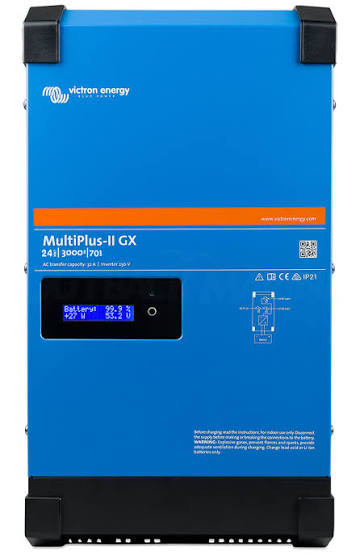
The Victron Energy MultiPlus-II Charger or Inverter is a premium inverter-charger designed for off-grid solar systems, backup power, marine applications, RVs, and grid-interactive energy storage setups. It combines a pure sine wave inverter, a battery charger, and an automatic transfer switch in one compact unit, making it a powerful all-in-one solution for users who need reliable energy management and seamless power switching. The MultiPlus-II series supports PowerControl and PowerAssist, which help prevent overloads by intelligently balancing generator, shore power, and battery input. For households and businesses that need stable backup power or efficient solar integration, the Victron Energy MultiPlus-II Charger or Inverter delivers strong performance, advanced configurability, and excellent system compatibility.
This product is especially popular among solar installers, DIY energy users, boat owners, and RV travelers who want professional-grade power conversion and charging in a single device. It works well in hybrid systems where battery support, fast transfer switching, and remote monitoring are important. Estimated pricing generally ranges from about $900 to $3,000+ depending on voltage, power class, and region, with availability through authorized Victron dealers, solar distributors, and specialty energy retailers. The Victron Energy MultiPlus-II Charger or Inverter stands out for its robust build quality, flexible system integration, and support for advanced monitoring and configuration through Victron’s ecosystem.
Specifications
- Product type: Pure sine wave inverter, battery charger, and transfer switch in one unit.
- Power classes: Common models include 3000 VA, 4000 VA, 5000 VA, 6500 VA, 8000 VA, 10000 VA, and 15000 VA variants.
- Battery voltages: Available in 12V, 24V, 48V, and selected 120V or split-phase versions depending on model.
- AC output: Stable regulated output for sensitive electronics, appliances, and mixed loads.
- Transfer switching: Fast automatic switch-over for uninterrupted power during grid or generator loss.
- Key features: PowerControl, PowerAssist, parallel operation, three-phase operation, and remote monitoring support.
- Efficiency: High conversion efficiency, with low idle consumption on many models.
- Connectivity: Compatible with Victron GX devices, VE.Bus networking, and system management apps through supported interfaces.
- Build quality: Rugged enclosure designed for marine, mobile, and stationary installations.
Compared with basic inverter chargers, the Victron Energy MultiPlus-II Charger or Inverter offers more advanced load management, better expandability, and stronger integration with lithium battery systems and monitoring platforms. Against simpler budget models, it typically provides superior reliability and finer control over charging profiles, making it a stronger long-term investment.
Setup Guide: How to Install and Configure the MultiPlus-II
1. Mount the unit in a dry, well-ventilated location with enough clearance for airflow and cable access.
2. Connect the DC battery cables using the correct cable gauge, fuse protection, and polarity. Always disconnect all power sources before wiring.
3. Wire the AC input from shore power, generator, or grid supply, then connect the AC output to the protected load circuits.
4. If using monitoring or automation, connect the unit to compatible Victron communication hardware for system setup and remote visibility.
5. Configure battery type, charge voltage, current limits, and transfer settings using supported configuration tools or GX integration.
6. Test inverter operation, charger function, and transfer switching under no-load and light-load conditions before full use.
Safety warnings: Always isolate AC and DC sources before installation, use properly rated breakers and fuses, and follow local electrical codes. If the unit does not start, check battery voltage, reverse polarity, AC input range, and communication settings. If alarms appear during startup, verify load size and wiring integrity before retrying.
Troubleshooting Common MultiPlus-II Problems
One common issue is no inverter output, which is often caused by low battery voltage, blown DC fuses, or incorrect wiring. Another frequent problem is charger not charging, usually due to missing AC input, incorrect charge settings, or a source outside the accepted voltage range. If the unit repeatedly transfers between inverter and charger mode, check for unstable generator output, overloaded AC input, or weak battery performance.
Error indicators and alarms typically point to overload, low battery, high temperature, or AC input failures. The most effective fix is to reduce connected loads, improve ventilation, confirm battery health, and verify input wiring. Preventive maintenance includes keeping terminals tight, monitoring operating temperature, and reviewing charge settings after battery changes. Victron generally provides warranty coverage through authorized channels, and support is available through the dealer network and official technical documentation. For help, contact your authorized Victron distributor or registered installer for model-specific support.
Pros and Cons
Pros
- Excellent all-in-one design with inverter, charger, and transfer switch combined.
- Strong performance for solar, backup, marine, and RV power systems.
- Advanced features like PowerControl and PowerAssist improve system flexibility.
- Compatible with lithium and lead-acid battery setups when configured correctly.
- Scales well in parallel, split-phase, and three-phase systems.
- High value for users who want professional-grade energy management.
Cons
- Higher price than entry-level inverter chargers.
- Installation can be complex for first-time users.
- Best results often require Victron ecosystem components.
- Some advanced features may be unnecessary for simple backup systems.
For users comparing it with cheaper alternatives, the Victron Energy MultiPlus-II Charger or Inverter offers better long-term reliability and more advanced control, but the extra cost may not be justified for basic power backup needs.
Customer Reviews
Average user sentiment is typically very positive, with many buyers rating it around 4.5 out of 5 stars. Customers frequently praise the stable power output, quiet operation, and seamless switching during outages. One RV owner noted that the system “handles shore power and battery backup without a hiccup,” while a solar installer described it as “one of the most dependable inverter-chargers for hybrid systems.”
Common complaints include installation complexity, the need for additional accessories, and the premium price. Some users also mention that setup can be confusing without prior experience with Victron equipment. Despite this, most recommendations are strong for serious off-grid, mobile, or backup power users who want a durable and future-ready solution.
Final Buying Advice
If you need a high-quality inverter charger for solar storage, backup power, or mobile energy systems, the Victron Energy MultiPlus-II Charger or Inverter is a strong choice. It is best suited for users who value reliability, expandability, and advanced power management over the lowest upfront cost.
Faqs
How do I set up victron energy MultiPlus-II Charger or Inverter for the first time in an off-grid system?
What should I do if victron energy MultiPlus-II Charger or Inverter is not switching to inverter mode during a power outage?
Can victron energy MultiPlus-II Charger or Inverter work with solar charge controllers and grid-tie inverters?
How do PowerControl and PowerAssist features help victron energy MultiPlus-II Charger or Inverter in real-world use?
Why does victron energy MultiPlus-II Charger or Inverter need an external current sensor, and when should it be installed?
How can I optimize charging performance on victron energy MultiPlus-II Charger or Inverter without shortening battery life?
What installation mistakes most often cause victron energy MultiPlus-II Charger or Inverter problems?
How often should I inspect and maintain victron energy MultiPlus-II Charger or Inverter for reliable operation?
More victron energy manuals
- Victron Energy BMV-702 Battery Monitor User Manual
- Victron Energy 230V Blue Smart IP22 Charger User Manual
- Victron Energy MPPT Solar Charger 100-30 User Manual
- How to Use: Victron Energy Blue Smart IP65 Charger 230V User Manual
- Victron Energy PMR482602020 Multi RS Solar User Manual
- How to Use: Victron Energy Orion XS 12/12-50A DC-DC Battery Charger User Manual
Leave a Comment