
Usage & Setup: Winix Air Purifier 5510 User Guide
Content
Winix Air Purifier 5510
Introduction
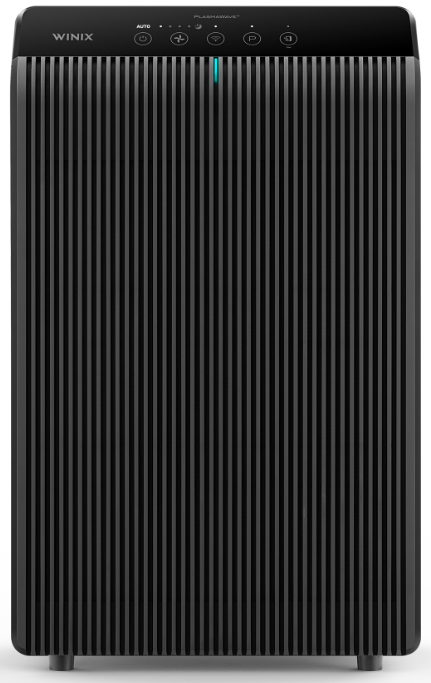
The Winix Air Purifier 5510 is a high-performance, smart home air purifier designed to deliver clean, fresh air for medium to large rooms. With its advanced four-stage filtration system—including a True HEPA filter, AOC™ carbon filter, washable pre-filter, and PlasmaWave® technology—the 5510 captures 99.99% of airborne allergens, dust, pollen, pet dander, and even ultrafine particles as small as 0.01 microns Its built-in air quality sensor and real-time LED indicator allow you to monitor indoor air quality at a glance, while Auto Mode automatically adjusts fan speed based on detected pollutants
This model stands out with its Wi-Fi connectivity and compatibility with the Winix Smart App, giving you remote control and monitoring from your smartphone.. The Winix 5510 is ENERGY STAR certified, ensuring energy efficiency and lower operating costs. Its sleek design, quiet operation (as low as 23.5dB), and sleep mode make it ideal for bedrooms, living rooms, and open-concept spaces..
The Winix Air Purifier 5510 targets health-conscious homeowners, pet owners, allergy sufferers, and anyone seeking to reduce indoor pollutants and odors. It’s particularly effective in kitchens, living areas, and bedrooms. The estimated price range is competitive for its feature set, typically found between $200 and $300, and is widely available online and at major retailers..
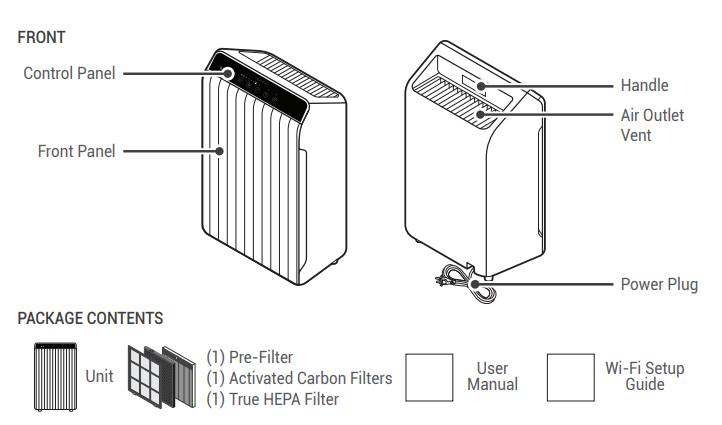
MODEL PART DIAGRAM
WHERE TO USE
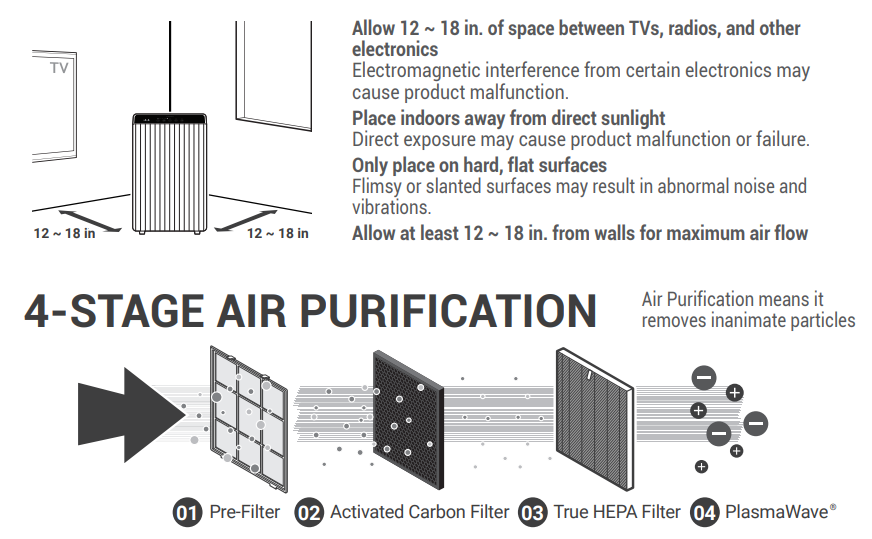
- Allow 12 ~ 18 in. of space between TVs, radios, and other electronics
- Electromagnetic interference from certain electronics may cause product malfunction.
- Place indoors away from direct sunlight
- Direct exposure may cause product malfunction or failure.
- Only place on hard, flat surfaces
- Flimsy or slanted surfaces may result in abnormal noise and vibrations.
- Allow at least 12 ~ 18 in. from walls for maximum air flow
INITIAL OPERATION
- Remove the front panel by grasping its upper edge and gently pulling forward.
- Remove the Pre-Filter, then the plastic bag of filters behind it.
- Remove filters from the protective plastic bag. Install the filters until they fit securely in place.
- True HEPA Filter (back)
- Activated Carbon Filter (middle) 01. Pre-Filter (front)
- After filters are installed, close the front panel.
- Insert the power cord into an electrical outlet.
MAINTENANCE
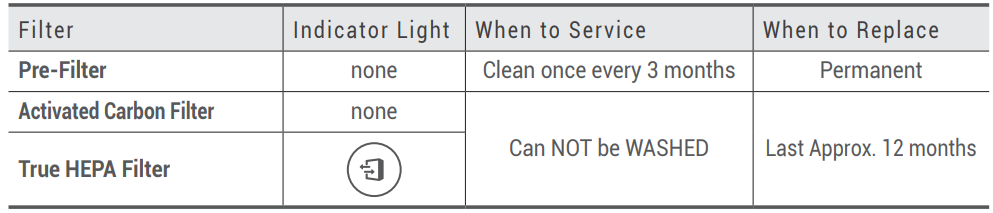
- When the Check Filter Indicator LED is on, it is time to replace the True HEPA Filter and Activated Carbon Filter.
- Intervals between filter replacement may vary depending on the environment.
CLEANING CARE
Cleaning the Filters:
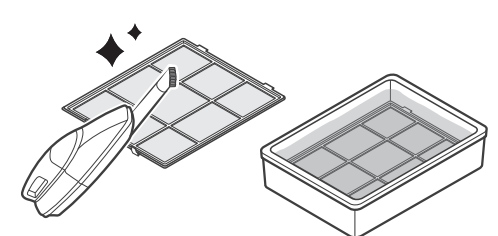
- Use a vacuum cleaner or soft brush to clean the Pre-Filter
- If it is excessively soiled, rinse in room temperature water. Do not use detergent or soap. Allow the filter to dry for 24 hours or more before using. Intervals between filter cleaning may vary depending on the air quality in the environment.
Cleaning the Exterior & Interior:
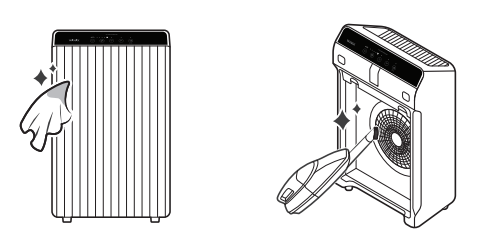
- Open the front panel and clean the interior with a vacuum cleaner.
- A handheld vacuum or hose attachment will work best.
- Dampen a cloth with room temperature water and wipe down the interior and exterior of the unit.
- Wipe the unit down with a clean, dry cloth.
- Ensure no moisture remains before plugging the unit back in.
- For optimal performance, clean every 1 - 2 months.
NOTICE
- When cleaning the unit, always unplug the power cord first and then wait until the unit has cooled down.
- Never disassemble, repair, or modify this unit yourself.
- Do not use flammable sprays or liquid detergents.
- Do not allow children to clean or maintain the unit.
- Before cleaning or maintaining, ensure the unit is unplugged.
- Do not use benzene, alcohol, or other volatile fluids, which may cause damage or discoloration.
- Do not use hot water over 104°F.
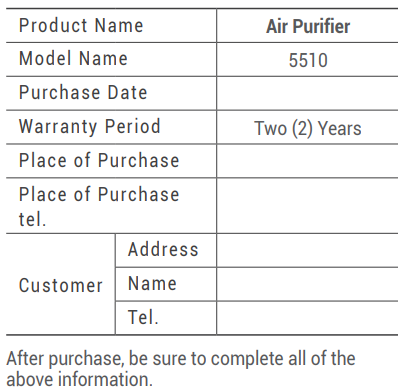
TWO-YEAR WARRANTY
The terms of the warranty are as follows:
- This product is manufactured under stringent quality control and inspections.
- The warranty will be voided if product failure is a result of negligence or misuse by the consumer.
- A proof of purchase must be presented upon claiming a Product Warranty.
- Store the proof of purchase in a safe place or register your product on winixamerica.com to upload your proof of purchase.
- This warranty is valid only in the USA and Canada.
Specifications and Key Features
- Filtration System: 4-stage (washable pre-filter, pelleted activated carbon filter, True HEPA filter, PlasmaWave technology)
- Room Coverage: Up to 392 sq. ft. (AHAM verified); cleans up to 1,882 sq. ft. in 1 hour
- CADR (Clean Air Delivery Rate): 253 CFM (smoke)
- Noise Level: As low as 23.5dB on the lowest setting, ultra-quiet for bedrooms
- Smart Features: Wi-Fi enabled, Winix Smart App control, remote monitoring, filter life indicator
- Auto Mode: Built-in air quality sensor adjusts fan speed in real time
- PlasmaWave Technology: Optional bipolar ionization for odor and VOC reduction, can be disabled
- Energy Efficiency: ENERGY STAR certified for low energy consumption
- Certifications: AHAM Verified, UL Certified
- Filter Life: Replacement indicators for each filter type
- Design: Vertically striped front panel, compact for its power
Compared to similar models like the Winix 5500-2, the 5510 adds Wi-Fi and app control, a slimmer filter set (Filter Q), and retains the same carbon content (226g) for odor control. It outperforms many competitors in its class with higher CADR, advanced sensors, and smart integration.
Troubleshooting and Support
Common Issues and Solutions:
- Unit Not Powering On: Check the power outlet and cord connections. Ensure the unit is properly plugged in.
- Reduced Airflow: Clean or replace filters as needed. The washable pre-filter should be rinsed monthly; replace True HEPA and carbon filters per the indicator..
- Strange Odors: Replace the carbon filter if odors persist. Ensure PlasmaWave is enabled for additional odor control.
- Wi-Fi Connectivity Problems: Restart the purifier and router. Re-pair the device via the Winix Smart App.
- Error Codes: Refer to the user manual for specific error code meanings. A blinking filter indicator means it’s time to replace the filter.
Preventive Measures: Regularly clean the pre-filter, avoid placing the unit near heat sources or in direct sunlight, and ensure proper ventilation in the room.
Warranty and Support: The Winix Air Purifier 5510 typically comes with a limited warranty (check your retailer for details). For technical support, contact Winix customer service via their official website. Keep your proof of purchase for warranty claims.
Pros and Cons
Pros
- Advanced Filtration: Four-stage system with True HEPA and pelleted carbon for superior particle and odor removal
- Smart Connectivity: Wi-Fi and app control for remote monitoring and adjustment
- Quiet Operation: Nearly silent on low speed, ideal for bedrooms
- Energy Efficient: ENERGY STAR certified, reducing electricity costs
- Real-Time Air Quality Monitoring: LED indicator and auto mode adjust to pollution levels
Cons
- Limited Sensor: Air quality sensor detects odors but not PM2.5, so it may not respond to all allergens
- Filter Costs: Replacement filters (especially True HEPA and carbon) can add to long-term costs
- PlasmaWave Ozone: While low, some users may prefer to disable this feature
- App Limitations: Some users report occasional connectivity issues with the smart app
Value for Money: The Winix 5510 offers excellent value with robust features, smart integration, and reliable performance, though filter replacement costs should be factored in. It compares favorably to alternatives like Levoit and Coway, especially for those wanting app control and advanced filtration
Customer Reviews and Testimonials
User feedback for the Winix Air Purifier 5510 is overwhelmingly positive, with many praising its effective filtration, quiet operation, and smart features. Common praises include noticeable reductions in pet dander, dust, and cooking odors, as well as the convenience of remote control via the app. The real-time air quality indicator is frequently mentioned as a helpful feature for monitoring indoor air.
Some users note that the air quality sensor is primarily odor-based and may not detect all particulate matter, which can be a limitation for allergy sufferers. A few have reported occasional Wi-Fi connectivity issues, but these are generally resolved with a reset. Star ratings average around 4.5 out of 5 on major retail sites, with high marks for ease of use and performance.
Purchase Recommendation: The Winix 5510 is highly recommended for medium to large rooms, especially for households with pets, smokers, or allergy concerns. It’s also a solid choice for tech-savvy users who value smart home integration. For those mainly concerned with particulate matter, consider pairing it with a standalone PM2.5 monitor for comprehensive air quality management.
For more information, troubleshooting, or to purchase the Winix Air Purifier 5510, visit authorized retailers or the Winix official website.
Faqs
How do I set up the Winix Air Purifier 5510 for the first time?
What should I do if my Winix Air Purifier 5510 is not responding or working properly?
What are the key features of the Winix Air Purifier 5510 that improve indoor air quality?
Can I control the Winix Air Purifier 5510 remotely via smartphone?
How often should the filters in the Winix Air Purifier 5510 be replaced or cleaned?
What does the PlasmaWave technology in the Winix Air Purifier 5510 do, and is it safe?
What should I do if the Winix Air Purifier 5510 auto mode does not respond to pollen or dust?
Is the Winix Air Purifier 5510 energy efficient and suitable for large rooms?
More winix manuals
Leave a Comment