
Setup: Winix PlasmaWave True HEPA Air Cleaner User Manual
Content
Winix PlasmaWave True HEPA Air Cleaner
Introduction
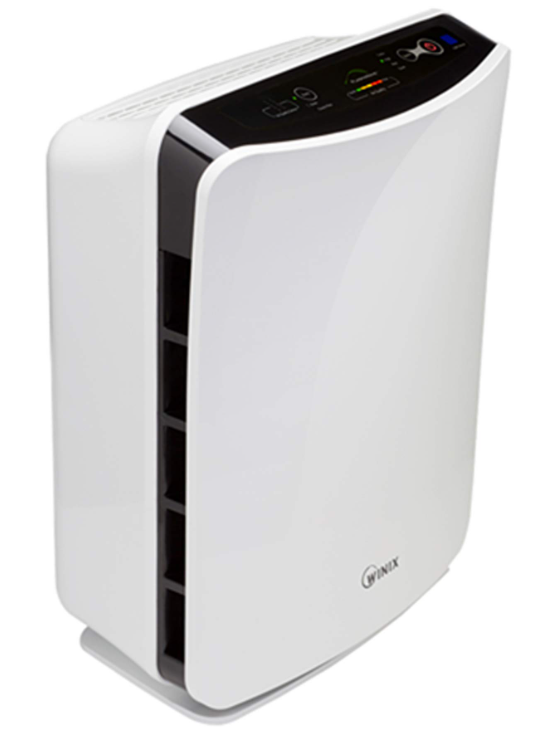
The Winix PlasmaWave True HEPA Air Cleaner is a top-tier air purification solution designed for modern homes and offices seeking advanced indoor air quality. Engineered with a multi-stage filtration system, this air purifier combines a True HEPA filter—capturing up to 99.99% of airborne particles as small as 0.003 microns—with PlasmaWave® technology, which safely neutralizes odors, viruses, bacteria, and chemical vapors without producing ozone. The result is a powerful, all-in-one device that tackles pollen, dust, pet dander, smoke, volatile organic compounds (VOCs), and other common indoor pollutants.
Key benefits include real-time air quality monitoring, automatic fan speed adjustment, and ultra-quiet operation—even in sleep mode for undisturbed nighttime use. Smart features like WiFi connectivity (available on select models) and compatibility with the Winix Smart App allow users to control and monitor air quality remotely, making it a smart choice for tech-savvy households. The Winix PlasmaWave True HEPA Air Cleaner is AHAM Verified, Energy Star Certified, and UL Certified, ensuring both performance and energy efficiency.
This air purifier is ideal for allergy sufferers, pet owners, urban dwellers, and anyone prioritizing clean indoor air. Use cases range from bedrooms and living rooms to offices and basements. The estimated price range is $130–$180 for most models, with availability through major retailers and the official Winix website. With its blend of advanced filtration, smart features, and quiet operation, the Winix PlasmaWave True HEPA Air Cleaner stands out as a reliable, efficient, and user-friendly solution for healthier indoor environments.
UNIT SPECIFICATIONS
- Model: WACP150 WACP300 WACP450
- Room Size: 150 sq. ft. 300 sq. ft. 450 sq. ft.
- Power Supply: AC 120V / 60 Hz
- Watts: 40 W 60 W 110 W
- CADR:
- Smoke (98) Dust (98)Pollen (103)
- Smoke (197)Dust (197)Pollen (214)
- Smoke (291) Dust (298)Pollen (343)
- Unit Dimensions: 8.27 in (W) x18.50 in (D) x13.78 in (H)8.66 in (W) x21.65 in (D) x16.30 in (H)10.24 in (W) x25.59 in (D) x17.32 in (H)
- Unit Weight: 11.15 lbs 13.95 lbs 19.40 lbs
- Replacement Filter:
- Filter C
Item: 113050 - Filter A
Item: 115115 - Filter E
Item: 113250
- Filter C
SAFETY INSTRUCTIONS
IMPORTANT CAUTIONS FOR USING YOUR AIR PURIFIER
WARNING: Follow the instructions in this manual to reduce the risk of electric shock, short circuit, and/or fire.
- Do not repair or modify the unit unless specifically recommended in this manual. All other repairs should be completed by a qualified technician.
- The plug for this unit is polarized with one blade wider than the other. Do not force the plug into an electrical outlet.
- Do not alter the plug in any way. If the does not fit into the outlet, reverse the plug. If it still does not fit, contact a qualified technician to install a proper outlet.
- Do not use if the power cord or plug is damaged or the connection to the wall outlet is loose.
- Use AC 120V only.
- Do not damage, break, forcefully bend, pull, twist, bundle, coat, pinch, or place heavy objects on the power cord.
- Periodically, remove dust from the power plug. This will reduce the risk of shock due to humidity buildup.
- If the power plug is damaged, it must be replaced by the manufacturer or a qualified technician.
- Remove the power plug from the outlet before cleaning the unit. When removing the power plug, grasp it by holding the plug itself; never hold by the cord.
- Remove the power plug from the outlet when not in use.
- Do not handle the power plug with wet hands.
- Do not operate the unit when using indoor smoke-generating insecticides.
- Do not clean the unit with benzene or paint thinner. Do not spray insecticides on the unit.
- Do not use the unit where it is humid or where the unit may become wet, such as the bathroom.
- Do not insert fingers or foreign objects into the air intake or outlet.
- Do not use use the unit near flammable gases. Do not use near cigarettes, incense, or other spark-creating items.The unit will not remove carbon monoxide emitted from heating appliances or
CONTROL PANEL
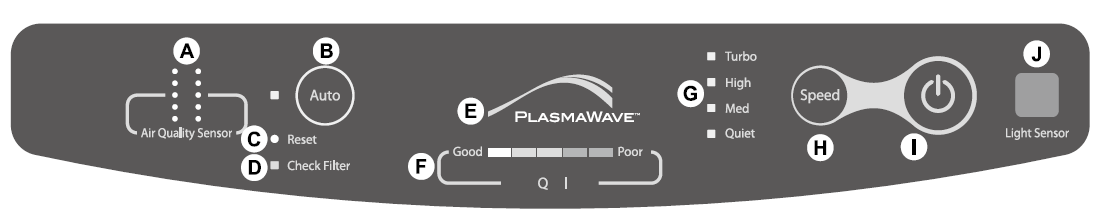
- ( A ) Air Quality Sensor: Automatically monitors the air quality within the environment.
- ( B ) Auto Mode: Based on the Air Quality Sensor, Auto Mode adjusts the fan speed to purify the environment as effeciently as possible.
- ( C ) Reset: Resets the Check Filter indicator light.
- ( D ) Check Filter: Lights up to signal when it is time to replace the True HEPA filter. ( E ) PlasmaWave®: Displays whether PlasmaWave® is enabled or disabled.
- ( F ) Air Quality Indicator: Displays the quality of air (Green / Yellow / Red).
- ( G ) Fan Speed Indicator: Displays the current fan speed.
- ( H ) Manual Control: Allows manual control of fan speeds.
- ( I ) Power: Turns the unit on or off.
- ( J ) Light Sensor: When in Auto Mode, the Light Sensors detect the amount of ambient light in the environment and dim the control panel lights.
MODES OF OPERATION
- Auto Mode
By default, the unit is set to Auto Mode on startup. Auto Mode uses SmartSensors to automatically detect the impurities in the air, automatically adjusting the fan speed to filter out those impurities to maintain clean air. - Manual Mode
Pressing the Speed button will switch the unit into Manual Mode. This will allow the Fan Speed to be chosen manually. - PlasmaWave®
By default, PlasmaWave is activated®. To enable or disable this, press and hold the Auto Button for 3 seconds.
WHERE TO USE
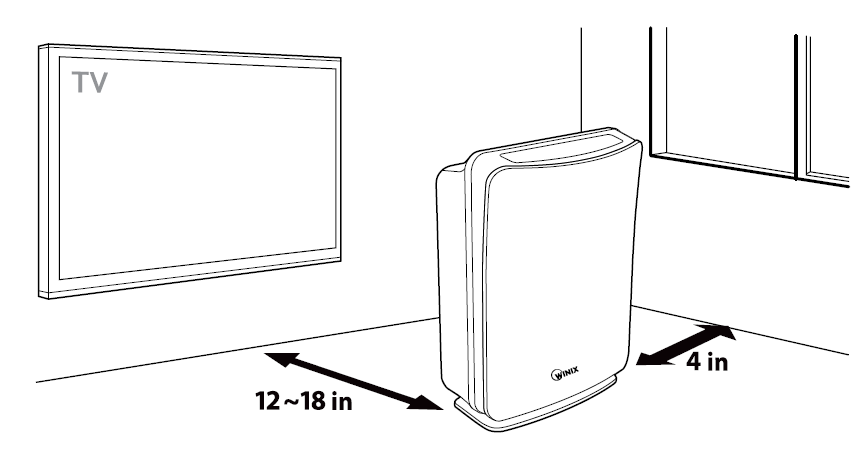
- Allow 12 ~ 18 in. of space between TVs, radios, and other electronic products. Electromagnetic interference from certain electronics may cause product malfunction.
- Place indoors away from direct sunlight light direct exposure may cause product malfunction or failure.
- Only place on hard, flat surfaces; flimsy or slanted surfaces may result in abnormal noise and vibrations.
FEATURES
- Quiet Operation
Offering low noise operation and Quiet speed for nighttime operation - Air Quality Sensor
Detects the presence of various pollutants in the air, controlling Auto Mode to adjust the fan speed. - Light Sensor
When in Auto Mode, it detects the amount of ambient light in the environment and automatically dims the control panel light and lowers the fan speed to Quiet. - Multi-Stage Cleaning
3-stage air cleaning returns clean air back into the room. - PlasmaWave®
Breaks apart airborne pollutants on a molecular level, without producing harmful ozone. - Carbon Pre-Filter
Traps large particles such as; dust, pet hair, and lint. Absorbs odor caused by smoking, cooking, and pets.
For optimal performance, replace: Once every 3 months. - True HEPA Filter
Captures up to 99.97% of particles as small as 0.3 microns, including smoke, dust, and pollen.
For optimal performance, replace: Once every 12 months.
INITIAL SET UP
- Remove the front panel by grasping the lower edge and gently pulling towards yourself.
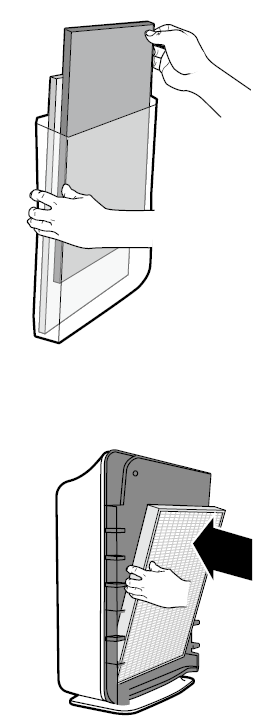
- Remove the Plastic Frame from the unit.
Remove the filters from the unit; they are protected inside a plastic wrap.
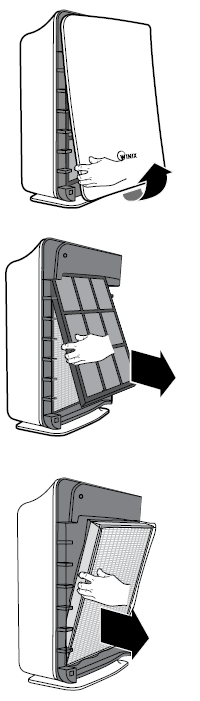
- Remove filters from protective plastic wrap.
- Operating the unit without removing filters from plastic may cause abnormal noise, deformation, or fire as a result of overheating.
- Insert the filters into the unit until they fit securely in place.
Filters must be installed in this order:- True HEPA Filter (rear)
Carbon Pre-Filter (front)
- Insert the Plastic Frame in front of the Carbon Pre-Filter.
- The Plastic Frame will ensure the filters stay in place.
- Replace the Front Cover.
Insert the cover tabs into the top slots on the unit, then bring the bottom of the Front Cover to the bottom of the unit until snapping into place.
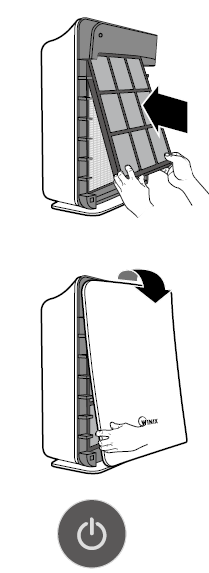
- Plug the unit into an electrical outlet.
- Press and hold the Power Button until a short "beep" sounds.
- The unit will take 3 - 4 minutes in order for the Air Quality Sensor to calibrate to the environment.
- While in calibration, the lights will flash on and off. Once it is complete, the lights will indicate the unit is in Auto Mode.
- Remove the plastic tab from the battery within the remote.
- Valid only for WACP300 & WACP450
Troubleshooting Common Issues
While the Winix PlasmaWave True HEPA Air Cleaner is designed for reliability, users may occasionally encounter issues. Here are common problems, solutions, and preventive measures to ensure optimal performance.
Common Problems & Solutions
- Unit Not Powering On: Check that the power cord is securely plugged in and the outlet is functioning. If the issue persists, contact Winix customer support.
- Reduced Airflow: Inspect and clean the washable pre-filter regularly. Replace the True HEPA and carbon filters as indicated by the filter replacement indicator[1][4].
- Unusual Noises: Ensure all filters are properly seated. Remove any foreign objects from the air intake or exhaust.
- WiFi Connectivity Issues (select models): Restart the unit and your router. Reinstall the Winix Smart App if necessary.
- Error Codes: Refer to the user manual for specific error code meanings. Common codes indicate filter replacement needs or sensor issues.
Preventive Measures
- Regularly clean the pre-filter and replace other filters as recommended.
- Keep the unit away from walls and furniture to ensure proper airflow.
- Place the air cleaner in a central location for optimal air circulation.
LIMITED WARRANTY
WINIX FRESHOME AIR CLEANERS LIMITED WARRANTY
- Limited Warranty: Winix warrants the parts of the machine to be free of defects in material and workmanship and provides service and support for one (1) year from the date of purchase by the original consumer for model WACP150, and three (3) years from the date of purchase by the consumer for models WACP300 and WACP450.
- If any part is found to be defective during the warranty period, your sole and exclusive remedy will be repair or replacement, at Winix's option and expense, of the defective part.
- This warranty does not apply in cases of abuse, mishandling, failure to comply with product usage standards, operation using an improper power supply (other than listed on the label), or unauthorized repair.
- Winix reserves the right to charge the consumers for any additional costs incurred by Winix to provide parts or services outside of the country where the air purifier is initially sold by an authorized reseller. This warranty does not include the air cleaner's replaceable filters, which are expendable parts that wear out from normal use.
- ANY IMPLIED WARRANTY, INCLUDING THAT OF MERCHANTABILITY OR FITNESS FOR A PARTICULAR PURPOSE, IS HEREBY LIMITED IN DURATION TO THE APPROPRIATE WARRANTY PERIOD SET FORTH ABOVE.
- In no event shall Winix be liable for any consequential or incidental damages attributable to this product.
- This warranty gives you specific legal rights. The duration , terms, and conditions of this warranty are valid worldwide, except where different limitations, restrictions, or conditions may be required by local law.
- For more details or to obtain service under this warranty, please contact your local dealer.
Pros & Cons
Advantages
- Advanced Filtration: True HEPA filter captures ultrafine particles, while PlasmaWave technology tackles odors and VOCs.
- Smart Features: WiFi-enabled models offer remote control and monitoring via the Winix Smart App.
- Quiet Operation: Sleep mode ensures near-silent performance for nighttime use—some models operate as low as 23.5dB.
- Energy Efficient: Energy Star Certified for lower electricity costs.
- Easy Maintenance: Filter replacement indicators and washable pre-filters simplify upkeep.
Limitations
- Filter Replacement Costs: True HEPA and carbon filters need periodic replacement, adding to long-term expenses.
- WiFi Limited to Select Models: Not all variants offer smart app connectivity.
- PlasmaWave Technology: While effective, some users may prefer to disable this feature for personal preference.
- Room Size: Coverage varies by model; ensure the unit matches your room size for optimal performance.
Value for Money
The Winix PlasmaWave True HEPA Air Cleaner offers excellent value, especially given its advanced filtration, smart features, and energy efficiency. It competes favorably with other premium air purifiers but remains more affordable than some high-end brands. For those seeking a balance of performance, convenience, and price, Winix is a strong choice.
Customer Reviews
User feedback for the Winix PlasmaWave True HEPA Air Cleaner is overwhelmingly positive, with many praising its effectiveness in reducing allergens, pet dander, and odors. Customers frequently highlight the quiet operation, especially in sleep mode, and the convenience of the filter replacement indicator. The smart app integration (on compatible models) is also a popular feature, allowing for remote monitoring and control.
Common complaints include the ongoing cost of replacement filters and occasional WiFi connectivity issues. Some users note that the PlasmaWave feature, while effective, produces a faint smell that may be noticeable to sensitive individuals. Despite these minor drawbacks, most customers rate the Winix PlasmaWave True HEPA Air Cleaner 4.5 out of 5 stars, recommending it for households with allergies, pets, or urban pollution concerns.
Purchase recommendations emphasize selecting a model that matches your room size and desired features (e.g., WiFi, filter longevity). For those prioritizing clean air and smart home integration, the Winix PlasmaWave True HEPA Air Cleaner is a reliable, user-friendly option that delivers on its promises.
Faqs
How do I reset the filter replacement indicator on my winix PlasmaWave True HEPA Air Cleaner?
What should I do if my winix PlasmaWave True HEPA Air Cleaner produces a strange odor?
Can I wash and reuse the filters in my winix PlasmaWave True HEPA Air Cleaner?
Why does the air quality indicator on my winix PlasmaWave True HEPA Air Cleaner stay red?
How often should I replace the filters in my winix PlasmaWave True HEPA Air Cleaner?
What should I do if my winix PlasmaWave True HEPA Air Cleaner is noisy or vibrating excessively?
How do I properly clean the exterior and interior of my winix PlasmaWave True HEPA Air Cleaner?
Can I use my winix PlasmaWave True HEPA Air Cleaner in a large room or open floor plan?
More winix manuals
Leave a Comment