
Setup & Usage: Acer Aspire Z5700 Series AZ5700-U2102 Desktop User Manual
Content
Acer Aspire Z5700 Series AZ5700-U2102 Desktop
Introduction
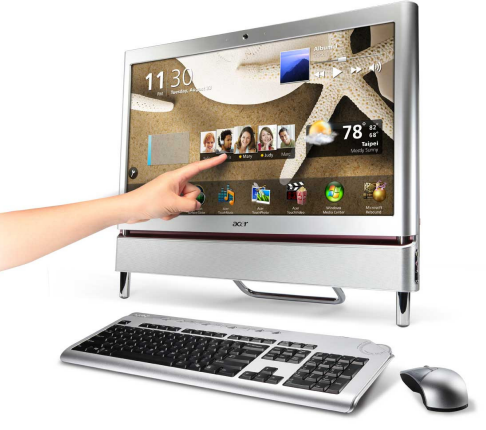
The Acer Aspire Z5700 Series AZ5700-U2102 Desktop is a sleek, all-in-one desktop designed to blend performance with space-saving convenience. Featuring a 23-inch Full HD touchscreen display, it combines vibrant visuals and responsive touch capabilities, making it ideal for both home and office environments. Powered by Intel Core i5 processors and equipped with fast DDR3 memory, this desktop offers smooth multitasking and robust performance for everyday computing, multimedia tasks, and light creative work.
Key benefits include its all-in-one design that eliminates the need for bulky towers, an integrated HD webcam and microphone for seamless video conferencing, and ample storage options that accommodate large files and media. The desktop supports a variety of connectivity options, including multiple USB ports, Ethernet, and optional eSATA for high-speed data transfer. Its energy-efficient build and stylish chassis suit modern workspaces and digital lifestyles.
Target audiences include students, professionals, and casual users seeking an affordable yet capable desktop with touch functionality. Estimated price ranges typically fall between $600 and $900, depending on configuration and availability, with refurbished units available at lower prices. The Acer Aspire Z5700 is widely available through online retailers and specialty computer stores.
Hiah Level Snecifications
- Intel® Core ™ 3-540 Processor (3.0GHZ, 4MB Cache)
- Windows® 7 Home Premium 64-bit
- Intel® H57 Express Chipset
- Intel® HD Graphics
- 23" Full HD Widescreen LCD
- Multi-Touch Capable Touch Screen Solution
- 4096MB DDR3 Dual-Channel 1333MHz Memory
- 1TB SATA Hard Drive (Green Product - variable RPM)
- 8X DVD-SuperMulti Double-Layer Drive
- 802.11b/g/n Wireless
- 1 Megapixel HD Webcam and Microphone
- Multi-in-One Digital Media Card Reader
- 6 - USB 2.0 Ports (4 Rear, 2 Side)
- 1 - HDMI Port
- 1 - eSATA Port
- Dolby® Home Theater v3
- High-Definition Audio Support 5.1-Channel
- Built-in 5W Stereo Speakers
- Wireless Keyboard and Mouse
- Sleek and Stylish All-in-One Design
Product Specifications
Compared to similar all-in-one desktops, the Acer Aspire Z5700 offers a balanced combination of performance, display quality, and multimedia features, making it competitive with units like Dell Inspiron 23 and HP Pavilion All-in-One series, especially at a comparable price point.
- Processor
- Intel® Core™ i3-540 Processor
- (3.0GHz, 4MB Cache)
- Display
- 23" Full HD Widescreen LCD
- 1920x1080 resolution; 16:9 Aspect Ratio
- Touch Screen
- Integrated Windows® 7 Compliant Multi-touch Capable Solution
- Chipset
- Intel® H57 Express Chipset
- Memory
- 4096MB DDR3 Dual-Channel 1333MHz Memory
- Upgradeable to 8GB
- 4 DDR3 Slots (Total) | 2 DDR3 Slots (Available)
- Video
- Intel® HD Graphics
- Audio
- Dolby® Home Theater v3
- High-Definition Audio Support 5.1-Channel
- Built-in 5W Stereo Speakers
- Built-in Microphone
- TV Tuner
- N/A
- Hard Drive
- 1TB SATA Hard Drive (Green Product - variable RPM)
- Optical Drive
- 8X DVD-SuperMulti Double-Layer Drive
- Read: 8X DVD-ROM, 24X CD-ROM
- Write: 8X DVD+R, 6X DVD-RW, 8X DVD+RW, 8X DVD+R DL (double-layer), 12X DVD-RAM, 484 CD-, 32 DW
- 8X DVD-SuperMulti Double-Layer Drive
- Digital Media Card Reader
- Multi-in-One Digital Media Card Reader
- MultiMediaCard, Secure Digital™ Card, SDHC™ Card,
- Memory Stick®, Memory Stick Pro Duo™, Memory Stick PRO-HG Duo ™
- Multi-in-One Digital Media Card Reader
- Communications
- 10/100/100 Gigabit Ethernet LAN (RJ-45 port)
- 802.11b/g/n Wireless
- Interfaces
- 6 - USB 2.0 Ports (4 Rear, 2 Side)
- 1- HDMI Port
- 1 - eSATA Port
- 1 - Ethernet RJ-45 Port
- 1 - Headphone Jack
- 1 - Microphone Jack
- 4 - Audio Jacks
- 1 - Kensington Lock Slot
- 1 - Ambient Light Switch
- 1 - DC-in Jack
- Input Devices
- Wireless Keyboard and Mouse
- Webcam
- 1 Megapixel HD Webcam and Microphone
- Power Supply
- 250W
- Dimensions (System)
- 19.06 (H) × 3.33 (D) x 22.44 (W) inches
- 484 (H) × 84.6 (D) x 570 (W) mm
- Dimensions (Box)
- 26.61 (H) × 7.17 (W) × 24.45 (L) inches
- 675.9 (H) x 181.12 (W) × 621.03 (L) mm
- Weights
- 25 Ibs. | 11.34 kg (system unit only)
- Approximately 33 Ibs. | 14.96 kg. (box)
- Pallet Quantity
- 30 units per pallet
- Limited Warranty
- 1 Year Parts and Labor Limited Warranty with
- Toll-Free Tech Support '
- UPC
- 884483168668
- Part Number
- PW.SDC02.009
- Software
- Windows® 7 Home Premium 64-bit
- Acer Recovery Management
- Acer Touch Suite
- Adobe® Reader®
- CyberLink® TouchVideo
- CyberLink® YouCam® eSobi™
- McAfee® Internet Security Suite 2009(60-day trial)?
- Microsoft® Office 2007 Trial
- Microsoft® Touch Pack
- Microsoft® Works
- MyWinLocker®
- WildTangent® Games?
- Windows® 7 Home Premium 64-bit
Packaging and Documentation
Hardware Items
- Wireless Keyboard and Mouse
- Power Cord
Documentation
- Setup Poster
- Registration / Limited Warranty Card
- McAfee® Internet Security Suite 2009 (60-day trial)
Online Documentation
- User's Guide
- Hardware Reference Guide
Setup Guide for Acer Aspire Z5700 Series AZ5700-U2102 Desktop
- Unbox the desktop and place it on a stable, flat surface near a power outlet.
- Connect the power cable securely to the back of the unit and plug it into the power source.
- Attach the included keyboard and mouse via USB ports or use Bluetooth pairing if available.
- Power on the system using the power button located under the display bezel.
- Follow the on-screen Windows setup prompts to configure your user account, language, and network preferences.
- Connect to Wi-Fi or Ethernet to activate Windows and download necessary updates.
- Adjust touchscreen calibration and display settings through Windows Control Panel for optimal responsiveness.
- Optional: Configure backup solutions using the eSATA port or external drives for data security.
Troubleshooting tips: If the desktop fails to boot, check power connections and perform a hard reset by disconnecting power for 30 seconds. For touchscreen issues, clean the screen gently with a microfiber cloth. Avoid exposing the unit to liquids or extreme temperatures.
Safety Precautions: Use a surge protector to prevent electrical damage. Handle the unit carefully during transport and avoid opening the chassis to maintain warranty coverage.
Troubleshooting Common Issues with Acer Aspire Z5700 Series AZ5700-U2102 Desktop
- System won’t power on: Verify power cable and outlet functionality; try a different power source.
- Touchscreen unresponsive: Recalibrate via Windows settings; update touch drivers from Acer support website.
- No display or black screen: Ensure display brightness is turned up; perform a power reset; check for loose internal connections.
- Slow performance: Close background applications; upgrade RAM if possible; check for malware.
- Error codes: Refer to BIOS beep codes via Acer’s official support for diagnostics.
Preventive measures include regular software updates, using antivirus tools, and keeping the desktop clean from dust. Acer offers a limited warranty (usually 1 to 3 years) covering hardware defects, with support available through official Acer customer service channels or authorized service centers.
Contact Acer Support via their website or hotline for advanced assistance.
Pros & Cons of Acer Aspire Z5700 Series AZ5700-U2102 Desktop
Pros
- Compact all-in-one design: Saves desk space and reduces cable clutter.
- Full HD touchscreen: Enhances interactivity and multimedia experience.
- Strong performance: Intel Core i5 processor and SSD options ensure smooth multitasking.
- Good connectivity: Multiple USB ports, Ethernet, and optional eSATA support diverse peripherals.
- Integrated webcam and speakers: Ideal for video calls and media consumption.
Cons
- Operating system limitations: Some models come with Windows 7 without free upgrade paths.
- Limited upgrade options: All-in-one design restricts internal hardware upgrades.
- Moderate RAM: Base RAM may require upgrading for demanding applications.
- Relatively heavy: Weighing around 25 lbs, less portable than laptops.
Overall, the Acer Aspire Z5700 Series AZ5700-U2102 Desktop offers excellent value for users seeking an affordable yet capable all-in-one desktop with a touchscreen, especially compared to similarly priced units from competitors.
Customer Reviews of Acer Aspire Z5700 Series AZ5700-U2102 Desktop
Users praise the Acer Aspire Z5700 Series AZ5700-U2102 Desktop for its crisp 23-inch Full HD touchscreen and reliable performance for everyday tasks. Many highlight the smooth multitasking and quick boot times when equipped with SSD storage. The integrated webcam and speakers receive positive remarks for video conferencing and casual media.
Common complaints include the outdated Windows 7 OS on some models and limited upgrade paths due to the all-in-one form factor. Some users note occasional touchscreen calibration issues, which are typically resolved with driver updates. Overall star ratings average around 4 out of 5 stars.
Buyers recommend this desktop for students, professionals, and home users seeking an affordable, stylish all-in-one PC with touchscreen capabilities and solid performance for general use.
Faqs
How do I set up my acer Aspire Z5700 Series AZ5700-U2102 Desktop for first-time use?
What should I do if the touchscreen on my acer Aspire Z5700 Series AZ5700-U2102 Desktop stops responding?
Can the acer Aspire Z5700 Series AZ5700-U2102 Desktop support additional storage upgrades?
What are the key performance features of the acer Aspire Z5700 Series AZ5700-U2102 Desktop?
How can I optimize the performance of my acer Aspire Z5700 Series AZ5700-U2102 Desktop?
Is the acer Aspire Z5700 Series AZ5700-U2102 Desktop compatible with Windows 10 or newer operating systems?
What maintenance is recommended to keep the acer Aspire Z5700 Series AZ5700-U2102 Desktop running smoothly?
How do I troubleshoot common audio or microphone issues on the acer Aspire Z5700 Series AZ5700-U2102 Desktop?
More acer manuals
Leave a Comment