
Setup: Acer Veriton All-in-one Computer User Manual
Content
Introduction to the Acer Veriton All-in-one Computer
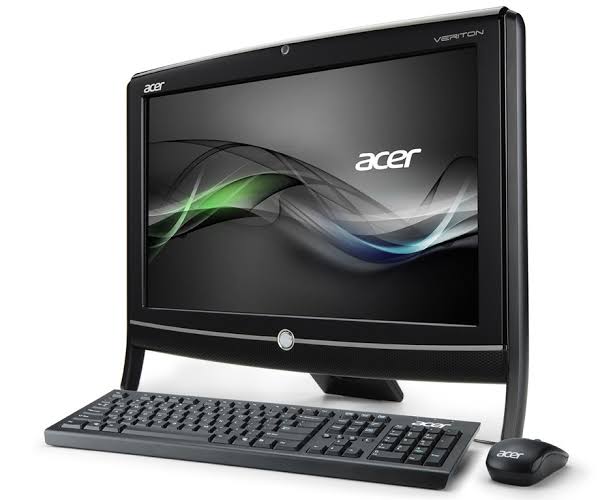
The Acer Veriton All-in-one Computer delivers premium business computing in a sleek, space-saving design. Ideal for offices, classrooms, and home workspaces, this all-in-one desktop combines powerful performance with a modern, minimalist aesthetic. Featuring a Full HD display, robust Intel Core processors, and upgradable memory, the Acer Veriton All-in-one Computer is engineered for seamless multitasking, high productivity, and reliable operation.
Key benefits include lightning-fast SSD storage, integrated Wi-Fi 6 (802.11ax), Bluetooth 5.0, and a built-in webcam for video conferencing. The device supports Windows 10 Pro and Windows 11 Pro, ensuring compatibility with the latest business applications and security features. Its compact footprint and narrow bezels maximize desk space while providing an immersive viewing experience.
Designed for professionals, educators, and small businesses, the Acer Veriton All-in-one Computer excels in everyday productivity, presentations, and remote collaboration. With an estimated price range of $700–$1,200, it’s widely available through major retailers and Acer’s official website, making it a competitive choice for those seeking reliable, future-ready computing.
Specifications: Acer Veriton All-in-one Computer
- Processor: Intel Core i5 or i7 (11th Gen), up to 8 cores, 2.5–4.9 GHz
- Memory: 16GB DDR4 SDRAM (upgradable to 32GB)
- Storage: 512GB PCIe SSD, additional M.2 slots for expansion
- Display: 21.5” or 23.8” Full HD (1920 x 1080) LED Active Matrix TFT LCD
- Graphics: Intel UHD Graphics 730 (shared DDR4 memory)
- Operating System: Windows 10 Pro or Windows 11 Pro (64-bit)
- Connectivity: Wi-Fi 6 (802.11ax), Bluetooth 5.0, Gigabit Ethernet
- Ports: USB 2.0, USB 3.2 Gen 1/2, USB-C, HDMI, DisplayPort, VGA, RJ-45, Audio In/Out
- Optical Drive: DVD-Writer (supports DVD-RAM/±R/±RW)
- Webcam: Built-in HD camera (5MP on select models)
- Dimensions: Approx. 13.4” H x 19.3” W x 2.3” D (21.5” model)
- Weight: Approx. 24.25 lbs
Compared to similar all-in-one desktops, the Acer Veriton stands out with its upgradable memory, multiple M.2 slots, and robust business-grade features like Intel vPro for remote management.
Setup Guide: Acer Veriton All-in-one Computer
1. Unbox the Acer Veriton All-in-one Computer and place it on a stable, well-ventilated surface.
2. Connect the included USB keyboard and mouse to the available USB ports.
3. Plug in the power cable and turn on the device.
4. Follow the on-screen Windows setup wizard to configure language, region, and user account.
5. Connect to Wi-Fi or Ethernet for internet access.
6. Pair Bluetooth devices (headsets, printers) via Settings > Devices > Bluetooth.
7. Install essential drivers and updates from Acer’s official support site.
Troubleshooting Tips: If the display is blank, check power connections and ensure the monitor is set to the correct input. For Wi-Fi issues, restart the router and verify the password.
Safety Precautions: Avoid blocking ventilation slots, use only the provided power adapter, and keep liquids away from the device.
Troubleshooting: Acer Veriton All-in-one Computer
Common Issues & Solutions:
- No Power: Check power cable and outlet; try a different outlet.
- No Display: Ensure monitor is on and set to correct input; check video cable.
- Slow Performance: Close unused apps; check for malware; upgrade RAM if needed.
- Wi-Fi Not Connecting: Restart router; update network drivers.
- Webcam Not Working: Check privacy settings; update camera drivers.
Error Codes: Refer to Acer’s support site for specific error code meanings.
Preventive Measures: Regularly update software, clean vents, and use surge protectors.
Warranty & Support: Acer offers a 1-year limited warranty. Contact Acer Support at 1-866-695-2237 or visit Acer Support for help.
Pros & Cons: Acer Veriton All-in-one Computer
Pros
- Powerful Intel Core processors for smooth multitasking
- Upgradable memory and storage for future-proofing
- Modern, space-saving design with narrow bezels
- Comprehensive connectivity options (USB-C, HDMI, DisplayPort)
- Business-grade security and remote management (Intel vPro)
Cons
- Integrated graphics limit gaming and heavy creative workloads
- Base models may have limited RAM (4GB on some configurations)
- Higher-end models are priced above budget all-in-ones
- Some ports may be limited compared to tower desktops
The Acer Veriton All-in-one Computer offers excellent value for businesses and professionals seeking a reliable, upgradable desktop solution.
Customer Reviews: Acer Veriton All-in-one Computer
Users consistently praise the Acer Veriton All-in-one Computer for its fast performance, clean design, and ease of setup. Many highlight the responsive SSD and clear Full HD display, making it ideal for office work and video calls. The built-in webcam and microphone receive positive feedback for clarity and convenience.
Common complaints include the lack of dedicated graphics for gaming and occasional driver issues with peripherals. Most reviewers rate the device 4.5/5 stars, recommending it for business and home office use. Frequent mentions include reliable daily operation, good value for money, and responsive customer support.
Faqs
How do I set up the acer Veriton All-in-one Computer for the first time?
What should I do if the acer Veriton All-in-one Computer screen is not responding?
Can I upgrade the memory on my acer Veriton All-in-one Computer to improve performance?
Does the acer Veriton All-in-one Computer support external monitors via HDMI?
What are the main features of the acer Veriton All-in-one Computer that enhance business productivity?
How do I maintain and clean my acer Veriton All-in-one Computer to ensure longevity?
Is the acer Veriton All-in-one Computer compatible with the latest Windows operating systems and software?
What troubleshooting steps can I take if my acer Veriton All-in-one Computer is running slower than usual?
More acer manuals
- Setup: Acer Veriton N Series Computer User Manual
- Setup: Acer Aspire All-in-one Computer User Manual
- Setup & Usage: Acer Aspire Z5700 Series AZ5700-U2102 Desktop User Manual
- Setup: Acer DA241HL Desktop Computer User Manual
- Acer Swift Go 16 AI Series Laptop User Manual
- Acer Gaming LCD Monitor 22 inches User Guide
Leave a Comment