
Setup: Acer DA241HL Desktop Computer User Manual
Content
Acer DA241HL Desktop Computer
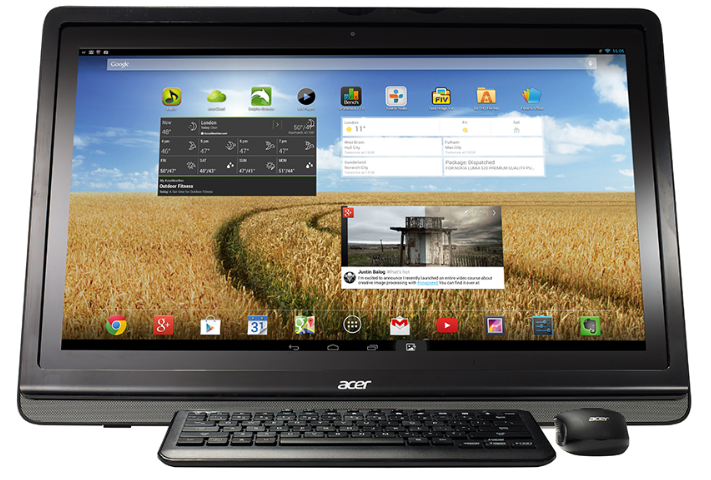
The Acer DA241HL Desktop Computer is an innovative all-in-one PC that merges the familiarity of Android with the expansive functionality of a 24-inch desktop display. Designed for users seeking a versatile, touchscreen-enabled desktop experience, this device stands out by running Android 4.2 Jelly Bean on an Nvidia Tegra 3 quad-core processor, offering a unique alternative to traditional Windows-based PCs. Its large Full HD (1920 x 1080) display supports multitouch interaction, making it ideal for family rooms, educational settings, and casual users who want seamless access to Android apps on a big screen.
Key benefits include the integration of the Google Play Store, allowing access to thousands of apps, games, and multimedia content, while its HDMI input supports use as a secondary monitor or streaming device. With a tiltable display ranging from 20 to 75 degrees, the Acer DA241HL adapts comfortably to various viewing angles for group activities or individual work. Targeted at Android enthusiasts, light productivity users, and multimedia consumers, it suits home entertainment and casual computing needs.
Launched around 2013 with an estimated price starting at approximately €429 (about $450-$500 USD), the Acer DA241HL is available through select retailers and online stores. Its combination of Android OS and desktop form factor makes it a distinctive choice for those looking to expand beyond tablets and smartphones while staying within the Android ecosystem.
Specifications of the Acer DA241HL Desktop Computer
- Operating System: Android 4.2 Jelly Bean
- Processor: Nvidia Tegra 3 quad-core ARM Cortex-A9 CPU, 1.3 GHz
- Display: 24-inch Full HD (1920 x 1080 pixels) touchscreen with multi-touch support
- Memory: 1 GB RAM
- Storage: Limited onboard storage, expandable via USB or external devices
- Connectivity: HDMI input for external device streaming, USB ports, MHL output
- Display Tilt: Adjustable stand with tilt angles from 20° to 75°
- Audio: Built-in stereo speakers
- Google Play Store: Full access to Android apps and games
Compared to similar Android-based all-in-one PCs, the Acer DA241HL offers a larger display and HDMI input capability, but with modest RAM and older-generation Tegra 3 hardware, its performance suits casual multitasking rather than intensive applications. It is best positioned against smaller Android tablets or Windows all-in-ones, focusing on desktop productivity.
Getting to know your DA241HL
Features and functions
Your new DA241HL offers leading, easy-to-access multimedia and entertainment features.
You can:
- Connect to the Internet.
- Access your email.
- Play music and video.
- Keep in touch with your friends via your People and social networking apps.
- View content from an HDMI device.
- Use touch to control a PC.
Product registration
When using your product for the first time, it is recommended that you immediately register it. This will give you access to useful benefits, such as:
- Faster service from our trained representatives.
- Membership in the Acer community: receive promotions and participate in customer surveys.
- The latest news from Acer.
Hurry and register, as other advantages await you!
How to register
- To register your Acer product, please visit www.acer.com. Tap Registration and follow the simple instructions.
- You can also register directly from your DA241HL by tapping the Registration icon.
- After we receive your product registration, you will be sent a confirmation email with important data that you should keep in a safe place.
Setting up
Unpacking your DA241HL
Your new DA241HL comes packed in a protective box. Carefully unpack the box and remove the contents. If any of the following items are missing or damaged, contact your dealer immediately:
- Acer DA241HL
- Setup poster
- Keyboard and Mouse (optional)
- Mini USB cable
- HDMI cable (optional)
- MHL cable (optional)
- AC adapter
- Warranty card
Getting to know your DA241HL
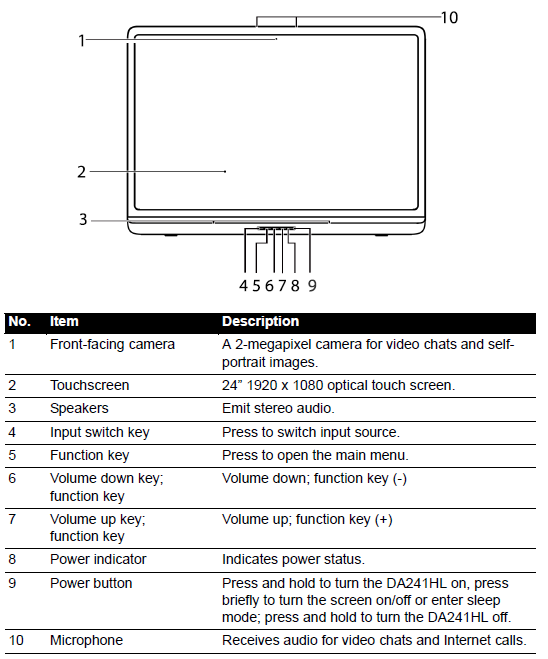
Front view
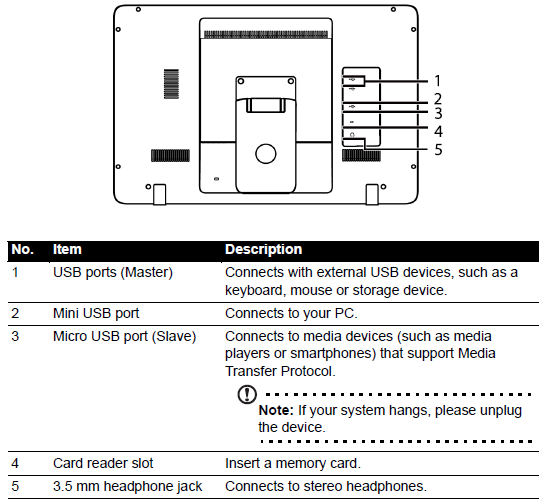
Back view
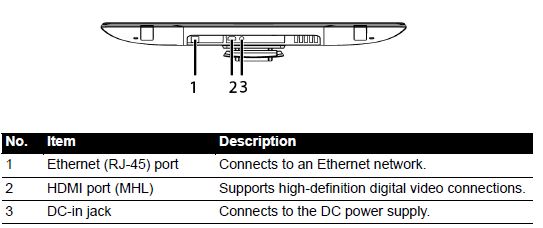
Back panel view
Troubleshooting Common Issues with the Acer DA241HL Desktop Computer
- Device won’t power on: Confirm power cable connection and try a power cycle. If unresolved, contact Acer support.
- Touchscreen unresponsive: Restart the device; if persist, check for screen calibration settings or update firmware.
- Slow performance or lag: Close unused apps, clear cache, or perform a factory reset if necessary to restore speed.
- Wi-Fi connection drops: Reset network settings, move closer to the router, or update Android software.
- Error codes: Android errors typically display app-related messages; updating or reinstalling apps often fixes the issue.
Preventive measures include regular software updates, avoiding overloading storage, and keeping the device in a dust-free environment. The Acer DA241HL comes with a limited warranty; for technical support, users can contact Acer customer service via their official website or phone hotline.
FAQ and Troubleshooting
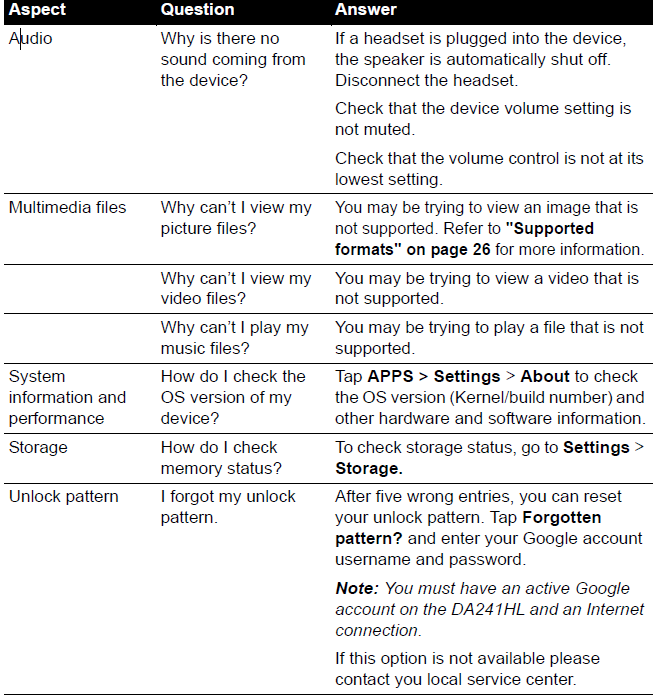
This section lists frequently asked questions that may arise during the use of your DA241HL, and gives easy answers and solutions to these questions.
Pros & Cons of the Acer DA241HL Desktop Computer
- Pros:
- Large 24-inch Full HD touchscreen ideal for media consumption and casual use
- Runs Android with access to Google Play Store apps and games
- HDMI input supports external device streaming and flexible usage
- Adjustable tilt screen enhances ergonomic viewing
- Compact all-in-one design reduces desk clutter
- Cons:
- Limited performance due to 1 GB RAM and an older Tegra 3 processor
- Not suitable for traditional desktop applications like Microsoft Office or heavy multitasking
- Storage constraints may require external solutions
- Android 4.2 OS is outdated, limiting modern app compatibility
- Touchscreen experience may lag compared to newer tablets or PCs
The Acer DA241HL offers good value for users desiring an Android desktop experience,ce but is outperformed by Windows all-in-ones or newer Android tablets in productivity and app compatibility.
Customer Reviews of the Acer DA241HL Desktop Computer
Users praise tAcercer DA241HL for its unique Android desktop experience and large, vibrant display, with many appreciating the convenience of accessing mobile apps on a big screen. The adjustable viewing angle and HDMI input are commonly highlighted as strong features.
However, several reviewers note occasional lag and limited multitasking performance due to the 1 GB RAM and the older processor. Some express frustration with the outdated Android version and limited storage space. Star ratings typically range between 3 and 4 stars out of 5, reflecting a mixed but generally positive reception.
Many recommend the DA241HL for casual home use, multimedia playback, and children’s educational activities,s but advise against it as a replacement for a conventional Windows desktop. Common issues include software lag and limited app compatibility, but users find customer support responsive for troubleshooting assistance.
Tags
More acer manuals
- Setup: Acer Aspire All-in-one Computer User Manual
- Acer Gaming LCD Monitor 22 inches User Guide
- Setup: Acer Veriton All-in-one Computer User Manual
- How to Connect: Acer LED Monitor X34 User Guide
- Setup: Acer Veriton N Series Computer User Manual
- Acer ODK390 USB C Docking Station User Manual | Specifications
Leave a Comment