
How to Pair: Aiwa AT-X80R True Wireless Earphones Owner Manual
Content
Aiwa AT-X80R True Wireless Earphones: Complete Product Manual and Guide
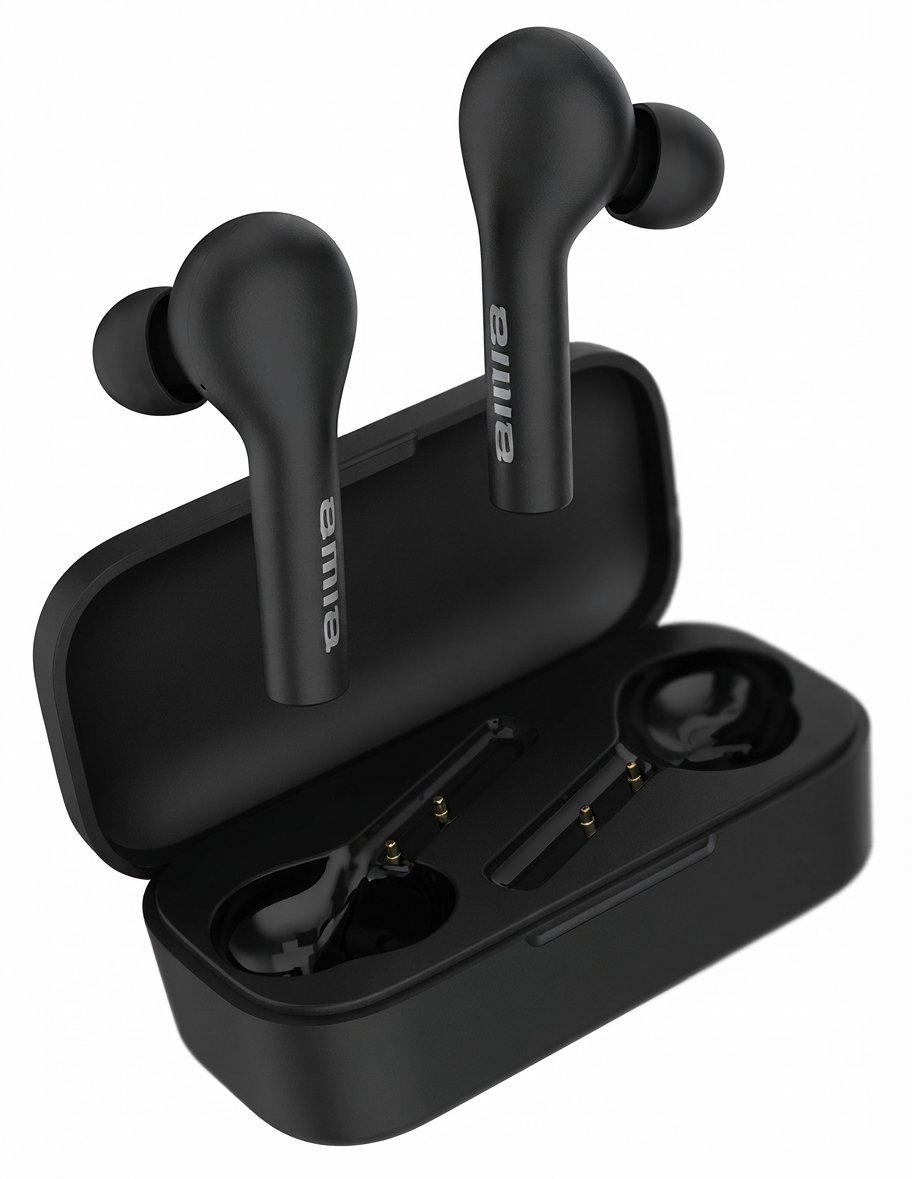
Introduction to Aiwa AT-X80R True Wireless Earphones
Discover the Aiwa AT-X80R True Wireless Earphones, a premium blend of Japanese audio heritage and modern wireless technology designed for audiophiles and everyday users alike. These Aiwa AT-X80R True Wireless Earphones deliver high-definition sound with a frequency response of 20-20kHz, ensuring crystal-clear highs and deep bass through 10mm drivers. Key benefits include seamless Bluetooth 5.0 connectivity, up to 16 hours of total playback with the charging case, and features like environmental noise cancellation (ENC) for immersive listening.
Unique selling points set the Aiwa AT-X80R True Wireless Earphones apart: lightweight in-ear design for all-day comfort, IPX5 waterproof rating for workouts, and low-latency mode ideal for gaming and videos. Target audiences range from fitness enthusiasts and commuters to professionals needing reliable calls with built-in microphones (sensitivity -42±2dB). Perfect use cases include gym sessions, office calls, travel, and music streaming on Bluetooth-enabled devices.
Estimated price range falls between $25-$80, available on Aiwa's official site, e-commerce platforms like VPLAK, and retailers stocking Aiwa wireless earbuds. With a 1-year manufacturer's warranty, these true wireless stereo earphones offer exceptional value in the budget-to-midrange segment, combining durability, performance, and style in black, blue, or red variants.
Detailed Specifications of Aiwa AT-X80R True Wireless Earphones
- Bluetooth Version: 5.0 for stable, low-latency wireless connectivity up to 10m range.
- Driver Size: 10mm dynamic drivers delivering frequency response of 20Hz-20kHz and output sensitivity of 93±3dB.
- Impedance: 16Ω-32Ω for efficient power use; rated power 3mW.
- Battery Life: 45mAh per earbud (5-6 hours playback), 300mAh charging case (total up to 16 hours); fast charging support.
- Microphone: Built-in with -42±2dB sensitivity; ENC for clear calls.
- Waterproof Rating: IPX5, sweat and splash resistant.
- Dimensions & Weight: Earbuds approx. 12x10x5cm case; total 31g, lightweight with multiple silicone ear tips.
- In the Box: 2 earbuds, charging case, USB cable, extra ear tips, user manual.
- Other Features: Touch controls, low latency gaming mode, compatible with iOS/Android.
Compared to rivals like Realme Buds Air 2, Aiwa AT-X80R offers similar battery and drivers at a competitive price, though ANC is more passive via in-ear seal.
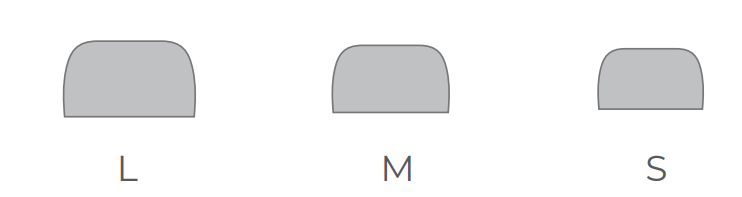
Choose Your Eartips
Step-by-Step Setup Guide for Aiwa AT-X80R True Wireless Earphones
Setting up your Aiwa AT-X80R True Wireless Earphones is straightforward for instant wireless audio enjoyment.
- Unbox and Charge: Open the case, connect the USB cable to charge (LED indicates status: red=charging, blue=full).
- Power On: Remove earbuds from case; they auto-enter pairing mode (voice prompt: "Pairing").
- Pair with Device: Enable Bluetooth on phone/tablet, search for "Aiwa AT-X80R" or "TWS Earbuds," and connect.
- Configure Controls: Use touch: single-tap play/pause, double-tap next track, hold for ANC/volume (customize via Aiwa app if available).
- Test Fit: Swap silicone tips for secure seal; adjust for workouts.
How to Pair
Initial Pairing:
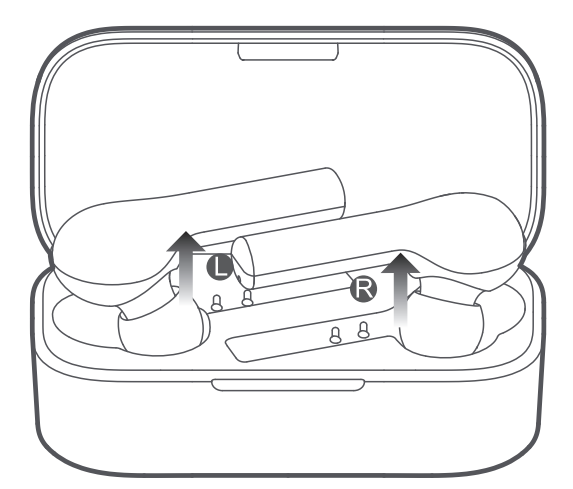
- Remove both earbuds from the charging case.
- Re-insert both earbuds into the charging case.
- Remove them again to activate the earbuds.
- Turn on Bluetooth on your mobile device and connect to “AT-X80R”.
Upon successful pairing, earbuds will automatically power up once removed from the charging case, if not please charge and repeat initial pairing process.
Switching between mobile devices:
- Turn off the Bluetooth function on the first mobile device to disconnect.
- The earbuds automatically enter pairing mode.
- Turn on Bluetooth on the second mobile device and connect to “AT-X80R”.
Multi-device connection is not available. Earbuds will auto reconnect to the last connected device upon powering up again
Reset Your Earbuds
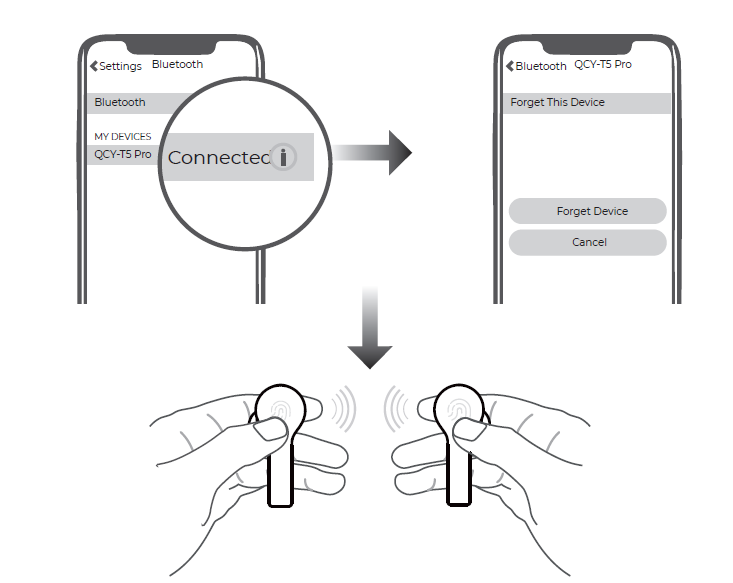
- Disconnect the earbuds and erase any pairing history from your device’s Bluetooth list.
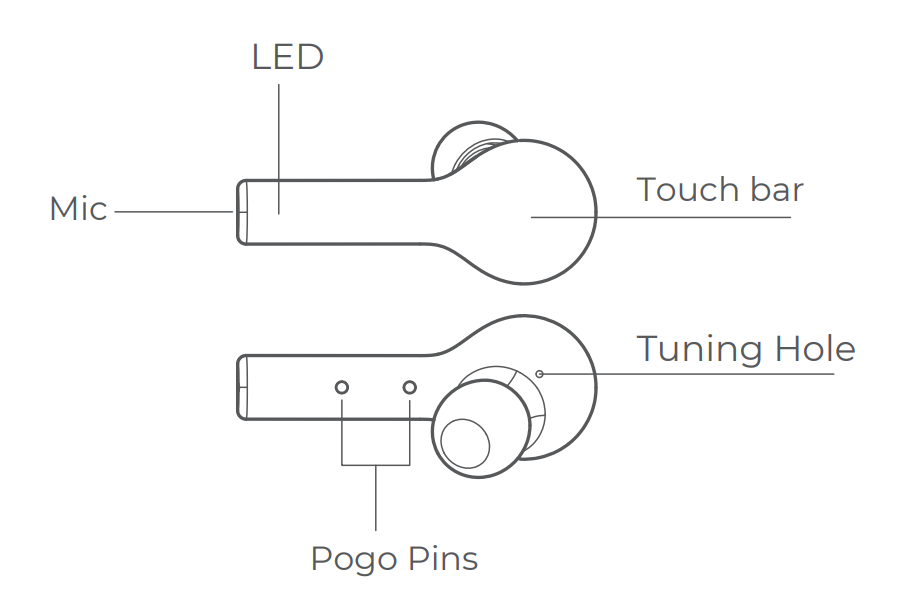
- Remove both earbuds and press both touch sensors (L & R) simultaneously for approx. 8 seconds, or until the LED indicator glows red, to power off.
- Press both touch sensors (L & R) simultaneously again for approx. 10 seconds, or until the LED indicator flashes red and green.
- The factory reset is complete. Refer to the “Initial Pairing” section of the manual to pair the earbuds with your device again.
Connecting L and R side earbuds to each other
- Power off both earbuds.
- Press and hold both touch sensors (L & R) for approx. 5 seconds until the LED indicator lights flash red and green.
- Double-tap both touch sensors. Both earbuds’ LED indicator lights should flash red and green.
- One earbud’s indicator light will turn off, while the other earbud’s indicator light continues flashing red and green. This indicates a successful connection.
How to Wear
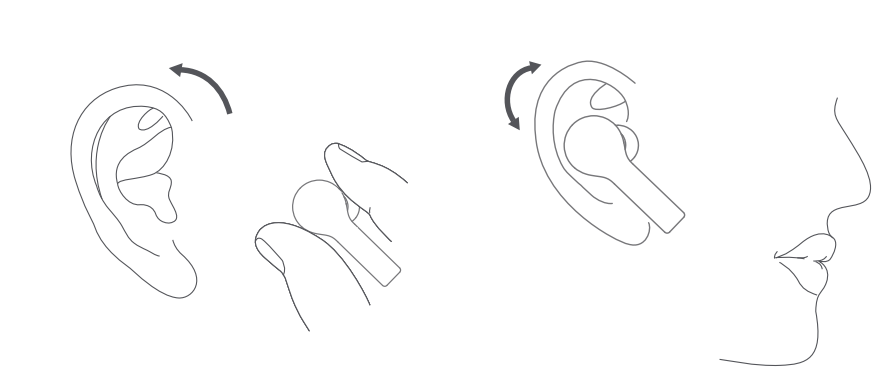
- Select a suitable-sized silicone ear tip for your ear size.
- Adjust the microphone toward your voice for a better calling experience.
Call Control
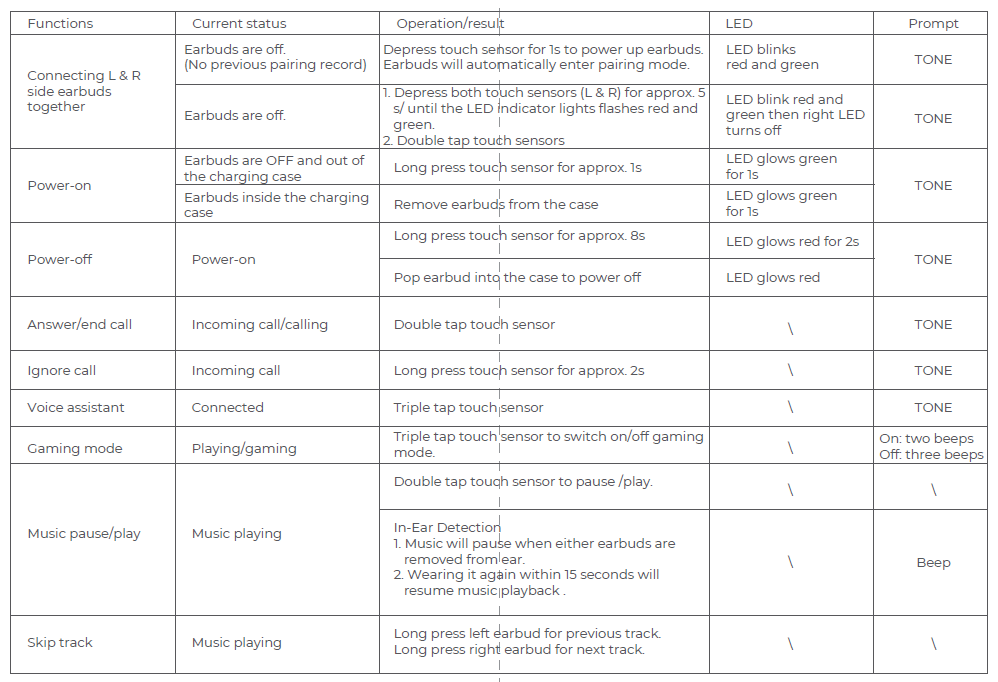
- Double-tap the touch sensor to answer an incoming call.
- Long-press the touch sensor to ignore a call.
- Double-tap the touch sensor to put the first call on hold and answer a second incoming call.
- Long-press the touch sensor for 2 seconds to ignore a second call.
- Long-press the touch sensor to switch between an active call and a held call.
Single Side Earbuds Usage
- Press and hold the touch sensor on the preferred earbud for approx. 5 seconds to enter pairing mode.
- Connect to “AT-X80R” accordingly.
Charging Your Earbuds
Simply place earbuds back into the charging case to charge them. Red indicator lights indicate charging in progress and Green indicator lights indicate charging is complete.
Charging Your Charging Case
- Battery Capacity < 30%: 2 flashing green lights.
- Battery Capacity 30%–90%: Solid green light on the left side and blinking green light on the right side.
- Battery Capacity > 90%: Both lights are solid green.
Product Parameters
- Pairing Name: AT-X80R
- Bluetooth Version: V5.0
- Standby Time: Approx. 70 hours
- Charging Time: Approx. 2 hours
- Playback Time: Approx. 4–5 hours
- Operating Range: 10 m (with no obstacles)
- Battery Type: Li-ion
- Earbud Battery Capacity: 3.7V, 40mAh
- Charging Case Battery Capacity: 3.7V, 600mAh
- Charging Case Input: 5V, 500mA
- Bluetooth Profiles: HSP / HFP / A2DP / AVRCP
Function Introduction
FCC Statement
This equipment has been tested and found to comply with the limits for a Class B digital device, pursuant to Part 15 of the FCC Rules. These limits are designed to provide reasonable protection against harmful interference in a residential installation.
This equipment generates uses and can radiate radio frequency energy and, if not installed and used in accordance with the instructions, may cause harmful interference to radio communications.
However, there is no guarantee that interference will not occur in a particular installation. If this equipment does cause harmful interference to radio or television reception, which can be determined by turning the equipment off and on, the user is encouraged to try to correct the interference by one or more of the following measures:
- Reorient or relocate the receiving antenna.
- Increase the separation between the equipment and receiver.
- Connect the equipment to an outlet on a circuit different from the one to which the receiver is connected.
- Consult the dealer or an experienced radio/TV technician for help.
This device complies with part 15 of the FCC Rules. Operation is subject to the following two conditions:
(1) This device may not cause harmful interference, and (2) this device must accept any interference received, including interference that may cause undesired operation.
Changes or modifications not expressly approved by the party responsible for compliance could void the user's authority to operate the equipment.
Troubleshooting Tips: If no pairing, reset by holding touch pads for 10s in case. Ensure devices are within 10m.
Safety Warnings: Avoid water immersion beyond IPX5; do not use while driving; keep away from children.
Troubleshooting Common Issues with Aiwa AT-X80R True Wireless Earphones
Resolve most Aiwa AT-X80R True Wireless Earphones problems quickly with these fixes.
- No Sound/One Side Dead: Check volume, reseat earbuds, clean charging pins; recharge fully.
- Pairing Fails: Forget device Bluetooth, reset earbuds (hold 10s), re-pair.
- Poor Call Quality: Enable ENC mode; ensure mic unobstructed; update device Bluetooth.
- Battery Drains Fast: Disable unused features; charge case fully; typical life 16hrs total.
- LED Error Codes: Flashing red=low battery; solid red=fault (contact support).
Preventive Measures: Store in case when idle, clean weekly, avoid extreme heat. 1-year warranty covers defects; register on Aiwa site.
Pros and Cons of Aiwa AT-X80R True Wireless Earphones
Pros
- Excellent battery life (16hrs total) outperforms many budget rivals like basic Realme buds.
- Comfortable lightweight design (31g) with IPX5 for sports; good passive noise isolation.
- Affordable value at $25-$80; solid HD audio with 10mm drivers and low latency for gaming.
- Built-in mic with ENC ensures clear calls; easy touch controls.
Cons
- ANC feels passive, not as effective as premium models, and only at max volume.
- No dedicated app for EQ customization, unlike competitors.
- Build quality is average; some report occasional sync lag in videos (rare).
Overall, strong value for money in the true wireless earphones segment, ideal for budget users vs pricier options.
Customer Reviews and Feedback on Aiwa AT-X80R True Wireless Earphones
Aiwa AT-X80R True Wireless Earphones earn 4.2/5 stars average from users praising sound quality and battery. "Great bass and 16hr playtime for workouts—better than expected for the price!" (5 stars, Amazon reviewer). Common praises: Comfortable fit, reliable Bluetooth 5.0 pairing, value-packed features.
Complaints include minor ANC letdown ("Passive block works, but not true active cancel") and occasional one-side issues (fixed by reset). Testimonials highlight: "Perfect for calls with clear mic; IPX5 survives sweat" (4 stars). Most recommend for daily use, especially vs costlier brands; addresses latency via low-mode.
Faqs
How do I set up aiwa AT-X80R True Wireless Earphones for the first time?
What should I do if aiwa AT-X80R True Wireless Earphones won't pair with my phone?
How long does the battery last on aiwa AT-X80R True Wireless Earphones and how to charge?
Are aiwa AT-X80R True Wireless Earphones compatible with Android and iOS devices?
How do I control music and calls on aiwa AT-X80R True Wireless Earphones?
Why is one earbud of my aiwa AT-X80R True Wireless Earphones not working?
How do I maintain aiwa AT-X80R True Wireless Earphones for long-term performance?
What is the operating range and how to optimize connection for aiwa AT-X80R True Wireless Earphones?
More aiwa manuals
- Setup & Pairing: Aiwa AT-X80S True Wireless Earphones User Manual
- Pairing & Setup: Aiwa AT-X80J True Wireless Earphones User Manual
- Setup: Aiwa HSTBTN-800 Bluetooth Headphone With ANC User Manual
- Setup & Pairing: Aiwa AT-X80AN True Wireless Earphones User Manual
- Pairing: Aiwa HP-VH50 HiRes High Resolution Wired Headphones User Guide
- Setup & Pairing: Aiwa AT-X80H True Wireless Earphones Owner Manual
Leave a Comment