
Setup: Aiwa HSTBTN-800 Bluetooth Headphone With ANC User Manual
Content
Aiwa HSTBTN-800 Bluetooth Headphone With ANC: Complete Product Manual
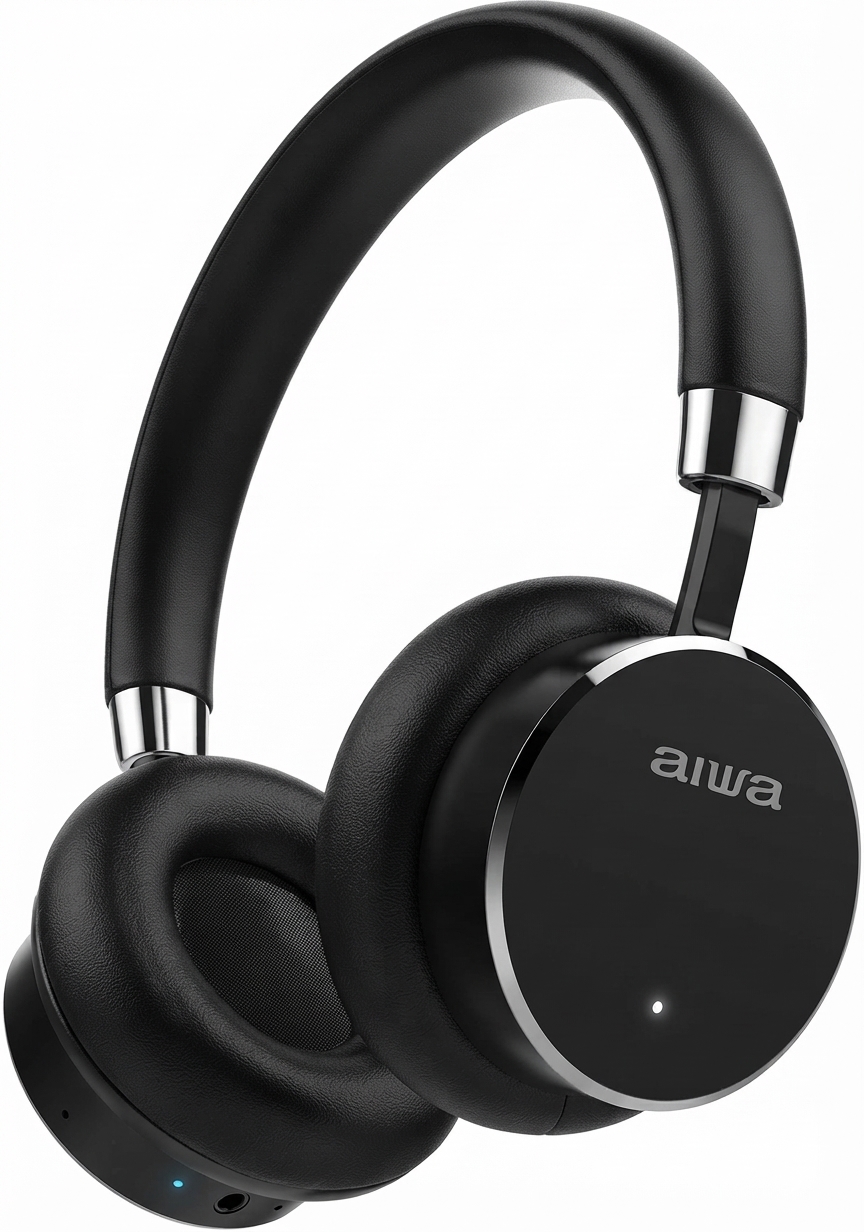
Introduction to Aiwa HSTBTN-800 Bluetooth Headphone With ANC
The Aiwa HSTBTN-800 Bluetooth Headphone With ANC is a premium over-ear wireless headphone designed for immersive audio experiences in noisy environments. Featuring active noise cancellation (ANC), these headphones effectively block out city traffic, office chatter, or airplane cabin noise, delivering crystal-clear sound for music, podcasts, movies, and calls. With up to 18 hours of battery life and USB-C fast charging, the Aiwa HSTBTN-800 stands out as a versatile daily companion for commuters, professionals, and audiophiles seeking elegance and performance.
Key benefits include Bluetooth 4.0 LE connectivity with A2DP, AVRCP, and HFP profiles for seamless pairing, a built-in microphone for hands-free calls compatible with all iPhone models and other devices, and a 3.5mm jack for wired use. The over-ear design offers closed-back isolation and exceptional comfort for extended wear, making it ideal for travel, workouts, or remote work. Its shiny details, silver buttons, and protective carrying case add a stylish touch.
Targeted at users wanting affordable high-quality ANC headphones, the Aiwa HSTBTN-800 Bluetooth Headphone With ANC suits busy lifestyles. Priced in the $50-$80 range, it's widely available at retailers like Digitec, Galaxus, and online stores, offering great value compared to pricier competitors.
Detailed Specifications of Aiwa HSTBTN-800 Bluetooth Headphone With ANC
The Aiwa HSTBTN-800 Bluetooth Headphone With ANC boasts robust specs for superior performance:
- Design: Over-ear, closed-back isolation for optimal noise blocking.
- Connectivity: Bluetooth 4.0 LE with A2DP, AVRCP, HFP profiles; 3.5mm jack; 10m wireless range.
- Noise Cancellation: Active Noise Cancelling (ANC) to silence ambient sounds like traffic or offices.
- Battery Life: Up to 18 hours playback (16 hours continuous use reported); USB-C fast charging.
- Controls: Multifunction (MF) button for calls/playback; Volume +/- for next/previous track; ANC switch on the right earcup.
- Microphone: Integrated for clear hands-free calls.
- Additional Features: Bluetooth/charge indicator lights; protective carrying case; flat AUX cable included.
Compared to rivals like basic Sony or JBL models, the Aiwa HSTBTN-800 offers competitive ANC and battery life at a budget price, though Bluetooth 4.0 is slightly dated compared with Bluetooth 5.0 found in newer options.
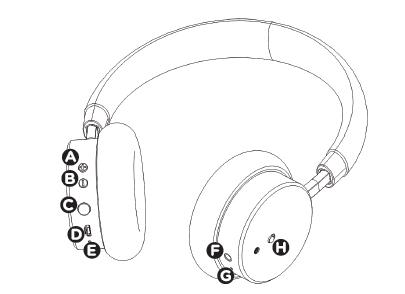
OVERVIEW OF HEADSET
POWER ON:
Turn on the headphone by pressing the MF BUTTON until you hear the voice "ON".
PAIRING MODE:
Turn on the headphone keep pressing the MF BUTTON for approximately 10 seconds. The indicator light will turn pink, the blink blue, and finally alternate between blue+red.
SWITCH OFF:
Keep pressing the MF BUTTON until you hear the voice "OFF".
- VOL (+) / Next Track: Increases volume or skips to the next track.
- VOL (-) / Previous Track: Decreases volume or returns to the previous track.
- MF Button: Multifunction button used for playback, calls, and other controls.
- USB Charging Port: Used to connect the charging cable.
- Bluetooth & Charge Indicator: Shows Bluetooth pairing and charging status.
- 3.5 mm Jack: Connects the headphones to compatible devices using an AUX cable.
- ANC Indicator: Shows the status of the Active Noise Cancellation function.
ANC Button: Turns Active Noise Cancellation on or off.
Step-by-Step Setup Guide for Aiwa HSTBTN-800 Bluetooth Headphone With ANC
Setting up your Aiwa HSTBTN-800 Bluetooth Headphone With ANC is straightforward for instant wireless audio.
- Power on by pressing the power button; hold for 10 seconds until the Bluetooth light turns pink for pairing mode.
- On your device, go to Bluetooth settings, search for "Aiwa HSTBTN-800BK" or "Iowa HSTBTN800BK," and connect.
- Activate ANC by sliding the switch on the right earcup after pairing for noise-free listening.
- For wired use, plug the 3.5mm AUX cable into the jack. The headphones must be powered on.
- Charge via the USB-C port; the indicator light shows charging status.
SECURITY PRECAUTIONS
Thank you for purchasing this Bluetooth & Noise Cancellation (ANC) headphone. Please read all instructions and warnings carefully before use to ensure safe and satisfactory operation of the product.
- Adjust Volume Carefully: Keep the volume at a safe level to help prevent hearing damage.
- Avoid Hazardous Situations: Stop using the headset in potentially dangerous situations to ensure your safety.
- Do Not Use While Driving: Avoid listening to music or making and receiving calls if using the headset may distract you while driving.
- Keep Away from Children: Store the product and its accessories out of the reach of children to prevent injury or improper use.
- Keep the Headset Dry: Prevent water or other liquids from entering the headset, as moisture may damage the headset or affect sound quality.
- Maintain Awareness: Do not set the volume so high that you cannot hear your surroundings. If you experience ringing in your ears or the sound feels too loud, reduce the volume immediately.
- Stop Use if Discomfort Occurs: Discontinue use if you experience noticeable discomfort, irritation, or any other adverse reaction.
- Observe Temperature Limits: Do not store or use the headset at temperatures below -15°C (5°F) or above 55°C (131°F), as extreme temperatures may shorten the lifespan of the headset and battery.
ANC FUNCTION
ACTIVE NOISE CANCELLATION (ANC) FUNCTION
Active noise cancelling technology captures the ambient sound with microphones, processes the incoming sound waves and creates inverse waves to offset them. Block out the background noise and then reate a quiet and comfortable listening environment. Active noise cancellation technology free yourself from external noise by flipping the switch when you needed. With rich bass, balanced and clear sound, will provide you a nice audio experience.
ACTIVATE ANC FUNCTION:
To activate the ANC function, move the handset switch to the "ON" position (red marker), the indicator will turn on and you can enjoy the noise canceling mode. When you don't need the Noise cancellation function, slide the NC button to the "OFF" side.
BUTTON FUNCTIONS
- Answer Incoming Call: When a call comes in, press the MF Button once to answer, or answer using your mobile phone.
- Reject a Call: When a call comes in, press and hold the MF Button to reject it, or reject the call using your mobile phone.
- End a Call: Press the MF Button once to end the current call, or use your mobile phone.
- Redial Last Call: In standby mode, double-press the MF Button to redial the last called number.
- Transfer Call Between Headset and Phone: During a call, press and hold the MF Button for 3 seconds to transfer the call from the headset to the mobile phone. Press and hold the MF Button for 3 seconds again to transfer the call back to the headset.
- Adjust Call Volume: Press and hold VOL (+) or VOL (-) to increase or decrease the call volume.
- Play/Pause Music: Press the MF Button once to play or pause music.
- Track Selection: Press VOL (+) once to skip to the next track. Press VOL (-) once to return to the previous track.
- Music Volume Adjustment: Press and hold VOL (+) to increase the volume or VOL (-) to decrease the volume.
BLUETOOTH PAIRING
Pair the Headset with Your Cell Phone
- Keep Devices Close: Place the headset and your cell phone or other Bluetooth device within 1 meter (3.3 ft) of each other.
- Enter Pairing Mode: With the headset powered off, press and hold the MF Button for approximately 10 seconds. The indicator light will turn pink, then blink blue, and finally alternate between blue and red.
- Enable Bluetooth: Turn on Bluetooth on your cell phone or other device. “HSTBTN800” should appear in the available Bluetooth device list.
- Connect the Headset: Select “HSTBTN800.” The headset will connect automatically, and the blue indicator light will begin blinking.
Note: Pairing mode remains active for approximately 120 seconds. If pairing is not completed within this time, the indicator lights may turn off. Repeat Steps 1–4 to try again.
Disconnect the Headset from Your Cell Phone
- Turn Off Bluetooth: Disable Bluetooth on your cell phone.
- Power Off the Headset: Press and hold the MF Button until the red indicator light turns off.
- Move Out of Range: Move the headset more than approximately 20 m (60 ft) away from the connected device.
Reconnect the Paired Headset
- Keep Devices Close: Place the headset and previously paired device within 1 meter (3.3 ft) of each other.
- Power On the Headset: Turn on the headset. The blinking blue indicator shows that it is attempting to reconnect.
- Enable Bluetooth: Turn on Bluetooth on your cell phone or other device. The headset should automatically reconnect to the last paired device.
Troubleshooting Common Issues with Aiwa HSTBTN-800 Bluetooth Headphone With ANC
Resolve most problems with these steps for your Aiwa HSTBTN-800 Bluetooth Headphone With ANC:
- No Sound/Connection: Re-pair by holding the power button for 10 seconds until the pink light appears; check the Bluetooth device list.
- ANC Not Working: Make sure the ANC switch on the right earcup is turned on; restart the headphones if necessary.
- Battery Drains Fast: Disable ANC when it is not needed and fully charge the headphones via USB-C. Battery life may reach up to 18 hours.
- Call Quality Poor: Test the microphone in a quiet environment and keep the earcups clean.
- Indicator Errors: Solid red indicates charging, pink indicates pairing mode, and no light may indicate a low battery; recharge the headphones.
Prevent issues by storing the headphones in their protective case and keeping the connected device’s Bluetooth software up to date. Warranty coverage may vary by seller or region; contact Aiwa support or the retailer for repair and warranty assistance.
Pros and Cons of Aiwa HSTBTN-800 Bluetooth Headphone With ANC
Pros
- Effective ANC blocks ambient noise for focused listening.
- Long 18-hour battery life with fast USB-C charging.
- Comfortable over-ear fit with a protective case for travel.
- Clear call quality through the built-in microphone, with both wired and wireless connection options.
- Excellent value in the $50-$80 range, with competitive battery life and design.
Cons
- Bluetooth 4.0 LE may be less stable than Bluetooth 5.0 in crowded wireless environments.
- Battery-life claims may vary between approximately 16 and 18 hours depending on use.
- No dedicated app for EQ customization, unlike some premium models.
Overall, the Aiwa HSTBTN-800 offers strong value for users looking for affordable ANC headphones compared with more expensive alternatives such as the Sony WH-CH720N.
Customer Reviews and Feedback on Aiwa HSTBTN-800 Bluetooth Headphone With ANC
Users praise the Aiwa HSTBTN-800 Bluetooth Headphone With ANC for its sound quality, comfort, and ANC effectiveness, averaging 4.2/5 stars across sites like YouTube and retailer reviews."Elegant design and 16-hour battery make these my go-to for commutes—ANC really silences traffic!" says one reviewer. Common praises include easy pairing, clear calls, and stylish case.
Complaints focus on occasional Bluetooth drops and dated version 4.0. "Great for price, but connectivity hiccups in busy offices," notes a user. Most recommend for budget buyers addressing noise issues effectively.
Faqs
How do I set up aiwa HSTBTN-800 Bluetooth Headphone With ANC for the first time?
What should I do if my aiwa HSTBTN-800 Bluetooth Headphone With ANC won't pair with my phone?
Why is ANC on my aiwa HSTBTN-800 Bluetooth Headphone With ANC making sound worse or producing hiss?
Can I use aiwa HSTBTN-800 Bluetooth Headphone With ANC with my laptop, TV, or airplane entertainment system?
How long does the battery last on aiwa HSTBTN-800 Bluetooth Headphone With ANC and how can I maximize runtime?
How do I update firmware or find support resources for my aiwa HSTBTN-800 Bluetooth Headphone With ANC?
What maintenance and cleaning steps keep my aiwa HSTBTN-800 Bluetooth Headphone With ANC in good condition?
How can I improve call quality and microphone performance on aiwa HSTBTN-800 Bluetooth Headphone With ANC?
More aiwa manuals
- Pairing: Aiwa HP-VH50 HiRes High Resolution Wired Headphones User Guide
- Setup & Pairing: Aiwa AT-X80S True Wireless Earphones User Manual
- Setup & Pairing: Aiwa ESBT-460 Hyperbass neckband In-Earphones User Manual
- How to Pair: Aiwa AT-X80R True Wireless Earphones Owner Manual
- Setup & Pairing: Aiwa Adventure Mini IP67 SB-X80 Speaker User Manual
- Pairing & Setup: Aiwa AT-X80J True Wireless Earphones User Manual
Leave a Comment