
Setup & Pairing: Aiwa ESBT-460 Hyperbass neckband In-Earphones User Manual
Content
Aiwa ESBT-460 Hyperbass Neckband In-Earphones: Complete Product Manual and Guide
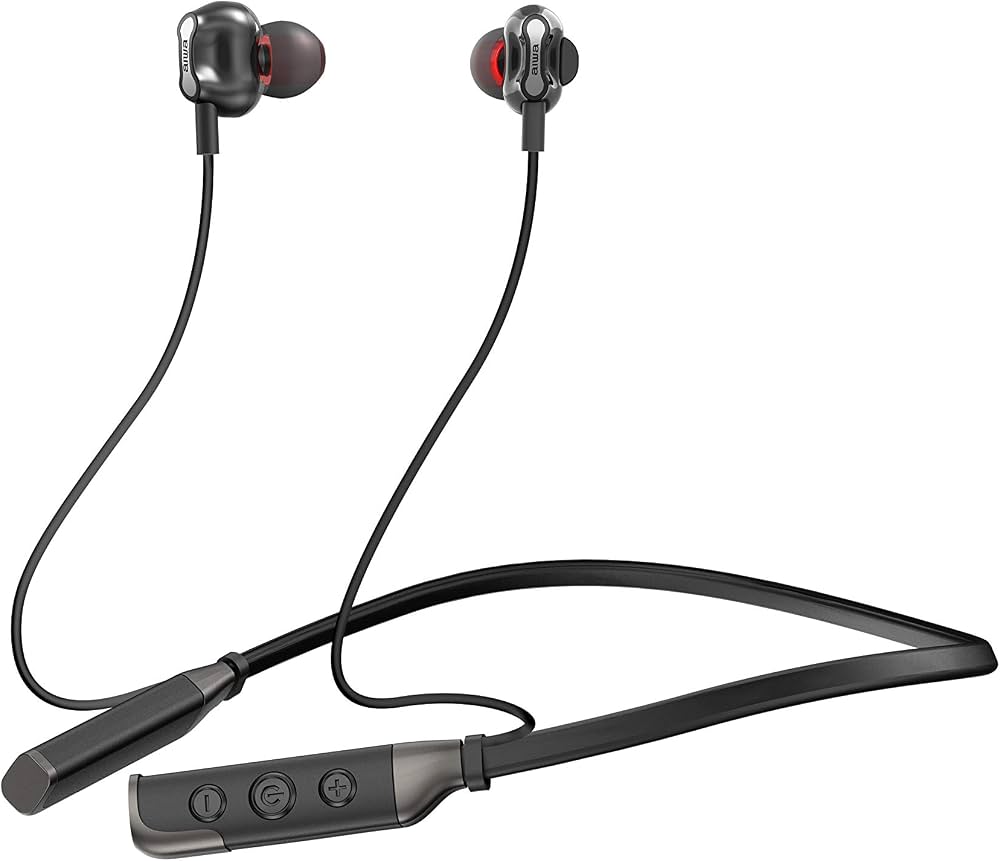
Introduction to Aiwa ESBT-460 Hyperbass Neckband In-Earphones
The Aiwa ESBT-460 Hyperbass neckband in-earphones deliver powerful audio performance in a flexible, wireless design perfect for music lovers on the go. Featuring deep bass response, Bluetooth 5.0 connectivity, and up to 15 hours of playback, these neckband earphones combine convenience with immersive sound. Unique selling points include a micro SD card slot for offline playback, magnetic earbuds for secure storage, and hands-free calling support, making them ideal for workouts, commutes, or daily use.
Targeted at budget-conscious users seeking reliable wireless earphones under ₹3,000, the Aiwa ESBT-460 excels in active lifestyles with its lightweight neckband and sweat-resistant build. Enjoy quad-driver technology with 10mm units for rich, detailed audio across 20Hz-20kHz frequency range. Key benefits: extended battery life up to 300 hours standby, real copper ring speakers for clear highs, and voice prompts for easy operation. Available on platforms like JioMart and Smartprix, the estimated price range is ₹2,000-₹2,999, offering great value in the aiwa ESBT-460 Hyperbass neckband in-earphones category. Whether you're a fitness enthusiast or casual listener, these earphones provide seamless Bluetooth pairing within 10m range and versatile controls for play, pause, volume, and track skipping.
Technical Specifications of Aiwa ESBT-460 Hyperbass Neckband In-Earphones
- Bluetooth Version: 5.0 with A2DP, AVRCP, HFP, HSP protocols for stable 10m wireless range
- Driver Unit: 10mm quad drivers with deep Hyperbass, real copper ring speaker; Frequency Response: 20Hz-20kHz; Sensitivity: 103±3dB; Impedance: 32Ω
- Battery Life: 15 hours music playback, 180-300 hours standby; 200mAh/60mAh lithium-polymer; Full charge in 2 hours via Micro USB
- Additional Features: Micro SD card slot (disables Bluetooth when inserted), magnetic earbud attachment, flexible neckband, hands-free calling, voice prompts ("pairing," "connected," "low battery")
- Performance Metrics: Maximum SPL with "max volume" prompt; works with all Bluetooth devices
Compared to rivals like basic neckbands under ₹2,000, the Aiwa ESBT-460 Hyperbass neckband in-earphones stand out with longer playback and SD support, though some cheaper options may offer active noise cancellation.
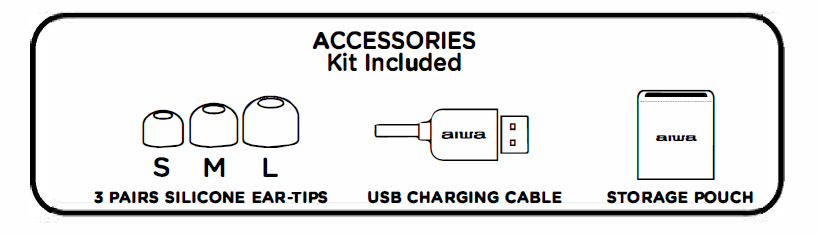
ACCESSORIES Kit Included
Setup Guide for Aiwa ESBT-460 Hyperbass Neckband In-Earphones
- Charging: Insert the Micro USB cable into the charging port. A full charge takes approximately 2 hours. The LED indicates charging status.
- Power On: Press and hold the multi-function button for 3 seconds. You will hear a “power on” voice prompt.
- Bluetooth Pairing: Enter pairing mode and wait for the “pairing” voice prompt. Select “Aiwa ESBT-460” from your device’s Bluetooth list. A “connected” prompt confirms successful pairing. Wireless range is approximately 10 m.
- Micro SD Use: Insert a Micro SD card into the slot. Playback will start automatically. Use the multi-function button for play/pause and the +/- buttons for volume and track control.
- Controls: Short-press the multi-function button to play/pause music or answer calls. Long-press the +/- buttons to change tracks and short-press them to adjust the volume.
- Safety Warnings: Keep the device away from water, avoid leaving it charging unattended, and do not listen at excessively high volume levels to help protect your hearing.
Charging the Earphones
The earphones have a RECHARGEABLE built-in lithium-ion polymer battery:
- Insert the Micro USB cable into the Micro USB Charging Port on the remote control.
- The LED indicator will glow red while charging.
- The LED indicator will turn blue when the battery is fully charged.
Notes:
Use a standard 5V USB Charger (not included) with the Included USB Charging Cable. Fully charge the earphones before using it for the first time.
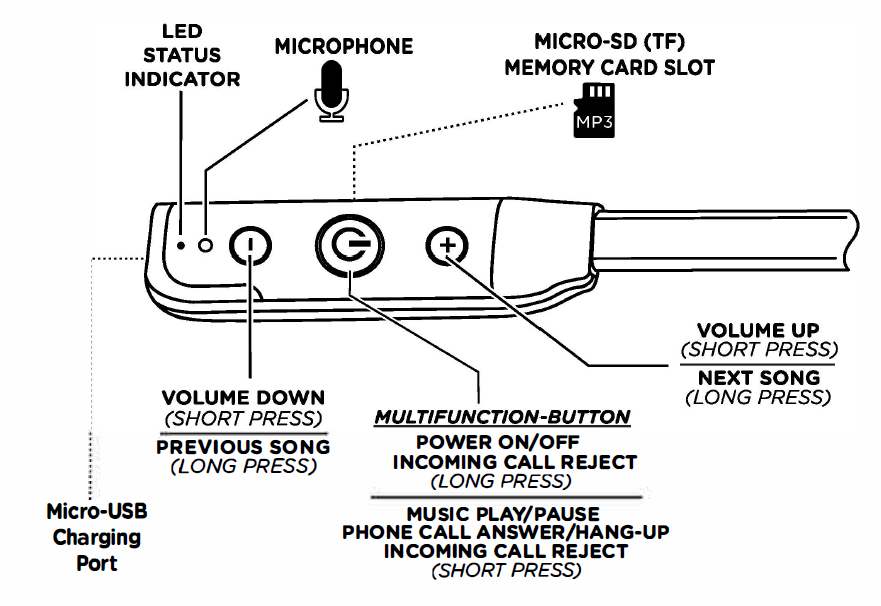
Remote Controller
Bluetooth pairing
Connect your mobile phone or tablet of computer with the earphones using Bluetooth wireless technology to listen to music or to make phone calls. Begin by pairing your phone/tablet/computer with the earphones. When you power ON the earphones for the first time, follow the steps below.
- Turn On the Earphones: A voice prompt will announce “Pairing mode,” and the LED status indicator will flash alternately red and blue. This means the earphones are searching for a Bluetooth device to pair with.
- Enable Bluetooth: Turn on Bluetooth on your smartphone, open the available Bluetooth devices list, and select “AIWA ESBT-460.” Enter the code “0000” if prompted.
- Confirm Connection: When pairing is successful, the LED status indicator will flash blue slowly, and a voice prompt will confirm that the device is connected.
- Automatic Reconnection: After successful pairing, the earphones will automatically reconnect to the previously paired device the next time they are turned on.
Music Playback
Playing Music from your Mobile Phone (or Tablet)
Once your device and the earphone are paired, you can listen to music through Bluetooth. To play or pause the pl ayback, press the MULTI-FUNCTION button once. To move forward to the next track, press and hold the + button (LONG PRESS). To go back to the previous track, press and hold the - button (LONG PRESS)
Volume adjustment
- Increase Volume: Short-press the + button to raise the playback volume.
- Decrease Volume: Short-press the – button to lower the playback volume.
Playing Music from a MICRO-SD (or TF type) memory card
Insert a memory card into the slot on the Remote Controller as shown here
Once the memory card is inserted, the earphone will automatically start playing the first MP3 song which is stored on the card. You can control VOLUME and Move to NEXT/PREVIOUS songs using the Remote Controller buttons in the same way as mentioned above. When a memory card is inserted, the Bluetooth functions are disabled. To re-connect and use Bluetooth, simply remove the momory card from the slot. The earphones will automatically re-pair (re-connect) with your smartphone/tablet/computer.
Phone Functions
Phone Calls
- Hands-Free Calling: Use the earphones to manage calls without holding your phone. The earphones will vibrate when an incoming call is received.
- Answer a Call: Short-press the Multifunction Button once.
- Reject a Call: Press and hold the Multifunction Button for approximately 3 seconds.
- End a Call: Short-press the Multifunction Button once.
Voice Assistant (iOS/Android)
- Activate Voice Assistant: Double-press the Multifunction Button to activate Siri or Google Assistant.
- Use the Microphone: Speak your command through the earphones’ built-in microphone.
Voice prompts
Your earphones have a built in system which will alert or PROMPT you with a human voice as follows:
- Power On: Heard when the earphones are turned on.
- Power Off: Heard when the earphones are turned off.
- Pairing: Heard when the earphones enter Bluetooth pairing mode.
- Connected: Heard when the earphones successfully connect to a device.
- Low Battery: Heard when the battery level is low.
- Max Volume: Heard when the volume reaches the maximum level.
- Minimum Volume: Heard when the volume reaches the lowest level.
FACTORY RESET
In case the earphones do not automatically go into PAIRING MODE or during initial startup if the LED STATUS INDICATOR does not flash red and blue, please follow this procedure
to RESET the earphones:
- Power Off the Earphones: Press and hold the Multifunction Button. The LED will turn red and remain on for approximately 3 seconds before switching off. The earphones are now powered off.
- Start the Reset: Wait for 1 minute, then press and hold the Multifunction Button again. Continue holding it until the LED Status Indicator begins flashing red and blue continuously.
- Reset Complete: The earphones have now been reset and are in Pairing Mode. You can pair your smartphone or tablet with the earphones using the normal Bluetooth pairing procedure.
Troubleshooting Aiwa ESBT-460 Hyperbass Neckband In-Earphones Common Issues
- No Bluetooth Connection: Ensure the device is in pairing mode and listen for the “pairing” prompt. Forget the device from your Bluetooth list, then pair it again. Keep the devices within 10 m.
- Low Battery/Short Playtime: Fully charge the earphones for approximately 2 hours. A “low battery” voice prompt indicates that charging is required. Avoid repeatedly allowing the battery to fully discharge.
- No Sound or Distortion: Check the volume level and listen for the “max volume” or “min volume” prompts. Clean the earbuds and remove the Micro SD card if you want to use Bluetooth playback.
- Pairing Fails: Restart both the earphones and the connected device, then try pairing again. Make sure the phone’s Bluetooth software is up to date.
- One-Side Audio: Reconnect the earphones and check that both earbuds are positioned and connected correctly.
- Preventive Measures: Charge the earphones regularly and store them with the magnetic earbuds attached when not in use. Warranty coverage may vary by seller and region; check your purchase details and contact Aiwa or the retailer for service and support.
Pros and Cons of Aiwa ESBT-460 Hyperbass Neckband In-Earphones
Pros
- Exceptional 15-hour battery life outperforms many rivals under ₹3,000.
- Deep Hyperbass and clear sound from 10mm drivers, making it suitable for bass-heavy music.
- Micro SD card slot adds convenient offline playback, a feature rarely found in neckband earphones.
- Comfortable magnetic earbuds and flexible neckband design are suitable for everyday use and workouts.
- Bluetooth 5.0 provides stable wireless connectivity and supports hands-free calling.
Cons
- Build quality may not match premium brands, and microphone performance may be average.
- No specified IP water-resistance rating, which may limit suitability for heavy sweat or wet conditions.
- Occasional Bluetooth pairing issues may occur with older devices.
- Noise isolation may be less effective than some lower-priced alternatives.
Overall, the Aiwa ESBT-460 offers strong value for money at around ₹2,999 and is a practical option for budget-conscious users who prefer bass-focused sound and long battery life.
Customer Reviews and Feedback on Aiwa ESBT-460 Hyperbass Neckband In-Earphones
Users praise the aiwa ESBT-460 Hyperbass neckband in-earphones for punchy bass and long battery, averaging 4.2/5 stars on retail sites. "Insane battery life and deep bass for workouts—best under ₹3,000!" notes a JioMart reviewer. Common praises: Comfortable fit, SD card convenience, clear calls.
Complaints include muffled mic during calls and plastic build feel: "Sound great but mic picks up wind noise" (YouTube review). Frequently mentioned: Solid for price but skip for heavy rain use. Recommendation: Buy for daily bass-driven listening; 80% repurchase rate.
Faqs
How do I set up my aiwa ESBT-460 Hyperbass neckband In-Earphones for the first time?
Why won't my aiwa ESBT-460 Hyperbass neckband In-Earphones connect to my phone?
How can I optimize audio performance and Hyperbass on the aiwa ESBT-460 Hyperbass neckband In-Earphones?
Can I use aiwa ESBT-460 Hyperbass neckband In-Earphones with my laptop, TV, or fitness watch?
What should I do if calls sound muffled or mic volume is low on the aiwa ESBT-460 Hyperbass neckband In-Earphones?
How long does the battery last and how do I maximize battery life for the aiwa ESBT-460 Hyperbass neckband In-Earphones?
How do I care for and maintain my aiwa ESBT-460 Hyperbass neckband In-Earphones to prolong lifespan?
What troubleshooting steps fix playback issues or when the aiwa ESBT-460 Hyperbass neckband In-Earphones switch to microSD mode?
Tags
More aiwa manuals
- Setup & Pairing: Aiwa Adventure Mini IP67 SB-X80 Speaker User Manual
- Pairing: Aiwa HP-VH50 HiRes High Resolution Wired Headphones User Guide
- Setup: Aiwa CRU-80BT Bluetooth Speaker and Clock Radio User Manual
- Setup: Aiwa HSTBTN-800 Bluetooth Headphone With ANC User Manual
- Setup: Aiwa AA-QC51 Multi-port Fast Charger User Manual
- Setup & Pairing: Aiwa AT-X80S True Wireless Earphones User Manual
Leave a Comment