
Setup & Pairing: Aiwa Adventure Mini IP67 SB-X80 Speaker User Manual
Content
aiwa Adventure Mini IP67 SB-X80 Speaker: Complete Product Manual and Guide
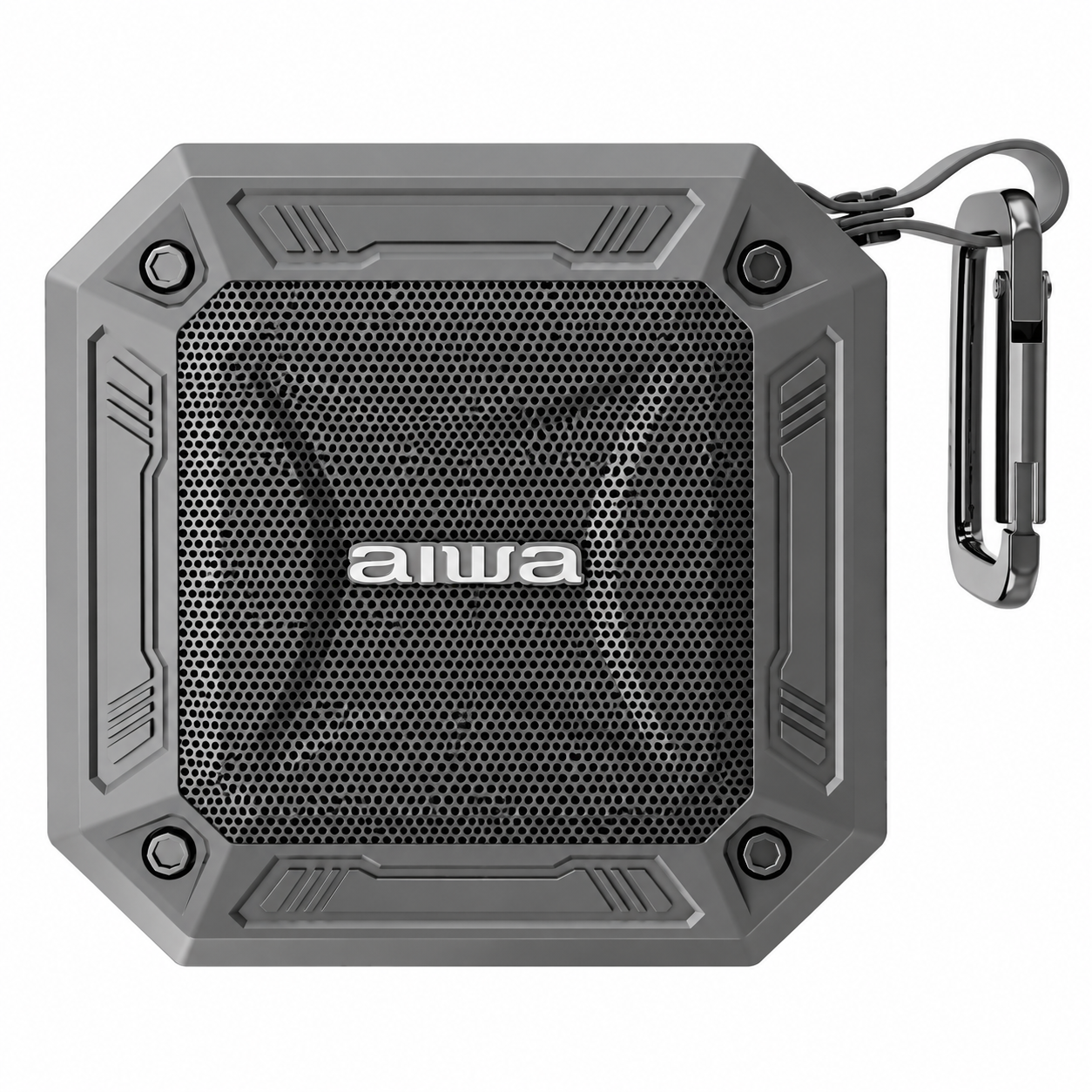
Introduction to aiwa Adventure Mini IP67 SB-X80 Speaker
The aiwa Adventure Mini IP67 SB-X80 Speaker is a rugged, compact Bluetooth speaker designed for adventure enthusiasts who demand premium sound on the go. Featuring premium Japanese construction, this waterproof portable speaker delivers crystal-clear audio via Bluetooth 5.0, ensuring seamless connectivity up to 10 meters. Its standout IPX7 water immersion rating allows submersion in up to 1 meter of water for 30 minutes, making it ideal for beach trips, hiking, camping, or workouts.
Key benefits include lightweight portability, up to 10 hours of playback on a 3-hour charge, and True Wireless Stereo (TWS) pairing for stereo sound. Target audiences range from outdoor explorers and fitness buffs to casual users seeking durable, high-quality audio without bulk. Unique selling points like aptX support for superior sound quality and push-button controls set the aiwa Adventure Mini IP67 SB-X80 Speaker apart in the mini Bluetooth speaker market.
Perfect for everyday adventures or travel, this speaker combines reliability with powerful 4W output. Estimated price range is $30-$50 USD, widely available on e-commerce sites like Shopee and official Aiwa stores. Whether syncing with your phone for podcasts or blasting tunes at a pool party, the SB-X80 offers exceptional value for portable audio lovers seeking an IP67 waterproof Bluetooth speaker that withstands real-world elements.
Technical Specifications of aiwa Adventure Mini IP67 SB-X80 Speaker
- Bluetooth Version: 5.0 (some models 5.2) with aptX support for crystal-clear, stable connection up to 10m range
- Waterproof Rating: IPX7 (full submersion up to 1m for 30 minutes); also sweatproof IPX5
- Power Output: 4W RMS, frequency response 150Hz ~ 20kHz for balanced sound
- Battery Life: Up to 10 hours playback; charging time approx. 3 hours via Micro-USB (DC 5V, 1A)
- Connectivity: Bluetooth pairing, TWS mode for stereo linking two units, Micro-USB charging
- Dimensions and Build: Rugged, compact, lightweight design with premium Japanese construction
- Controls: Push-button for power, volume, play/pause, Bluetooth mode
Compared to rivals like JBL Clip 4 or Anker Soundcore, the aiwa Adventure Mini IP67 SB-X80 Speaker excels in water resistance and battery life at a lower price, though it has lower power output for smaller venues.
Unboxing
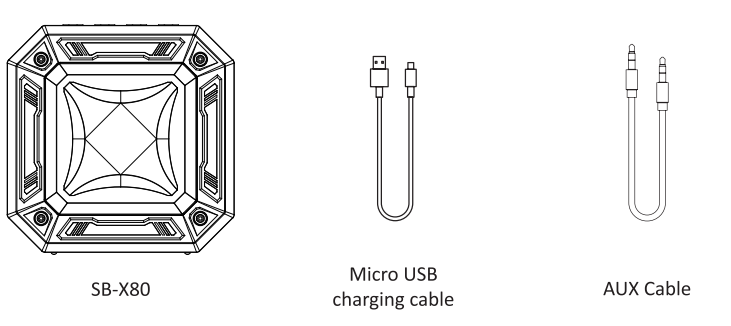
Please refrain from using any damaged components. Contact your local authorised Aiwa distributor/customer service.
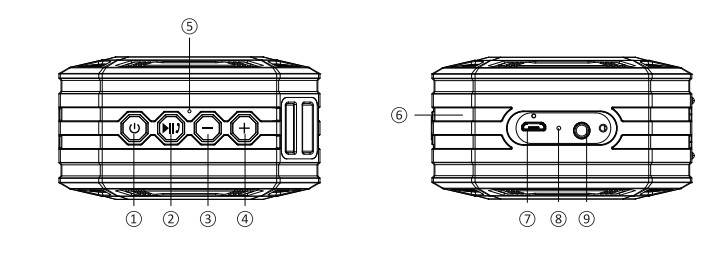
parts
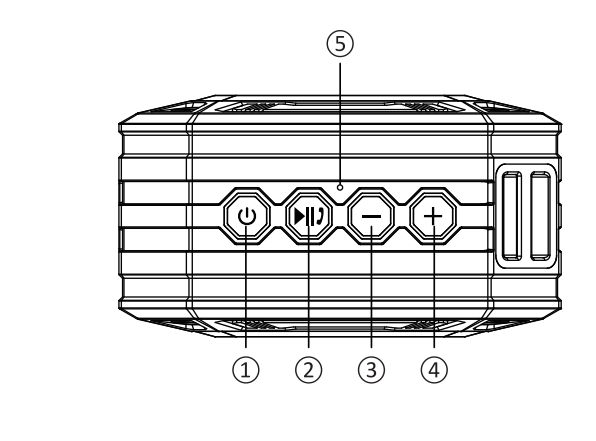
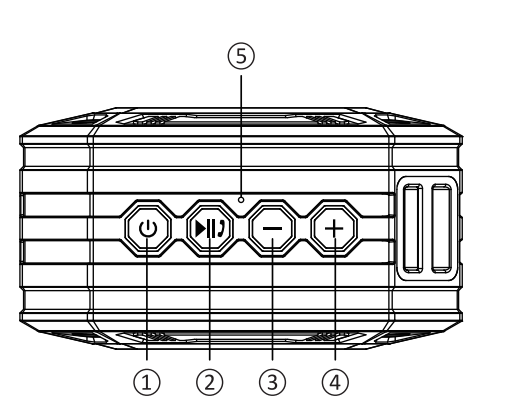
- Power Button
- Play/Pause / TWS Connection/Disconnection
- Volume – / Previous Song: Short press
- Volume + / Next Song: Short press
- Microphone
- Charging Indicator
- Micro USB Charging Port
- Reset Button
- AUX-In Port
Setup Guide for Aiwa Adventure Mini IP67 SB-X80 Speaker
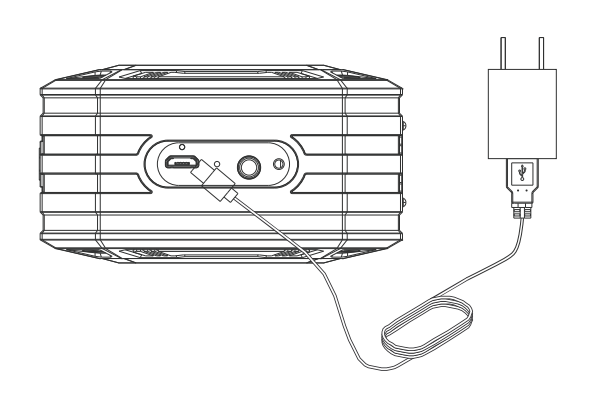
- Charge the Speaker: Connect the Micro-USB cable to a 5V power source and the SB-X80 charging port. A full charge takes approximately 3 hours. The LED indicates the charging status.
- Power On: Press and hold the power button for 3 seconds until the LED flashes blue.
- Bluetooth Pairing: Enable Bluetooth on your phone, tablet, or other compatible device. Search for “AIWA SB-X80” and select it to connect. The wireless range is up to 10 m, and the speaker automatically reconnects to the previously paired device during future use.
- TWS Mode (Optional): To pair two SB-X80 speakers, power on the first speaker and double-press the Bluetooth button to enter TWS pairing mode. Repeat the process on the second speaker. Once paired, the speakers can reconnect automatically when restarted.
- Controls: Use the onboard buttons to adjust the volume, skip tracks, play/pause audio, or activate the voice assistant. The speaker also supports switching between compatible connected devices.
Important Safety Instructions
- Do not install or use the device near any heat sources.
- Use only accessories specified or recommended by the manufacturer.
- Refer all servicing to qualified service personnel if the device is damaged in any way.
- Keep this user manual for future reference and troubleshooting.
- Read and follow all safety cautions carefully.
Safety Cautions
- Keep the device away from fire and heat sources at all times.
- Do not attempt to disassemble, modify, or alter the device.
- Do not expose the device to excessive heat, including prolonged direct sunlight.
- The product label is located on the bottom of the device.
Device Walkthrough - Power ON/OFF
Hold the power button@for 3 seconds. (Refer to device overview page)
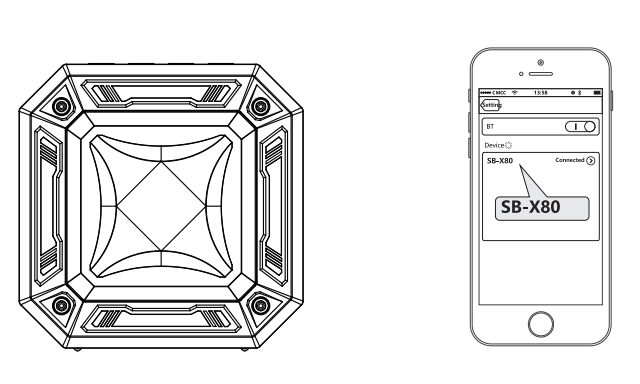
Device Walkthrough - Connection
- Power On: Turn on the SB-X80.
- Connect via Bluetooth: Find “SB-X80” in your mobile device’s Bluetooth list and select it to connect.
- Disconnect: Press and hold the Play/Pause Button to terminate the Bluetooth connection.
Notes
- Make sure only one device is connected to the speaker at a time.
- Keep the connected device within the operating range of 10 meters.
- Use the Mode Button to switch between the available playback modes in sequence.
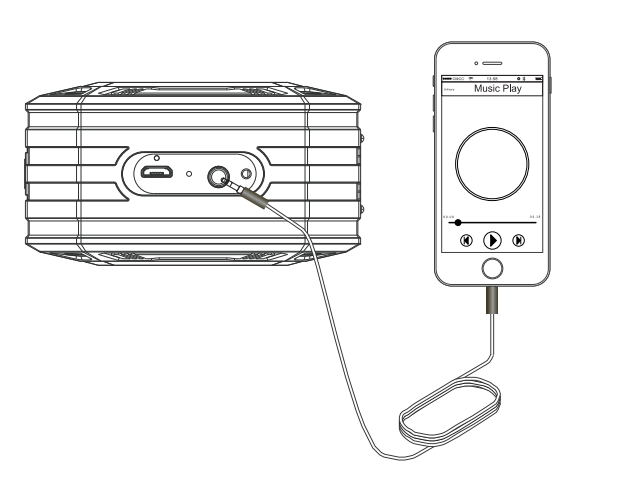
Device Walkthrough - AUX Connection
- Power On: Turn on the SB-X80.
- Connect AUX Cable: Insert a 3.5mm AUX cable into the AUX-In Port.
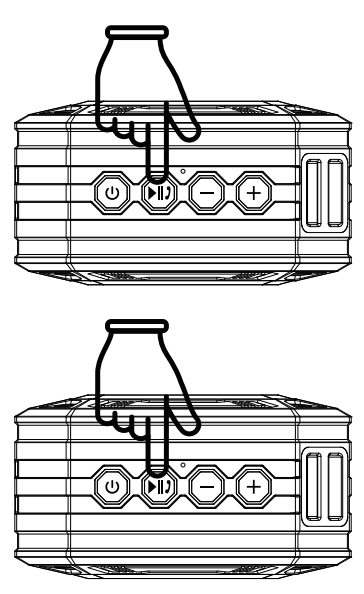
Device Walkthrough - Answering Calls
- Answer a Call: Short-press the Play/Pause Button to answer an incoming call.
- Reject a Call: Press and hold the Play/Pause Button to reject an incoming call.
- End a Call: Short-press the Play/Pause Button to end an ongoing call.
Device Walkthrough - True Wireless Stereo
- Connect the Host Speaker: Complete the Bluetooth connection with one of the two speakers and use it as the host speaker.
- Enter TWS Pairing Mode: Double-press the dedicated TWS Function Button on the host speaker to enter TWS pairing mode.
- Connect the Second Speaker: Turn on the second speaker and keep both speakers close to each other. The TWS connection will begin automatically.
- Exit TWS Mode: Press and hold the dedicated TWS Function Button to exit TWS mode.
Notes
- TWS pairing mode remains active for approximately 80 seconds.
- Double-pressing the TWS Function Button again during these 80 seconds will have no effect.
- If a speaker is powered off while in TWS mode and then powered on again, it will remain in TWS mode.
Device Walkthrough - Battery & Charging
- Charging: Connect the Micro-USB charging cable to the SB-X80 and a compatible power source.
- Charging Time: Approximately 3 hours.
- Playback Time: Approximately 10 hours.
Cleaning & maintenance
Wipe down the SB-X80 with a soft, dry cloth.
Troubleshooting Aiwa Adventure Mini IP67 SB-X80 Speaker Common Issues
- No Sound / No Bluetooth Connection: Check the pairing status and confirm that the blue LED is flashing. Restart both the speaker and the connected device, keep them within 10 m, and re-pair if necessary.
- Poor Battery Life: High volume levels or TWS mode may reduce battery life. Fully charge the speaker, disable unused features, and avoid exposing it to extreme temperatures.
- Water Exposure / Speaker Will Not Turn On: Allow the speaker to dry completely before use. If the LED flashes red or the speaker does not power on, charge it for at least 30 minutes before trying again.
- TWS Not Pairing: Power off both speakers. Restart the first speaker in TWS mode, then power on the second speaker and attempt pairing again.
Cannot Find “SB-X80” / Unstable Connection
- Make sure the SB-X80 and your device are within the Bluetooth operating range.
- Make sure the SB-X80 is sufficiently charged.
- Try pairing the speaker with your device again.
Disconnection Within Operating Range
- Make sure there are no metal objects or other materials nearby that may interfere with the Bluetooth connection.
Warranty: Typically a 1-year limited warranty from Aiwa. Contact support via int-aiwa.com or local retailers. For Singapore users, aiwa.com.sg offers service. Preventive measures: Rinse with fresh water after saltwater exposure; store dry. Check manuals. Plus for guides.
Pros and Cons of aiwa Adventure Mini IP67 SB-X80 Speaker
Pros
- Exceptional IPX7 waterproofing outperforms many options at this price, making it ideal for outdoor adventures.
- Long 10-hour battery life and quick charging are suitable for all-day use.
- Compact, rugged build with a premium feel and strong value under $50.
- Bluetooth 5.0 provides stable connectivity, while TWS supports immersive stereo playback.
Cons
- 4W power output may limit bass performance in larger spaces compared with more powerful JBL models.
- Micro-USB charging is outdated compared with USB-C, and a charging cable may not always be included.
- No dedicated app for EQ customization, with only basic onboard controls.
Overall, superior value for money as a budget IP67 mini Bluetooth speaker, especially vs. pricier alternatives.
Customer Reviews and Feedback on aiwa Adventure Mini IP67 SB-X80 Speaker
Users rave about the aiwa Adventure Mini IP67 SB-X80 Speaker, averaging 4.5/5 stars on Shopee and Aiwa sites. Common praises: "Survived full pool dunk and sounds crisp for size!" (5 stars) and "10-hour battery is legit for hikes" (4.8 stars).
Complaints include occasional pairing glitches ("Reset fixed it") and modest volume ("Fine for personal use"). Testimonials highlight durability: "Best waterproof speaker under $40." Recommendations: Buy for outdoor portability; pairs well with phones for travel. Addresses issues like connectivity via simple resets boost satisfaction.
Faqs
How do I set up the aiwa Adventure Mini IP67 SB-X80 Speaker for the first time?
How do I connect the aiwa Adventure Mini IP67 SB-X80 Speaker to my smartphone via Bluetooth?
What should I do if the aiwa Adventure Mini IP67 SB-X80 Speaker won't pair with Bluetooth?
How do I use TWS mode on the aiwa Adventure Mini IP67 SB-X80 Speaker for stereo sound?
Is the aiwa Adventure Mini IP67 SB-X80 Speaker compatible with AUX input and what cable do I need?
How long does the battery last on aiwa Adventure Mini IP67 SB-X80 Speaker and how to charge it?
How do I care for the waterproof aiwa Adventure Mini IP67 SB-X80 Speaker after outdoor use?
Why is my aiwa Adventure Mini IP67 SB-X80 Speaker not charging and how to fix it?
More aiwa manuals
- Setup: Aiwa CRU-80BT Bluetooth Speaker and Clock Radio User Manual
- Setup & Pairing: Aiwa ESBT-460 Hyperbass neckband In-Earphones User Manual
- Setup: Aiwa AA-QC51 Multi-port Fast Charger User Manual
- Pairing: Aiwa HP-VH50 HiRes High Resolution Wired Headphones User Guide
- Setup & Pairing: Aiwa R-190BW and R-190RD Portable Radios Owner Manual
- Setup: Aiwa HSTBTN-800 Bluetooth Headphone With ANC User Manual
Leave a Comment