
Setup: Aiwa CRU-80BT Bluetooth Speaker and Clock Radio User Manual
Content
Introduction — aiwa CRU-80BT Bluetooth Speaker and Clock Radio
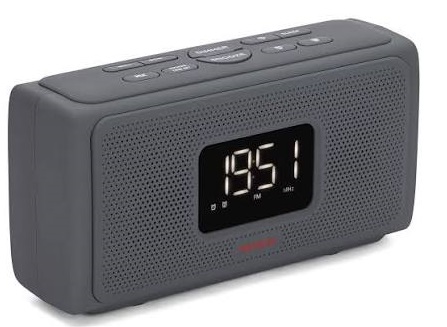
The Aiwa CRU-80BT Bluetooth Speaker and Clock Radio is a compact bedside/study audio system that combines a clock radio, dual-alarm clock and a Bluetooth stereo speaker in a single soft-touch tabletop unit. Designed for users who want dependable alarm functions plus flexible audio playback, it suits bedrooms, dorm rooms, offices and kitchen counters while delivering portable convenience and clear sound for its class.
Key benefits include dual alarm and snooze scheduling for separate wake times, PLL FM radio, Bluetooth v4.2 streaming, USB and microSD media playback, and a large white LED display with adjustable dimmer for comfortable night viewing. The system pairs a practical clock-radio feature set with Bluetooth stereo output (2 x 10 W RMS) and a 2000 mAh rechargeable battery that supports portable use and up to roughly 10 hours playback on a charge, making it useful for short power outages or moving between rooms.
Target audience: budget-conscious listeners, students, commuters, or anyone wanting a bedside unit that’s also a Bluetooth speaker and media player. Typical use cases: alarm/clock with FM radio wake-up, streaming music from phone/tablet, playing MP3/WAV/FLAC files from USB or microSD, and hands-free calls via built-in microphone when connected by Bluetooth.
Estimated price range and availability: retail pricing generally ranges around €50–€80 (market dependent) and the model is commonly available through consumer electronics retailers and online stores in Europe and selected markets.
Specifications — Technical details and key features
- Audio Output: 2 x 10 W RMS stereo (Hyperbass tuning available on some SKUs).
- Bluetooth: Bluetooth v4.2, typical range up to 10 m for audio streaming.
- Media Playback: USB reader and microSD card slot supporting up to 128 GB, with MP3, WMA, WAV, APE, and FLAC file support on many retailer specifications.
- Radio: PLL FM tuner with station preset capability and LCD display.
- Clock & Alarms: Large white LED display, dimmer with multiple brightness levels, dual alarm, snooze, and sleep timer.
- Battery & Power: Rechargeable Li-ion battery, 3.7 V / 2000 mAh; playback time approximately 10 hours; charging time approximately 2–3 hours; DC 5V charging input.
- Connectivity: 3.5 mm AUX IN, USB playback, microSD slot, Bluetooth streaming, and built-in microphone for hands-free calls.
- Dimensions & Weight: Approximately 215 x 72 x 110 mm; weight approximately 830 g, depending on the source.
- Design: Soft-touch finish, large tactile buttons, and a simple bedside-friendly layout.
Performance notes: For a compact clock-radio speaker, the CRU-80BT offers solid volume and bass for small rooms thanks to its dual 10 W drivers, but it is not intended to replace a full-size hi-fi system. Larger bookshelf speakers may provide deeper low-frequency performance. Compared with similar budget clock radios, the CRU-80BT stands out for its larger battery capacity and multi-format playback support.
Setup guide — How to get started with the aiwa CRU-80BT Bluetooth Speaker and Clock Radio
Follow these steps to set up your Aiwa CRU-80BT Bluetooth Speaker and Clock Radio for first use.
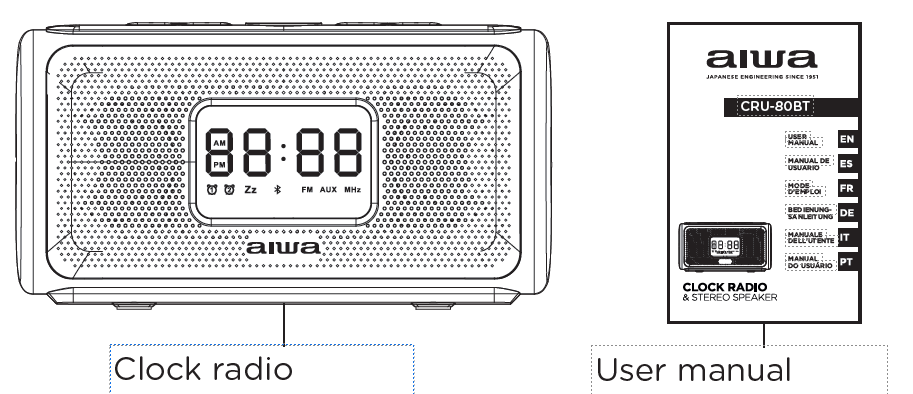
- Unbox and Inspect: Confirm that the clock radio, power cable/adapter, and user manual are included. Connect the DC 5V charger and charge the unit for approximately 2–3 hours before extended first use to fully charge the 2000 mAh battery.
- Position the Unit: Place the unit on a flat, stable surface near a power outlet. Position the display where it is easy to read and use the dimmer button to select the preferred LED brightness level.
- Set the Time: Enter clock-setting mode using the Clock/Time button. Adjust the hours and minutes with the tuning or +/– buttons, then confirm to save the setting.
- Configure Alarms: Use the Alarm button to set Alarm A and Alarm B separately. Configure the alarm time and preferred alarm source, such as buzzer, FM, USB, or Bluetooth. Set the snooze and sleep timer as required.
- Pair a Bluetooth Device: Switch the unit to Bluetooth mode, enable Bluetooth on your phone or other device, search for available devices, and select “CRU-80BT” or the displayed device name. Once paired, the unit should automatically reconnect when the device is within range.
- Use USB or microSD Playback: Insert a compatible USB flash drive or microSD card containing supported audio files such as MP3, WAV, or FLAC. Use the Mode button to select USB or SD playback, then use the playback controls to manage tracks.
- Use AUX IN: Connect a compatible non-Bluetooth device using a 3.5 mm audio cable for direct wired playback.
Safety Warnings: Keep the unit away from water and excessive heat. Do not open or disassemble the enclosure. Use only the specified DC 5V charger, and have battery servicing performed by qualified personnel.
Instructions
Getting Started
- Power On: Slide the ON/OFF switch on the back of the unit to the ON position. The alarm clock display will light up and show the time.
- Power Off: Slide the ON/OFF switch to the OFF position. The display and mood light will turn off, but the clock and alarm functions will continue to operate.
Note:
The first time the clock is powered on the display will show the hour 00:00.
Setting the clock
In standby mode, press and hold the MODE/TIME SET button to enter the clock setting mode. After the first press the clock will allow you to set the hour with the BACKWARD and FORWARD buttons, then short-press the MODE/TIME SET button to set the minutes using the BACKWARD and FORWARD buttons. Finally short press the MODE/TIME SET button again to confirm the clock settings.
Setting the hour system
The clock allows the user to select the desired hour system, between the 12 and 24 hours format. In standby mode short press BACKWARD or FORWARD buttons to select between the 12 and 24-hour formats. When the 12 hours format is activated, the screen will bright up the HOUR SYSTEM INDICATOR showing AM or PM, depending the time of the day.
RADIO FM
Listening to radio
- Adjust Volume: Press and hold the BACKWARD button to decrease the volume or the FORWARD button to increase the volume.
- Auto Search and Save Stations: Press and hold the MODE/TIME SET button to automatically search for and save available FM radio stations.
- Switch Saved Stations: Short-press the PLAY/PAUSE/ANSWER CALLS button to cycle through the saved radio stations.
Note:
You can store up to 40 preset stations.
ACCESSORIES
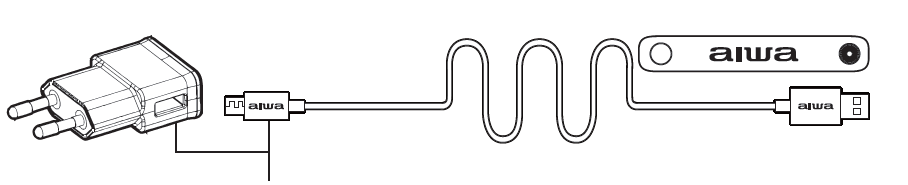
Aiwa nylon braided cable with alluminium shell and USB AC adaptor (2A)
Alarm
To set the alarm
The alarm clock allows you to set two different times for the alarm:
- Enter Alarm Setting Mode: In standby mode, press and hold the ALARM 1 or ALARM 2 button to enter the alarm time setting mode.
- Set the Hour: Press the BACKWARD or FORWARD button to adjust the hour.
- Set the Minutes: Short-press ALARM 1 or ALARM 2 again, then use the BACKWARD or FORWARD button to set the minutes.
- Confirm the Alarm: Short-press ALARM 1 or ALARM 2 once more to confirm the alarm time and activate the alarm.
Note:
The alarm can be set at any function mode.
Turning the alarm on or off
Press the ALARM 1 or ALARM 2 button to set the desired alarm. The corresponding Alarm 1 or Alarm 2 indicator will light up or light off depending of their current state.
To switch off the alarm
Press the alarm button corresponding to the alarm that is ringing, ALARM 1 or ALARM 2, to deactivate it.
Note:
When the alarm rings, the current hour and the corresponding Alarm 1 or Alarm 2 indicator flashes on the display, even if the screen has been switched off.
Snooze
To temporarily turn off the alarm, press the SNOOZE button. The alarm will ring again when the snooze time has elapsed (10 minutes). The corresponding alarm 1 or alarm 2 indicator flashes on the display during the snooze period. To cancel the snooze and the alarm, press the alarm button corresponding to the alarm that is in the snooze period, ALARM 1 or ALARM 2 to deactivate it.
Sleep
The sleep function defines the duration of time before the alarm clock switches off automatically. When the alarm clock is switched on, press the SLEEP timer button repeatedly to select a sleep setting option (Sleep timer: Off, 15, 30 and 60 minutes). Once activated, the SLEEP FUNCTION INDICATOR will light up on the screen. The alarm clock will automatically switch off when the sleep period is over. To cancel this function press the SLEEP button repeatedly until the word OFF appears on screen and the SLEEP FUNCTION INDICATOR turns off.
DISPLAY
Display brightness
In standby mode, short press the DIMMER button to change the display brightness between low, medium or high options.
Display ON/OFF
- Turn Off the Display: In standby mode, press and hold the POWER button for approximately 2 seconds.
- Turn On the Display: Press and hold the POWER button again for approximately 2 seconds.
- Reset the Alarm Clock: Press and hold the POWER button for approximately 5 seconds to reset the alarm clock.
Note:
While the display and mood light are off, the clock and alarms will still be working.
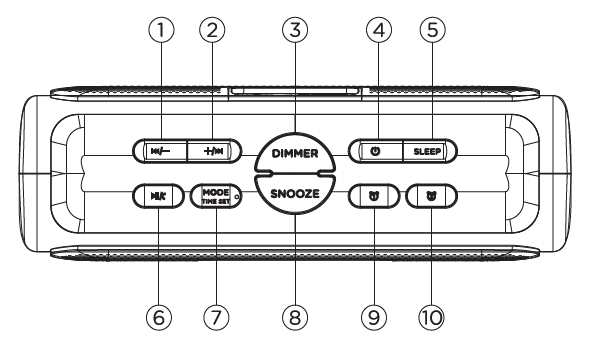
BUTTONS FUNCTION
- Backward/Volume Down
- Forward/Volume Up
- Dimmer
- Power Button
- Sleep
- Play/Pause/Answer Calls
- Mode / Time Set
- Snooze
- Alarm 1
- Alarm 2
BLUETOOTH MODE
- Enter Bluetooth Mode: In standby mode, short-press the MODE/TIME SET button once. The Bluetooth Mode Indicator will flash on the display, and a voice prompt will indicate that the unit is ready to pair.
- Enable Bluetooth: Turn on Bluetooth on your phone and search for available devices.
- Select the Device: Choose “AIWA CRU-80BT” from the Bluetooth device list.
- Enter Pairing Code: If prompted, enter “0000.”
- Confirm Connection: When pairing is successful, the Bluetooth Mode Indicator will remain steadily lit, and a voice prompt will confirm that the Bluetooth device is connected.
- Automatic Reconnection: After successful pairing, the unit will automatically reconnect to the previously paired device the next time Bluetooth mode is used.
Incoming calls
- Incoming Call Alert: When a call is received while Bluetooth mode is active, the alarm clock will play a continuous ringtone.
- Answer a Call: Short-press the PLAY/PAUSE/ANSWER CALLS button.
- End a Call: Short-press the PLAY/PAUSE/ANSWER CALLS button during a call.
- Reject a Call: Press and hold the PLAY/PAUSE/ANSWER CALLS button while the incoming call ringtone is sounding.
- Redial Last Number: Quickly press the PLAY/PAUSE/ANSWER CALLS button twice to redial the last phone number.
USB & TF CARD MODE
- Insert Storage Device: Insert a USB drive into the USB Port or a TF card into the TF Card Port on the back of the unit.
- Automatic Mode Detection: A voice prompt will announce that the unit has entered USB Mode or TF Card Mode.
- Automatic Playback: Music playback will begin automatically after the storage device is detected.
AUX IN MODE
Auxiliary input function mode
Plug an auxiliary cable ended in a 3.5mm jack to the AUXILIARY INPUT socket at the back of the unit. The AUXILIARY MODE INDICATOR will light up on the screen, and a prompt voice will notify that has entered in auxiliary input mode.
Note:
The auxiliary input mode only allows the user to control the volume from the unit.
PLAYING MUSIC
You can control the playback during Bluetooth, USB or TF card mode with:
PLAY/PAUSE/ANSWER CALLS
- Short-press the button to play or pause music playback.
FORWARD/VOLUME UP
- Short-press the button to skip to the next track.
- Press and hold the button to increase the playback volume.
BACKWARD/VOLUME DOWN
- Short-press the button to return to the previous track.
- Press and hold the button to decrease the playback volume.
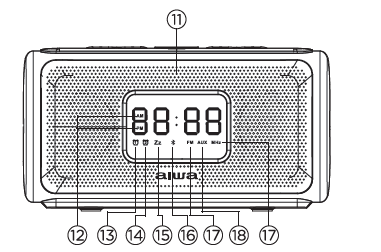
screen functions
- Microphone
- 12-Hour Format Indicator
- Alarm 1 Indicator
- Alarm 2 Indicator
- Sleep Function Indicator
- Bluetooth Mode Indicator
- FM Mode and MHz Indicator
- Auxiliary Mode Indicator
BATTERY AND CHARGE
Charging the alarm clock
This alarm clock is provided with a rechargable battery:
- Connect the Charging Cable: Insert the USB charging cable into the Micro USB Charging Port on the back of the unit.
- Charging Indicator: The Power and Charging LED Indicator will glow bright red while charging.
- Fully Charged: The LED indicator will turn green when the battery is fully charged.
WARNING
To reduce the risk of electric shock, do not open the device; there are no parts that can be changed by the consumer. Refer all servicing to qualified personnel.
IMPORTANT
- Allow Proper Ventilation: Maintain at least 5 cm of clearance around the unit to ensure adequate ventilation.
- Do Not Block Ventilation Openings: Keep ventilation openings clear of newspapers, tablecloths, curtains, and similar items.
- Keep Away from Open Flames: Do not place open flame sources, such as lit candles, on or near the device.
- Protect from Water: Do not expose the device to dripping or splashing water.
- Keep Liquids Away: Do not place objects filled with liquids, such as glasses or vases, on the device.
- Battery Disposal: Do not throw batteries into a fire. Dispose of used batteries responsibly according to local regulations.
- Avoid Excessive Heat: Do not expose batteries to direct sunlight, fire, or other sources of excessive heat.
- Keep Power Plug Accessible: Make sure the power plug remains easily accessible at all times. Unplug the device to disconnect it completely from the power supply.
- Electrostatic Reset: If the device malfunctions due to electrostatic discharge, remove the battery and unplug the unit for approximately 1 minute. Then reconnect the power and reinstall the battery to reset the device.
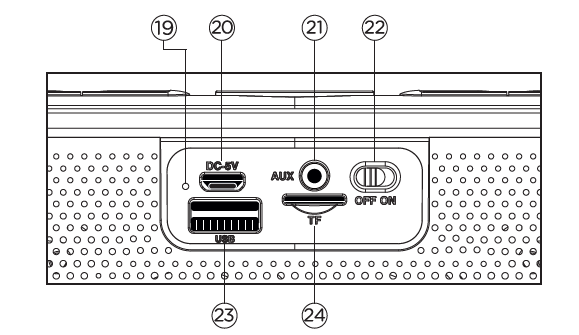
Rear view
- Power and Charging LED Indicator
- Micro USB Charging Port
- Auxiliary Input
- On/Off Switch
- USB Port
- TF Card Port
Troubleshooting — Common problems and fixes for the aiwa CRU-80BT
- No Power / Won’t Charge: Check the DC 5V adapter and charging cable, try a different compatible USB power adapter, and make sure the charging port is clean. If the battery is underperforming, have it inspected or replaced by qualified service personnel.
- No Bluetooth Connection: Make sure Bluetooth mode is active on the CRU-80BT. Remove the previous pairing from your phone, restart both devices, and pair them again within 1–2 m for the initial connection.
- Low Volume / Distorted Sound: Check the volume on both the source device and the speaker. Disable excessive EQ boosts, try a different audio source or file, and make sure the battery is sufficiently charged. Distortion at maximum volume may indicate source clipping or speaker output limits.
- USB or microSD Not Recognized: Reformat the storage device to FAT32, confirm that the files use supported formats such as MP3, WAV, FLAC, or APE, and try another USB drive or microSD card if necessary.
- Alarm Won’t Sound: Make sure the alarm is enabled, verify the selected alarm source, check that the volume is not muted, and confirm that the clock and alarm time are set correctly.
Error codes: consumer listings and manuals do not commonly list numeric error codes for this model; most faults are handled via the above steps or by resetting/power-cycling the unit. Preventive measures: keep firmware-supported devices updated, avoid using badly formatted media, and use surge protection for mains power.
Warranty and support: warranty terms vary by retailer and region—check your purchase receipt and local aiwa distributor for warranty duration and service centers. For technical help, contact the retailer or aiwa after-sales support (refer to your manual for local contact points) or the reseller where purchased.
Pros & Cons — Balanced assessment
- Pros
- Compact all-in-one unit with alarm clock, FM radio, and Bluetooth speaker, making it suitable for bedside use and small rooms.
- Strong feature set for the price, including dual alarms, a large LED display with dimmer, USB/microSD playback, and a built-in microphone for calls.
- Portable battery operation of approximately 10 hours adds flexibility beyond mains-only clock radios.
- Stylish soft-touch design and tactile controls make everyday use simple and convenient.
- Cons
- Audio performance is good for its size but cannot match larger bookshelf speakers, especially in terms of low-frequency performance in bigger rooms.
- Bluetooth v4.2 is functional but lacks some features found in newer Bluetooth versions, such as LE Audio and support for newer codecs.
- Exact specifications and supported features may vary slightly between retailers, so it is advisable to confirm specific codec and file-format support before purchase.
- No DAB+ or internet radio support; broadcast radio is limited to FM.
Value for money: the aiwa CRU-80BT offers a competitive feature set at entry-level price points and is a strong value for users who need an alarm clock with flexible playback and modest portable speaker performance compared to alternatives like basic Bluetooth alarm clocks lacking battery operation or multi-format playback.
Customer reviews & real-user feedback — Ratings, testimonials and common themes
Aggregate user feedback for the Aiwa CRU-80BT typically rates the unit positively for convenience and value. Common praises include the clear display, easy-to-use alarm functions, and the variety of playback options, including Bluetooth, USB, microSD, and FM radio.
Typical complaints focus on expected limitations: sound output may be limited for larger rooms, Bluetooth features are basic due to version 4.2, and some users report occasional pairing issues that can usually be resolved by re-pairing or power cycling the unit.
Representative ratings and recommendations: many retailers list it in the 4/5-star range for price-to-features. Reviewers generally recommend it for buyers who want a reliable bedside alarm clock with streaming capability, but not for audiophiles seeking deep bass or high-resolution wireless codecs.
Sample testimonial
“Great little bedside speaker — loud enough for my bedroom, solid dual alarm and battery backup. USB and SD player are very handy.” — 4/5 star typical user comment.
SEO & keywords used
This manual naturally uses the primary keyword aiwa CRU-80BT Bluetooth Speaker and Clock Radio and related terms such as Bluetooth alarm clock, USB/microSD playback, PLL FM tuner, dual alarm clock radio, bedside Bluetooth speaker, rechargeable battery clock radio, and long-tail phrases like “aiwa CRU-80BT setup guide Bluetooth pairing” to help the content rank for both short and long-form queries.
Faqs
How do I set up the aiwa CRU-80BT Bluetooth Speaker and Clock Radio for the first time?
How do I pair Bluetooth devices with aiwa CRU-80BT Bluetooth Speaker and Clock Radio?
How do I set dual alarms on aiwa CRU-80BT Bluetooth Speaker and Clock Radio?
What should I do if aiwa CRU-80BT Bluetooth Speaker and Clock Radio won't connect to Bluetooth?
How do I play music from USB or microSD on aiwa CRU-80BT Bluetooth Speaker and Clock Radio?
Is aiwa CRU-80BT Bluetooth Speaker and Clock Radio compatible with my smartphone and what are the requirements?
How can I optimize sound quality and battery life on aiwa CRU-80BT Bluetooth Speaker and Clock Radio?
How do I maintain and clean aiwa CRU-80BT Bluetooth Speaker and Clock Radio to ensure longevity?
More aiwa manuals
- Setup: Aiwa AA-QC51 Multi-port Fast Charger User Manual
- Setup & Pairing: Aiwa Adventure Mini IP67 SB-X80 Speaker User Manual
- Setup & Pairing: Aiwa R-190BW and R-190RD Portable Radios Owner Manual
- Setup & Pairing: Aiwa ESBT-460 Hyperbass neckband In-Earphones User Manual
- Setup: Aiwa BR412BK AudioConnect Adapter User Manual
- Pairing: Aiwa HP-VH50 HiRes High Resolution Wired Headphones User Guide
Leave a Comment