
Setup: Aiwa BR412BK AudioConnect Adapter User Manual
Content
Aiwa BR412BK AudioConnect Adapter: Complete Product Manual and Setup Guide
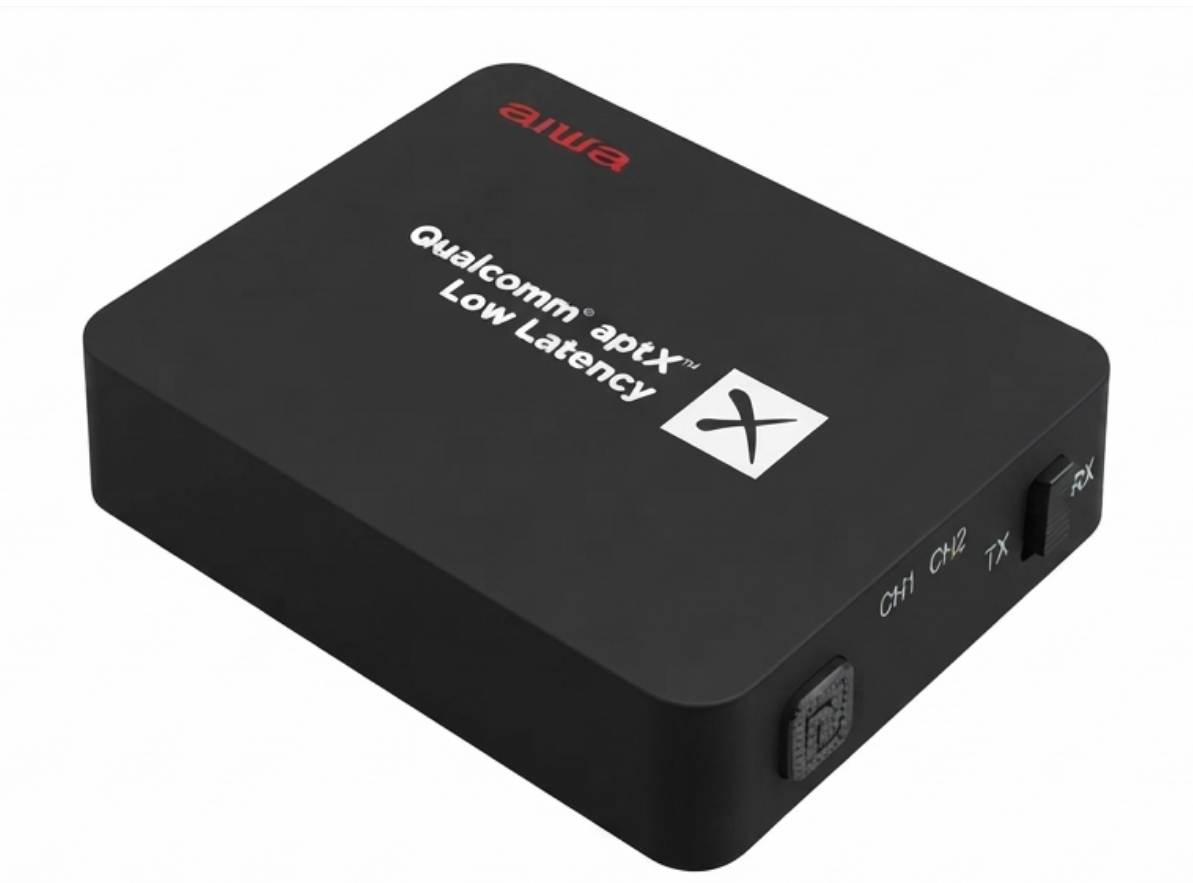
Introduction to the Aiwa BR412BK AudioConnect Adapter
The Aiwa BR412BK AudioConnect Adapter is a versatile Bluetooth V4.2 audio transmitter and receiver designed to bridge wired audio devices with wireless Bluetooth headphones, speakers, and more. This compact Aiwa BR412BK AudioConnect Adapter supports 2-way end-to-end functionality, allowing seamless switching between TX (transmitter) mode for sending audio from TVs or stereos to Bluetooth devices, and RX (receiver) mode for streaming to wired speakers. Key benefits include low-latency aptX-LL codec for lip-sync perfection during movies, up to 20 hours of playback on a rechargeable 500mAh battery, and broad compatibility with RCA, 3.5mm jack, and optical TOSLINK inputs.
Ideal for home theater enthusiasts, audiophiles, and users with legacy audio equipment, the Aiwa BR412BK AudioConnect Adapter enables wireless audio from TVs, monitors, radios, or active speakers without compromising quality. Unique selling points like CSR8670 chipset support for A2DP, aptX Low Latency, aptX, and SBC codecs ensure high-fidelity sound. Target use cases include pairing with Bluetooth headphones for private TV watching or connecting non-Bluetooth speakers to smartphones. Priced in the $30-50 range, it's widely available on Aiwa's official site and major retailers, offering exceptional value for wireless audio upgrades.
Technical Specifications of Aiwa BR412BK AudioConnect Adapter
The Aiwa BR412BK AudioConnect Adapter delivers robust performance with these detailed specs:
- Bluetooth Version: V4.2 with aptX-LL (Low Latency) for minimal audio delay.
- Supported Profiles: A2DP, AVRCP; Codecs: aptX Low Latency, aptX, SBC.
- Connectivity: RCA, 3.5mm audio jack, Optical TOSLINK (S/PDIF); TX mode supports up to 2 Bluetooth devices simultaneously.
- Battery: 500mAh/3.7V rechargeable lithium; 20 hours playback (TX mode), 2-hour charge time (2.5 hours first use).
- Dimensions & Weight: 67 x 53 x 18 mm, ≈46g; Range: <10m.
- Other Features: Pin code 0000, auto shutdown after 10 minutes inactivity, low battery indicator.
Compared to rivals like basic Bluetooth adapters, the Aiwa BR412BK excels with dual-mode versatility and low-latency aptX-LL, outperforming standard SBC-only devices in video syncing and battery life.
Important Safety Instructions
- Do not install the device near any heat sources.
- Use only accessories specified by the manufacturer.
- Refer all servicing to qualified personnel if the device is damaged.
- Keep this user manual for future reference and troubleshooting.
- Follow all safety cautions.
SAFETY CAUTIONS
- Keep the device away from fire and heat sources at all times.
- Do not attempt to disassemble or alter the device.
- Do not expose the device to excessive heat, such as direct sunlight.
- Do not immerse or expose the device to any form of fluids.
- The product label is located at the bottom of the product.
Step-by-Step Setup Guide for Aiwa BR412BK AudioConnect Adapter
Setting up your Aiwa BR412BK AudioConnect Adapter is straightforward for Bluetooth audio transmitter/receiver functionality.
- Charge the Device: Connect the Micro-USB cable to a power source; full charge takes approximately 2 hours. The indicator blinks when the battery is low.
- TX Mode (Transmitter): Power on the adapter, connect it to the audio source via TOSLINK, RCA, or 3.5mm. Set the source to STEREO/PCM when using TOSLINK. Hold the pairing button for 5 seconds until the indicator flashes green, then pair the Bluetooth device within 1 m. PIN: 0000. Supports up to 2 devices.
- RX Mode (Receiver): Connect the adapter to wired speakers and pair it with a Bluetooth source in the same way.
- Auto-Pairing: The adapter reconnects to the last paired device when powered on.
Safety: Avoid water exposure and use only approved chargers.
Unboxing
AudioConnect BR412BK
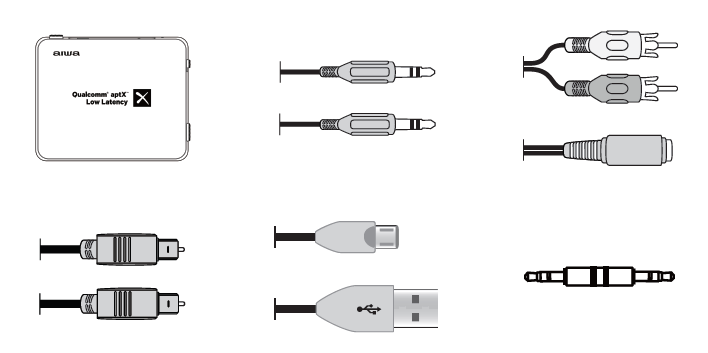
Please refrain from using any damaged components. Contact your local authorised aiwa distributor/customer service.
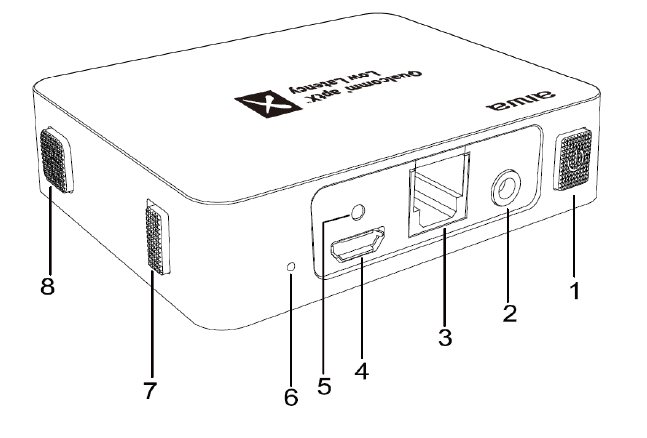
Parts
- Power Button
- 3.5 mm AUX Jack
- Digital Optical IN
- Charging Port
- Charging Indicator Light
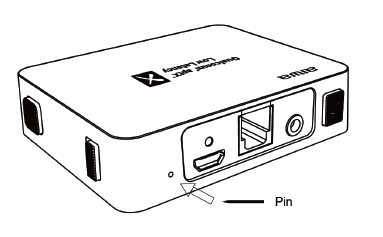
- Reset Port
- RX/TX Button
- Pairing Button
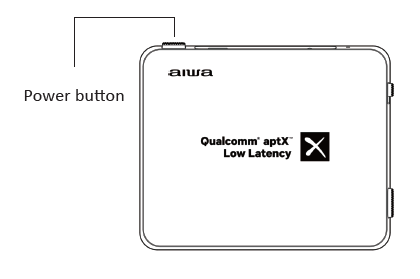
Device Walkthrough- Power ON/OF
- Flashing Blue LED (TX Mode) on top of the device indicates the device is turned on.
- Flashing Red LED (RX Mode) on top of the device indicates the device is turned on.
Device Walkthrough- Battery & Charging
- Connect the Micro-USB charging cable to any power source and the AudioConnect as shown.
- Charging Time: Approx. 2 hours.
- First Charge Time: Approx. 2.5 hours.
- Playback Time in TX Mode: Approx. 20 hours.
- Playback Time in RX Mode: Approx. 12 hours.
- Charging indicator light lights up red during charging.
- Charging indicator light turns off when fully charged.
- Charging indicator light blinks when the battery is low.
- Auto shutdown activates within 10 minutes of inactivity.
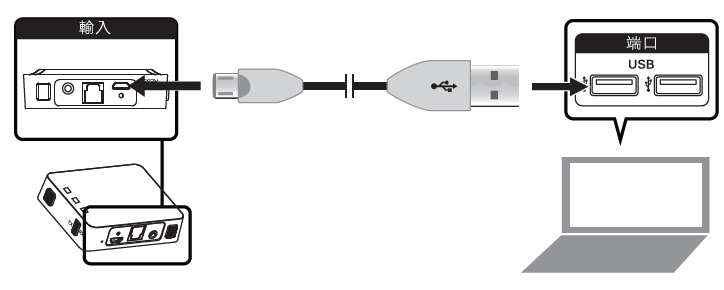
Device Walkthrough- TX Mode (Transmitter Mode)
AudioConnect can connect to up to 2 Bluetooth devices simultaneously in TX Mode.
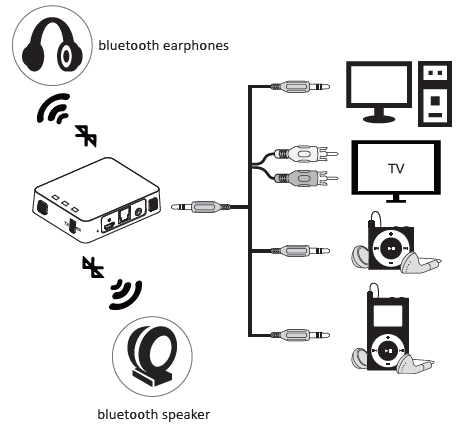
Connecting to an audio source (Audio output device).
- TOSLINK (S/PDIF)
- RCA Adaptor
- 3.5 mm Audio Jack
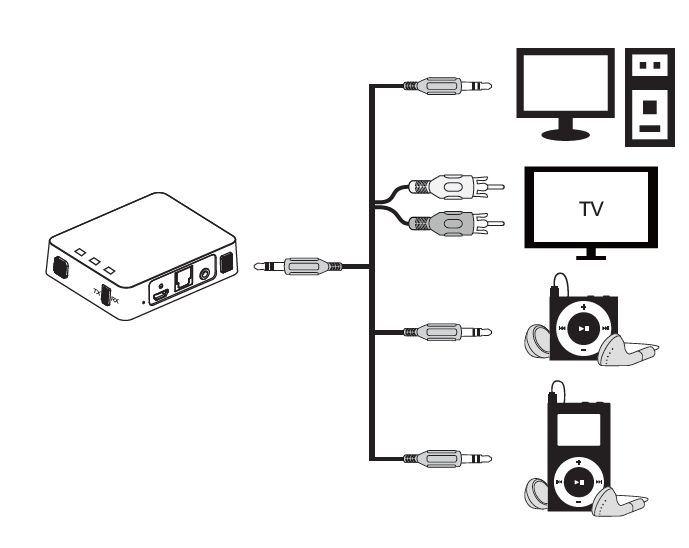
TX Mode (Connecting to audio output device) TOSLINK (S/PDIF)
If you are not receiving any sound through a TOSLINK connection, please make sure that the audio output settings on your TV, DVR, and other playback sources are set to “STEREO” or “PCM”.
.png)
TX Mode (Connecting to audio output device) RCA Audio OUT
To enable RCA audio output, locate the audio output setting on your TV with the options “FIXED” and “VARIABLE”, sometimes labeled “SET MONITOR OUT”, and change this setting to “VARIABLE”. If you still don’t hear any sound, look for a setting that controls the TV’s internal speakers and set it to “OFF”.
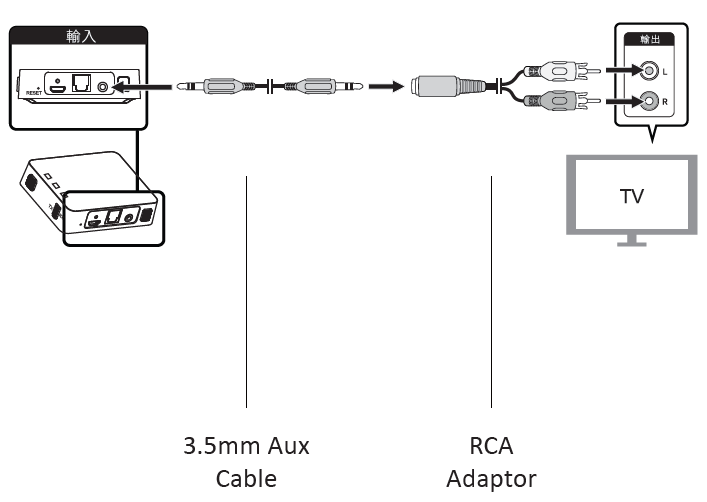
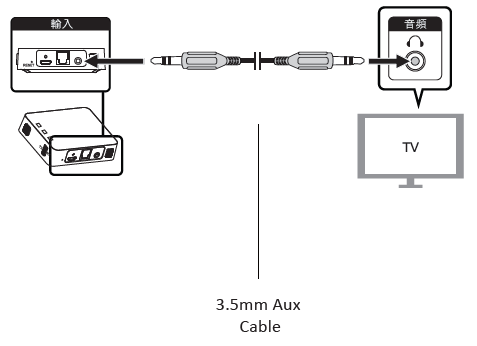
TX Mode (Connecting to audio output device) 3.5mm Audio Jack
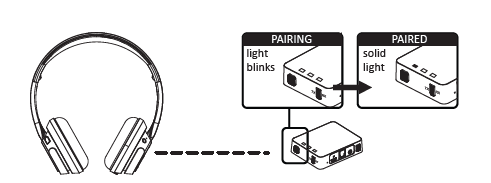
TX Mode Pairing: First Bluetooth speaker/headphones
- Set the TX/RX switch to the “TX” position.
- Turn the AudioConnect ON.
- Make sure the Bluetooth device is in pairing mode and within 1 meter.
- Press the pairing button.
- A flashing blue light indicates pairing mode.
- A non-flashing blue light indicates pairing is successful.
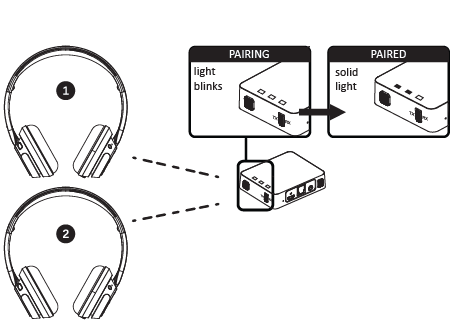
TX Mode Pairing Second Bluetooth speaker/headphones
- Make sure the Bluetooth device is in pairing mode and within 1 meter.
- Hold the pairing button for 5 seconds.
- A flashing green light indicates pairing mode.
- A non-flashing green light indicates pairing is successful.
Device Walkthrough - RX Mode (Receiver Mode)
- AudioConnect can pair with only 1 audio source.
- AudioConnect will pair with the last paired device when turned ON.
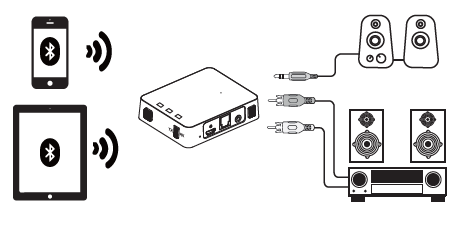
RX Mode (Pairing with Bluetooth Audio source)
- Set the TX/RX switch to the “RX” position.
- Turn the AudioConnect ON.
- Make sure the Bluetooth device is in pairing mode and within 1 meter.
- Press the pairing button.
- A flashing red light indicates pairing mode.
- A non-flashing red light indicates pairing is successful.
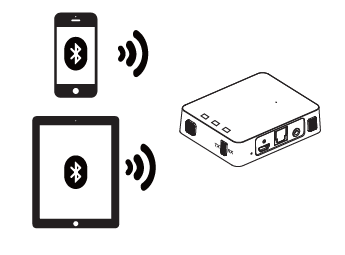
Device Walkthrough - Clearing Paired List
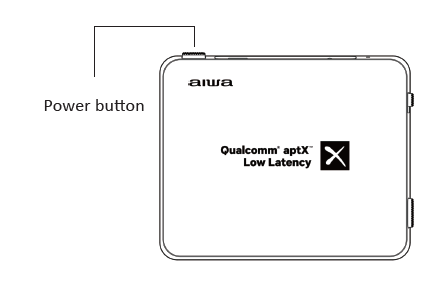
Device Walkthrough - Reset Device
Insert a needle/pin into the reset port for 3 seconds.
Cleaning & maintenance
- Wipe the AudioConnect with a soft, dry cloth.
- Do not use corrosive chemicals to clean the AudioConnect.
- Do not allow any liquids to enter any openings.
Troubleshooting Common Issues with Aiwa BR412BK AudioConnect Adapter
Resolve most Aiwa BR412BK AudioConnect Adapter problems quickly with these solutions:
- No Sound in TX Mode: Confirm STEREO/PCM settings on TV/source; re-pair devices. Check connections (TOSLINK, RCA, 3.5mm).
- Pairing Fails: Hold the pairing button for 5 seconds until the indicator flashes green; ensure the device is in pairing mode within 1 m, use PIN 0000, and power cycle if needed.
- Battery Drains Fast: Charge fully; auto-shutdown activates after 10 minutes of inactivity. A blinking light indicates low battery.
- Latency Issues: Use aptX-LL compatible devices for low delay and avoid wireless interference.
Prevent issues by keeping firmware updated through Aiwa support. A 1-year warranty covers defects; contact Aiwa Electronics International at support@int-aiwa.com or the official site for RMA support.
Pros and Cons of the Aiwa BR412BK AudioConnect Adapter
Pros
- Versatile 2-way TX/RX modes connect legacy gear wirelessly to Bluetooth headphones/speakers.
- Excellent 20-hour battery and aptX-LL for lag-free video audio, e.g., perfect TV lip-sync.
- Compact (67x53x18mm) with multiple inputs (RCA, TOSLINK, 3.5mm); pairs 2 devices in TX.
- Great value at $30-50 vs. pricier single-mode adapters.
Cons
- Limited to <10m range; may drop in crowded Wi-Fi areas.
- 10min auto-shutdown is inconvenient for pauses; no app for advanced config.
- First charge takes 2.5 hours; Micro-USB outdated vs. USB-C.
Overall, superior value for dual-function Bluetooth audio adapter needs compared to basic transmitters.
Customer Reviews and Feedback on Aiwa BR412BK AudioConnect Adapter
Users praise the Aiwa BR412BK AudioConnect Adapter for easy TV-to-headphones wireless streaming, with an average of 4.5/5 stars across sites. "Transformed my old stereo—aptX low latency is flawless for movies!" (5 stars). Common praises: Long battery, simple pairing, dual-device support. Complaints include occasional TOSLINK setup glitches (fix: PCM mode) and range limits. 80% recommend for budget wireless audio upgrades, noting it outperforms cheaper no-latency options. Frequently mentioned: Reliable daily use with minimal issues.
For more product information, please visit www.int-aiwa.com
Faqs
How do I set up the aiwa BR412BK AudioConnect Adapter in TX mode for the first time?
What should I do if there's no sound from my aiwa BR412BK AudioConnect Adapter in TOSLINK mode?
How do I switch between TX and RX modes on the aiwa BR412BK AudioConnect Adapter?
Is the aiwa BR412BK AudioConnect Adapter compatible with my older TV and Bluetooth headphones?
How long does the battery last on aiwa BR412BK AudioConnect Adapter and how to optimize playback time?
How do I pair a second Bluetooth device with aiwa BR412BK AudioConnect Adapter in transmitter mode?
What maintenance tips help keep my aiwa BR412BK AudioConnect Adapter performing optimally?
Why is there audio delay with aiwa BR412BK AudioConnect Adapter and how to fix it?
Tags
More aiwa manuals
- Setup & Pairing: Aiwa SB-X200 Resonance Speaker User Manual
- Setup & Pairing: Aiwa R-190BW and R-190RD Portable Radios Owner Manual
- Setup & Pairing: Aiwa AT-X80E True Wireless Earphones User Manual
- Setup: Aiwa AA-QC51 Multi-port Fast Charger User Manual
- Setup: Aiwa SB-X120 Portable Bluetooth Speaker User Manual
- Setup: Aiwa CRU-80BT Bluetooth Speaker and Clock Radio User Manual
Leave a Comment