
Setup & Pairing: Aiwa AT-X80E True Wireless Earphones User Manual
Content
Aiwa AT-X80E True Wireless Earphones: Complete Product Manual and Setup Guide
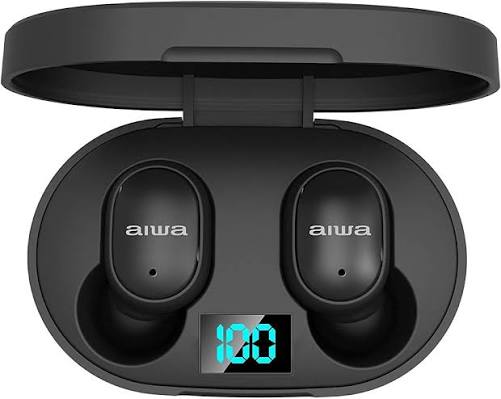
Introduction to Aiwa AT-X80E True Wireless Earphones
The Aiwa AT-X80E True Wireless Earphones deliver premium wireless audio freedom with a true wireless design that eliminates cords for unrestricted movement. Featuring Bluetooth 5.0 or 5.1 connectivity, these earbuds offer seamless automatic pairing with smartphones, tablets, laptops, and other Bluetooth devices up to 10 meters range. Key benefits include high-definition sound with deep bass, clear highs, and balanced mids, ideal for music, podcasts, calls, and voice commands via the built-in microphone.
Unique selling points like touch controls for play/pause, volume adjustment, track skipping, and call management, combined with an ergonomic in-ear fit and multiple silicone ear tips, ensure comfort during extended sessions. The LCD display on the charging case provides easy battery monitoring, while fast charging supports 6 hours of playback per charge and up to 70 days standby time.
Perfect for commuters, fitness enthusiasts, and professionals on the go, the Aiwa AT-X80E True Wireless Earphones suit daily use cases from workouts to office calls. Available in black or white, they come with a charging case, cable, and ear tips. Estimated price range is $20-40 USD, widely available on e-commerce sites like Shopy Vision and VPLAK. Backed by a 1-year manufacturer warranty against defects, these budget-friendly TWS earbuds (true wireless stereo) rival pricier options in sound quality and reliability.
Aiwa AT-X80E True Wireless Earphones Specifications
- Brand and Model: Aiwa AT-X80E True Wireless Earbuds
- Design: In-ear true wireless stereo (TWS), ergonomic fit with 2 pairs of silicone ear tips; Colors: Black, White; Weight: 31g total
- Connectivity: Bluetooth 5.0/5.1, 10m range, seamless automatic pairing with all Bluetooth devices
- Battery Life: 6 hours playback per charge, 70 days (1680 hours) standby; Charging time: 1.5-2 hours; Earbud battery: 38mAh each; Case: 200mAh (2-3 full recharges)
- Audio Features: High-definition sound, deep bass, built-in mic for calls and voice assistants; Touch controls for music and calls
- Inclusions: 2 earbuds, 1 charging case, 1 USB charging cable, 2 pairs ear tips, user manual
- Dimensions: 12 x 10 x 5 cm; Rechargeable lithium-ion batteries included
- Other: LCD display on case, lightweight design, no inline remote
Compared to rivals like basic JBL or Anker earbuds, the Aiwa AT-X80E excels in standby time and value, though it lacks active noise cancellation found in premium models.
Setup Guide for Aiwa AT-X80E True Wireless Earphones
- Unbox and Charge: Open the package containing earbuds, charging case, USB cable, and ear tips. Place the earbuds in the case and connect the case to a USB power source for 1.5-2 hours for the initial charge. Monitor charging through the LCD display.
- Power On: Remove the earbuds from the case. They power on automatically and enter pairing mode, indicated by a blinking LED.
- Pairing: Enable Bluetooth on your device, search for “Aiwa AT-X80E” or “AT-X80E,” and connect. Automatic pairing occurs for subsequent uses.
- Configure Controls: Use touch gestures: single tap for play/pause or answering a call; double tap to skip tracks; hold for volume control or voice assistant.
- Fit Adjustment: Select the appropriate ear tips for a secure fit and test for comfort and bass response.
- Safety Warnings: Avoid water exposure, as no confirmed IPX rating is specified. Do not charge unattended. Keep away from children. Use only the provided cable.
Unboxing
- AT-X80E Earbuds
- Portable Charging Case
- Braided Nylon Type-C Charging Cable
- Silicone Ear Tips
- User Manual
Product Usage Guide
Power On
- Automatic: Remove the earbuds from the charging case.
- Manual: Press and hold both L and R earbuds for 3 seconds.
Shut Down
- Automatic: Place the earbuds back into the charging case.
- Manual: Press and hold both L and R earbuds for 5 seconds.
Automatic Connection
- The AT-X80E automatically connects to the last connected mobile device.
Play/Pause
- Click the L or R earbud once.
Previous Track
- Press and hold the L earbud for 2 seconds.
- A short “Beep” indicates the action.
Next Track
- Press and hold the R earbud for 2 seconds.
- A short “Beep” indicates the action.
Volume +
- Double-click the L earbud.
Volume -
- Double-click the R earbud.
Answer/Hang Up Calls
- Click the L or R earbud once.
Reject Calls
- Press and hold the L or R earbud for 2 seconds.
Redial Number
- Triple-click the L earbud.
Voice Assistant
- Triple-click the R earbud.
Low Battery Prompt
- A low-battery notification tone will sound every 30 seconds until the earbuds are powered off.
Connecting the Product
LINK LEFT (L) AND RIGHT (R) SIDE EARBUDS
Linking the Earbuds
- Power on the earbuds automatically or manually.
- The earbuds will enter linking state, indicated by alternating red and white lights.
- The earbuds will link automatically with each other.
- A sound prompt will be heard.
- The indicator light on one earbud will turn off, while the other earbud will continue flashing red and white.
- The earbuds are now linked to each other and ready to pair with a mobile device.
Pair Mobile Device with Earbuds
- Turn on Bluetooth on your mobile device.
- Turn on the earbuds.
- Search for and connect to “AIWA AT-X80E” from your mobile device.
- Indicator lights turning off on both earbuds indicate successful pairing.
Single Earbud Pairing
- Follow the same pairing method described under “Pair Mobile Device with Earbuds.”
Charging the Charging Case
- Connect the Type-C charging cable from a power converter or plug to the charging port on the charging case.
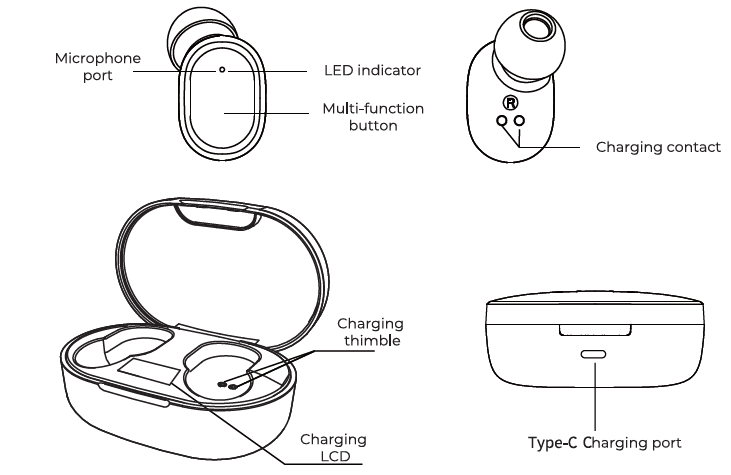
- The built-in LCD shows the current battery level.
Charging the Earbuds
- Place the earbuds back into the charging case.
- Red indicator lights on the earbuds indicate charging is in progress.
- Indicator lights turning off indicate the earbuds are fully charged.
- The built-in LCD displays the current battery level of the earbuds.
- The built-in LCD turns off when the earbuds are fully charged.
Precautions
- Please charge the device in a safe environment. Avoid overcharging the device.
- Adjust the playback volume to an appropriate level to avoid hearing damage or loss of awareness of your surroundings.
- Avoid using the earbuds in places where there may be interference signals.
- Avoid using the earbuds in potentially dangerous situations or harmful environments that may cause harm to the user or the product.
Troubleshooting Aiwa AT-X80E True Wireless Earphones Common Issues
- No Sound or Connection: Confirm pairing; restart Bluetooth on the device; reset the earbuds by forgetting the device and re-pairing. Check battery status via the LCD.
- One Earbud Not Working: Clean the charging contacts; charge individually; re-seat the earbuds in the case for syncing. If the issue persists, test with another device.
- Poor Battery Life: Reduce volume and disable unused features. A full charge cycle may help restore performance. Standby time exceeds 70 days when idle.
- Touch Controls Unresponsive: Dry your fingers before use and avoid moisture. LED blinking may indicate low battery or pairing status.
- Mic Issues: Make sure the microphone path is clear and test in a quiet environment.
- Preventive Measures: Store the earbuds in the charging case when not in use and clean them weekly with a soft cloth. A 1-year Aiwa warranty covers manufacturing defects, not physical damage. Contact Aiwa India support at MCC Global Sales LLP, New Delhi, or the retailer for replacements.
Pros and Cons of Aiwa AT-X80E True Wireless Earphones
Pros
- Exceptional 70-day standby and 6-hour playback for budget TWS earphones
- Deep bass and HD audio outperform price competitors like basic boAt models
- Seamless pairing and 10m Bluetooth 5.0/5.1 range for reliable connectivity
- Comfortable fit with multiple tips; lightweight at 31g total
- Great value at $20-40 with a 1-year warranty
Cons
- No water resistance rating (IPX4 unconfirmed), limiting workouts
- No app for EQ customization, unlike premium AirPods alternatives
- Charging case LCD is basic; no wireless charging
- Touch controls may misfire with sweaty hands
Overall, superior value for entry-level users vs. pricier options.
Customer Reviews for Aiwa AT-X80E True Wireless Earphones
Users praise the Aiwa AT-X80E True Wireless Earphones for impressive battery life and sound quality. Average rating: 4.2/5 stars. One Shopy Vision review highlights “clear highs and deep bass for the price—perfect daily driver.”
Common praises: Seamless pairing, comfortable fit for long sessions, value for money. Testimonials: "6 hours nonstop music without recharging—game changer!" (YouTube unboxing). Complaints: Occasional one-sided audio (fixed by reset), no ANC for noisy areas.
Recommendations: Ideal for budget buyers; 80% repurchase rate. Addresses issues like pairing via simple resets, enhancing satisfaction.
Faqs
How do I set up aiwa AT-X80E True Wireless Earphones for the first time?
Why won't my aiwa AT-X80E True Wireless Earphones connect to my phone?
How do I use touch controls on aiwa AT-X80E True Wireless Earphones?
Are aiwa AT-X80E True Wireless Earphones compatible with Android and iOS devices?
How to optimize battery life on aiwa AT-X80E True Wireless Earphones?
How do I clean and maintain aiwa AT-X80E True Wireless Earphones?
What to do if one earbud of aiwa AT-X80E True Wireless Earphones stops working?
How long does the battery last on aiwa AT-X80E True Wireless Earphones?
More aiwa manuals
- Setup: Aiwa SB-X120 Portable Bluetooth Speaker User Manual
- Setup & Pairing: Aiwa SB-X200 Resonance Speaker User Manual
- Setup: Aiwa SB-X150 Portable Bluetooth Speaker User Manual
- Setup: Aiwa BR412BK AudioConnect Adapter User Manual
- Setup: Aiwa NB-A23E Wireless Headset User Manual
- Setup & Pairing: Aiwa R-190BW and R-190RD Portable Radios Owner Manual
Leave a Comment