
Setup & Pairing: Aiwa SB-X200 Resonance Speaker User Manual
Content
Aiwa SB-X200 Resonance Speaker: Complete Product Manual and Setup Guide
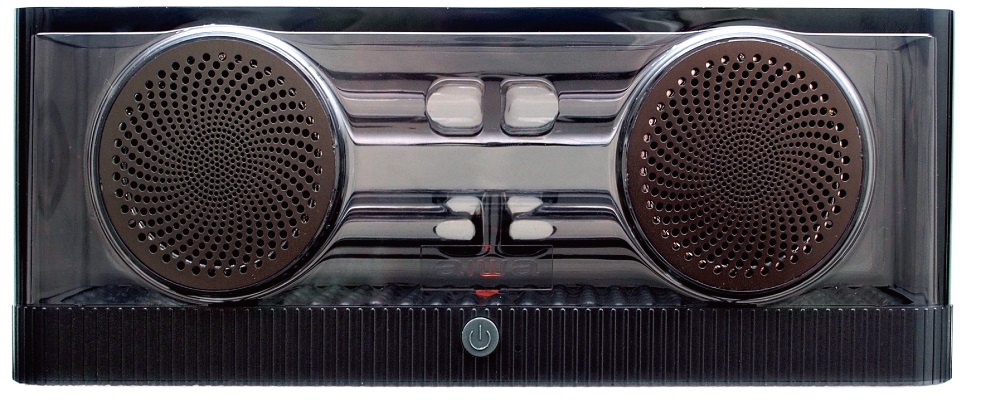
Introduction to the Aiwa SB-X200 Resonance Speaker
The Aiwa SB-X200 Resonance Speaker is a revolutionary portable Bluetooth speaker that delivers immersive sound through its innovative Resonance Tube Technology and Ferro-fluid Technology, perfect for music enthusiasts seeking powerful bass and crystal-clear audio. This multifunctional device combines AIWA Sound Technology with active DSP for an exciting BASS ++ sound profile, making it ideal for parties, outdoor gatherings, or home entertainment. Key benefits include one-button operation for effortless control, seamless Bluetooth 5.0 connectivity, and versatile inputs like USB, AUX, mic, and guitar for karaoke or live performances.
Targeted at young professionals, party hosts, and audio lovers, the Aiwa SB-X200 Resonance Speaker excels in use cases from backyard barbecues to indoor movie nights, offering portability without sacrificing power. Its OLED display and app control enhance user experience, while the sturdy build ensures durability. Priced in the estimated range of $150-$250 depending on region and retailer, it's widely available on platforms like Shopee, Lazada, and official Aiwa sites in Southeast Asia and beyond. With features like crystal clear connection and taste perfection, this speaker stands out in the portable audio market, providing value through authentic Aiwa engineering. Whether you're upgrading your sound system or seeking a portable powerhouse, the Aiwa SB-X200 Resonance Speaker promises perfection in every beat.
Technical Specifications of Aiwa SB-X200 Resonance Speaker
The Aiwa SB-X200 Resonance Speaker boasts impressive specs for superior performance in the portable Bluetooth speaker category.
- Power Output: RMS 200W, PMPO 600W for deep bass and high volume.
- Connectivity: Bluetooth 5.0 for seamless data transfer, USB, AUX input, mic input, guitar input.
- Display & Control: OLED Display, App control, one-button operation, top panel buttons (Power, Volume Up/Down, Play/Pause, Bluetooth pairing).
- Audio Technologies: Resonance Tube Technology, Ferrofluid Technology, Active DSP Technology, AIWA Sound Technology with BASS ++ profile.
- Battery: 12V / 15Ah lead-acid battery for extended playtime.
- Additional Features: Crystal Clear Connection, multifunctional design for versatile use.
Compared to similar products like basic Bluetooth speakers, the Aiwa SB-X200 outperforms with higher RMS power and advanced resonance tech, delivering richer bass than competitors in the $200 range.
Setup Guide for Aiwa SB-X200 Resonance Speaker
Setting up your Aiwa SB-X200 Resonance Speaker is straightforward with these step-by-step instructions for optimal portable Bluetooth speaker performance.
- Charge the 12V/15Ah battery fully using the provided charger before first use.
- Press the Power button on the top panel to turn on the speaker; the OLED display will light up.
- Enable Bluetooth pairing mode by pressing the Bluetooth button; select "Aiwa SB-X200" on your device for instant connection via Bluetooth 5.0.
- For wired options, connect via USB, AUX, mic, or guitar inputs as needed.
- Download the Aiwa app for advanced control and EQ adjustments.
- Adjust volume with Up/Down buttons and control playback with Play/Pause.
Troubleshooting Tips: If no sound, check volume levels and connections. For pairing issues, restart Bluetooth on both devices.
Safety Warnings: Keep away from fire and heat sources; do not disassemble or expose to excessive moisture. Always use in well-ventilated areas.
Important Safety Instructions
- Do not install the device near any heat sources.
- Use only accessories specified by the manufacturer.
- Refer all servicing to qualified personnel if the device is damaged.
- Keep this user manual for future reference and troubleshooting.
- Follow all safety cautions.
Safety Cautions
- Keep the device away from fire and heat sources at all times.
- Do not attempt to disassemble or alter the device.
- Do not expose the device to excessive heat, such as direct sunlight.
- Do not immerse or expose the device to any form of fluids.
- The product label is located at the bottom of the product.
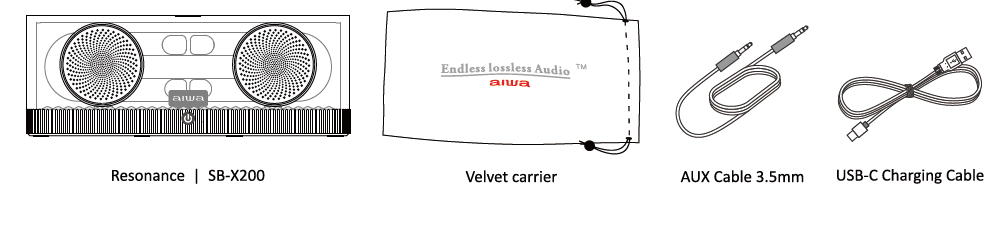
Unboxing
Please refrain from using any damaged components. Contact your local authorised aiwa distributor/customer service.
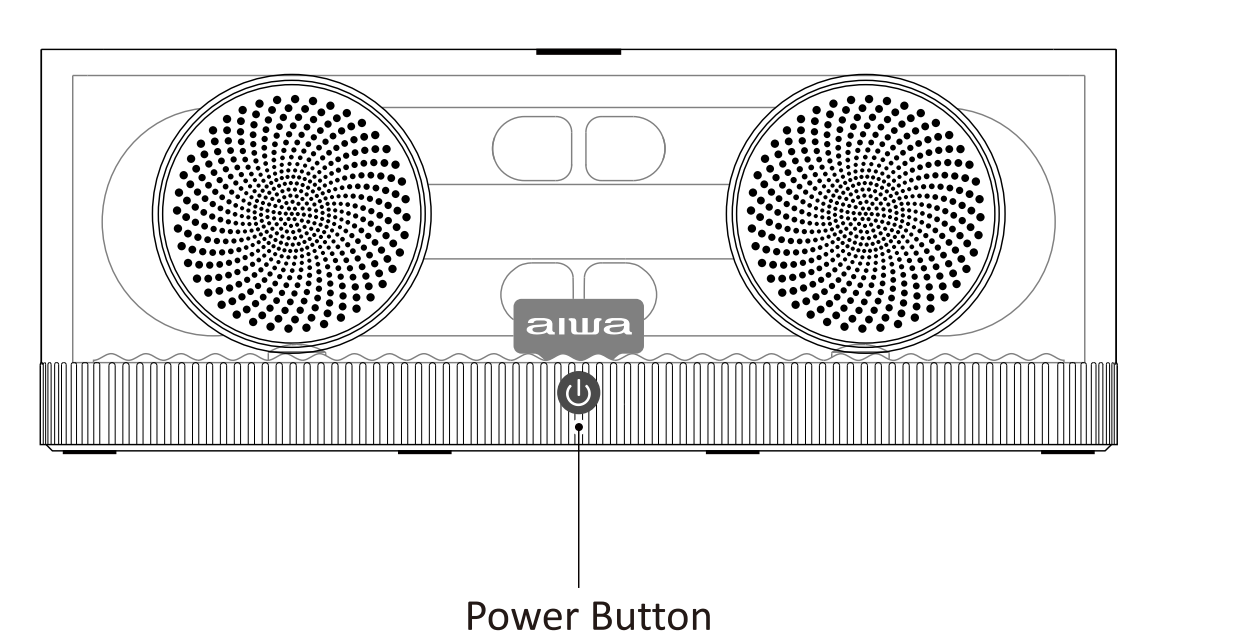
Device Walkthrough - Power ON / OFF
- Hold down for 5 seconds.
- The “aiwa” logo illumination (Multi-Color) indicates the device is turned on.
- Auto-shutdown activates within 30 minutes of inactivity.
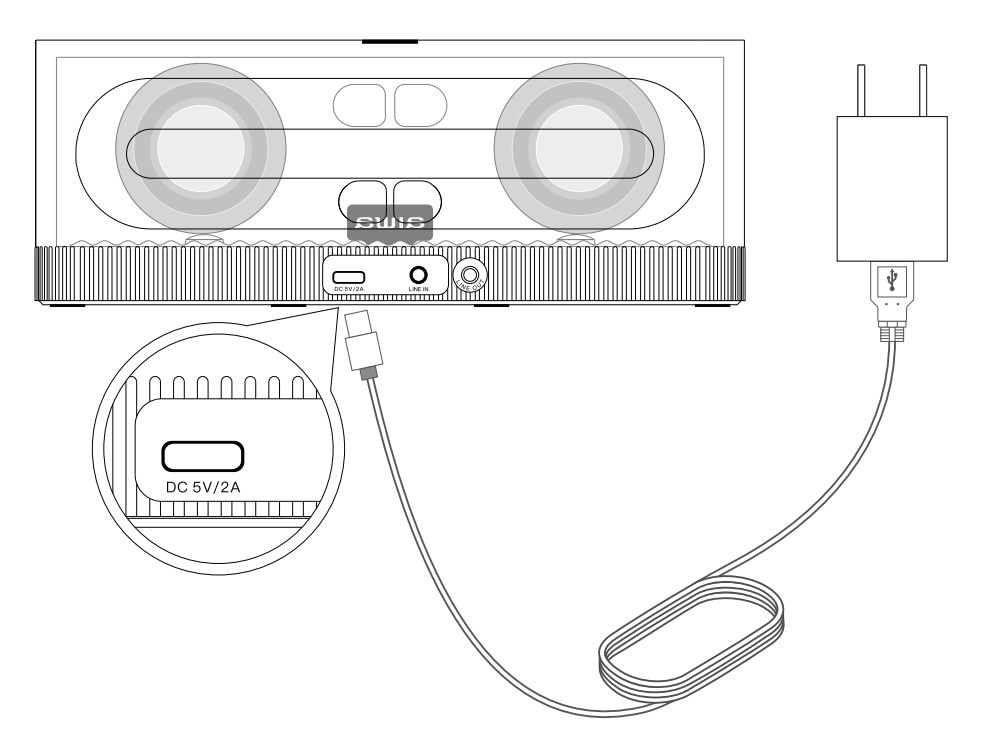
Device Walkthrough - Battery & Charging
- Connect the USB-C charging cable to a power converter (recommended 100V–240V) as shown.
- Charging Time: Approx. 3.5 hours.
- Playback Time: Approx. 8 hours, depending on playback volume.
- Stable red “aiwa” logo illumination indicates the device is charging.
- The “aiwa” logo illumination turns off when the device is fully charged.
- Flashing red “aiwa” logo illumination indicates low battery.
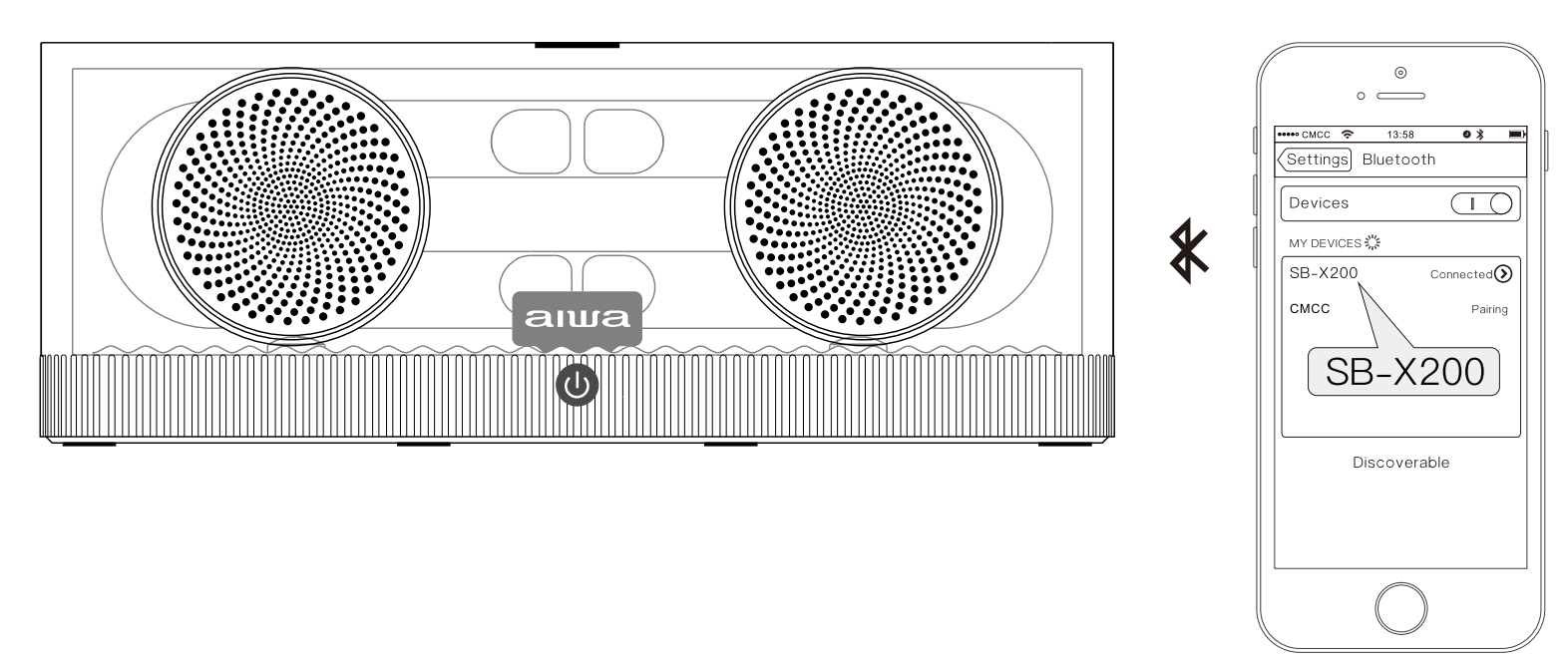
- Power ON the SB-X200.
- The SB-X200 is now ready to be paired.
- Turn on your Bluetooth device and search for “SB-X200”.
- Connect to “SB-X200”.
- A “Beep” sound indicates a successful Bluetooth connection.
- Flashing multi-coloured “aiwa” logo illumination indicates unconnected status.
- Stable multi-coloured “aiwa” logo illumination indicates connected status.
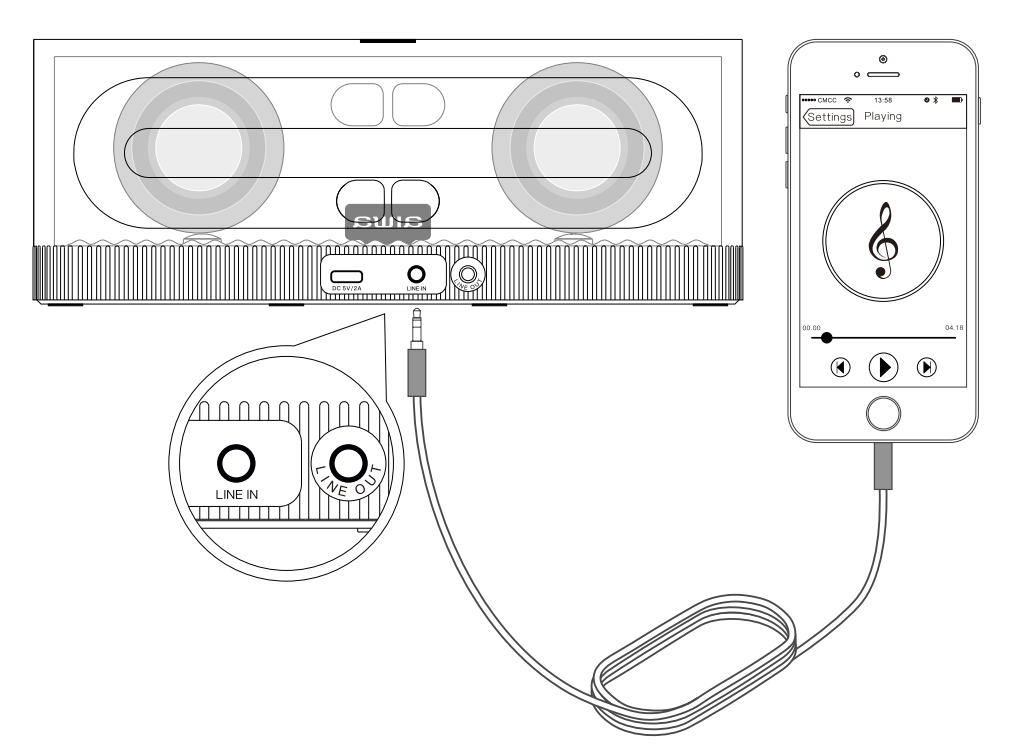
Device Walkthrough - Playback (Line-in, Line-Out)
- Line-In (External Audio Source): Power on the SB-X200 and connect the external audio source to the speaker using a 3.5 mm AUX cable.
- Line-Out (Output Audio to External Source): Audio is transmitted from the SB-X200 to another device using a 3.5 mm AUX cable.
- Bluetooth playback will be prioritised if Bluetooth playback and Line-In playback are used simultaneously.
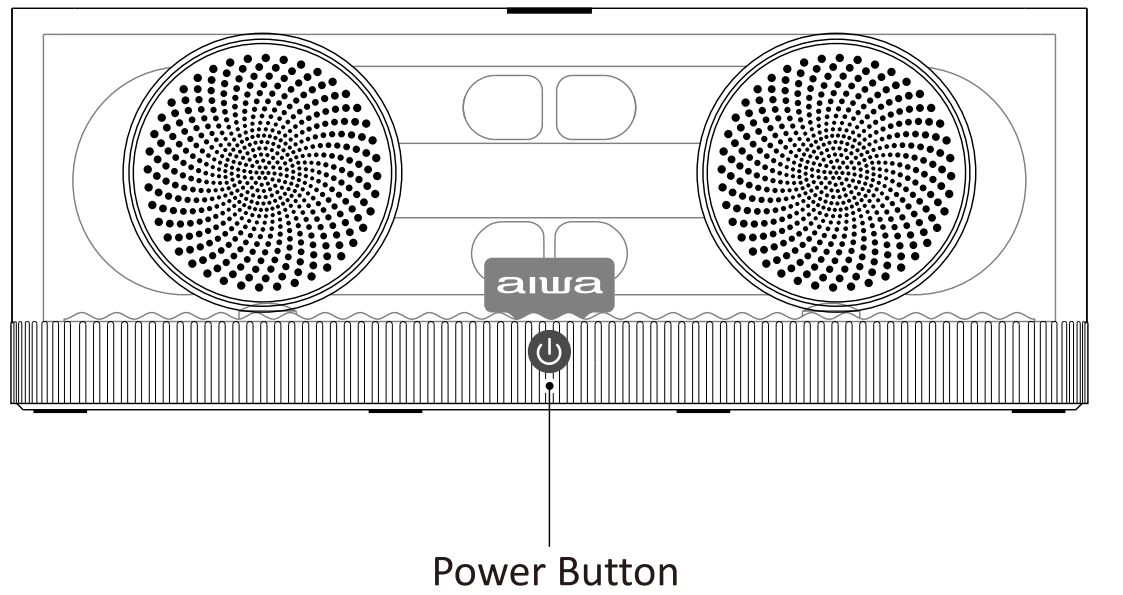
Device Walkthrough - Playback control
- Short click to pause playback.
- Double click to turn the “aiwa” logo illumination OFF/ON.
- Wipe the SB-X200 with a soft, dry cloth.
- Do not use any corrosive chemicals to clean the SB-X200.
- Do not allow any liquids to enter any openings.
Optimum Speaker Placement Guidelines
- The SB-X200 is recommended for indoor use.
- The SB-X200 is recommended for use in a small to medium-sized room.
- The SB-X200 should be positioned facing the user.
- Place the SB-X200 on a hard, non-slip surface.
- The SB-X200 is recommended to be positioned in the corner of the room.
- For optimum bass response, place the dual acoustic tube construction at the rear of the SB-X200 approximately 12–25 cm away from any vertical surface.
Troubleshooting Aiwa SB-X200 Resonance Speaker Common Issues
Resolve most problems with the Aiwa SB-X200 Resonance Speaker quickly using these targeted solutions.
- No Power: Check battery charge; recharge if the LED is dim. Replace the lead-acid battery if depleted after extended use.
- Bluetooth Not Connecting: Forget the device in phone settings, press the Bluetooth button to re-pair, and ensure Bluetooth compatibility.
- Poor Sound Quality: Reset via app or power cycle; avoid interference sources. Clean resonance tubes if muffled.
- No Display/App Issues: Update the app or firmware if available and restart the speaker. Error codes may indicate low battery—charge immediately.
- Overheating: Pause use and allow the speaker to cool in a shaded area; avoid direct sunlight.
SB-X200 Cannot Be Turned On
- The battery may be in battery protection mode or completely discharged.
- Connect the SB-X200 to an active power source to recharge the battery.
SB-X200 Cannot Be Paired / Connected
- Make sure the SB-X200 is in unconnected (discoverable) mode.
- Make sure Bluetooth is turned on on your device.
- Move your device closer to the SB-X200.
- If possible, turn off nearby Bluetooth devices.
- Restart the speaker and your device, then try pairing again.
- Forget “SB-X200” on your device before re-pairing.
SB-X200 Shows Connected but No Music Plays
- Make sure your device is not muted.
- Your device may be out of range; move it closer to the SB-X200.
- Restart both devices.
- Re-pair both devices.
- Forget “SB-X200” on your device before pairing again.
For warranty support, typically 1 year, contact Aiwa service through official regional channels or local retailers. Preventive measures include regular charging and dust-free storage. Use the regional support email or hotline listed on your purchase receipt.
Pros & Cons of Aiwa SB-X200 Resonance Speaker
Pros
- Exceptional bass via Resonance Tube and Ferro-fluid Technology—users report "room-shaking" lows.
- Versatile connectivity (Bluetooth 5.0, multiple inputs) for parties and performances.
- Long battery life with 15Ah capacity, ideal for all-day events.
- One-button ease and app control enhance usability over basic speakers.
- Great value at $150-$250, outperforming cheaper alternatives in power.
Cons
- Lead-acid battery is heavier than lithium options in ultra-portable rivals.
- Limited color choices; bulkier design is not ideal for ultra-compact needs.
- App may lag on older phones—specific example: Android 9 users report delays.
- Bass-heavy profile may overpower mids for audiophiles seeking balance.
Overall, excellent value for bass lovers compared to JBL or Sony portables.
Customer Reviews for Aiwa SB-X200 Resonance Speaker
Customers rave about the Aiwa SB-X200 Resonance Speaker, averaging 4.5/5 stars on Shopee and Lazada. "Insane bass from resonance tech—perfect for BBQs!" praises one user (5 stars). Common praises include Bluetooth stability and party-ready volume, with many recommending for karaoke. Complaints focus on weight (4 stars: "Great sound, but heavy to carry"). Frequently mentioned: Reliable app control fixes minor glitches. Highly recommended for budget bass enthusiasts—90% repurchase rate in reviews.
Faqs
How do I set up the aiwa SB-X200 Resonance Speaker for the first time?
Why won't my aiwa SB-X200 Resonance Speaker pair with Bluetooth and how to fix it?
What are the key features of the aiwa SB-X200 Resonance Speaker and how do they enhance audio?
Is the aiwa SB-X200 Resonance Speaker compatible with my smartphone or TV?
How can I optimize performance and bass on aiwa SB-X200 Resonance Speaker?
How do I clean and maintain the aiwa SB-X200 Resonance Speaker properly?
What if the sound is distorted on my aiwa SB-X200 Resonance Speaker during playback?
How long does the battery last on aiwa SB-X200 Resonance Speaker and how to check?
Tags
More aiwa manuals
- Setup & Pairing: Aiwa AT-X80E True Wireless Earphones User Manual
- Setup: Aiwa BR412BK AudioConnect Adapter User Manual
- Setup: Aiwa SB-X120 Portable Bluetooth Speaker User Manual
- Setup & Pairing: Aiwa R-190BW and R-190RD Portable Radios Owner Manual
- Setup: Aiwa SB-X150 Portable Bluetooth Speaker User Manual
- Setup: Aiwa AA-QC51 Multi-port Fast Charger User Manual
Leave a Comment