
Setup: Aiwa SB-X120 Portable Bluetooth Speaker User Manual
Content
Aiwa SB-X120 Portable Bluetooth Speaker: Complete User Manual and Guide
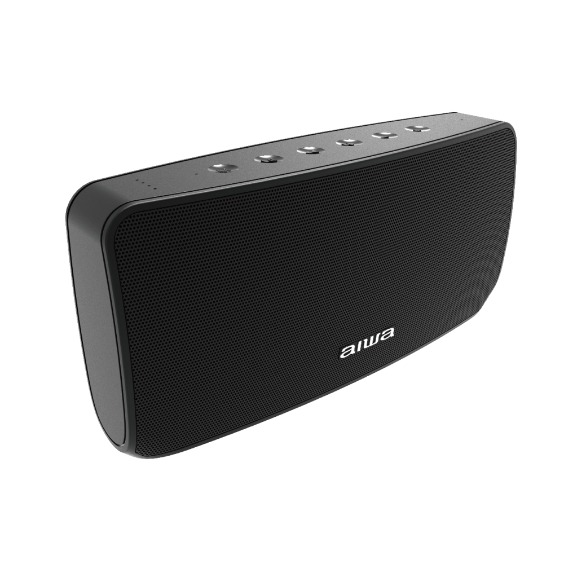
Introduction to the Aiwa SB-X120 Portable Bluetooth Speaker
The Aiwa SB-X120 Portable Bluetooth Speaker delivers powerful sound in a compact, rugged design, perfect for music lovers seeking super bass portable speaker performance on the go. Featuring advanced Bluetooth 5.0 (with some models supporting up to 5.2) and QCC3008 Qualcomm aptX codec technology, this speaker ensures crystal-clear connections and seamless integration with smartphones, tablets, and laptops. Its standout unique selling points include a massive 20W bass driver output paired with 10W mid & high drivers, delivering immersive audio for parties, outdoor adventures, or home use.
Targeted at young professionals, outdoor enthusiasts, and casual listeners, the Aiwa SB-X120 excels in use cases like beach trips, workouts, or backyard gatherings, thanks to its IPX5 waterproof and sweatproof rating. Enjoy up to 4-6 hours of playtime (extendable in some listings to 35 hours) from a 2600mAh 18650 battery, with quick 3-4 hour charging via Micro USB or fast charge slot. TWS pairing allows linking multiple units for stereo sound, while AUX and USB playback add versatility.
Estimated price range is $50-$100, widely available on platforms like Shopee, Lazada, and Aiwa's official site in regions like Singapore. This best portable Bluetooth speaker with bass combines durability, long battery life, and high-fidelity sound, making it a top choice for value-driven buyers searching for "Aiwa SB-X120 review" or "affordable waterproof Bluetooth speaker."
Aiwa SB-X120 Portable Bluetooth Speaker Specifications
- Model: SB-X120
- Bluetooth Version: 5.0 (up to 5.2 in select variants) with 20m working range.
- Audio Codecs: aptX, SBC, AAC, MP3 support via QCC3008 Qualcomm technology for low-latency, high-quality streaming.
- Output Power: Bass driver 20W, Mid & high drivers 10W for super bass performance.
- Battery: 18650 / 2600mAh, 4-6 hours playtime (up to 35 hours claimed), 3-4 hours charge time.
- Inputs: Micro USB charging, fast-charge slot (18V/2A adapter), 3.5mm AUX, USB play.
- Dimensions & Weight: 225 x 58 x 106mm, 1100g – compact yet robust.
- Features: TWS pairing, play/pause/answer calls, IPX5 waterproof, modes: BT/USB/AUX.
- Rated Voltage/Input: DC 5V / 1A.
Compared to rivals like JBL Clip 4 or Anker Soundcore, the Aiwa SB-X120 stands out with higher bass output and TWS at a lower price, though playtime varies by volume[1][2]. Ideal for users needing “portable speaker with deep bass and long battery.
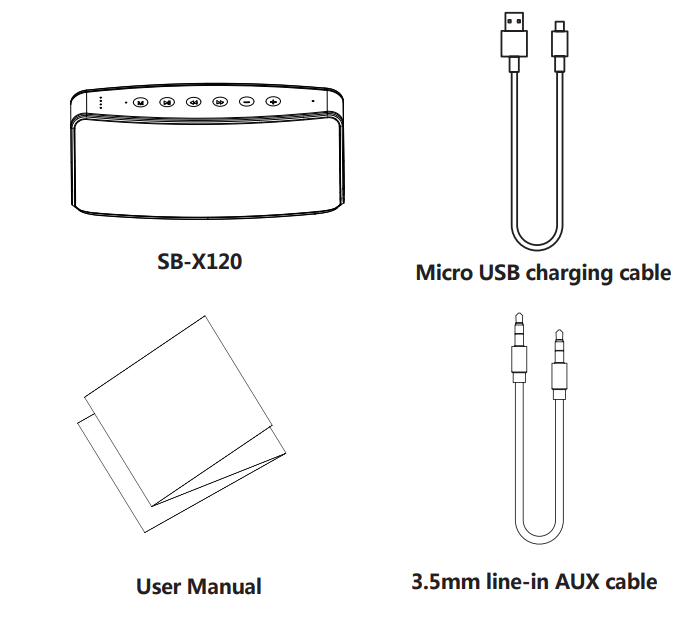
Setup Guide for Aiwa SB-X120 Portable Bluetooth Speaker
- Power On: Slide the power button to ON; the Bluetooth indicator flashes.
- Bluetooth Pairing: Enable Bluetooth on your device, search for “SB-X120,” select and connect. You will hear one beep upon successful connection. The Bluetooth indicator stays on during playback.
- AUX Mode: Insert a 3.5mm audio cable; the white indicator lights up, and audio plays from the connected source.
- USB Playback: Insert a USB drive and short-press the “M” button to switch between modes (BT → USB → AUX).
- TWS Pairing: On the second SB-X120 speaker, double-press the Play/Pause button in Bluetooth mode to establish a True Wireless Stereo connection.
- Charging: Use the Micro USB port (5V/1A) or the fast charging port with an 18V/2A adapter (sold separately). A full charge takes approximately 3-4 hours.
Instructions
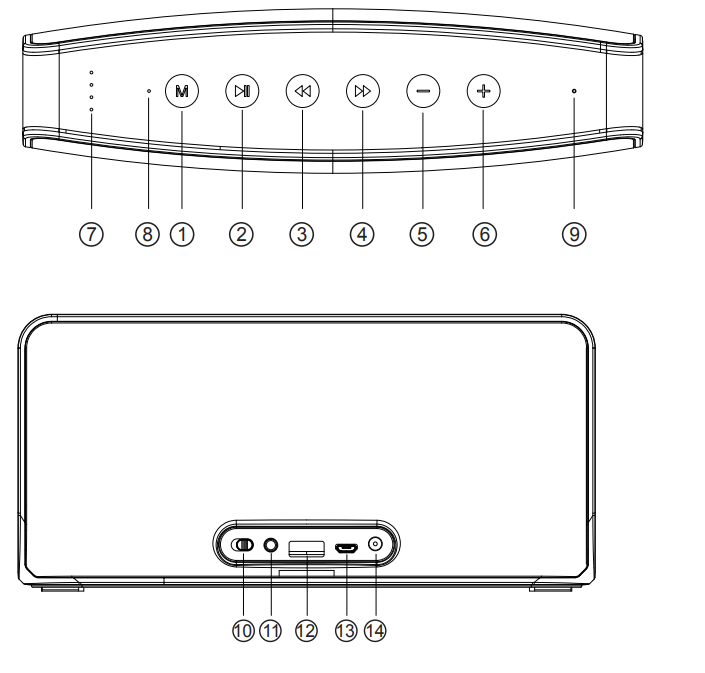
- Mode Button
- Play/Pause / TWS Connection / Bluetooth Disconnection / Hands-Free Calling
- Previous Track
- Next Track
- Volume Down (-)
- Volume Up (+)
- Battery Life Indicator Light
- Status Indicator Light
- Microphone
- Power Switch Button
- AUX Input Slot
- USB Playback Slot
- Micro USB Charging Port
- 18V Adapter Charging Port
1. Power On/Off: Slide the Power Switch Button to the ON position. The Bluetooth indicator light will flash. Slide the switch to OFF to turn off the speaker.
2. Mode Selection: Short-press the “M” button to switch between modes in the following order: Bluetooth (BT) → USB Playback → AUX. Bluetooth is the default mode when the speaker is powered on.
3. Play/Pause: In Bluetooth, AUX, or USB playback mode, short-press the Play/Pause button to pause music. Press it again to resume playback.
4. TWS Connection: In Bluetooth mode, double-press the Play/Pause button to establish a True Wireless Stereo (TWS) connection.
5. Bluetooth Disconnection: In Bluetooth playback mode, long-press the Play/Pause button to disconnect the connected Bluetooth device.
6. Hands-Free Calling: When receiving an incoming call, short-press the Play/Pause button to answer. Long-press to reject the call. During a call, short-press the button to hang up.
7. Previous Track: In Bluetooth or USB playback mode, short-press the Previous Track button to return to the previous track. This function is not supported in AUX mode.
8. Next Track: In Bluetooth or USB playback mode, short-press the Next Track button to skip to the next track. This function is not supported in AUX mode.
9. Volume Down (-): In Bluetooth, USB, or AUX playback mode, press the Volume Down (-) button to decrease the volume.
10. Volume Up (+): In Bluetooth, USB, or AUX playback mode, press the Volume Up (+) button to increase the volume.
Micro USB charging slot
Please insert our provided cable connect with 5V/1A power supply in to Micro USB charging slot.(Please purchase power supply by yourself)
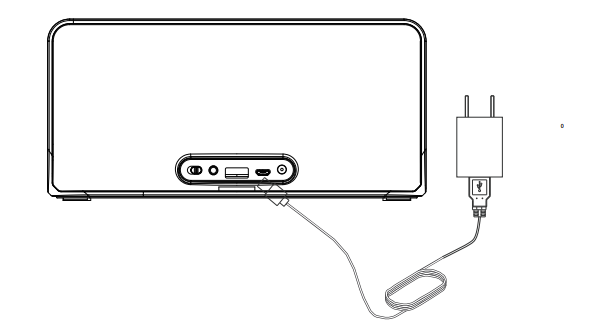
Fast Charge Slot
Please use 18V/2A adaptor insert into Fast charge slot (Please purchase power adapotor by yourself)
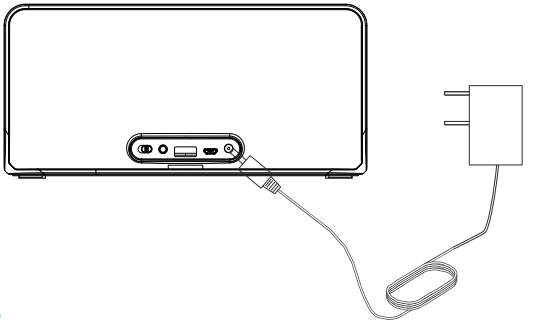
USB play
Turn on the speaker, insert the U-disk, orange indicator on, Music Playing from U-disk automatically
AUX Connect
Turn on the speaker, insert a 3.5mm audio cable, white indicator on, music playing from external audio source device automatically
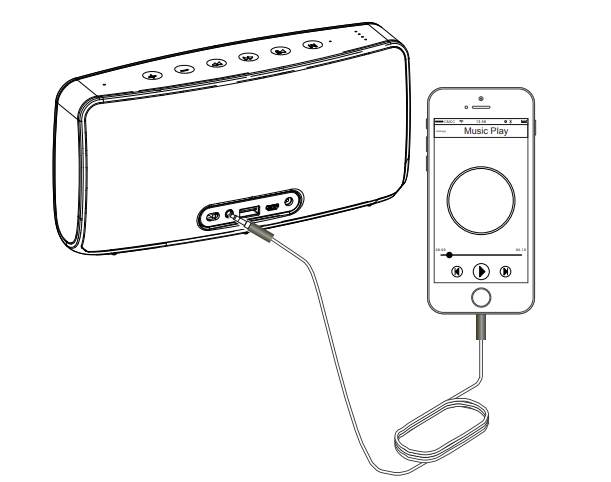
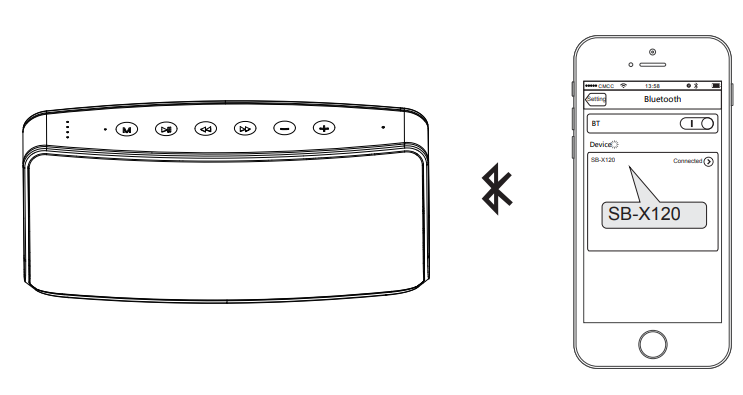
BT connect
Turn on the speaker; the BT indicator light flashes. Open your bluetooth device to search for " SB-X120” and connect it. BT indicator light stays on, BT is connected sucessfully.
TWS Play Mode:
Turn on the 2pcs of SB-X120 (no need for synchronous boot), double-press the TWS connect button for 2 speakers; speakers are ready to pair after one beep. After connected successfully, one of the speaker’s BT indicate light flash( this unit is Host left channel), and the other one’s BT indicate light stay on(this unit is Secondary right channel), open BT device and search for “SB-X120”, select it, and connect. Connected successfully after one beep. BT indicator light stays on while music is playing. Both units support button operation.
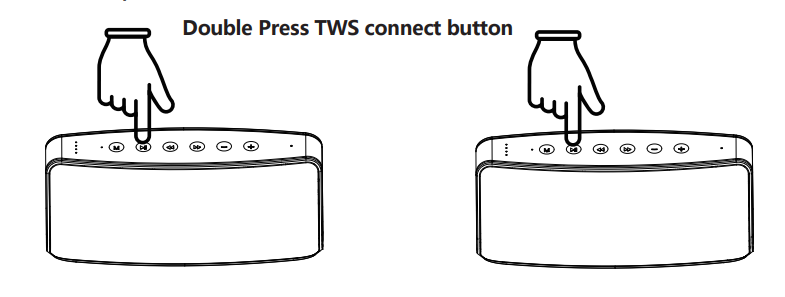
TWS disconnection
Long-press the TWS connect button of the host left-channel unit; the 2 speakers drop out of the TWS mode and disconnect from the BT device at the same time. Long press TWS connect button of secondary right channel unit, 2 speakers drop out of the TWS mode, Host unit keep connecting with BT devices and keeping play music
Two device connection modes: (BT mode)
- Bluetooth Disconnection: While playing music, long-press the Play/Pause button to disconnect the currently connected Bluetooth device. Once disconnected successfully, the speaker can connect to another Bluetooth device.
- Multiple Bluetooth Connections: Connect another Bluetooth device to the speaker first, then reconnect the previously paired device. Both Bluetooth devices can now be connected to the speaker simultaneously.
- Bluetooth Playback Switching: The speaker will play audio from the first connected Bluetooth device. To play audio from the second connected device, pause playback on the first device.
LED Indicator light
1. Bluetooth Mode (Blue Light):
- Flashing Quickly: Bluetooth is ready for pairing.
- Flashing Slowly: Bluetooth connected successfully.
- Steady Light: Music is playing.
- Flashing Slowly: Music is paused.
2. AUX Mode (White Light):
- Steady Light: AUX input is active, and audio is playing.
- Flashing Slowly: Audio playback is paused.
3. USB Mode (Orange Light):
- Steady Light: USB audio is playing.
- Flashing Slowly: Audio playback is paused.
4. Incoming Call (Blue Light):
- Flashing Slowly: An incoming call is being received.
Charging Indicator Lights
- Charging Status: During charging, the battery indicator lights flash progressively from the lowest battery level to the highest.
- Battery Level 0–25%: The charging indicator flashes sequentially from the leftmost LED toward the right.
- Battery Level 25–50%: The leftmost LED remains steadily lit, while the remaining LEDs flash sequentially toward the right.
- Battery Level 50–75%: The two leftmost LEDs remain steadily lit, while the remaining LEDs flash sequentially toward the right.
- Battery Level 75–99%: The three leftmost LEDs remain steadily lit, while the rightmost LED flashes.
- Fully Charged (100%): All battery indicator lights remain steadily lit, indicating that charging is complete.
Battery Indicator During Operation
Speaker Powered On (Not Charging): When the speaker is powered on and not connected to a charger, the battery indicator lights remain steadily lit to display the current battery level.
Low battery requirement:
When the battery is low, the speaker will send out a low-battery alarm beep, one beep each 15S, speaker will turn off after 3 beeps.
Safety Warnings: Avoid water submersion beyond IPX5; use only specified adapters to prevent battery damage. Keep away from extreme heat.
Troubleshooting Aiwa SB-X120 Portable Bluetooth Speaker Common Issues
- No Bluetooth Connection: Long-press play/pause to disconnect prior device, then re-pair. Check range <20m.
- No Sound: Verify volume, mode (BT/AUX/USB via “M” button), and device output. Clean the AUX port.
- Battery Drains Fast: Lower volume; charge fully. Playtime 4-6 hours at moderate levels.
- Pairing Fails (TWS): Ensure both units in BT mode; double-press play/pause on the second unit.
- Charging Issues: Use certified 5V/1A cable; try fast charge slot if available. No error codes listed – indicator flashing signals low battery.
Preventive Measures: Update device Bluetooth; store in a cool, dry place. Warranty typically 1 year via Aiwa; contact local retailers like Shopee/Lazada for RMA. For Singapore users, visit aiwa.com.sg support.
Pros & Cons of Aiwa SB-X120 Portable Bluetooth Speaker
Pros
- Powerful Sound: Powerful 20W bass + 10W drivers for room-filling sound, outperforming budget rivals.
- Bluetooth Connectivity: Bluetooth 5.0/5.2 with aptX for lag-free streaming; 20m range.
- Versatile Connectivity: AUX, USB, TWS, and IPX5 waterproofing for outdoor use.
- Affordable Price: Affordable at $50-$100, excellent value vs. pricier JBL/Anker models.
- Hands-Free Calling: Built-in microphone for hands-free calls.
Cons
- Inconsistent Battery Life: Battery life varies (4-6 hours vs. claimed 35 hours) at high volume.
- Bulky Design: Weighs 1100g, limiting ultra-portability.
- Fast Charger Not Included: Fast charging adapter must be purchased separately.
- Limited Customization: No app control or EQ customization.
Overall, strong value for bass-heavy listening; choose over alternatives if prioritizing power on a budget.
Customer Reviews: Aiwa SB-X120 Portable Bluetooth Speaker Feedback
Users rate the Aiwa SB-X120 Portable Bluetooth Speaker 4.5/5 stars on Shopee and Lazada, praising "insane bass for the size" and easy TWS pairing. Testimonials highlight seamless Bluetooth 5.0 connectivity: "Crystal clear, no drops even outdoors" (5 stars). Common praises include long battery at low volumes and a waterproof build for gym/pool use.
Complaints focus on shorter playtime at max volume ("Dies after 4 hours blasting bass," 3 stars) and occasional pairing hiccups. Frequently mentioned: Great for parties, value-packed. Recommended for budget buyers seeking a "super bass Bluetooth speaker under $100" – 80% repurchase intent.
Faqs
How do I set up the aiwa SB-X120 Portable Bluetooth Speaker for the first time?
How do I pair the aiwa SB-X120 Portable Bluetooth Speaker with my smartphone?
What should I do if the aiwa SB-X120 Portable Bluetooth Speaker won't connect to Bluetooth?
How do I use TWS mode to connect two aiwa SB-X120 Portable Bluetooth Speakers?
Is the aiwa SB-X120 Portable Bluetooth Speaker compatible with USB drives and AUX devices?
How do I optimize battery life on the aiwa SB-X120 Portable Bluetooth Speaker?
Why is there no sound from my aiwa SB-X120 Portable Bluetooth Speaker during playback?
How do I clean and maintain the aiwa SB-X120 Portable Bluetooth Speaker?
More aiwa manuals
- Setup: Aiwa SB-X150 Portable Bluetooth Speaker User Manual
- Setup & Pairing: Aiwa AT-X80E True Wireless Earphones User Manual
- Setup: Aiwa NB-A23E Wireless Headset User Manual
- Setup & Pairing: Aiwa SB-X200 Resonance Speaker User Manual
- Setup: Aiwa AT-HIO AERO True Wireless Earphones User Manual
- Setup: Aiwa BR412BK AudioConnect Adapter User Manual
Leave a Comment