
Alienware AW510M RGB Gaming Mouse User Manual
Content
Alienware AW510M RGB Gaming Mouse Review and Manual
Introduction
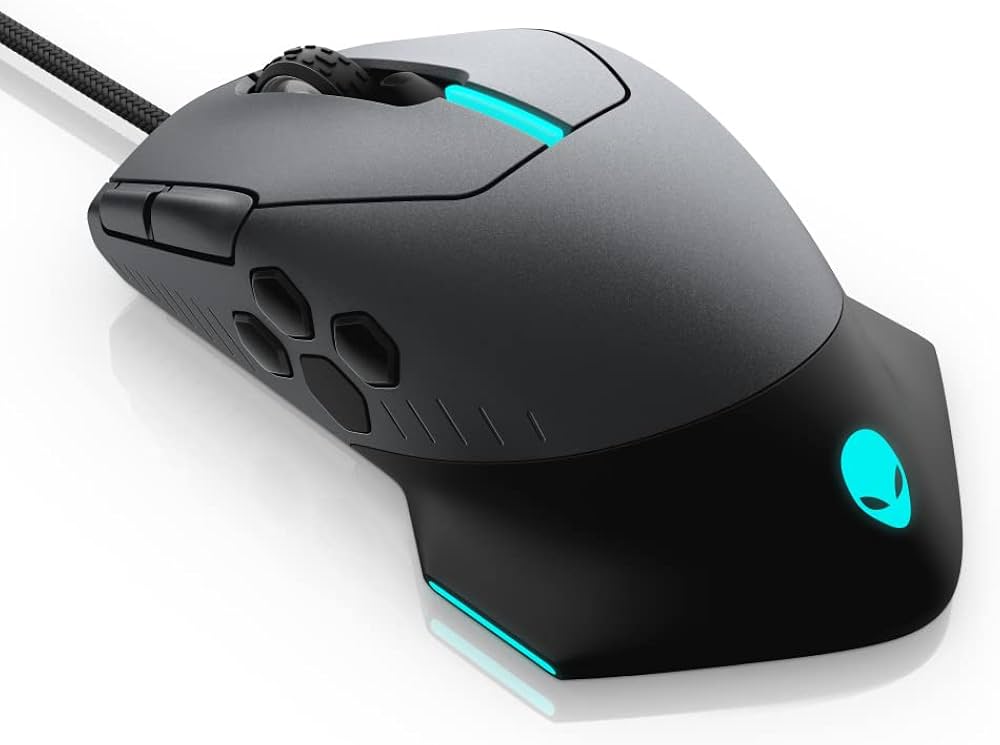
The Alienware AW510M RGB Gaming Mouse is a wired gaming mouse designed for players who want high-precision tracking, customizable controls, and AlienFX lighting in a sleek right-handed shell. Built around a 16,000 DPI optical sensor, it appeals to competitive gamers, MMO players, and everyday PC users who want fast response times and consistent performance in shooters, strategy titles, and productivity tasks. The Alienware AW510M RGB Gaming Mouse stands out with its programmable button layout, adjustable scroll wheel tension, and onboard profile support, making it easy to tailor the mouse for different games and workflows.
This model is especially useful for users who prefer a dependable wired connection over wireless convenience. Its 10-button design gives extra control for macros, weapon switching, or browser shortcuts, while the AlienFX RGB lighting adds a premium gaming aesthetic that matches Alienware desktops and laptops. The mouse is also known for its comfortable, medium-to-large shape, which suits palm and claw grip styles better than ultra-compact esports mice.
In the current market, the Alienware AW510M RGB Gaming Mouse typically falls in the mid-range price bracket, with availability commonly seen around $60 to $80, though pricing can vary by retailer and stock levels. It is widely available through major online electronics sellers and gaming accessory stores. For buyers seeking a feature-rich wired mouse with strong sensor performance and customizable gaming controls, this model remains a solid option.
Specifications
- Sensor: 16,000 DPI optical gaming sensor with adjustable DPI steps for precise sensitivity control.
- Polling rate: 1000 Hz for responsive cursor tracking and low-latency input.
- Buttons: 10 programmable buttons for gaming macros, shortcuts, and custom profiles.
- Lighting: AlienFX RGB illumination with customizable effects and color profiles.
- Connectivity: Wired USB connection for stable, interruption-free performance.
- Scroll wheel: Adjustable wheel resistance with 12-step and 24-step options.
- Shape: Right-handed ergonomic design suited to palm and claw grip users.
- Weight: Approximately 91 grams, giving it a balanced feel rather than an ultra-light design.
- Cable: Braided cable with roughly 2 meters of length.
- Dimensions: About 133.7 mm long, 77.6 mm wide, and 49.2 mm high.
Compared with lightweight esports mice, the Alienware AW510M RGB Gaming Mouse is heavier but offers more customization and a richer feature set. Compared with many general-purpose gaming mice, it provides stronger RGB integration, more programmable controls, and a more premium feel for Alienware-focused setups.
Pros & Cons
Pros
- Excellent sensor performance: The 16,000 DPI optical sensor delivers accurate tracking for FPS and MOBA gameplay.
- Highly customizable: Programmable buttons and adjustable DPI levels make it easy to build game-specific setups.
- Premium design: The Alienware styling and RGB lighting create a clean, modern gaming look.
- Stable wired connection: Ideal for players who want consistent input without charging or wireless latency concerns.
- Good value for feature set: It offers more customization than many similarly priced wired gaming mice.
Cons
- Not ultra-light: At around 91 grams, it may feel too heavy for users who prefer fast flick movements.
- Right-handed only: Left-handed players will need to look elsewhere.
- Wired only: Users wanting wireless freedom may prefer a newer alternative.
- Large shape: Smaller hands may find the body a bit bulky for fingertip grip styles.
For value for money, the Alienware AW510M RGB Gaming Mouse is a strong buy if you want RGB lighting, a precise sensor, and extra buttons in a wired package. If maximum speed and minimal weight matter more, an ultralight gaming mouse may be a better alternative.
Customer Reviews
Overall customer feedback tends to be positive, with many users rating the mouse around 4 out of 5 stars for accuracy, build quality, and customization. Buyers frequently praise the responsive sensor, the comfortable right-handed shape, and the flexible button mapping. The RGB lighting is also a common highlight for users building an Alienware-themed setup.
Common complaints include the mouse’s heavier feel, which some gamers describe as less suitable for competitive FPS play, and the lack of wireless support. A few users also mention that the software experience can feel less streamlined than more polished rival ecosystems. One typical comment is that the mouse feels “solid, accurate, and great for daily gaming,” while another notes that it is “a little heavier than expected but excellent for general use.”
Recommendation: if you want a dependable wired gaming mouse with strong customization and a premium design, the Alienware AW510M RGB Gaming Mouse is worth considering. If you prioritize ultra-light weight or wireless freedom, a newer esports-focused mouse may be a better fit.
Faqs
How do I set up the Alienware AW510M RGB Gaming Mouse for the first time?
Why is my Alienware AW510M RGB Gaming Mouse not being detected by Windows?
How do I change DPI and sensitivity on the Alienware AW510M RGB Gaming Mouse?
Can the Alienware AW510M RGB Gaming Mouse be used for both gaming and work tasks?
What should I do if the buttons on my Alienware AW510M RGB Gaming Mouse feel inconsistent or unresponsive?
How do I customize RGB lighting on the Alienware AW510M RGB Gaming Mouse without affecting performance?
Is the Alienware AW510M RGB Gaming Mouse compatible with Mac or consoles?
How should I clean and maintain the Alienware AW510M RGB Gaming Mouse for long-term use?
More alienware manuals
Leave a Comment