
Setup & Pairing: Amazfit Balance Smart Watch A2286/A2287 User Manual
Content
Amazfit Balance Smart Watch A2286/A2287
Introduction
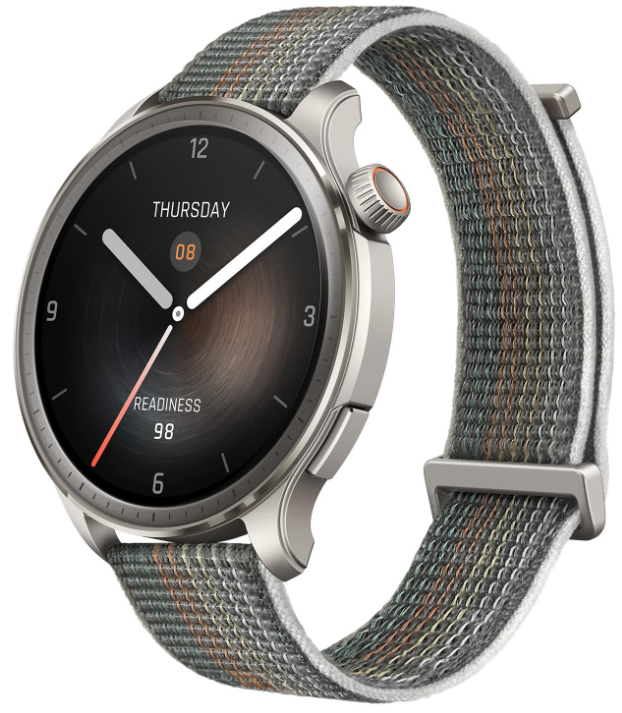
The Amazfit Balance Smart Watch A2286/A2287 is a cutting-edge wearable designed for users seeking a versatile, stylish, and health-focused smartwatch. Equipped with a vibrant 1.5-inch AMOLED display boasting 1500 nits of brightness, this smartwatch delivers clear visuals even under direct sunlight, combining aesthetics with functionality. Unique selling points include ultra-long battery life of up to 14 days, built-in Alexa voice assistant, and advanced health monitoring features such as 24-hour heart rate tracking, blood oxygen saturation measurement, and sleep quality analysis.
Targeted at fitness enthusiasts, tech-savvy professionals, and health-conscious individuals, the Amazfit Balance serves well in daily lifestyle management, sports tracking with over 150+ sports modes, and seamless smartphone connectivity, including Bluetooth calling and music control. It's 5 ATM water resistance extends usability to swimming and outdoor activities, making it a comprehensive companion for active users.
Available in sleek designs with nylon and liquid silicone straps, the watch fits wrists ranging from 140mm to 215mm, catering to diverse preferences. The estimated price range is competitive within the mid-tier smartwatch market, usually around $150 to $200, making it accessible while offering premium features. The watch is broadly available across major retailers and online platforms, including Target and Amazfit’s official store, often eligible for flexible spending accounts (FSA) and health savings accounts (HSA).
Package Contents
Technical Specifications and Features of Amazfit Balance Smart Watch A2286/A2287
- Display: 1.5” AMOLED, 480x480 resolution, 1500 nits brightness for vivid visuals.
- Battery Life: Up to 14 days on typical use; multiple GPS modes with up to 44 hours of GPS tracking.
- Health Monitoring: 24H heart rate, blood oxygen (SpO2) saturation, sleep quality, stress level, and body composition analysis (body fat, muscle mass).
- Sports Modes: 150+ customizable sports modes, including running, cycling, swimming, and strength training.
- GPS: Dual-band GPS supporting 6 satellite systems for precise outdoor tracking.
- Connectivity: Bluetooth calling and texting, music storage and playback, built-in Alexa voice assistant.
- Water Resistance: 5 ATM rating, suitable for swimming and water exposure.
- Compatibility: Supports Android 7.0+ and iOS 14.0+ with Zepp app integration.
- Build and Comfort: Available with nylon or liquid silicone straps; lightweight at 35 grams for comfortable wear.
Basic Parameters
- Product Name: Smart Watch
- Input: DC 5 V 800 mA MAX
- Bluetooth version: V5.0
- Water resistance rating: 5 ATM
- Wi-Fi: 2.4 GHz 802.11 b/g/n
- Wi-Fi frequency: 2402–2480 MHz
- Operating temperature: 0°C to 45°C
- Bluetooth frequency: 2402–2480 MHz
- Wi-Fi output power: <16 dBm
- Bluetooth output power: <18 dBm
- BLE output power: <8 dBm
View product certification information on the watch's Settings > System > Regulatory page.
- Device requirements: Devices installed with Android 7.0 or iOS 14.0 or above OS versions
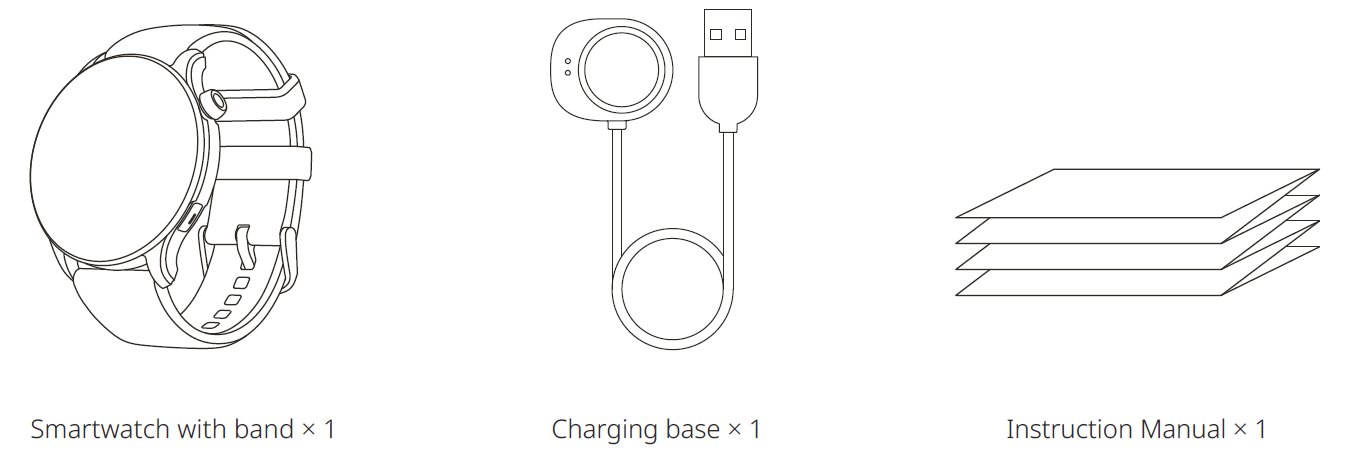
- Package Contents: Smartwatch with the band, Charging base, Instruction manual
Please refer to the watch user interface to see the software version.
Compared to similar smartwatches in the mid-range category, the Amazfit Balance offers a superior balance of battery life and health features, especially with its AI-powered Zepp Coach™ for personalized training guidance, setting it apart from competitors like the Fitbit Versa or Samsung Galaxy Watch Active models.
About the Watch
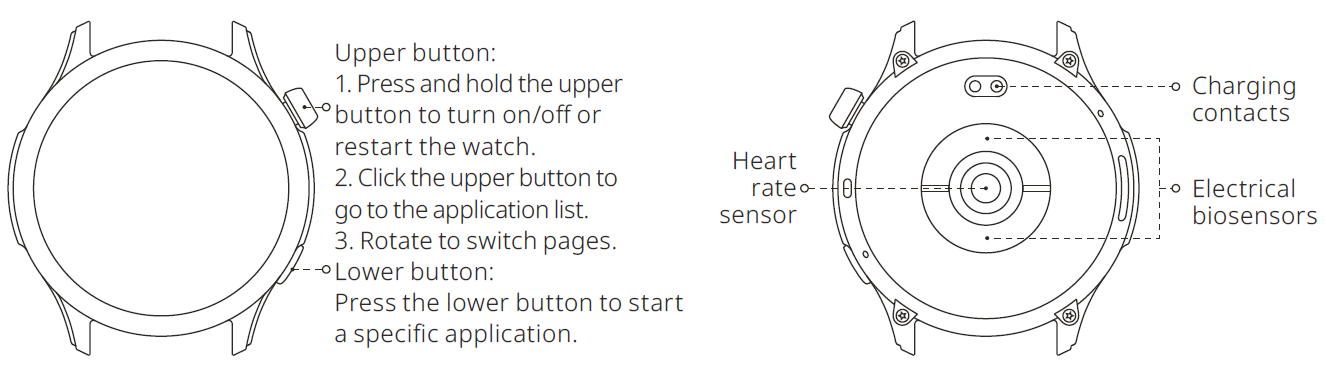
Note: If the watch cannot be turned on by pressing and holding the upper button, charge the watch and try again.
Measurement of Body Composition
- Wipe dry the back of the watch and the sides of the buttons.
- Tap on the body composition icon on the main menu screen.
- Enter your weight and tap on confirm.
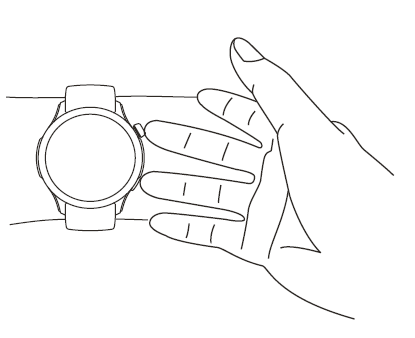
- Follow the on-screen instructions and place two fingers on the digital crown button and the back button to start measuring your body composition. During the measurement, keep your arms parallel to your chest, stable, and avoid any contact with your body for accurate measurement results.
- After the measurement has concluded, 8 types of body composition values can be viewed on the watch: Body fat percentage, muscle mass, BMI, body water percentage, protein percentage, bone salt mass, BMR, and skeletal muscle mass.
Note:
- The function is not intended to diagnose or treat any medical condition, only for health and fitness purposes. Please do not use it for medical purposes. The measurement results are for reference only and should not be used as a basis for diagnosis or treatment.
- Individuals with implanted medical devices such as pacemakers, defibrillators, or other transplant medical devices are prohibited from using the body composition measurement function.
- Since the measurement requires microcurrent to flow through the body, it is not recommended for pregnant women.
- Before measuring body composition, please enter your actual date of birth, gender, actual height, and weight in the personal profile of the Zepp App connected to your smartphone.
- Do not let the two fingers placed on the side buttons touch each other, and also avoid touching other parts of the watch with your fingers (except for the two buttons).
- If your fingers are too dry, the measurement of body composition may fail. In this case, please moisten your fingers with water before measuring.
Charging the Watch
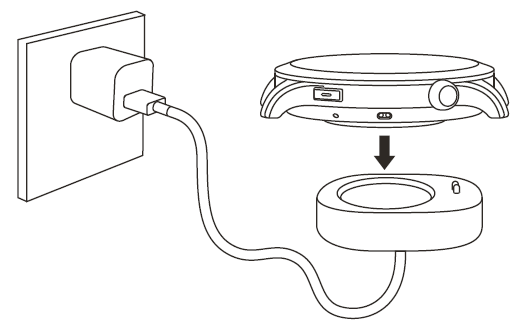
- Connect the watch's charging cable to a power adapter or a computer's USB port.
- Put the watch into the charging base. Pay attention to the direction and position of the watch, and make sure that the metal contacts on the back of the watch fit closely with the charging base.
- When charging starts, the watch screen displays the charging progress.
Disassembling and Assembling the Watch Strap
Please refer to the illustrations to disassemble or assemble the watch strap.
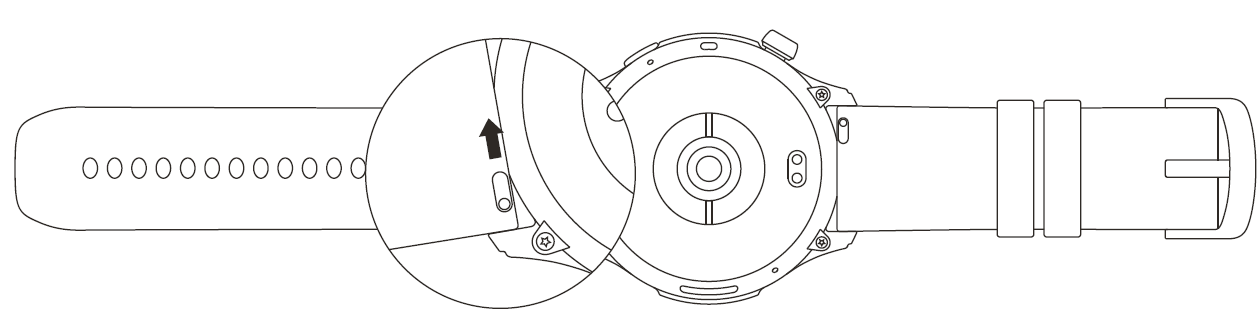
Note: Once the strap is assembled, pull the strap properly to ensure it is installed successfully.
Wearing the Watch
- In order to ensure the accuracy of heart rate, blood oxygen, and other measurements, please wear your watch at a distance of at least one n r away from the carpal, and keep the strap at a comfortable snugness.
- During a workout, please wear it as tightly as possible to ensure that the watch does not shake. Wear your watch at a distance of at least one finger away from the carpal to obtain more accurate heart rate data. After waworkyou can loosen the strap appropriately to ensure a comfortable experience.
- When measuring blood oxygen saturation, wear the watch correctly. Avoid wearing the watch on the wrist joint, keep your arm flat, maintain coa mfortable (appropriately tight) fitting between the watch and the skin of your wrist, and keep your arm still throughout the measurement process.
- Before measuring body composition, please ensure that the surfaces of both buttons and the back sensor area are dry and free from stains. If there is any water or dirt, please wipe it clean before measuring.
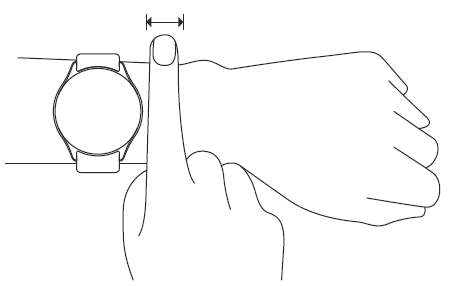
Note: When affected by external factors (arm sag, arm sway, arm hair, tattoo, etc.), the measurement result may be inaccurate or the measurement may fail and provide no output.
Battery Safety
- This device is equipped with a built-in battery that cannot be removed or replaced. Do not disassemble or modify the battery by yourself.
- Disposal of a battery into fire or a hot oven, or mechanically crushing or cutting of a battery, that can result in an explosion.
- Leaving a battery in an extremely high temperature surrounding environment can result in an explosion or the leakage of flammable liquid or gas.
- A battery subjected to extremely low air pressure may result in an explosion or the leakage of flammable liquid or gas.
Safety Notice
- Do not allow children or pets to bite or swallow the product or its accessories, as this may cause injury.
- Do not place this product under excessively high or low temperatures, which may cause the product to catch fire or explode.
- Do not place this product near heat sources or open flame, such as ovens and electric heaters.
- Some people may experience allergic skin reactions to plastics, leathers, fibers, and other materials, and symptoms such as redness, swelling, and inflammation will occur after long-term contact with this product's components. If you experience such symptoms, please discontinue use and consult your doctor.
- Do not use unauthorized or incompatible power adapters or data cables, which may damage the watch and accessories, or cause fire, explosion, or other hazards.
- The radio waves generated by this product may affect the normal operation of implanted medical devices or personal medical devices, such as pacemakers and hearing aids. If you use any such medical devices, consult the manufacturer for relevant usage restrictions.
- Do not dispose of this device or its accessories as ordinary household waste. Please make sure you dispose of or recycle this device and its accessories in accordance with local laws and regulations.
Repair and Maintenance
- Avoid using detergents such as soap, hand sanitizer, bath foam, or lotion for cleaning to prevent chemical residues from irritating the skin, corroding the device, or degrading the water resistance of the device.
- After wearing the device while bathing (for devices that support bathing), swimming (for devices that support swimming), or sweating, please promptly clean and dry the device.
- The leather strap is not waterproof. Avoid getting the strap wet, as this may shorten its service life.
- When using light-colored watch straps, avoid contact with dark clothing to prevent staining.
- Do not wear your watch during snorkeling, hot showers, hot springs, saunas (steam rooms), diving, underwater diving, water skiing, and other activities involving high-speed water currents.
- Do not place the device in direct sunlight for long periods. Excessively high or low ambient temperature may cause device failure.
- Handle with care during transportation. Keep the device dry and away from humidity.
- Do not wear the watch in MRI examinations and other highly magnetic environments. Otherwise, the watch may be damaged.
Troubleshooting Common Issues with Amazfit Balance Smart Watch A2286/A2287
- Issue: The Watch is not charging or is charging slowly.
Solution: Ensure the magnetic charger is correctly aligned; use the original charging cable; clean the charging contacts. - Issue: Bluetooth connection drops.
Solution: Restart both devices; update the Zepp app; keep devices within 10 meters; disable power-saving mode. - Error Codes: Some synchronization errors appear with app updates.
Fix: Reinstall the Zepp app; check for firmware updates via the app; reset the watch if needed. - Health Sensor Inaccuracy: Incorrect heart rate or SpO2 readings.
Preventive: Wear snugly; keep the sensor clean; avoid excessive movement during measurement. - Preventive Measures: Regular firmware updates, proper charging habits, and app maintenance are recommended.
The Amazfit Balance Smart Watch comes with a standard warranty (usually 1 year), and customer support is accessible through Amazfit’s official website, Zepp app, or retailer contact points. For assistance, users can reach Amazfit support via their website or authorized service centers.
Warranty and Return Policy
The Amazfit Limited Warranty covers Amazfit products against manufacturing defects beginning on the original purchase date. The warranty period is 12 months or another specified period as the applicable consumer laws in the consumer’s country of purchase require. Our warranty is in addition to the rights provided by applicable consumer laws.
Official website: en.amazfit.com
Please check the FAQ on the website: https://support.amazfit.com/en.
Note:
- None of the data or measurements is intended for medical diagnosis or medical monitoring.
- If the product is not in use for a long period of time, it is recommended that you power off the product before storing it.
- Recharge the battery every 6 months to 100% to prevent battery damage by over-discharge due to long-term storage.
Pros & Cons of Amazfit Balance Smart Watch A2286/A2287
- Pros:
- Exceptional battery life up to 14 days reduces charging frequency.
- Comprehensive health tracking, including body composition and stress monitoring.
- High-brightness AMOLED display ensures readability in outdoor conditions.
- Robust sports tracking with 150+ modes and precise dual-band GPS.
- Integrated Alexa and Bluetooth calling enhances smartwatch usability.
- Water-resistant design suitable for swimming and daily wear.
- Cons:
- Occasional lag in screen refresh rate during scrolling due to lower refresh display.
- Limited third-party app ecosystem compared to Apple Watch or Wear OS devices.
- Band change options require compatible quick-release straps, which may limit customization.
- Voice assistant function requires a stable internet connection and may vary by region.
- Value for Money: Offers a competitive feature set for its price range ($150-$200), making it a strong candidate for users looking for health and fitness features without premium-tier costs.
Customer Reviews and Feedback on Amazfit Balance Smart Watch A2286/A2287
Users commonly praise the Amazfit Balance Smart Watch A2286/A2287 for its extended battery life and accurate health sensors, especially appreciating the detailed body composition and sleep monitoring features. Many highlight the convenience of built-in Alexa and Bluetooth calls as standout functionalities enhancing everyday use.
Frequent complaints include minor UI lag during navigation and some issues with Bluetooth stability reported under heavy notification loads. The watch's brightness and display quality are often compared favorably against more expensive smartwatches.
Overall, the product holds an average rating of around 4.3 to 4.5 stars across major retail platforms, with users recommending it strongly for fitness enthusiasts and everyday users seeking a balance of functionality and affordability.
More amazfit manuals
- Setup & Pairing: Amazfit Balance 2 Smart Watch User Manual
- Pairing & Setup: Amazfit Bip S Lite Smart Watch Fitness User Manual
- Usage & Setup: Amazfit GTS 3 Smart Watch User Manual
- All functions Explained: Amazfit Bip Lite Setup Guide | Specs & Price
- Setup & Pairing: Amazfit GTR Mini A2174 Smart Watch User Manual
- Setup & Pairing: Amazfit Band 7 Fitness Tracker User Manual
Leave a Comment