
Setup & Pairing: Amazfit GTR Mini A2174 Smart Watch User Manual
Content
Amazfit GTR Mini A2174 Smart Watch
Introduction
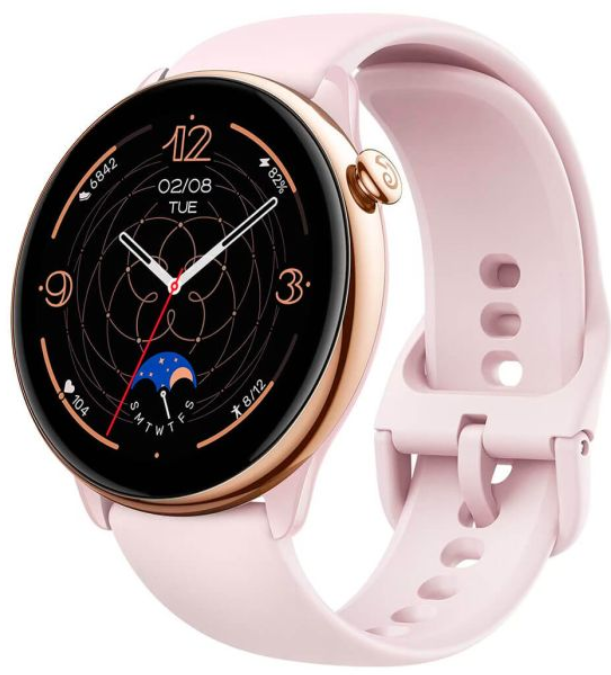
The Amazfit GTR Mini A2174 Smart Watch is a sleek, feature-packed wearable designed for fitness enthusiasts and everyday users alike. This compact smartwatch boasts a vibrant 1.28-inch HD AMOLED display with a high resolution of 326 PPI, ensuring clear visibility even under direct sunlight. It supports over 120 sports modes, continuous heart rate monitoring, SpO₂ tracking, stress level monitoring, and in-depth sleep analysis. The watch is powered by a 280 mAh battery that provides up to 14 days of typical usage, making it an excellent choice for those seeking a low-maintenance fitness companion.
The Amazfit GTR Mini is ideal for individuals looking to track their daily activities, monitor health metrics, and stay connected with notifications for calls and SMS (on Android devices). It is available in three stylish color options: Midnight Black, Ocean Blue, and Pink Mist, all at an affordable price point of around $120. Whether you're a fitness enthusiast or just starting your journey into smart wearables, the Amazfit GTR Mini offers a great balance of functionality and style.
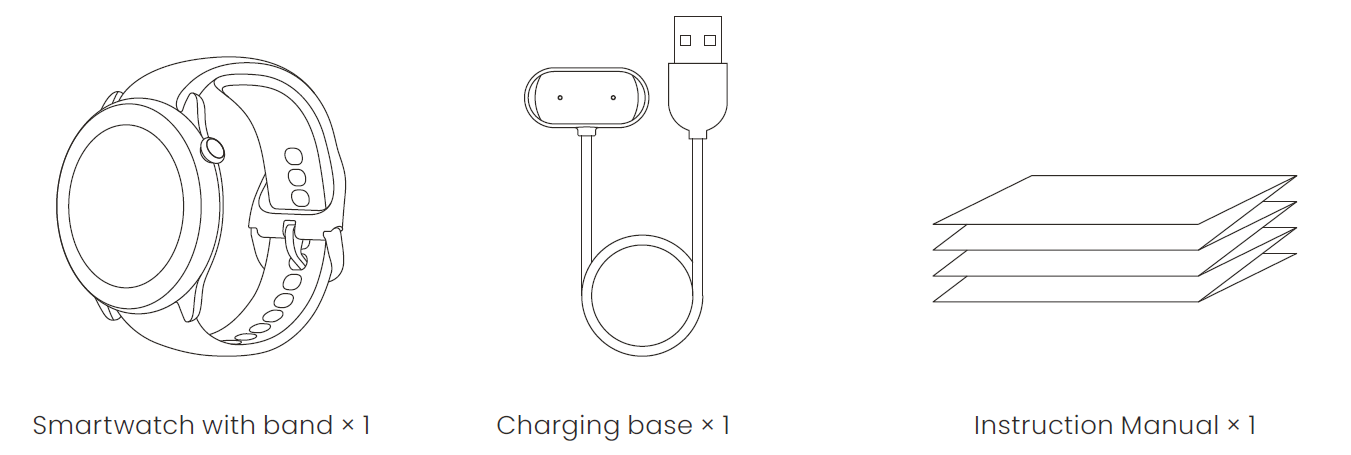
Package Contents
Basic Parameters
- Product Name: Smart Watch
- Product model: A2174
- Input: DC 5 V 500 mA MAX
- Bluetooth version: BLE V5.1
- BLE output power: <5 dBm
- Operating temperature: 0°C to 45°C
- Water resistance rating: 5 ATM
- Bluetooth frequency: 2402–2480 MHz
View product certification information on the watch's Settings > System > Regulation page.
Device requirements: Devices installed with Android 7.0 or iOS 12.0 or above OS versions
About the Watch
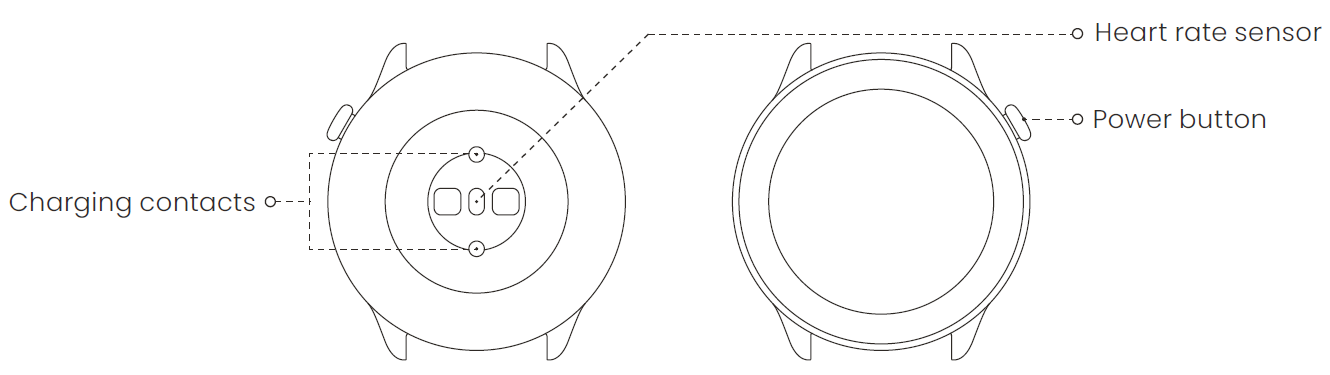
Note: Press and hold the power button to turn on the watch. If the watch cannot be turned on, please charge it and then try again.
Charging the Watch
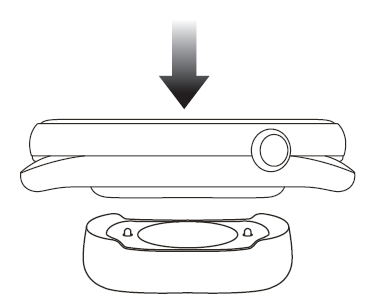
- Connect the watch's charging cable to a power adapter or a computer's USB port.
- Put the watch into the charging base. Pay attention to the direction and position of the watch, and make sure that the metal contacts on the back of the watch fit closely with the charging base.
- When charging starts, the watch screen displays the charging progress.
Note:
- Please use the charging base that comes with the watch.
- Make sure that the charging base is dry before charging.
- Please use a 1A or above power adapter.
Disassembling and Assembling the Watch Strap
Please refer to the illustrations to disassemble or assemble the watch strap.
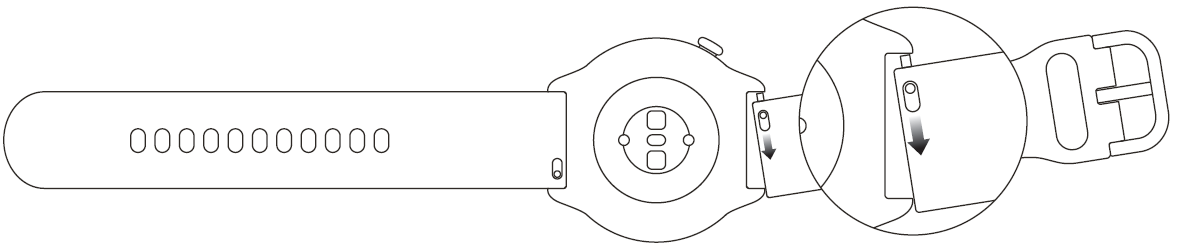
Note: Once the strap is assembled, pull the strap properly to ensure it is installed successfully.
Wearing the Watch
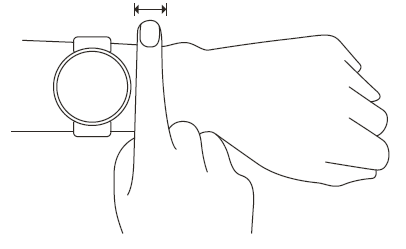
- In order to ensure the accuracy of heart rate, blood oxygen, and other measurements, please wear your watch at a distance of at least one finger away from the carpal, and keep the strap at a comfortable snugness.
- During a workout, please wear it as tightly as possible to ensure that the watch does not shake. Wear your watch at a distance of at least one finger away from the carpal to obtain more accurate heart rate data. After a workout, you can loosen the strap appropriately to ensure a comfortable wear experience.
- When measuring blood oxygen saturation, wear the watch correctly. Avoid wearing the watch on the wrist joint, keep your arm flat, maintain a comfortable (appropriately tight) fit between the watch and the skin of your wrist, and keep your arm still throughout the measurement process.
Battery Safety
- This device is equipped with a built-in battery that cannot be removed or replaced. Do not disassemble or modify the battery by yourself.
- Disposal of a battery into fire or a hot oven, or mechanically crushing or cutting of a battery, that can result in an explosion.
- Leaving a battery in an extremely high-temperature surrounding environment can result in an explosion or the leakage of flammable liquid or gas.
- A battery subjected to extremely low air pressure may result in an explosion or the leakage of flammable liquid or gas.
- Do not drop, hit, squeeze, or puncture the battery, and avoid exposing the battery to large external pressure, which may cause a short circuit and overheating inside the battery.
Safety Notice
- Do not allow children or pets to bite or swallow the product or its accessories, as this may cause injury.
- Do not place this product under excessively high or low temperatures, which may cause the product to catch fire or explode.
- Do not place this product near heat sources or open flame, such as ovens and electric heaters. Some people may experience allergic skin reactions to plastics, leathers, fibers, and other materials, and symptoms such as redness, swelling, and inflammation will occur after long-term contact with this product's components. If you experience such symptoms, please discontinue use and consult your doctor.
- Do not use unauthorized or incompatible power adapters or data cables, which may damage the watch and accessories, or cause fire, explosion, or other hazards.
- The radio waves generated by this product may affect the normal operation of implanted medical devices or personal medical devices, such as pacemakers and hearing aids. If you use any such medical devices, consult the manufacturer for relevant usage restrictions.
- Do not dispose of this device or its accessories as ordinary household waste. Please make sure you dispose of or recycle this device and its accessories in accordance with local laws and regulations.
Repair and Maintenance
- Avoid using detergents such as soap, hand sanitizer, bath foam, or lotion for cleaning to prevent chemical residues from irritating the skin, corroding the device, or degrading the water resistance of the device.
- After wearing the device while bathing (for devices that support bathing), swimming (for devices that support swimming), or sweating, please promptly clean and dry the device.
- The leather strap is not waterproof. Avoid getting the strap wet, as this may shorten its service life. When using light-colored watch straps, avoid contact with dark clothing to prevent staining.
- Do not place the device in direct sunlight for long periods. Excessively high or low ambient temperature may cause device failure.
- Do not wear your watch during snorkeling, hot showers, hot springs, saunas (steam rooms), diving, underwater diving, water skiing, and other activities involving high-speed water currents. Handle with care during transportation. Keep the device dry and away from humidity.
- Do not wear the watch in MRI examinations and other highly magnetic environments. Otherwise, the watch may be damaged.
Troubleshooting
Please check the FAQ on the website: https://support.amazfit.com/en.
If the product is not in use for a long period of time, it is recommended that you power off the product before storing it. Recharge the battery every 6 months to 100% to prevent battery damage by over-discharge due to long-term storage.
12 Warranty and Return Policy
The Amazfit Limited Warranty covers Amazfit products against manufacturing defects beginning on the original purchase date. The warranty period is 12 months or another specified period as the applicable consumer laws in the consumer's country of purchase require. Our warranty is in addition to the rights provided by applicable consumer laws.
- Official website: en.amazfit.com
- Support: support.amazfit.com/en
Pros and Cons of the Amazfit GTR Mini A2174 Smart Watch
Pros:
- Long Battery Life: Up to 14 days on a single charge, ideal for continuous tracking without frequent recharging.
- Comprehensive Health Monitoring: Offers heart rate, SpO₂, stress level, and sleep monitoring for a holistic view of your health.
- Extensive Sports Modes: Supports over 120 sports modes with smart recognition for common activities like walking, running, and cycling.
- Affordable: Priced at approximately $120, making it an excellent value-for-money option in the smartwatch market.
Cons:
- Limited Smartwatch Functionality: No built-in microphone or speaker, limiting direct voice calls and voice assistants.
- Notification Limitations: Users can only respond with preset messages on Android devices.
- Thick Bezel: The watch's design includes a noticeable bezel around the display.
Customer Reviews and Feedback
Users of the Amazfit GTR Mini A2174 Smart Watch often praise its sleek design, long battery life, and robust health monitoring features. Many appreciate the watch's lightweight and comfortable design, making it suitable for all-day wear. However, some users note the lack of advanced smartwatch features like built-in speakers or microphones. Overall, the watch receives positive reviews for its value and functionality.
On platforms like Amazon, the Amazfit GTR Mini typically receives high ratings (4-star average or higher) for its affordability and performance. Customers recommend it for those seeking a basic yet effective fitness tracker and smartwatch.
Faqs
How do I set up and pair my amazfit GTR Mini A2174 Smart Watch with my smartphone for the first time?
Why won't my amazfit GTR Mini A2174 Smart Watch turn on or charge properly?
How can I customize the watch face and widgets on my amazfit GTR Mini A2174 Smart Watch?
What should I do if my amazfit GTR Mini A2174 Smart Watch is not syncing notifications or health data with my phone?
Is the amazfit GTR Mini A2174 Smart Watch compatible with both iPhone and Android devices?
How do I find my phone or watch if I misplace them using the amazfit GTR Mini A2174 Smart Watch?
What maintenance tips can help extend the battery life and overall performance of my amazfit GTR Mini A2174 Smart Watch?
How do I replace or adjust the watch strap on my amazfit GTR Mini A2174 Smart Watch?
More amazfit manuals
- Setup & Pairing: Amazfit Band 7 Fitness Tracker User Manual
- Usage & Setup: Amazfit GTS 3 Smart Watch User Manual
- Setup & Usage: Amazfit X Curved SmartWatch User Manual
- Setup & Pairing: Amazfit Balance 2 Smart Watch User Manual
- Usage & Pairing: Amazfit Active A2211 Smart Watch User Manual
- Setup & Pairing: Amazfit Balance Smart Watch A2286/A2287 User Manual
Leave a Comment