
Setup & Usage: Amazfit X Curved SmartWatch User Manual
Content
Amazfit X Curved SmartWatch
Introduction
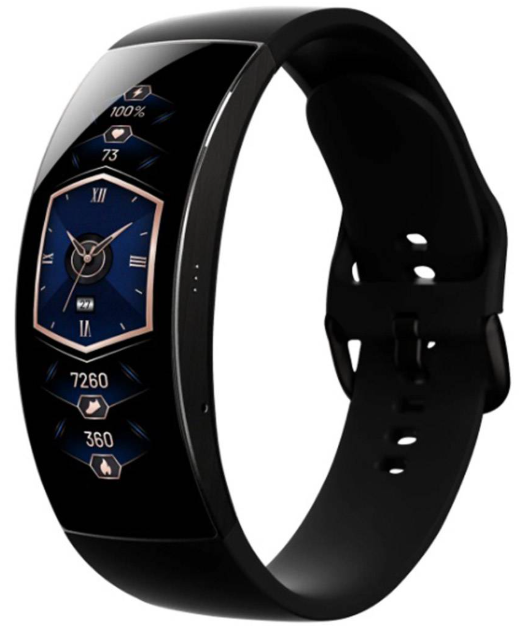
The Amazfit X Curved SmartWatch represents a pioneering leap in wearable technology with its distinctive 92-degree curved AMOLED display that seamlessly wraps around the wrist, offering an immersive 2.07-inch screen space. Crafted with a titanium alloy unibody and a button-free design, this smartwatch combines elegance with cutting-edge durability, making it ideal for business professionals, fitness enthusiasts, and tech-savvy users who demand both style and advanced functionality.
Equipped with the Huami-developed BioTracker™ PPG optical sensor, the device provides precise health monitoring, including heart rate, blood oxygen (SpO2) tracking, sleep analysis, and stress detection. Its robust 5 ATM water resistance rating allows users to swim confidently, while an internal GPS supports accurate outdoor activity tracking. Despite its large, curved screen, the amazfit X offers up to seven days of battery life on a single charge, powered by a 200mAh curved lithium-ion battery optimized within its sleek form factor.
Targeted at users who seek a stylish yet powerful smartwatch for daily wellness management, business notifications, and fitness tracking, the amazfit X stands out with its high-resolution 326 PPI display featuring 100% NTSC color saturation and 400 nits brightness, ensuring clear visibility even outdoors. Its Bluetooth 5.0 connectivity and magnetic charging technology further enhance user convenience.
Currently available through crowdfunding platforms and select retailers, the amazfit X Curved SmartWatch is priced approximately between USD 149 to 199. This competitive pricing positions it as an attractive option for early adopters and those looking for a premium curved screen experience in a wearable device.
Package Contents
About the Watch
Charging the Watch
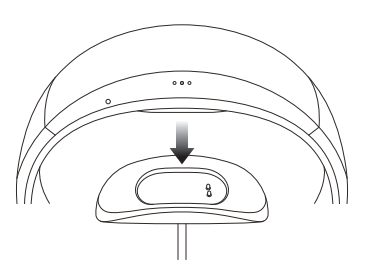
Only use the original charger to charge your watch. The charging plates on the back of the watch should be aligned with those of the charger. Once the watch begins to charge, the charging indicator will appear on the screen.
Note:
Only use the original charging base provided in the product package to charge your watch. Also make sure that the charging base is always kept dry.
Installing the App
The watch works with App. App helps you control your smartwatch and all its functions.
Scan the QR code on the Instruction Manual with your mobile phone to download App to your mobile phone. You can also download the latest version of App from the Google Play Store or Apple App store.
Pairing
- Open the App on your phone register or login with your account. Select the device to pair in the device list, then complete the pairing as prompted.
- Once the pairing is done, the watch will display the correct time. You can set the other watch functions as needed.
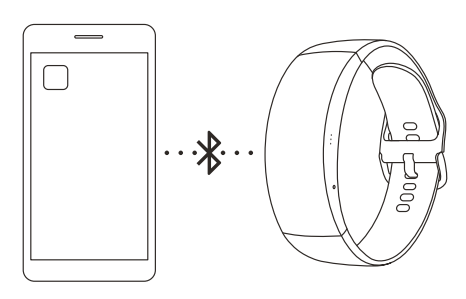
Note:
Do not pair the watch directly using your mobile phone’s Bluetooth settings.
Attaching/Detaching the Watch Strap
- Adjust the position of the strap mount to suit your wrist.
- To attach or detach the watch strap, refer to the illustration below.
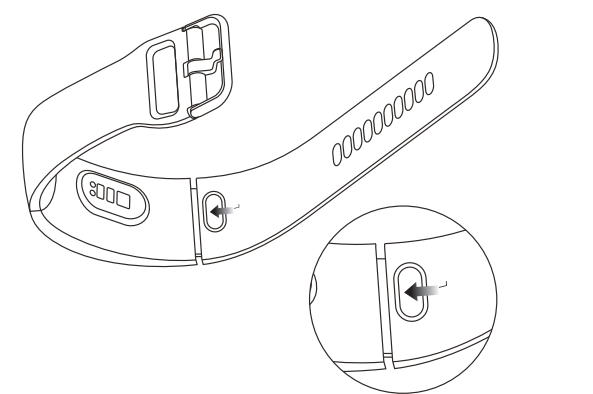
Note:
After the strap is attached, please pull on the strap using appropriate force to ensure a secure attachment.
Basic Specifications
- Model: A2025
- Battery capacity: 205 mAh
- Input: 5V 500 mA MAX
- Wireless connection: Bluetooth 5.0 BLE
- Frequency: 2402-2480 MHz
- Max.output: 0 dBm
- Operation temperature: 0°C to 45°C
- Waterproofing: 5 ATM
- System requirements: Android 5.0 or iOS 10.0 or above
Warranty and Return Policy
The Amazfit Limited Warranty covers Amazfit products against manufacturing defects beginning on the original purchase date. The warranty period is 12 months or other period as the applicable consumer laws in the consumer’s country of purchase require. Our warranty is in addition to rights provided by applicable consumer laws.
Troubleshooting Common Issues with the Amazfit X Curved SmartWatch
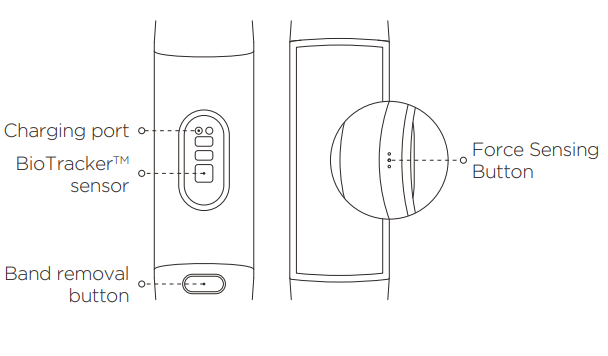
Users may occasionally encounter issues such as the touchscreen becoming unresponsive, difficulty in powering on, or synchronization problems with the companion app. As the amazfit X lacks physical buttons, powering the device requires pressing the capacitive sensor located on the side of the watch.
- Touchscreen unresponsiveness: Restart the watch by pressing both side sensors simultaneously for a few seconds. Keeping the screen clean and dry helps prevent this issue.
- Power-on difficulties: Ensure the device is adequately charged using the magnetic charger. If the watch does not power on, try reconnecting the charger and holding the sensors simultaneously to activate the screen.
- App synchronization errors: Confirm Bluetooth 5.0 is enabled on your smartphone and that the amazfit app is updated. Re-pairing the device often resolves connectivity issues.
Preventive measures include regular software updates, keeping the watch clean, and avoiding extreme impacts that could damage the curved glass. The amazfit X comes with a limited manufacturer warranty covering hardware defects. For specialized assistance, users can contact Amazfit customer support via their official website or authorized service centers.
Pros & Cons of the Amazfit X Curved SmartWatch
Pros
- Unique Curved Design: The 92° curved 2.07-inch AMOLED display delivers a visually striking look and enhanced screen real estate compared to flat smartwatches.
- Durable Build Quality: Titanium alloy unibody and 3rd-generation Corning Gorilla Glass provide resilience against daily wear and tear.
- Comprehensive Health Tracking: Includes heart rate, SpO2 monitoring, sleep, and stress tracking with Huami’s BioTracker™ sensor.
- Long Battery Life: Up to seven days of use on a single charge, supporting active lifestyles without frequent recharging.
- Water-Resistant: Rated 5 ATM, suitable for swimming and water activities.
Cons
- Button-Free Navigation: Lack of physical buttons can complicate navigation for some users, requiring adjustment to capacitive controls.
- Limited App Ecosystem: The Amazfit app, though functional, may require improvements in interface and stability.
- Price Point: While competitive, some users might find alternatives like Fitbit Charge 4 or Garmin devices offer more mature ecosystems or features.
- Potential Comfort Issues: The pronounced curve may not suit all wrist sizes comfortably during extended wear.
Customer Reviews and Feedback on the Amazfit X Curved SmartWatch
Customers praise the amazfit X Curved SmartWatch predominantly for its innovative design and vibrant curved AMOLED display, describing it as a standout among smartwatches in its price range. Many users appreciate its accurate heart rate and SpO2 sensors, along with the convenience of a long-lasting battery.
Common complaints include the learning curve associated with the button-free design and occasional Bluetooth connectivity issues with smartphones. Some users have noted that the Amazfit app could benefit from enhanced stability and user interface improvements.
Overall, the watch receives an average rating of 4 out of 5 stars, with many recommending it for early adopters and those prioritizing design and display quality over a broad app ecosystem. Users highlight its value-for-money as compelling, especially given its premium features and unique curved form factor.
Faqs
How do I set up the amazfit X Curved SmartWatch for the first time?
What should I do if my amazfit X Curved SmartWatch screen is not responding?
Can I customize the watch faces on the amazfit X Curved SmartWatch?
Is the amazfit X Curved SmartWatch compatible with both Android and iOS devices?
How can I optimize battery life on my amazfit X Curved SmartWatch?
What fitness tracking features does the amazfit X Curved SmartWatch offer?
How do I maintain and clean my amazfit X Curved SmartWatch to ensure longevity?
Why can't I reply to messages directly from the amazfit X Curved SmartWatch?
More amazfit manuals
- Usage & Pairing: Amazfit Active A2211 Smart Watch User Manual
- Setup & Pairing: Amazfit Band 7 Fitness Tracker User Manual
- Setup & Usage: Amazfit Stratos 3 SmartWatch User Manual
- Setup & Pairing: Amazfit GTR Mini A2174 Smart Watch User Manual
- Usage & Setup: Amazfit T-Rex Pro Watch User Manual
- Usage & Setup: Amazfit GTS 3 Smart Watch User Manual
Leave a Comment