
Usage & Setup: Amazfit T-Rex Pro Watch User Manual
Content
Amazfit T-Rex Pro Watch
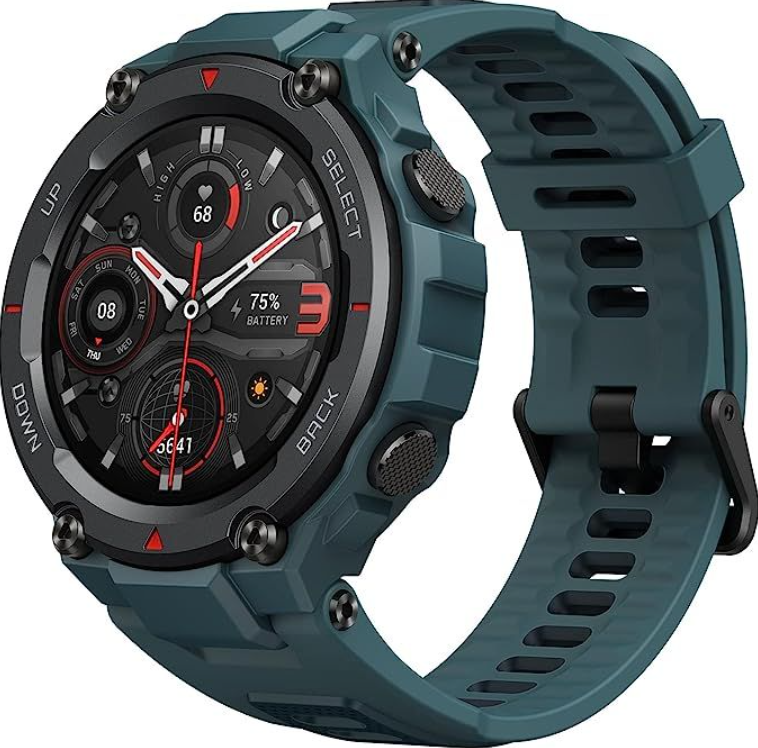
Introduction
The Amazfit T-Rex Pro Watch is a rugged, feature-rich smartwatch designed for outdoor enthusiasts and fitness lovers seeking durability and advanced health tracking in one device. Building on the legacy of the original T-Rex, the Pro model boasts military-grade toughness with a 10 ATM water resistance rating, allowing it to withstand intense adventures, including swimming and harsh weather conditions. Its vibrant 1.3-inch AMOLED display with Always-On functionality ensures clear visibility in bright sunlight, ideal for outdoor use.
This smartwatch is equipped with comprehensive health and fitness features such as heart rate monitoring, blood oxygen saturation (SpO2) tracking, sleep analysis, and stress measurement, covering over 100 sports modes. The on-board GPS with multi-satellite support (GPS, GLONASS, Beidou, Galileo) provides precise navigation and tracking for hiking, trail running, and more. The device runs on a proprietary RTOS, compatible with both Android and iOS platforms through the Zepp app, facilitating seamless data syncing.
Targeted at adventurers, athletes, and everyday users who demand resilience and accuracy at an affordable price, the Amazfit T-Rex Pro is available globally at an estimated price of around $180, making it a competitive option in the rugged smartwatch market.
Technical Specifications and Features of the Amazfit T-Rex Pro Watch
- Display: 1.3-inch AMOLED, 360 x 360 pixels resolution, Always-On Display supported
- Dimensions & Weight: 47.7 x 47.7 x 13.5 mm, 59g with strap
- Material: Polymer body with tempered glass and oleophobic coating, military-grade durability (MIL-STD-810G)
- Water Resistance: 10 ATM (up to 100 meters), suitable for swimming and snorkeling
- Battery: 390mAh, up to 18 days typical usage, 40 hours continuous GPS tracking
- Connectivity: Bluetooth 5.0 BLE, GPS + GLONASS, Beidou, Galileo, multi-satellite positioning
- Sensors: BioTracker 2 PPG optical sensor, 3-axis accelerometer and gyroscope, geomagnetic sensor, ambient light sensor, barometric altimeter
- Operating System: Proprietary RTOS, compatible with Android 5.0+ and iOS 10.0+
- Sports & Fitness: Over 100 sports modes including hiking, trail running, swimming, cycling, and more
Compared to similar rugged smartwatches like the Garmin Instinct or Suunto Core, the Amazfit T-Rex Pro offers an exceptional balance of price and features, with longer battery life and similar durability certifications at a more accessible cost.
Watch Wearing and Charging
Daily wearing: We recommend that you wear the watch at a moderate tightness at a distance of two fingers from your wrist to ensure that the optical heart rate monitor works properly.
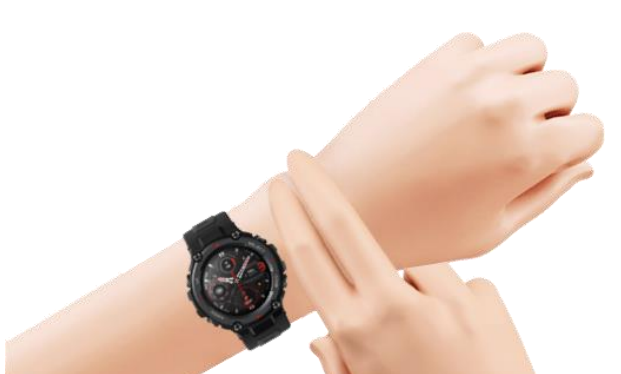
Wearing during workouts: We recommend that you wear the watch comfortably and ensure a tight fit that does not slip. Being too tight or too loose may cause inaccurate detection of workout data, which must be avoided.
Charging
- Insert the USB port of the watch charger in a device that supports USB power supply, such as a socket, a PC, or a power bank.
- Put the watch into the magnetic charging base. Pay attention to the direction and position of the watch, and ensure that the metal contacts on the back of the watch fit snugly onto the charging base.
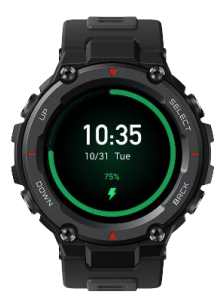
- The screen will display a charging notification when the watch is placed properly.
Before Use
Download the app via your phone before using the Mazfit T-Rex Pro. You need to pair the watch using the app to use all functions. In addition, a paired watch allows the saving of data generated on the watch to your personal account in the cloud, which will avoid data loss.
Device Pairing and Unpairing
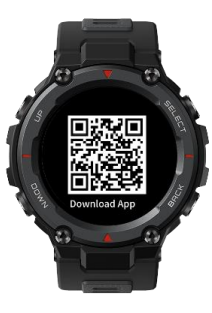
- Download the app from an app store or by scanning the QR code on the watch, and register an account or log in to your account.
- Open the app and tap + in the upper left corner or go to Zepp APP > Profile > +Add > Watch > Watch with a QR code, and scan the QR code on the watch as prompted.
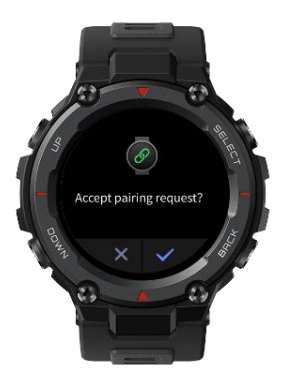
- Complete pairing as prompted on the watch and your phone.
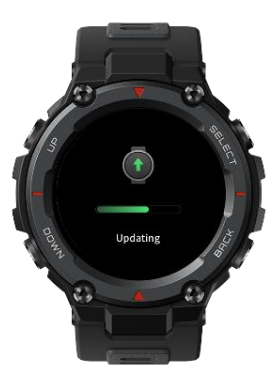
- Upgrade the system on the watch after pairing. During the upgrade, keep your phone connected to both the network and the watch via Bluetooth to ensure that the upgrade is successful.
- You can use the features provided by the watch after pairing and upgrading. You can also use
The app to configure the watch. - To unpair your watch, open the app, go to Profile >Amazfit T-Rex Pro, and tap Unpair.
Common Troubleshooting and Support for the Amazfit T-Rex Pro
- Issue: Watch not syncing with the Zepp app
Solution: Ensure Bluetooth is enabled, restart both devices, update the app, and watch firmware. - Issue: GPS accuracy problems
Solution: Allow GPS to acquire signal in an open area, enable multi-GNSS support, and reset location data if needed. - Error Codes: Most errors resolve with a device restart; persistent issues may require a factory reset via the settings menu.
- Battery Drain: Close unused apps, reduce Always-On Display time, and disable unnecessary notifications.
- Preventive Measures: Regularly update firmware, avoid extreme impacts despite rugged design, charge regularly to maintain battery health.
The Amazfit T-Rex Pro comes with a standard warranty covering manufacturing defects. For further assistance, users can contact Amazfit customer support via the official Amazfit website or through the Zepp app support chat.
Daily Maintenance
- The watch is water-resistant. We recommend that you regularly clean the watch and watch strap with water and drying with a soft cloth before wearing.
- Avoid using detergents such as soap, hand sanitizer, or shampoo for cleaning to prevent chemical residues from irritating the skin or corroding the watch.
Precautions
- The watch has a water resistance rating of 10 ATM. It can be used in swimming, snorkeling, and water works, but cannot be used in diving, jump diving, showering, or a sauna.
- Do not operate the watch underwater via the touch screen or physical buttons. If the watch gets wet, operate the touch screen or charge the watch only after the watch is wiped clean using a soft cloth.
- The watch is not resistant to corrosive liquids such as acidic and alkaline solutions and chemical reagents. Damage or defects caused by misuse or improper use are not covered by the warranty.
Pros and Cons of the Amazfit T-Rex Pro Watch
- Pros:
- Robust military-grade design with excellent 10 ATM water resistance suitable for diverse outdoor activities
- Bright and clear 1.3" AMOLED display with Always-On feature enhances usability in all lighting conditions
- Long battery life up to 18 days on typical use, reducing frequent charging
- Comprehensive health tracking, including SpO2, heart rate, stress, sleep, and over 100 sports modes
- Accurate multi-GNSS positioning supporting GPS, GLONASS, Beidou, and Galileo satellites
- Affordable price point (~$180) compared to premium rugged smartwatches
- Cons:
- Lacks third-party app support; runs on proprietary RTOS limiting app ecosystem
- Some users report occasional GPS lag in dense urban or forested areas
- Display size and resolution are modest compared to newer premium models like the T-Rex 3 Pro
- No built-in microphone or speaker for calls or voice commands
Customer Reviews and Ratings for the Amazfit T-Rex Pro Watch
Users generally praise the Amazfit T-Rex Pro Watch for its ruggedness, solid battery life, and value for money. Positive reviews highlight the watch’s dependable GPS tracking and extensive sports modes as ideal for hikers and fitness enthusiasts. The bright AMOLED display and water resistance are also frequently commended.
Common complaints include occasional syncing issues with the Zepp app and limited smart features due to the proprietary OS. Some customers note that GPS accuracy can fluctuate in dense forests or urban canyons. Overall, the watch averages around 4 to 4.5 stars out of 5 across multiple platforms, with recommendations for buyers seeking a durable, budget-friendly outdoor smartwatch.
More amazfit manuals
- Setup & Usage: Amazfit Smart Scale User Manual
- Setup & Usage: Amazfit Stratos 3 SmartWatch User Manual
- Setup & Usage: Amazfit T-REX 3 Pro Smart Watch User Manual
- Usage & Pairing: Amazfit Active A2211 Smart Watch User Manual
- Setup & Pairing: Amazfit Balance 2 Fitness Watch User Manual
- Setup & Usage: Amazfit X Curved SmartWatch User Manual
Leave a Comment