
Setup & Pairing: Amazfit Balance 2 Fitness Watch User Manual
Content
Amazfit Balance 2 Fitness Watch
Introduction
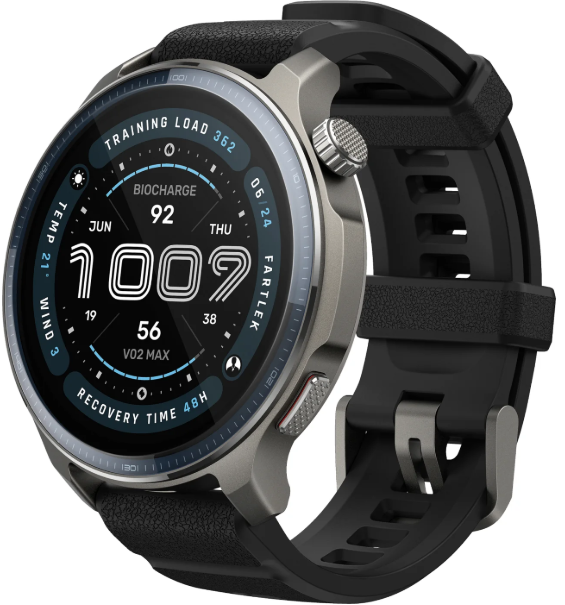
The Amazfit Balance 2 Fitness Watch is a premium, feature-packed wearable designed for fitness enthusiasts and lifestyle users who demand both performance and style. This sleek smartwatch boasts a 1.5-inch AMOLED display with sapphire glass protection, delivering vibrant visuals and enhanced durability for everyday wear. Its lightweight aluminum alloy frame and fiber-reinforced polymer case ensure comfort without compromising robustness, while the 10 ATM water resistance makes it suitable for swimming, diving, and a wide range of outdoor activities.
What truly sets the Amazfit Balance 2 Fitness Watch apart are its advanced health and fitness tracking capabilities. It features the BioTracker 6.0 PPG sensor for accurate heart rate, blood oxygen (SpO2), and skin temperature monitoring, alongside continuous stress and sleep tracking with improved accuracy over previous models. With over 170 sports modes—including industry-first HYROX training, golf course maps, and professional-grade SCUBA diving support—this watch is a true multisport companion. The integration with Zepp Coach AI provides personalized training plans, making it ideal for users seeking data-driven fitness insights.
Battery life is another standout, with up to 21 days of typical use on a single charge—far exceeding most competitors in its class. The watch runs on Zepp OS, supports offline maps and notifications, and is compatible with both Android and iOS devices.
Targeted at active individuals, weekend athletes, and tech-savvy professionals, the amazfit Balance 2 Fitness Watch bridges the gap between a dedicated fitness tracker and a stylish everyday smartwatch. It’s available for approximately $299.99, offering excellent value for its premium features and long-lasting battery.
Package Contents
Basic Parameters
- Product Name: Smart Watch
- Model number: A2429/A2430
- Input: DC 5 V 1.5 A MAX
- Bluetooth version: V5.2
- Wi-Fi: 2.4 GHz 802.11 b/g/n
- Wi-Fi frequency: 2402–2480 MHz
- Wi-Fi output power: <18 dBm
- Bluetooth output power: <13 dBm
- BLE output power: <9 dBm
- Operating temperature: 0°C to 45°C
- Water resistance rating: 10 ATM
- Bluetooth frequency: 2402–2480 MHz
View product certification information on the watch's Settings > System > Regulatory page.
- Device requirements: Devices installed with Android 7.0 or iOS 15.0 or above OS versions
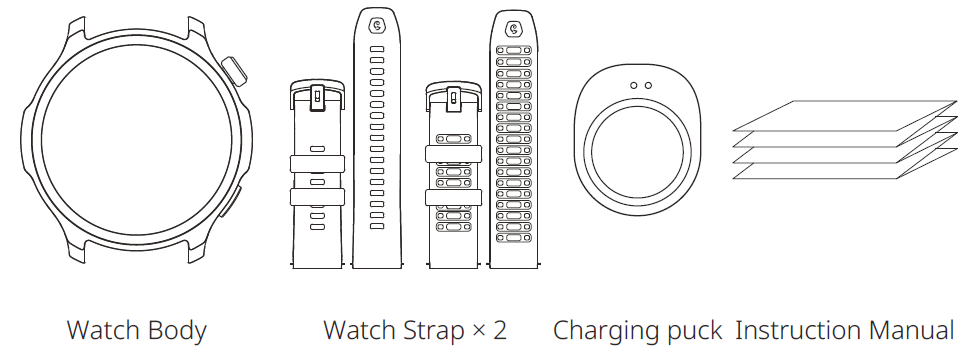
- Package Contents: Watch body, Watch strap, Charging puck, Instruction manual
Please refer to the watch user interface to see the software version.
About the Watch
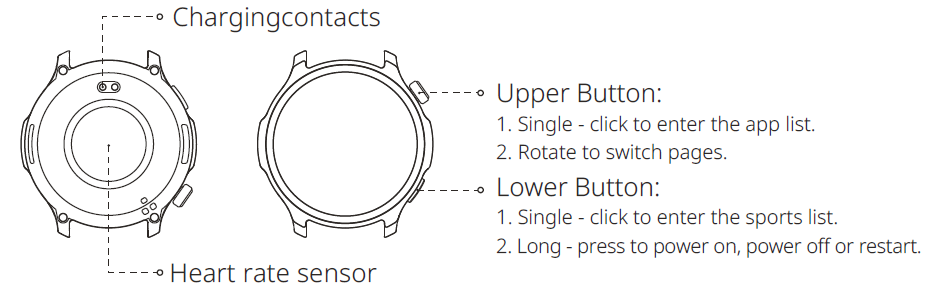
Note: Power on the watch by long-pressing the lower button. In case of a failed startup, charge the watch and then retry.
Charging the Watch
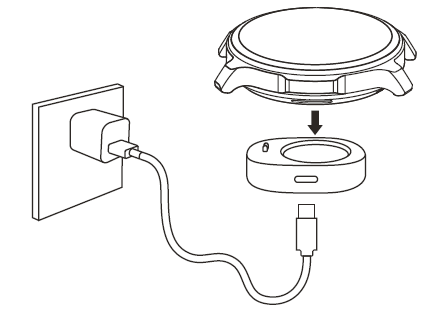
- Use a Type-C USB cable to connect the charging base to a power adapter or computer. Ensure a secure connection for proper charging.
- Put the watch into the charging base. Pay attention to the direction and position of the watch, and make sure that the metal contacts on the back of the watch fit closely with the charging base.
- When charging starts, the watch screen displays the charging progress.
Notes:
- Please use the charging base that comes with the watch. Make sure that the charging base is dry before charging.
- To ensure the best charging speed, it is recommended to use a power adapter with a charging current of 1A or above.
Disassembling and Assembling the Watch Strap
Please refer to the illustrations to disassemble or assemble the watch strap.
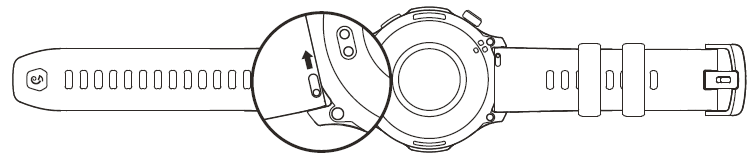
Note:
Once the strap is assembled, pull the strap properly to ensure it is installed successfully.
Disassembling and Assembling the Watch Strap
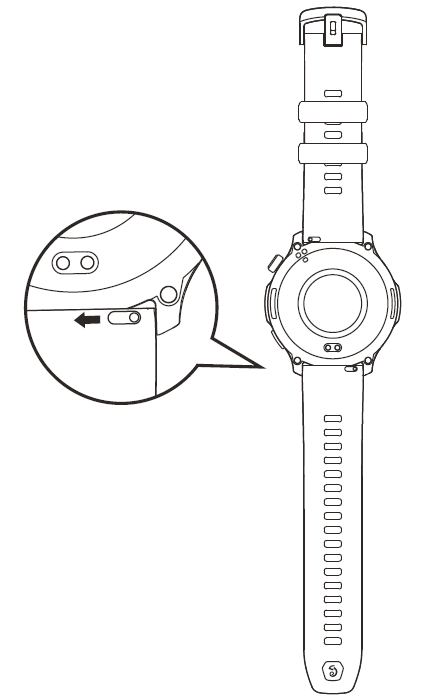
- Take the strap out of the packaging box, ensuring the short strap is on top and the long strap is on the bottom, with the correct orientation.
- Align the strap pin with the lug hole, insert one end first, then use your finger or a tool to press the spring bar, allowing the other end to snap into the lug hole.
- After installation, gently pull the strap to ensure it is securely installed.
- To remove the strap, please refer to the illustration.
Wearing the Watch
- In order to ensure the accuracy of heart rate, blood oxygen, and other measurements, please wear your watch at a distance of at least one finger away from the carpal, and keep the strap at a comfortable snugness.
- During a workout, please wear it as tightly as possible to ensure that the watch does not shake. Wear your watch at a distance of at least one finger away from the carpal to obtain more accurate heart rate data.
After a workout, you can loosen the strap appropriately to ensure a comfortable wear experience. - When measuring blood oxygen saturation, wear the watch correctly. Avoid wearing the watch on the wrist joint, keep your arm flat, maintain a comfortable (appropriately tight) fitting between the watch and the skin of your wrist, and keep your arm still throughout the measurement process.
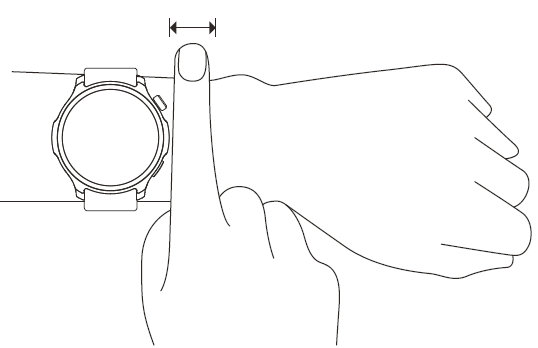
Note: When affected by external factors (arm sag, arm sway, arm hair, tattoo, etc.), the measurement result may be inaccurate or the measurement may fail and provide no output.
Battery Safety
- This device is equipped with a built-in battery that cannot be removed or replaced. Do not disassemble or modify the battery by yourself.
- Disposal of a battery into fire or a hot oven, or mechanically crushing or cutting of a battery, that can result in an explosion.
- Leaving a battery in an extremely high temperature surrounding environment can result in an explosion or the leakage of flammable liquid or gas.
- A battery subjected to extremely low air pressure may result in an explosion or the leakage of flammable liquid or gas.
- Do not use power adapters or data cables that are not properly certified or incompatible, as this may damage the watch and accessories, or cause fire, explosion, or other hazards.
Diving Safety
- This device is only applicable to recreational free diving activities. The maximum depth at which it can function normally is 45 meters.
- The free diving-related features of this device can only be used by divers with relevant qualifications. Before using this device, make sure that you have received professional training and know how to use this device. When using free diving-related features (including breath-holding training and breath-holding test), ordinary users should be accompanied by a coach, an experienced diving companion, or a professional.
- Before using the device, you should be aware that any electronic device may malfunction, and this device may be unable to provide accurate data information in specific cases. Please carry a backup device as needed.
- Free diving activities contain certain risks. Before using the device, make sure that your physical condition is suitable for such activities. Consult your doctor for advice if you have any questions.
- To avoid the risks of decompression sickness, make sure that you have enough rest on the surface of the water. There should be sufficient surface intervals between scuba diving and free diving.
Safety Notice
- Do not allow children or pets to bite or swallow the product or its accessories, as this may cause injury.
- Do not place this product under excessively high or low temperatures, which may cause the product to catch fire or explode.
- Do not place this product near heat sources or open flame, such as ovens and electric heaters.
- Some people may experience allergic skin reactions to plastics, leathers, fibers, and other materials, and symptoms such as redness, swelling, and inflammation will occur after long-term contact with this product's components. If you experience such symptoms, please discontinue use and consult your doctor.
- Do not use power adapters or data cables that are not properly certified or incompatible, as this may damage the watch and accessories, or cause fire, explosion, or other hazards.
- The radio waves generated by this product may affect the normal operation of implanted medical devices or personal medical devices, such as pacemakers and hearing aids. If you use any such medical devices, consult the manufacturer for relevant usage restrictions.
- Do not dispose of this device or its accessories as ordinary household waste. Please make sure you dispose of or recycle this device and its accessories in accordance with local laws and regulations.
Repair and Maintenance
- Avoid using detergents such as soap, hand sanitizer, bath foam, or lotion for cleaning to prevent chemical residues from irritating the skin, corroding the device, or degrading the water resistance of the device.
- After wearing the device while bathing (for devices that support bathing), swimming (for devices that support swimming), or sweating, please promptly clean and dry the device.
- The leather strap is not waterproof. Avoid getting the strap wet, as this may shorten its service life.
- When using light-colored watch straps, avoid contact with dark clothing to prevent staining.
- The watch is not suitable for use in hot showers, hot springs, saunas (steam rooms), and similar scenarios.
- Do not place the device in direct sunlight for long periods. Excessively high or low ambient temperature may cause device failure.
- Handle with care during transportation. Keep the device dry and away from humidity.
- Do not wear the watch in MRI examinations and other highly magnetic environments. Otherwise, the watch may be damaged.
Troubleshooting
Common Problems and Solutions
- Watch Not Charging: Ensure the magnetic charger is properly aligned and the USB-C cable is securely connected. Try a different power source if issues persist.
- Syncing Issues: Restart both the watch and your smartphone. Ensure Bluetooth is enabled and the Zepp App is updated to the latest version.
- Inaccurate Heart Rate Readings: Wear the watch snugly on your wrist, slightly above the wrist bone. Clean the sensor area regularly for optimal performance.
- GPS Not Locking: Make sure you’re outdoors with a clear view of the sky. Update your watch firmware for the latest GPS improvements.
- Display Issues: Restart the device. If unresponsive, perform a factory reset via the settings menu.
Error Codes and Fixes
While specific error codes are not commonly reported, most issues can be resolved by restarting the device, updating firmware, or reinstalling the Zepp App. Refer to the official Amazfit support page for detailed error code explanations.
Preventive Measures
Avoid exposing the watch to extreme temperatures, harsh chemicals, or direct impacts. Regularly update the firmware and app for the best performance and security.
Warranty and Support
The Amazfit Balance 2 Fitness Watch comes with a standard manufacturer’s warranty. For technical support, visit the Amazfit website or contact customer service via the Zepp App. In the US, warranty and support inquiries can also be directed to the retailer where the watch was purchased.
Warranty and Return Policy
The Amazfit Limited Warranty covers Amazfit products against manufacturing defects beginning on the original purchase date. The warranty period is 12 months or another specified period as the applicable consumer laws in the consumer’s country of purchase require. Our warranty is in addition to the rights provided by applicable consumer laws.
- Official website: www.amazfit.com
- Please check the FAQ on the website for troubleshooting: support.amazfit.com/en/product-list
Notes:
- This product isn't a medical device. None of the data or measurements is intended for medical diagnosis or medical monitoring.
- If the product is not in use for a long period of time, it is recommended that you power off the product before storing it. Recharge the battery every 6 months to 100% to prevent battery damage by over-discharge due to long-term storage.
- For detailed operating instructions, safety precautions, and repair and maintenance information, please visit the website https://support.amazfit.com to download the user manual.
Pros & Cons
Advantages
- Exceptional Battery Life: Up to 21 days of typical use reduces charging frequency significantly.
- Premium Build: Sapphire glass and aluminum alloy frame offer durability and a refined look.
- Comprehensive Health Tracking: Advanced sensors for heart rate, SpO2, stress, sleep, and skin temperature.
- Extensive Sports Modes: Over 170 activities, including HYROX, golf, and diving, with downloadable maps.
- User-Friendly Zepp OS: Intuitive interface, customizable watch faces, and seamless smartphone integration.
Limitations
- Sleep Tracking: Improved but not as detailed as specialized devices like the Oura Ring.
- Charging Cable: USB-C cable not included; proprietary magnetic charger required.
- Third-Party App Support: Limited compared to Wear OS or Apple Watch.
- Price: Higher than entry-level fitness trackers, though competitive for its feature set.
Compared to alternatives like Garmin or Apple Watch, the Amazfit Balance 2 Fitness Watch offers superior battery life and multisport features at a more accessible price point, though it may lack some advanced smart features and ecosystem integration[6].
Customer Reviews
User feedback for the Amazfit Balance 2 Fitness Watch is overwhelmingly positive, with an average rating of 4.7 out of 5 stars based on 31 reviews at major retailers. Customers praise its long battery life, vibrant display, and robust fitness tracking capabilities. Many highlight the watch’s comfortable fit and stylish design, making it suitable for both workouts and daily wear.
Common praises include accurate heart rate monitoring, intuitive interface, and the breadth of sports modes. Some users note that sleep tracking, while improved, could be more precise for detecting micro-awakenings. A few mention the lack of an included charging cable as a minor inconvenience.
Testimonials frequently recommend the Amazfit Balance 2 Fitness Watch for athletes and active users seeking a reliable, feature-rich wearable without the premium price tag of flagship smartwatches. The watch is especially recommended for those prioritizing battery life and multisport functionality.
Faqs
How do I set up the amazfit Balance 2 Fitness Watch for first-time use?
What should I do if my amazfit Balance 2 Fitness Watch won't sync with the Zepp app?
How can I customize widgets and shortcuts on the amazfit Balance 2 Fitness Watch?
Is the amazfit Balance 2 Fitness Watch compatible with both Android and iOS devices?
How can I optimize battery life on the amazfit Balance 2 Fitness Watch?
What are the key fitness tracking features of the amazfit Balance 2 Fitness Watch?
How do I maintain and care for the amazfit Balance 2 Fitness Watch to ensure durability?
Why are my notifications not appearing on the amazfit Balance 2 Fitness Watch, and how can I fix this?
More amazfit manuals
Leave a Comment