
Setup & Usage: Amazfit GTR 2 A1952 User Manual
Content
Amazfit GTR 2 A1952
Introduction
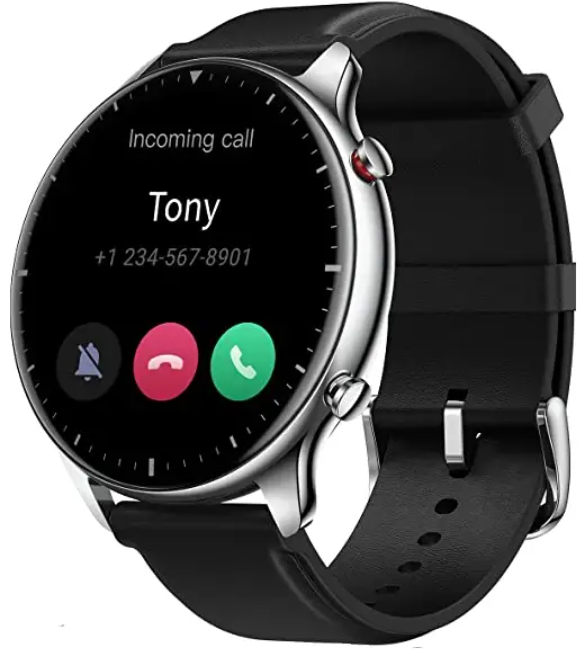
The Amazfit GTR 2 A1952 is a sophisticated smartwatch designed to blend style, advanced health monitoring, and versatile sports tracking in one sleek device. It features a stunning 1.39-inch AMOLED display with vibrant colors and a 454x454 pixel resolution, ensuring clear readability both indoors and outdoors. Ideal for fitness enthusiasts, busy professionals, and tech-savvy users, this smartwatch supports comprehensive health metrics like continuous heart rate monitoring, blood oxygen saturation (SpO2) measurement, and sleep analysis, making it a powerful companion for wellness management.
With its durable 5 ATM water resistance, the Amazfit GTR 2 is suitable for swimming and outdoor adventures, while built-in GPS with GLONASS ensures precise route tracking. The device also includes features such as music storage, Bluetooth calling, and voice assistant support, enhancing everyday usability beyond fitness. Available in Classic stainless steel and Sports aluminum alloy editions, the watch caters to different style preferences.
Priced typically around the mid-range smartwatch market, the Amazfit GTR 2 A1952 balances premium features and affordability, making it accessible globally through online and retail outlets. Its robust battery life, lasting up to 14 days under typical use, further adds to its appeal for users seeking longevity without frequent recharging.
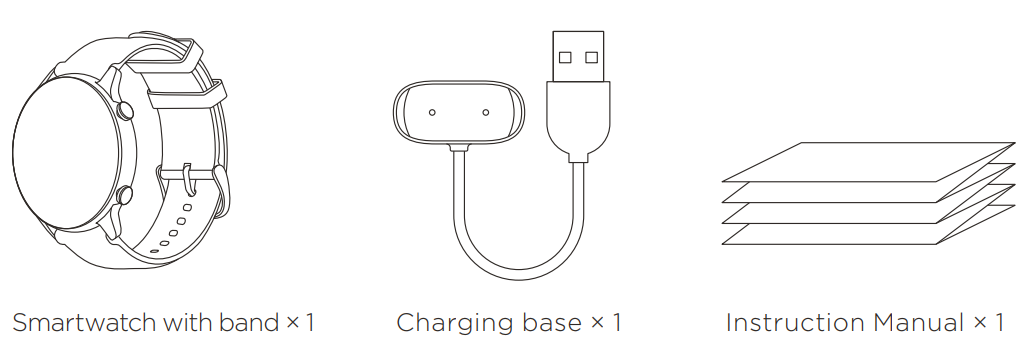
Package Contents
Technical Specifications and Key Features of amazfit GTR 2 A1952
- Display: 1.39-inch AMOLED, 454 x 454 pixels, 326 PPI, protected by 3D Corning Gorilla Glass with anti-fingerprint and diamond-like carbon coating
- Dimensions: 46.4 x 46.4 x 10.7 mm; weight varies — Classic: 39g (stainless steel), Sports: 36g (aluminum alloy)
- Battery: 471mAh with up to 14 days typical usage and magnetic charging (2.5 hours full charge)
- Sensors: BioTracker 2 PPG heart rate sensor, blood oxygen (SpO2) monitor, 6-axis accelerometer, gyroscope, geomagnetic sensor, air pressure sensor, ambient light sensor
- Connectivity: Bluetooth 5.0 BLE, Wi-Fi 6, NFC for payments (AliPay), GPS + GLONASS
- Health & Fitness: 24/7 heart rate and sleep tracking, PAI health scoring, 12+ professional sports modes including running, cycling, swimming (pool and open water), skiing, climbing
- Storage & Media: Approximately 3-4GB internal storage for up to 600 music tracks, allowing offline playback
- Compatibility: Android 5.0+ and iOS 10.0+ via Zepp app
Compared to similar smartwatches like the Huawei Watch GT2 or Samsung Galaxy Watch Active 2, the Amazfit GTR 2 A1952 offers competitive battery life and a highly pixel-dense AMOLED display at a lower price point, combined with extensive sports tracking capabilities and offline music playback.
Basic Parameters
- Product model: A1952
- Input: 5V d.c. 500mA MAX
- Bluetooth version: V5.0
- WLAN: 2.4 GHz 802.11 b/g/n
- Bluetooth output power: <18 dBm
- Operating temperature: 0°C to 45°C
- Water resistance rating: 5 ATM
- Bluetooth frequency: 2400–2483.5 MHz
- WIFI frequency: 2400–2483.5MHz
- WIFI output power: <10 dBm
Device requirements: Devices installed with Android 5.0 or iOS 10.0 or above OS versions
View product certification information on the watch's Settings > System > Regulation page.
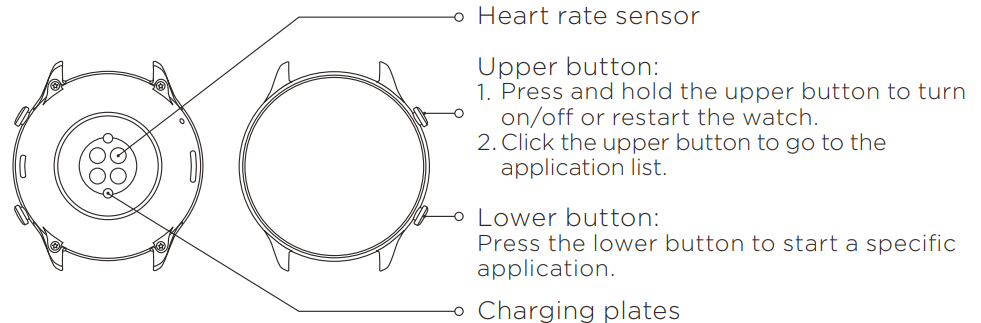
About the Watch
Charging the Watch
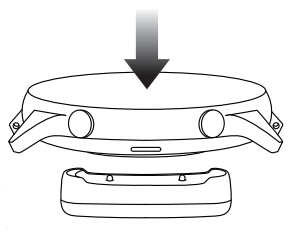
- Connect the USB port of the watch charging cable to a mobile phone charger or a computer USB port.
- Put the watch into the charging base. Pay attention to the direction and position of the watch, and make sure that the metal contacts on the back of the watch fit closely with the charging base.
- When charging starts, the watch screen displays the charging progress.
Disassembly and Assembly of the Watch Strap
Please refer to the illustrations to disassemble or assemble the watch strap.
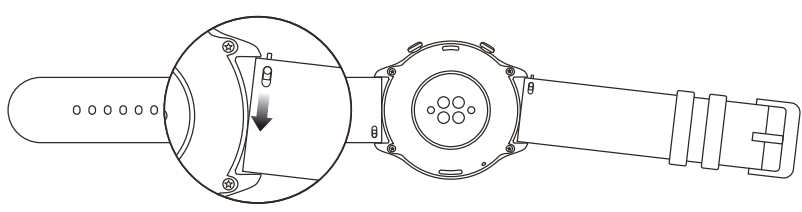
Note:
- Once the strap is assembled, pull the strap properly to ensure it is installed successfully.
- Avoid contact with liquid as the leather strap is not waterproof.
- Change to a fluororubber strap where you cannot avoid such contact, for example, when swimming.
Wearing the Watch
- Wear the watch strap not too tightly or too loosely, and leave enough space for the skin to breathe. This makes you feel comfortable and allows the sensor to function.
- When measuring blood oxygen saturation, wear the watch correctly. Avoid wearing the watch on the wrist joint, keep your arm flat, maintain ca omfortable (appropriately tight) fitting between the watch and the skin of your wrist, and keep your arm still throughout the measurement process. When affected by external factors (arm sag, arm sway, arm hair, tattoo, etc.), the measurement result may be inaccurate or the measurement may fail and provide no output.
- We recommend that you tighten the watch strap during exercise and loosen it afterwards.
Battery Safety
- Disposal of a battery into fire or a hot oven, or mechanically crushing or cutting of a battery, that can result in an explosion.
- Leaving a battery in an extremely high temperature surrounding environment that can result in an explosion or the leakage of flammable liquid or gas.
- A battery subjected to extremely low air pressure that may result in an explosion or the leakage of flammable liquid or gas.
Safety Notice
- Do not allow children or pets to bite or swallow the product or its accessories, as this may cause injury.
- Do not place this product under excessively high or low temperatures, which may cause the product to catch fire or explode.
- Do not place this product near heat sources or open flame, such as ovens and electric heaters.
- Some people may experience allergic skin reactions to plastics, leathers, fibers, and other materials, and symptoms such as redness, swelling, and inflammation will occur after long-term contact with this product's components. If you experience such symptoms, please discontinue use and consult your doctor.
- Do not use unauthorized or incompatible power adapters, chargers, or data cables, which may damage the watch and accessories, or cause fire, explosion, or other hazards.
- The radio waves generated by this product may affect the normal operation of implanted medical devices or personal medical devices, such as pacemakers and hearing aids. If you use any such medical devices, consult the manufacturer for relevant usage restrictions.
- Do not dispose of this device or its accessories as ordinary household waste. Please comply with local regulations for the disposal of this device and its accessories, and support recycling.
Repair and Maintenance
- Avoid using detergents such as soap, hand sanitizer, bath foam, or lotion for cleaning to prevent chemical residues from irritating the skin, corroding the device, or degrading the water resistance of the device.
- After wearing the device while bathing (for devices that support bathing), swimming (for devices that support swimming), or sweating, please promptly clean and dry the device. The leather strap is not waterproof. Avoid getting the strap wet, as this may shorten its service life.
- When using light-colored watch straps, avoid contact with dark clothing to prevent color staining.
- Do not wear your watch during snorkeling, hot showers, hot springs, saunas (steam rooms), diving, underwater diving, water skiing, and other activities involving high-speed water currents.
- Do not place the device in direct sunlight for long periods. Excessively high or low ambient temperature may cause device failure.
- Handle with care during transportation. Keep the device dry and away from humidity.
Troubleshooting Common Issues with amazfit GTR 2 A1952
- Issue: Watch not syncing with smartphone
Solution: Ensure Bluetooth is enabled and the Zepp app is updated; restart both devices; re-pair the watch if needed. - Issue: Heart rate or SpO2 readings are inaccurate or missing
Solution: Wear the watch snugly; clean the sensor area; update firmware; avoid motion during measurement. - Issue: Battery drains quickly
Solution: Reduce screen brightness; disable always-on display; close unused apps; enable power-saving mode. - Error Codes: No specific error codes reported; system issues generally resolved via app or firmware updates.
- Preventive Measures: Regularly update firmware via the Zepp app, avoid exposing the watch to extreme temperatures, and use the original charger.
The Amazfit GTR 2 A1952 comes with a standard manufacturer's warranty (typically 1 year) covering manufacturing defects. For support, contact Amazfit customer service via their official website or authorized retailers.
Please check the FAQ on the website: https://support.amazfit.com/en.
Warranty and Return Policy
The Amazfit Limited Warranty covers Amazfit products against manufacturing defects beginning on the original purchase date. The warranty period is 12 months or another specified period as the applicable consumer laws in the consumer’s country of purchase require. Our warranty is in addition to the rights provided by applicable consumer laws.
- Official website: en.amazfit.com
- Support: support.amazfit.com
Pros & Cons of the Amazfit GTR 2 A1952 Smartwatch
- Pros:
- Sharp and bright AMOLED display with high pixel density for clear visuals
- Long-lasting battery life up to 14 days under typical use
- Comprehensive health sensors, including heart rate, SpO2, and sleep tracking
- Built-in GPS and multiple sports modes support versatile fitness tracking
- Offline music playback with sufficient internal storage
- Water-resistant up to 50 meters,,s suitable for swimming
- Attractive design in both classic and sports editions
- Cons:
- No LTE or cellular connectivity option
- Limited third-party app ecosystem due to proprietary OS
- Voice assistant functionality ty dependent on OTA updates and limited to offline commands
- Charging is magnetic cable only; no wireless charging support
Overall, the Amazfit GTR 2 A1952 offers excellent value for money when compared to other smartwatches with similar features,, like the Garmin Vivoactive or Samsung Galaxy Watch Active, especially for users prioritizing battery life and fitness tracking without LTE dependency.
Customer Reviews and Feedback on amazfit GTR 2 A1952
Users consistently praise the Amazfit GTR 2 A1952 for its impressive battery longevity and crisp AMOLED screen quality. Many appreciate the accuracy of heart rate and SpO2 tracking and the convenience of offline music playback during workouts. The watch’s lightweight design and water resistance are often mentioned as practical benefits for active users.
Common complaints include occasional synchronization delays with smartphones, limited app compatibility due to the proprietary OS, and the absence of cellular connectivity, which some users expected. The voice assistant integration has also been noted as basic pending OTA updates.
Star ratings average around 4 to 4.5 out of 5, with frequent recommendations focusing on its fitness tracking capabilities and style for the price point. Buyers looking for a durable, feature-rich smartwatch with excellent battery life often rate it highly.
Faqs
How do I set up my amazfit GTR 2 A1952 for the first time?
What should I do if my amazfit GTR 2 A1952 is not turning on?
Can I use the amazfit GTR 2 A1952 with a Samsung Galaxy A55?
How do I troubleshoot Bluetooth connectivity issues with my amazfit GTR 2 A1952?
What are the key features that make the amazfit GTR 2 A1952 different from other smartwatches?
How often should I update the firmware of my amazfit GTR 2 A1952?
How do I optimize battery life on my amazfit GTR 2 A1952?
How do I maintain and clean my amazfit GTR 2 A1952?
More amazfit manuals
- Usage & Setup: Amazfit Bip 6 Smartwatch User Manual
- Setup & Pairing: Amazfit Balance 2 Fitness Watch User Manual
- Setup: Amazfit Bip S SmartWatch User Manual
- Setup & Usage: Amazfit T-REX 3 Pro Smart Watch User Manual
- Setup: Amazfit PowerBuds Pro Earbuds User Manual
- Setup & Usage: Amazfit Smart Scale User Manual
Leave a Comment