
Setup & Usage: Amazfit T-REX 3 Pro Smart Watch User Manual
Content
amazfit T-REX 3 Pro Smart Watch
Introduction
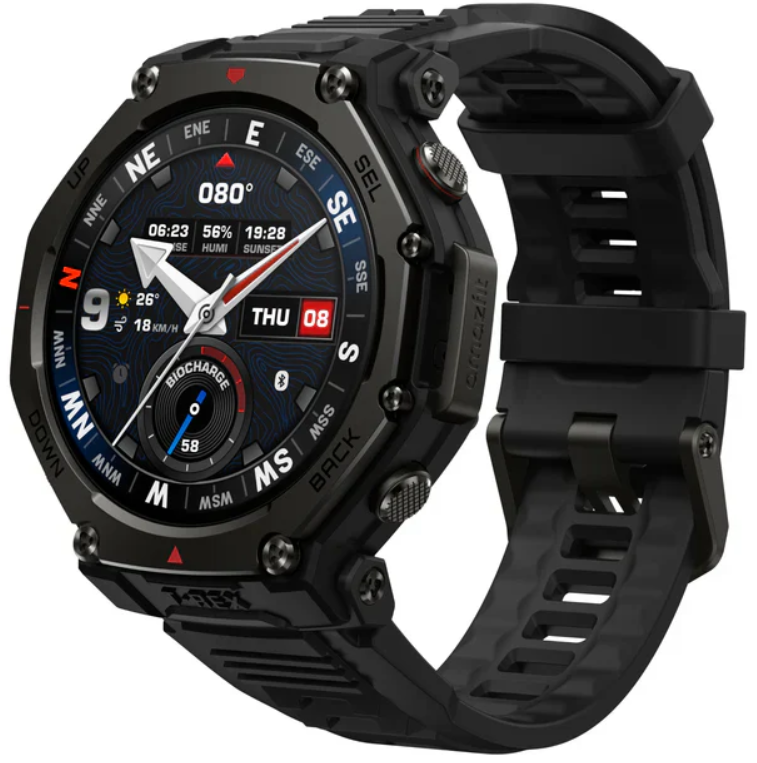
The Amazfit T-REX 3 Pro Smart Watch is a rugged, high-performance smartwatch designed for outdoor enthusiasts and athletes seeking durability, precision, and advanced health tracking. Built with premium materials such as a grade 5 titanium bezel and scratch-resistant sapphire glass, this smartwatch is engineered to withstand extreme environments, including temperatures as low as -30°C and water depths up to 45 meters, making it ideal for hiking, rucking, diving, and other adventurous activities.
Featuring a vibrant 1.5-inch AMOLED display on the 48mm model (also available in 44mm with a 1.32-inch display), the T-REX 3 Pro offers excellent visibility even in bright sunlight with peak brightness up to 3000 nits. It supports a comprehensive 6-satellite system for ultra-accurate GPS positioning, offline maps, and route planning, ensuring reliable navigation in dense urban or forested areas. Users also benefit from over 180 sports modes, including recreational diving and kayaking, plus built-in features such as a two-color LED flashlight with boost mode, Bluetooth calling via an integrated speaker and microphone, and advanced health sensors,s including the BioTracker™ 3.0 for precise heart rate, SpO2, and skin temperature monitoring.
Targeted at outdoor athletes, fitness enthusiasts, and adventure seekers, the amazfit T-REX 3 Pro combines military-grade toughness with smart connectivity and extensive fitness tracking capabilities. It delivers up to 25 days of battery life for uninterrupted use during extended excursions. Priced around $399, this smartwatch offers exceptional value for those who demand accuracy, durability, and comprehensive health monitoring in challenging environments.
Pairing the Watch
Zepp is a must-have app for this watch. It provides scientific sleep and workout guidance and personalized health services to help you start a healthy lifestyle.
- Use your mobile phone to scan the QR code on the right side to download and install the app, or search for the app in the Google Play Store or Apple App Store and then download and install the latest version of the app.
- Open the app, register an account, and log in.
- Pair the watch as prompted by the app.
Notes:
- For a better user experience, please use the most recent version of the app.
- The operating system needs to be Android 7.0, iOS 15.0, or above.
- Do not pair the watch directly using your mobile phone’s Bluetooth. Follow the steps in the app to pair your watch correctly.
Charging the Watch
- Use a Type-C USB cable to connect the charging base to a power adapter or computer. Ensure a secure connection for proper charging.
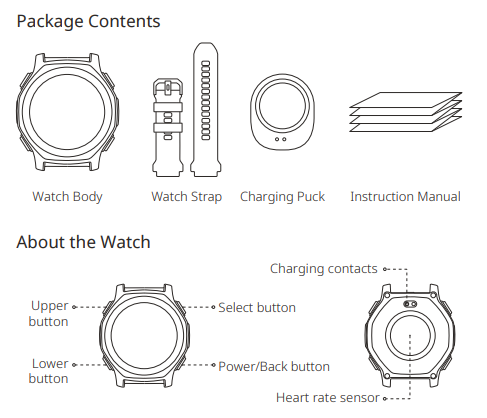
- Put the watch into the charging base. Pay attention to the direction and position of the watch, and make sure that the metal contacts on the back of the watch fit closely with the charging base.
- When charging starts, the watch screen displays the charging progress.
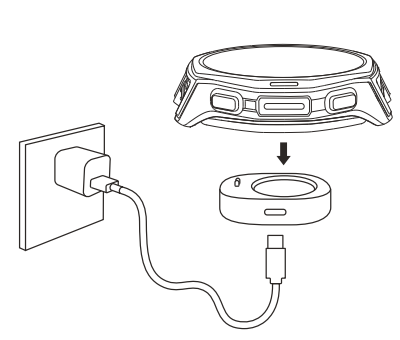
- Please use the charging base that comes with the watch. Make sure that the charging base is dry before charging.
- To ensure the best charging speed, it is recommended to use a power adapter with a charging current of 1A or above.
Wearing the Watch
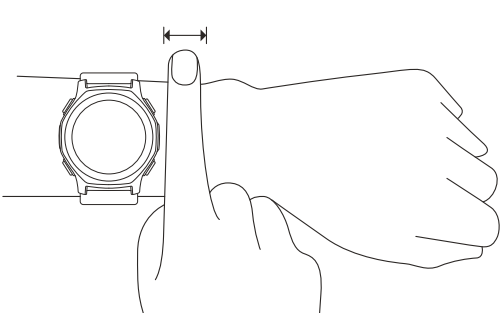
- To ensure the accuracy of heart rate, blood oxygen, and other measurements, please wear your watch at a distance of at least one finger away from the wrist bone, and keep the strap at a comfortable snugness.
- For optimal heart rate accuracy during workouts, wear the watch snugly (avoiding wrist movement) and position it at least a finger's width away from your wrist bone. You may slightly loosen the band post-workout for comfort.
- When measuring blood oxygen saturation, wear the watch correctly. Avoid wearing the watch on the wrist joint, keep your arm flat, maintain a comfortable (appropriately tight) fitting between the watch and the skin of your wrist, and keep your arm still throughout the measurement process.
Note:
Factors such as arm sag, arm sway, arm hair, and tattoos can cause measurement inaccuracies.
Basic Parameters
- Product name: Smart Watch
- Model number: A2548/A2549 Input: DC 5 V 800 mA MAX
- Wi-Fi: 2.4 GHz 802.11 b/g/n
- Wi-Fi frequency: 2400–2483.5 MHz Wi-Fi output power: <18 dBm
- Bluetooth output power: <12 dBm BLE output power: <8 dBm
- Working temperature: -30°C-45°C Charging temperature: -10℃-45℃ Water resistance rating: 10 ATM Bluetooth frequency: 2400-2483.5 MHz
- Bluetooth version: V5.2
- View product certification information on the watch's Settings > System > Regulation page.
- Device requirements: Devices installed with Android 7.0 or iOS 15.0 or above OS versions
- Package Contents: Watch body, Watch strap, Charging puck, Instruction manual. Please refer to the watch user interface to see the software version.
Note:
- The low temperature mode ensures that the watch can be used in -30℃ - -10℃ environments, but the touch screen and certain features cannot be used.
- After the automatic low temperature mode is enabled, the watch will automatically switch between low temperature mode and normal mode according to the temperature. The watch needs to restart during the mode switching process.
- You can also exit low temperature mode by pressing and holding the back button.
Repair and Maintenance
- Avoid using detergents such as soap, hand sanitizer, bath foam, or lotion for cleaning to prevent chemical residues from irritating the skin, corroding the device, or degrading the water resistance of the device. If accidentally contacted, immediately rinse with clean water, soak for 30 minutes, then remove and dry the device with a clean soft cloth.
- After wearing the device while bathing (for devices that support bathing), swimming (for devices that support swimming), or sweating, please promptly clean and dry the device.
- After long-term wear, it is recommended to clean the charging contacts with alcohol to prevent sweat, sebum, and dirt from affecting the charging performance.
- When using light-colored watch straps, avoid contact with dark clothing to prevent staining.
- The watch is not suitable for use in situations such as hot showers, hot springs, saunas (steam rooms), etc. After the watch comes into contact with seawater, please rinse all the holes with fresh water to prevent seawater residue and crystallization, which may affect the normal use of the watch.
- Do not place the device in direct sunlight for long periods. Excessively high or low ambient temperature may cause device failure.
- Handle with care during transportation. Keep the device dry and away from humidity.
- Do not wear the watch in MRI examinations and other highly magnetic environments. Otherwise, the watch may be damaged.
Warranty and Return Policy
- The Amazfit Limited Warranty covers Amazfit products against manufacturing defects beginning on the original purchase date. The warranty period is 12 months or another specified period as the applicable consumer laws in the consumer’s country of purchase require. Our warranty is in addition to the rights provided by applicable consumer laws.
- Please check the FAQ on the website for troubleshooting
Notes:
- This product isn't a medical device. None of the data or measurements is intended for medical diagnosis or medical monitoring.
- If the product is not in use for a long period of time, it is recommended that you power off the product before storing it. Recharge the battery every 6 months to 100% to prevent battery damage by over-discharge due to long-term storage.
- For detailed operating instructions, safety precautions, and repair and maintenance information, please visit the website .
Pros & Cons of the Amazfit T-REX 3 Pro Smart Watch
- Pros:
- Extremely durable with a military-grade titanium bezel and scratch-resistant sapphire glass, ensuring long-lasting wear in harsh conditions.
- Outstanding battery life—up to 25 days on the 48mm version—reducing frequent charging during outdoor adventures.
- An advanced 6-satellite GPS with offline maps and route planning offers reliable navigation even in dense forests or urban canyons.
- Wide selection of 180+ sport modes, including hiking, rucking, and recreational diving certified up to 45 meters underwater.
- Built-in LED flashlight with multiple modes enhances safety and usability in low-light environments.
- Bluetooth calling support via integrated speaker and microphone allows hands-free communication on the go.
- Cons:
- The smartwatch is relatively heavy at 52g (48mm), which might feel bulky for users preferring lightweight devices.
- Lacks an ECG feature, which some competing smartwatches include for advanced cardiac monitoring.
- The heart rate sensor, while accurate for most activities, may show minor deviations during intense workouts in some cases.
- More expensive than basic fitness trackers, though its rugged features justify the premium price.
- Value for Money: Considering its premium materials, military-grade durability, and extensive feature set, the amazfit T-REX 3 Pro provides excellent value for outdoor and fitness enthusiasts compared to alternatives like Garmin or Suunto, which often cost significantly more.
Customer Reviews and Feedback on the Amazfit T-REX 3 Pro Smart Watch
Users consistently praise the Amazfit T-REX 3 Pro Smart Watch for its robust build quality, exceptional battery life, and accurate GPS tracking. Many highlight how the sapphire glass display resists scratches and maintains clarity in bright light, enhancing outdoor usability.
Typical five-star reviews mention the convenience of Bluetooth calling and the versatility of over 180 sport modes, especially diving and hiking features. Customers appreciate the built-in LED flashlight as a handy tool during night activities.
Common complaints include the watch’s bulkiness, which some find uncomfortable for all-day wear, and occasional minor inaccuracies in heart rate readings during highly intense exercise. A few users also note the absence of an ECG feature as a drawback.
Overall, the Amazfit T-REX 3 Pro receives strong recommendations for adventurers and fitness enthusiasts looking for a rugged smartwatch with comprehensive tracking and communication features at a competitive price point.
Faqs
How do I set up and pair the amazfit T-REX 3 Pro Smart Watch with my smartphone?
What should I do if my amazfit T-REX 3 Pro Smart Watch is not connecting or syncing with my phone?
Can the amazfit T-REX 3 Pro Smart Watch be used for swimming and diving workouts?
How can I optimize battery life on my amazfit T-REX 3 Pro Smart Watch?
What are the key rugged features of the amazfit T-REX 3 Pro Smart Watch for outdoor use?
How do I maintain and care for the amazfit T-REX 3 Pro Smart Watch to ensure longevity?
What features of the amazfit T-REX 3 Pro Smart Watch help with health and fitness monitoring?
Is the amazfit T-REX 3 Pro Smart Watch compatible with all smartphones and can it receive calls?
More amazfit manuals
- Setup & Pairing: Amazfit Balance 2 Fitness Watch User Manual
- Setup & Usage: Amazfit Smart Scale User Manual
- Setup & Usage: Amazfit GTR 2 A1952 User Manual
- Usage & Setup: Amazfit T-Rex Pro Watch User Manual
- Usage & Setup: Amazfit Bip 6 Smartwatch User Manual
- Setup & Usage: Amazfit Stratos 3 SmartWatch User Manual
Leave a Comment