
Setup: Amazfit PowerBuds Pro Earbuds User Manual
Content
Amazfit PowerBuds Pro Earbuds
Introduction
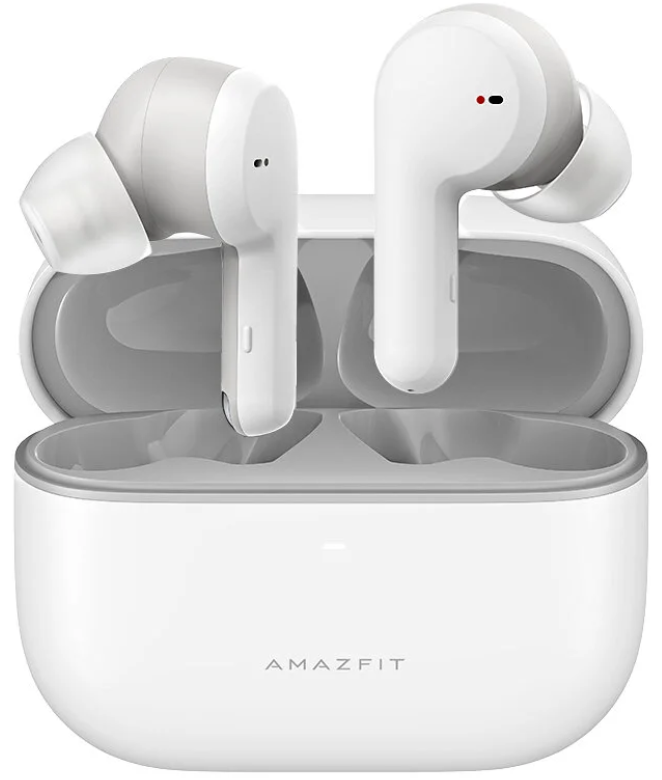
The Amazfit PowerBuds Pro Earbuds deliver a premium blend of audio performance, fitness tracking, and smart features tailored for active users and audiophiles alike. These true wireless earbuds feature advanced active noise cancellation (ANC) up to 40dB, adaptive sound modes, and a unique cervical posture monitoring system that sets them apart in the crowded wireless earbuds market. Designed for runners, gym enthusiasts, and everyday commuters, they combine comfort with cutting-edge technology to enhance both workouts and daily listening experiences.
Key benefits include powerful, customizable sound with multiple EQ settings, real-time heart rate monitoring via an onboard PPG sensor, and smart hearing protection that helps prevent hearing loss by managing sound levels and recommended listening durations. The earbuds also support seamless syncing with popular fitness apps and provide up to 30 hours of total playback with the charging case included.
Available in popular markets globally, the Amazfit PowerBuds Pro typically retails at around retail prices, offering a compelling value proposition against pricier competitors by integrating health monitoring and posture reminders alongside high-quality audio and noise cancellation. This makes them an excellent choice for health-conscious individuals who want more than just sound from their earbuds.
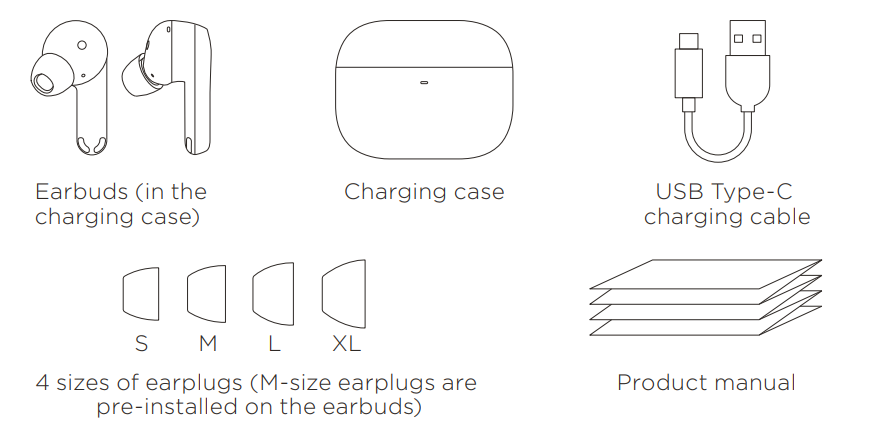
Specifications of Amazfit Powthe eAmazfitro Earbuds
- Bluetooth Version: 5.0 with BLE support, ensuring stable connectivity
- Battery Life: 9 hours of playback (ANC off), 5 hours 45 minutes of playback (ANC on), up to 30 hours total with the charging case
- Charging: 510 mAh case capacity, 2.5 hours full recharge, 10-minute quick charge for 1.5 hours of playtime
- Active Noise Cancellation: Hybrid digital ANC with adaptive modes (Indoor, Travel, Sports, Adaptive), noise cancellation up to 40 dB
- Audio Components: Custom independent acoustic module with LCP liquid crystal diaphragm and dome pattern design for rich bass and clear treble
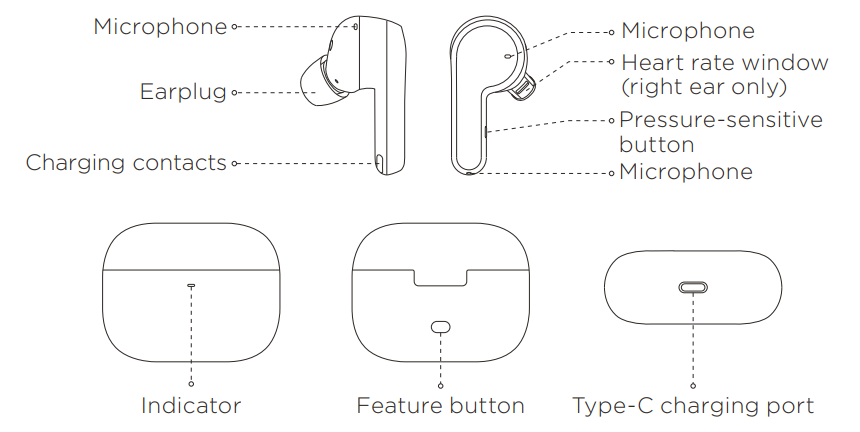
- Sensors: Optical PPG heart rate sensor (right earbud), accelerometer, proximity sensor, cervical spine posture detection
- Microphones: Six microphones total for AI call noise reduction and environmental awareness
- Water Resistance: IP55 rating for dust and sweat resistance (not suitable for swimming)
- Compatibility: Android 5.0 or iOS 10.0 and above
- Special Features: Smart hearing protection, customizable EQ via Zepp app, Thru Mode for ambient sound, gesture controls
Compared to alternatives like Apple AirPods Pro, the PowerBuds Pro offer competitive noise cancellation and health tracking features at a lower price point, making them a strong contender in the mid-tier true wireless earbuds segment.
Using Your Earbuds
Installing the Zepp app
- Install the Zepp app to experience more features.
- Scan the QR code below with your phone to download and install the latest version of the app.

Pairing with the App
- Start the app and log in or register an account.
- Choose Profile > My Devices > Add to add the Amazfit PowerBuds Pro. Open the charging case cover, press and hold the feature button for 2 seconds, and complete pairing as prompted. When you open the charging case cover for the first time, the earbuds automatically enter the pairing state.
Keep Bluetooth on when you are performing device pairing and using the earbuds. We recommend charging the earbuds before use.
Wearing the Earbuds
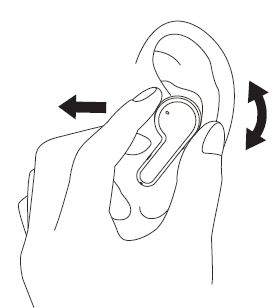
For a better noise cancellation effect, adjust the earbuds to ensure that they fit closely with your ear canals.
Controlling the Earbuds
- Long-press the pressure-sensitive button: switch among Active Noise Cancellation on, Thru Mode, and Active Noise Cancellation off.
- Press the pressure-sensitive button once: play, pause, or answer a call. Press the pressure-sensitive button twice: skip to the next song or reject a call. Press the pressure-sensitive button three times: wake up the device's voice assistant.
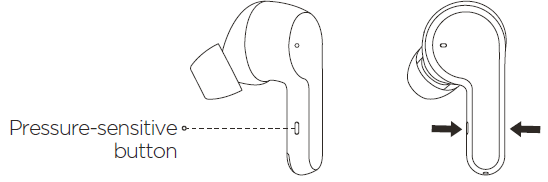
- You can personalize the features of the left and right earbud buttons in the app.
- Voice assistant support may vary depending on the device brand and model.
Charging the Earbuds
- Place the earbuds into the charging case, which will automatically charge the earbuds.
- Use the USB Type-C charging cable to charge the charging case.
Viewing Battery Level
- After the earbuds are connected to the device, you can check the power of the earbuds and the charging case in the app.
- Open the lid or press the charging case feature button. The white indicator on the charging case indicates sufficient power, and the red indicator indicates that the power is low and the case needs to be charged.
Warranty and Return Policy
The Amazfit Limited Warranty covers Amazfit products against manufacturing defects beginning on the original purchase date. The warranty period is 12 months or another specified period as the applicable consumer laws in the consumer’s country of purchase require. Our warranty is in addition to the rights provided by applicable consumer laws.
Troubleshooting amazfit PowerBuds Pro Earbuds
- No Sound or Audio Dropouts: Ensure both earbuds are charged; reset by placing them back in the case and re-pair with your device.
- ANC Not Activating: Verify ANC is turned on via the Zepp app or by pressing and holding the right earbud’s stem. Update firmware if persistent.
- Bluetooth Connection Issues: Turn Bluetooth off and on, forget the device on your phone, then re-pair. Keep earbuds close e to the paired device during pairing.
- Heart Rate Sensor Not Working: Wear the right earbud snugly; ensure the sensor area is clean. Restart the earbuds and sync again with the Zepp app.
- Error Codes: Refer to the user manual for specific LED indicators; common fixes include resetting earbuds and updating app firmware.
To prolong device lifespan, avoid charging the earbuds in wet environments and clean them regularly to prevent dust build-up. The earbuds come with a limited warranty—check with your retailer or Amazfit customer service for detailed terms. Support is accessible via the Zepp app and the Amazfit official website for firmware updates, FAQs, and direct contact options.
Pros & Cons of amazfit PoweAmazfit Earbuds
Pros
- Robust ANC Performance: Up to 40dB noise cancellation with multiple adaptive modes suitable for various environments.
- Integrated Health Features: Heart rate monitoring and cervical posture alerts, uncommon in earbuds at this price.
- Long Battery Life: Up to 30 hours total with case; fast charging support enhances usability.
- Customizable Sound: Multiple EQ presets and user-defined settings via the Zepp app for a tailored audio experience.
- IP55 Rating: Durable against sweat and dust, ideal for workouts and outdoor use.
Cons
- Wind Noise Sensitivity: ANC microphones can pick up wind noise outdoors, reducing effectiveness.
- Control Sensitivity: Touch controls may require firm presses, which can be uncomfortable during exercise.
- Charging Case: Not waterproof, requiring careful handling around moisture.
- Calorie Tracking Accuracy: Reported slight overestimation in fitness metrics compared to dedicated trackers.
Overall, Amazfititro offers excellent value for money by merging fitness tracking and quality audio, standing out from competitors like Apple AirPods Pro and Sony WF-1000XM4 in their price bracket.
Customer Reviews of amazfit PowerBuds Pro Earbuds
Users frequently praise the Amazfit PoweAmazfitro earbuds for their impressive sound quality and effective noise cancellation, especially in indoor and gym settings. The heart rate and posture monitoring features receive positive feedback as unique bonuses that enhance workout motivation and health awareness.
Common complaints include sensitivity to wind noise when running outdoors and occasional difficulty with touch controls, which some find less responsive than expected. Battery life and quick charging capabilities are consistently highlighted as strong points, supporting extended use without frequent recharging.
Most customers rate these earbuds between 4 and 4.5 stars, recommending them particularly for fitness enthusiasts and users seeking health-oriented earbuds with reliable audio performance. Frequent reviewers suggest pairing with the Zepp app to maximize the earbuds’ capabilities and personalize sound and health settings.
Faqs
How do I set up and pair my amazfit PowerBuds Pro Earbuds for the first time?
What should I do if my amazfit PowerBuds Pro Earbuds are not connecting or visible during pairing?
Can I customize the touch controls and Active Noise Cancellation on amazfit PowerBuds Pro Earbuds?
Are amazfit PowerBuds Pro Earbuds compatible with both Android and iOS devices?
How can I optimize battery life and monitor battery status on amazfit PowerBuds Pro Earbuds?
What maintenance and care tips should I follow for amazfit PowerBuds Pro Earbuds?
How do I use the amazfit PowerBuds Pro Earbuds’ heart rate monitoring feature during workouts?
What troubleshooting steps can I take if the amazfit PowerBuds Pro Earbuds have audio or connectivity issues?
More amazfit manuals
- Setup & Pairing: Amazfit T-REX 3 Smartwatch User Manual
- Setup: Amazfit Bip S SmartWatch User Manual
- Setup & Pairing: Amazfit Active-Edge Rugged Smartwatch A2212 User Manual
- Usage & Setup: Amazfit Bip 6 Smartwatch User Manual
- Setup: Amazfit Bip U Smartwatch A2017 User Manual
- Setup & Usage: Amazfit GTR 2 A1952 User Manual
Leave a Comment