
Setup & Pairing: Amazfit Active-Edge Rugged Smartwatch A2212 User Manual
Content
Amazfit Active-Edge Rugged Smartwatch A2212
Introduction
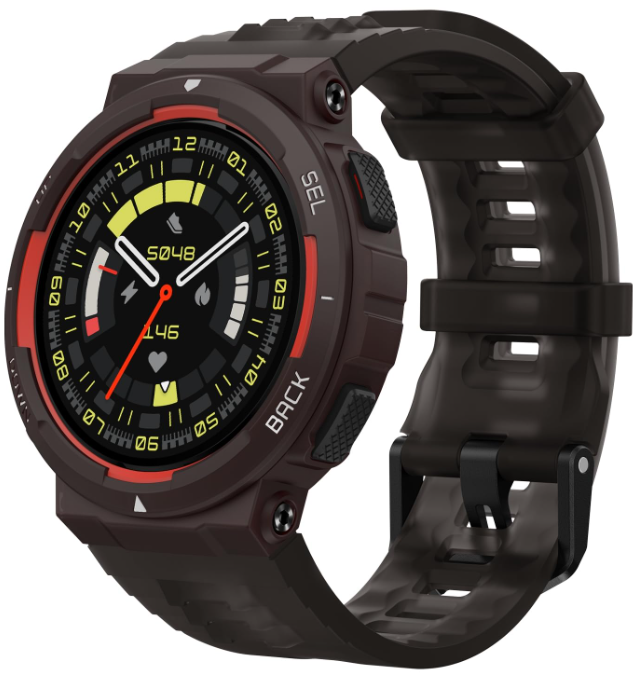
The Amazfit Active-Edge Rugged Smartwatch A2212 is designed for individuals leading active lifestyles, offering a robust combination of fitness tracking, durable design, and smart features. With its 10 ATM water resistance, this smartwatch is perfect for swimming and other water-based activities. It features a 1.32-inch circular TFT display, four physical buttons for easy navigation, and a battery life of up to 16 days. The smartwatch supports over 130 sports modes, including running, cycling, and swimming, making it ideal for fitness enthusiasts. The Amazfit Active-Edge is available in colors like Lava Black, Midnight Pulse, and Mint Green, typically priced between $30 and $60, depending on the retailer and location.
Basic Parameters
- Product name: Smart Watch Model: A2212
- Input: DC 5 V 500 mA MAX
- Bluetooth version: BLE V5.2
- Bluetooth output power: <2 dBm
- Operating temperature: 0°C to 45°C
- Water resistance rating: 10 ATM
- Bluetooth frequency: 2402–2480 MHz
- View product certification information on the watch's Settings > System > Regulation page.
- Device requirements: Devices installed with Android 7.0 or iOS 14.0 or above OS versions
About the Watch
Pairing the Watch
Zepp is a must-have app for this watch. It provides scientific sleep and workout guidance and personalized health services to help you start a healthy lifestyle.
- Use your mobile phone to scan the QR code on the right side to download and install the app, or search for the app in the Google Play Store or Apple App Store and then download and install the the latest version of the app.
- Open the app, register an account, and log in.
- Pair the watch as prompted by the app.
Note:
- For a better user experience, please use the most recent version of the app. The operating system needs to be Android 7.0, iOS 14.0, or above.
- Do not pair the watch directly using your mobile phone’s Bluetooth. Follow the steps in the app to pair your watch correctly.

Charging the Watch
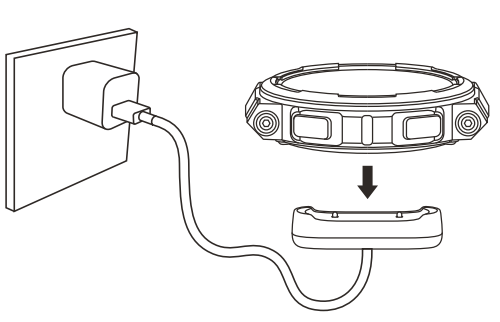
- Connect the watch's charging cable to a power adapter or a computer's USB port.
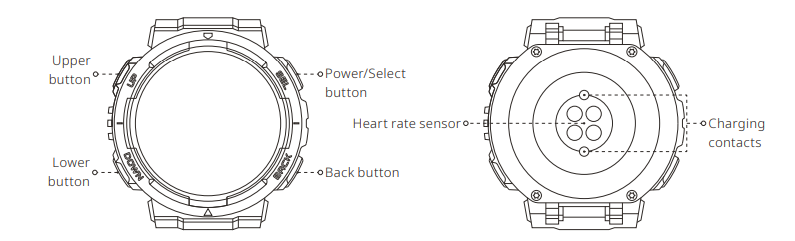
- Put the watch into the charging base. Pay attention to the direction and position of the watch, and make sure that the metal contacts on the back of the watch fit closely with the charging base.
- When charging starts, the watch screen displays the charging progress.
Note:
- Please use the charging base that comes with the watch. Make sure that the charging base is dry before charging.
- Please use a 1A or above power adapter.
Wearing the Watch
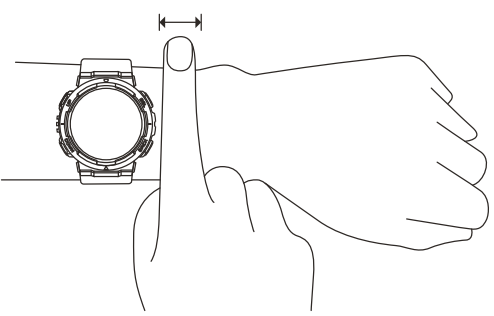
- To ensure the accuracy of heart rate, blood oxygen, and other measurements, please wear your watch at a distance of at least one finger away from the carpal, and keep the strap at a comfortable snugness.
- During a workout, please wear it as tightly as possible to ensure that the watch does not shake. Wear your watch at a distance of at least one finger away from the carpal to obtain more accurate heart rate data.
- After a workout, you can loosen the strap appropriately to ensure a comfortable wear experience.
- When measuring blood oxygen saturation, wear the watch correctly. Avoid wearing the watch on the wrist joint, keep your arm flat, maintain ca omfortable (appropriately tight) fitting between the watch and the skin of your wrist, and keep your arm still throughout the measurement process.
Note: When affected by external factors (arm sag, arm sway, arm hair, tattoo, etc.), the measurement result may be inaccurate or the measurement may fail and provide no output.
Repair and Maintenance
- Avoid using detergents such as soap, hand sanitizer, bath foam, or lotion for cleaning to prevent chemical residues from irritating the skin, corroding the device, or degrading the water resistance of the device.
- After wearing the device while bathing (for devices that support bathing), swimming (for devices that support swimming), or sweating, please promptly clean and dry the device.
- The leather strap is not waterproof. Avoid getting the strap wet, as this may shorten its service life.
- When using light-colored watch straps, avoid contact with dark clothing to prevent staining.
- Do not wear your watch during snorkeling, hot showers, hot springs, saunas (steam rooms), diving, underwater diving, water skiing, and other activities involving high-speed water currents.
- Do not place the device in direct sunlight for long periods. Excessively high or low ambient temperature may cause device failure.
- Handle with care during transportation. Keep the device dry and away from humidity.
- Do not wear the watch in MRI examinations and other highly magnetic environments. Otherwise, the watch may be damaged.
Warranty and Return Policy
The Amazfit Limited Warranty covers Amazfit products against manufacturing defects beginning on the original purchase date. The warranty period is 12 months or another specified period as the applicable consumer laws in the consumer’s country of purchase require. Our warranty is in addition to the rights provided by applicable consumer laws.
Troubleshooting
Common issues with the Amazfit Active-Edge often include connectivity problems, battery drain, or sensor inaccuracies. Solutions involve restarting the device, updating firmware, or recalibrating sensors. For persistent issues, users can contact Amazfit support via their official website or customer service hotline. The warranty typically covers manufacturing defects for a period of one year.
- Connectivity Issues: Restart your watch and ensure Bluetooth is enabled on both devices.
- Battery Drain: Adjust screen brightness, turn off unnecessary features, or use power-saving mode.
- Sensor Inaccuracies: Calibrate sensors regularly and ensure proper fit.
Pros and Cons
Pros
- Durable Design: Rugged build with 10 ATM water resistance, suitable for active lifestyles.
- Long Battery Life: Up to 16 days of typical use, reducing the need for frequent charging.
- Advanced Fitness Tracking: Supports over 130 sports modes and includes AI-driven health coaching.
Cons
- Display Quality: The TFT display may not match the vibrancy of AMOLED screens found in other models.
- Software Updates: Some users report occasional lag or need for manual updates.
Customer Reviews
Users praise the Amazfit Active-Edge for its robust design, extensive sports tracking features, and value for money. Common complaints include the display quality and occasional software issues. Overall, it receives a solid 4-star rating from users who appreciate its durability and fitness tracking capabilities.
Example Testimonial: "The Amazfit Active-Edge is perfect for my active lifestyle. It's durable, tracks my workouts well, and offers great value for the price."
Faqs
How do I set up the amazfit Active-Edge Rugged Smartwatch A2212 for the first time?
What should I do if my amazfit Active-Edge Rugged Smartwatch A2212 is not syncing with the Zepp app?
Can the amazfit Active-Edge Rugged Smartwatch A2212 track swimming activities underwater?
What are the key fitness features of the amazfit Active-Edge Rugged Smartwatch A2212?
Is the amazfit Active-Edge Rugged Smartwatch A2212 compatible with both Android and iOS devices?
How long does the battery last on typical and heavy use for the amazfit Active-Edge Rugged Smartwatch A2212?
What maintenance tips help prolong the life of the amazfit Active-Edge Rugged Smartwatch A2212?
How can I optimize GPS accuracy on my amazfit Active-Edge Rugged Smartwatch A2212 during outdoor activities?
More amazfit manuals
Leave a Comment