
Setup & Pairing: Amazfit ZenBuds Earbuds User Manual
Content
Amazfit ZenBuds Earbuds
Introduction
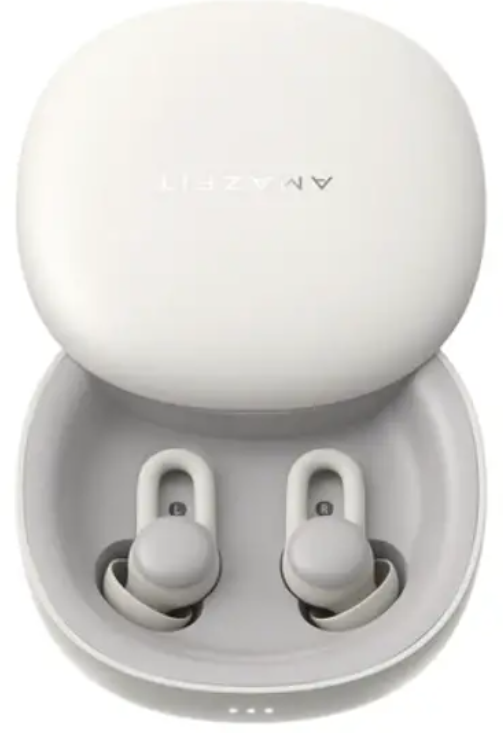
Amazfit ZenBuds Earbuds are a groundbreaking innovation in wearable sleep technology, designed for people who struggle with nighttime noise, light sleepers, and anyone seeking better rest and focus. These ultra-lightweight, noise-isolating earbuds use curated sleep sounds, advanced sleep tracking, and in-ear alarms to create a personalized sleep environment—helping users fall asleep faster, stay asleep longer, and wake up gently, without disturbing others.
The Amazfit ZenBuds Earbuds are not traditional music earbuds; instead, they specialize in sleep and relaxation. Their unique features include Knowles balanced armature receivers for high-quality, soothing sounds, detailed sleep monitoring with heart rate and position sensors, and a personal in-ear alarm that quietly wakes only you. The earbuds are remarkably lightweight at just 1.78g each—about 65% lighter than standard wireless buds—making them comfortable enough for side sleepers and all-night wear. The charging case extends battery life to eight nights, ensuring uninterrupted use for frequent travelers and those with irregular sleep schedules.
Target users include light sleepers, frequent travelers, shift workers, and anyone interested in improving sleep quality or daytime focus. With a price range typically in the mid-tier for sleep-focused wearables, Amazfit ZenBuds Earbuds offer a compelling balance of comfort, functionality, and value for anyone seeking a smarter, quieter night. Availability is global, with online retailers and direct channels offering easy purchase options.
Specifications
- Model Numbers: Earbuds: A1943; Charging Case: A1945
- Weight: 1.78g per earbud (with medium tip), 50g for charging case
- Battery Life: Up to 12 hours per charge (earbuds), up to 8 nights with charging case (56 hours total)
- Charging: USB-C, ~2.5 hours to full charge
- Driver: Knowles balanced armature receiver
- Frequency Response: 20Hz – 8kHz
- Sensors: Acceleration (sleep position), heart rate
- Connectivity: Bluetooth 5.0 BLE
- App Compatibility: Zepp app (Android 5.0+, iOS 10.0+)
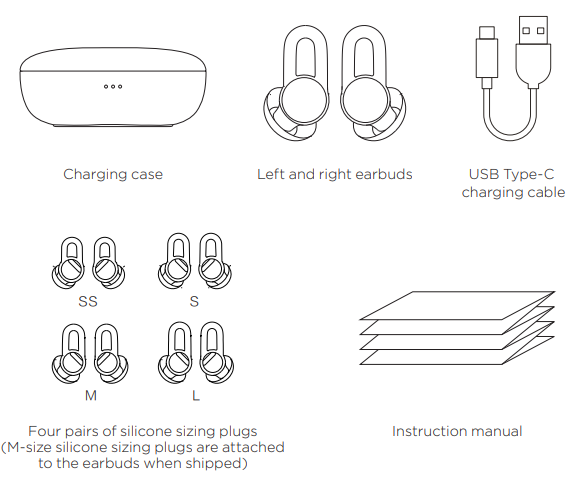
- Included Accessories: Charging case, USB-C cable, four pairs of silicone tips (XS, S, M, L), manual
- Special Features: Auto-pause on sleep detection, in-ear alarm, Pomodoro timer for focus, noise isolation (passive), curated sound library
Compared to competitors like Ozlo Sleepbuds, Amazfit ZenBuds Earbuds stand out with sleep tracking (heart rate and position), a longer battery life, and a unique focus timer feature, though they lack active noise cancellation and do not stream music from your device.
Packaging contents
About the product
Usage
App installation
- Scan the QR code to the right with your phone to download and install the latest version of the app.
- Notes:
- To improve your experience, update the app to the latest version as prompted.
- System requires Android 5.0 or iOS 10.0 or later.
- Amazfit ZenBuds usage
- Open the app on your phone and register or log in with your account.
- Open the charging case and remove the earbuds.
- In the app, select "Add Device", then "My" > "My Device" to add the Amazfit ZenBuds.
You can control the rhythm playback or experience more functions in the app.- Notes:
- Once the Amazfit ZenBuds are connected and in use, ensure your Bluetooth is enabled.
- We recommend charging the Amazfit ZenBuds before use.
- Notes:

Charging
- Place the earbuds into the charging case, after which the earbuds will automatically enter the charging state.
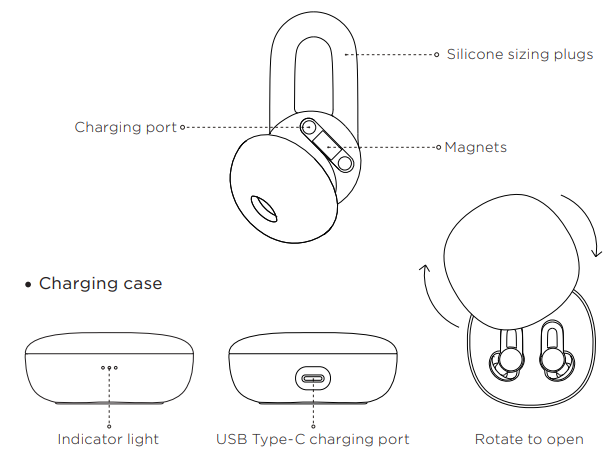
- Use the USB Type-C charging cable that comes with the product to charge the charging case. When charging, the three white power level indicator lights will flash in sequence. When all three white indicators are lit, charging is complete.
- Note:
When the earbuds are in the charging case, the corresponding indicator light will flash. If the indicator light does not flash, the earbuds are not securely in place, which will cause earbud charging to fail. If this happens, adjust the earbud placement or take out and replace the earbuds. Specifically, the left indicator corresponds to the left earbud, and the right indicator corresponds to the right earbud.
Viewing battery level
- Viewing earbud battery level: After connecting the earbuds to your device, view their battery level in the app.
- Viewing charging case battery level: Open the charging case and check the white indicator lights to view whether the case is charged. When the left indicator light flashes to indicate low power, please charge immediately.
Wearing comfortably
- Select the correct sizing plugs for your ears, then adjust the angle of the earbuds slightly to ensure that they fit closely in your ear when you use them for the optimum noise blocking effect.
Operating environment
- Do not use the product in dusty, humid, dirty environments, or within strong magnetic fields, which may cause the internal circuits of the device to fail. When installing this product, please keep it away from appliances with strong magnetic or electric fields, such as microwave ovens and refrigerators.
- Do not use this product during thunderstorms. Thunderstorms may cause equipment failure or danger of electric shock.
- The use of this product in environments such as gas stations, fuel depots, chemical plants, transportation, or storage facilities for fuel or chemical samples is strictly prohibited, and may cause explosion or fire.
- Use this product within the temperature range of 0°C-45°C, and store the product and its accessories within the temperature range of -40°C to +70°C.
- An ambient temperature that is too high or too low may cause product failure. Do not place the product in direct sunlight, such as a car dashboard or windowsill. Do not place this product near heat sources or exposed fire sources, such as electric heaters, microwave ovens, water heaters, ovens, stoves, candles, or other places where high temperatures may occur.
- Do not place sharp metal objects, such as pins, near the receiver or speaker of the device, as metal objects may attach to the headset and injure you.
Care and maintenance
- Keep this product and its accessories dry. Do not dry the product using an external heating device such as a microwave oven or hair dryer.
- Do not place this product or its accessories in areas with excessively high or low temperatures, which may cause the product to malfunction, catch fire, or explode.
- Before cleaning and maintenance, stop using the product, close all applications, and disconnect all connections from other devices.
- Do not use harsh chemicals, cleaners, or strong detergents to clean this product or its accessories. Use a clean, dry, soft cloth to wipe the product or its accessories. Do not expose the product to magnetic stripe cards (such as bank cards, phone cards, etc.) for long periods of time, or the magnetic stripe cards may be damaged by the product's magnetic field.
Troubleshooting
Common Problems & Solutions
- Earbuds Not Pairing: Ensure Bluetooth is enabled on your device and the earbuds are fully charged. Reset the earbuds by placing them back in the case and holding the case button.
- No Sound or Low Volume: Check the volume in the Zepp app. Ensure the correct sound is selected and the earbuds are properly seated in your ears.
- Battery Drains Quickly: Update the app and firmware. Use the correct playback mode (e.g., timed or smart playback). Avoid leaving earbuds outside the case when not in use.
- Sleep Tracking Not Working: Enable all permissions for the Zepp app. Ensure the earbuds are worn correctly and the sensors are not obstructed.
- Earbuds Fall Out: Try different silicone tip sizes for a secure fit. Clean your ears and the tips regularly.
Preventive Measures
- Regularly clean the earbuds and charging contacts.
- Keep firmware and app updated for optimal performance.
- Store earbuds in the case when not in use to preserve battery.
Warranty & Support
Amazfit ZenBuds Earbuds come with a standard manufacturer’s warranty. For technical support, visit the official Amazfit website or contact customer service via the app. Include your purchase details and a description of the issue for faster resolution.
Pros & Cons
Advantages
- Ultra-Lightweight & Comfortable: At just 1.78g each, they’re barely noticeable, ideal for side sleepers and all-night use.
- Effective Noise Isolation: Silicone tips block out ambient noise, helping users fall asleep in noisy environments.
- Comprehensive Sleep Tracking: Monitors heart rate and sleep position for detailed sleep analysis
- Long Battery Life: Up to 12 hours per charge, extendable to 8 nights with the case.
- Personal In-Ear Alarm: Wake gently without disturbing others.
- Curated Sound Library: Wide variety of soothing, sleep-inducing sounds via the Zepp app.
- Smart Features: Auto-pause on sleep detection, focus timer, and smart notifications.
Limitations
- No Music Streaming: Cannot play music from your phone or tablet—designed solely for sleep and relaxation sounds.
- No Active Noise Cancellation: Relies on passive noise isolation, which may not block very loud noises.
- Limited Sound Frequency: 20Hz–8kHz range is sufficient for sleep sounds but not for music.
- App Dependency: Most controls and features require the Zepp app.
- Fit May Vary: Finding the right silicone tip size is essential for comfort and noise isolation.
For those prioritizing sleep quality over music, Amazfit ZenBuds Earbuds deliver excellent value. However, if you want multi-purpose earbuds for music and calls, consider alternatives like standard wireless earbuds with active noise cancellation.
Customer Reviews
Users consistently praise the Amazfit ZenBuds Earbuds for their comfort, effective noise isolation, and ability to improve sleep quality. Many highlight the barely-there feel, making them ideal for side sleepers, and appreciate the variety of soothing sounds available through the app. The in-ear alarm is frequently mentioned as a standout feature, offering a gentle, private wake-up experience.
Common complaints include the inability to stream music, occasional connectivity issues, and the need to find the right ear tip size for optimal fit and noise isolation. Some users note that very loud noises may still be heard, as the buds rely on passive rather than active noise cancellation.
Star ratings typically range from 4 to 4.5 out of 5, with most users recommending Amazfit ZenBuds Earbuds for anyone seeking better sleep in noisy environments. Frequent travelers and shift workers find them especially useful. If you prioritize sleep and relaxation over music, these earbuds are a top choice.
Faqs
How do I set up the amazfit ZenBuds Earbuds for the first time?
What should I do if my amazfit ZenBuds Earbuds are not charging properly?
Can I use amazfit ZenBuds Earbuds with any smartphone, and what are the compatibility requirements?
How do the amazfit ZenBuds Earbuds help improve sleep quality?
What features in the amazfit ZenBuds Earbuds app allow me to customize my experience?
How can I troubleshoot connectivity issues with amazfit ZenBuds Earbuds and the app?
What maintenance steps should I follow to keep my amazfit ZenBuds Earbuds in good condition?
How can I optimize the fit and comfort of amazfit ZenBuds Earbuds for better performance?
More amazfit manuals
- Setup & Pairing: Amazfit T-Rex Smart Watch User Manual
- Setup & Usage: Amazfit Nexo Smartwatch User Manual
- Setup: Amazfit GTS 2 Smartwatch User Manual
- Setup: Amazfit Bip U Smartwatch A2017 User Manual
- Setup : Amazfit Helio Ring User Manual
- Setup & Pairing: Amazfit Active-Edge Rugged Smartwatch A2212 User Manual
Leave a Comment