
Setup & Pairing: Amazfit T-Rex Smart Watch User Manual
Content
Amazfit T-Rex Smart Watch
Introduction
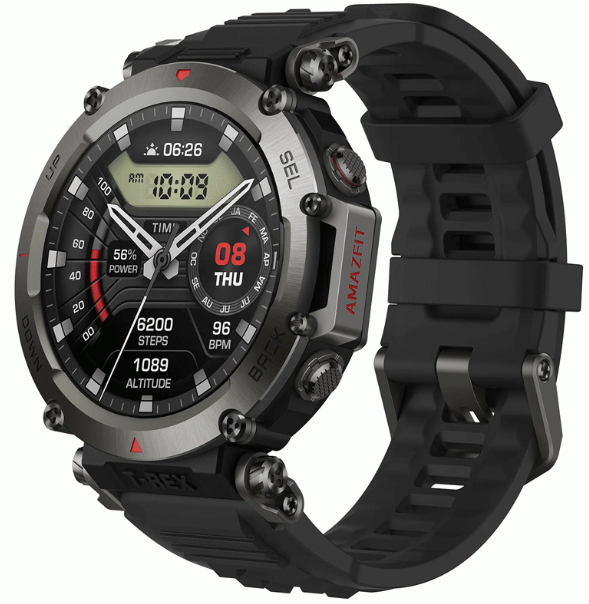
The Amazfit T-Rex Smart Watch is a rugged, durable smartwatch designed for outdoor enthusiasts and fitness athletes who demand reliability and long battery life. Engineered with military-grade certification (MIL-STD-810G), this watch offers exceptional endurance against extreme temperatures, shocks, and water exposure, making it perfect for adventurers, hikers, and athletes who require both durability and smart functionality. Its robust polymer body, combined with Gorilla Glass and oleophobic coating, ensures the display stays clear and scratch-resistant during intense activities.
Key benefits include a vibrant 1.3-inch AMOLED display with a resolution of 360x360 pixels, an impressive 20-day typical battery life, and comprehensive health and fitness tracking features like heart rate monitoring, GPS + GLONASS support, and multiple sport modes. The watch is compatible with both Android (5.0+) and iOS (10.0+) devices, offering seamless notifications, fitness data synchronization, and customizable watch faces.
Typically priced in the affordable segment, ranging approximately from $140 to $160, the Amazfit T-Rex is widely available online and through major retailers. It appeals to outdoor adventurers, fitness enthusiasts, and anyone seeking a reliable, value-for-money wearable that can withstand harsh environments while delivering core smartwatch functionalities.
Specifications and Features
- Display: 1.3" AMOLED touchscreen, 360 x 360 pixels, Always-On Display (AOD) supported
- Body: 47.7 x 47.7 x 13.5 mm; 58g including strap; polymer body with metal buttons; Gorilla Glass 3 with oleophobic coating
- Durability: 5 ATM water resistance (suitable for swimming); MIL-STD-810G certified for shock, temperature, and humidity resistance
- Operating System: Proprietary OS compatible with Android 5.0+ and iOS 10.0+
- Connectivity: Bluetooth 5.0 + BLE; GPS + GLONASS for accurate outdoor tracking
- Battery: 390mAh lithium polymer; up to 20 days typical use, 66 days in basic watch mode, 20 hours continuous GPS tracking
- Sensors: BioTracker PPG optical heart rate sensor, 3-axis accelerometer, geomagnetic sensor, ambient light sensor
- Fitness Features: Multiple sport modes, activity tracking, sleep monitoring, customizable alerts, and workout statistics
Compared to similar rugged smartwatches, the T-Rex excels in battery longevity and durability but lacks a full third-party app ecosystem, focusing instead on efficient, optimized core features. Its tough build outperforms many mid-range smartwatches, placing it as a top contender for outdoor use at an affordable price point.
Basic Operations
Touch screen
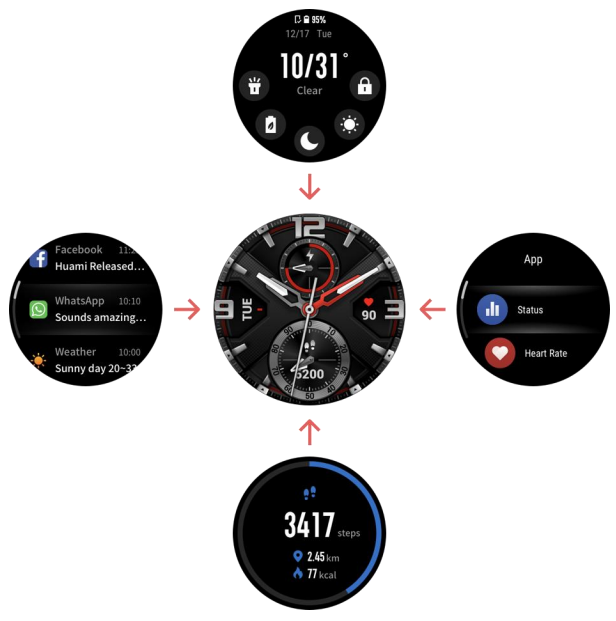
You can swipe left/right or up/down on the watch face to switch between different function pages.
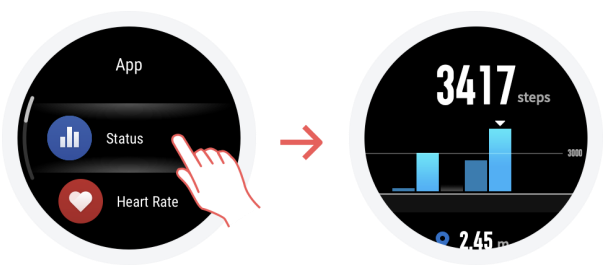
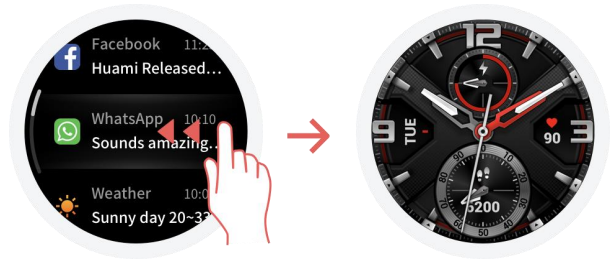
Tapping and exiting: You can tap to enter a specific function page and also display the tap tips on that page. After entering a certain function page through tapping, you can swipe right to quickly return to the previous menu level. Swipe left from the Notification List page will return you to the watch face.
Physical Buttons
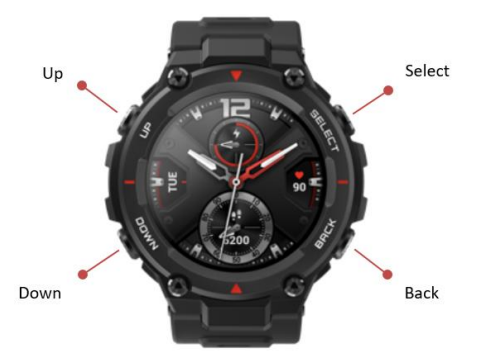
SELECT button:
- Long-press the button for 2 seconds to power on the watch.
- Short-press to light up the screen.
- A short press on the watch face will open the workout list. (You can also set this operation to quickly start other functions by customizing in the system settings.)
- Short-pressing on other pages will enter the next menu level, or enter a sub-page when on a list page.
- Long-press for 10s to shut down.
BACK button:
- Short-press to light up the screen.
- Press on the watch face short to turn off the screen.
- Short-press on other screens to return to the previous page.
- Long-press on other screens to quickly return to the watch face.
UP & DOWN buttons:
- Press on the watch face short to switch between different widgets.
- Short-press on any list screen to change the currently selected item.
- Short-press on a long page to scroll up and down.
Functions Navigation
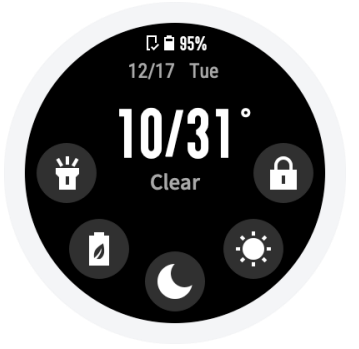
Swipe down from the watch face or short-press the UP button to enter the shortcut control screen, where you can quickly turn on the flashlight, set screen brightness, set DND mode, enter battery saver mode, and enable screen lock.
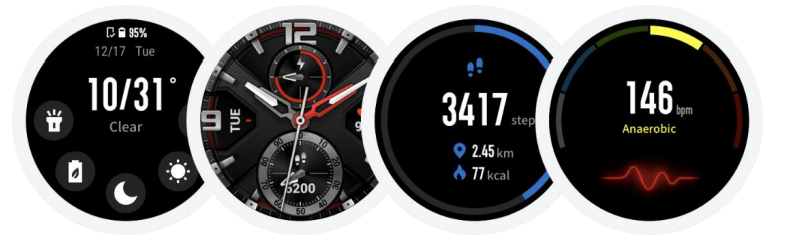
Swipe up on the watch face or short-press the DOWN button to switch between Health status → Heart rate measurement. Keep swiping up to return to the shortcut control screen → watch face.
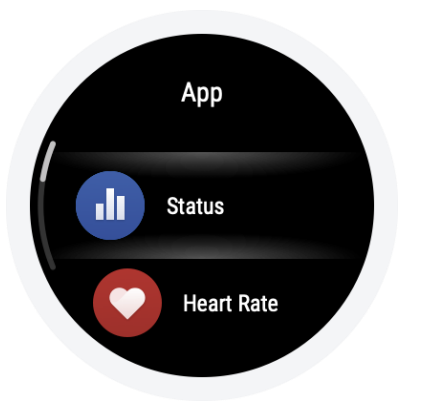
Swipe left on the watch face to enter the apps list
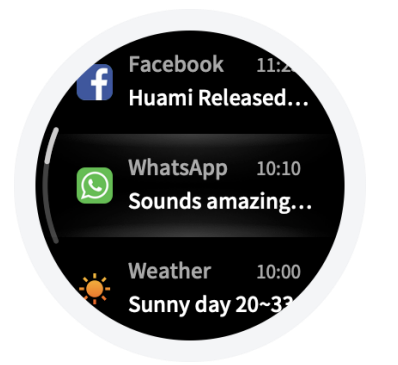
Swipe right on the watch face to enter the notifications list
Use of Functions
Download the Amazfit app via the mobile phone before using the Amazfit T-Rex. You need to pair the watch using the Amazfit app to enjoy its full functionality. In addition, a paired watch allows the saving of data generated on the watch to your personal account in the cloud, which will avoid data loss.
Device Pairing and Unpairing
- Please download the Amazfit app through Google Play or App Store, then scan the QR code on the watch, and register or log in to your account.
- Open the Amazfit app and tap the "+" icon in the upper right corner or tap "Profile → Add device → Watch → Amazfit T-Rex", and follow the prompts to scan the QR code on the watch.
- Follow the prompts on your watch and mobile phone to complete the pairing process. Once paired, it is usually necessary to perform a system upgrade on the watch. Please wait while this is happening and keep the phone connected to both the Internet and the watch via Bluetooth, so as to ensure a successful upgrade.
- After the watch is paired and upgraded, its functions are available. The Amazfit app can also be used to configure the watch.
- If you need to unpair your watch, open the Amazfit app, go to "Profile → Amazfit T-Rex" and choose "Unpair".
Common Troubleshooting for the Amazfit T-Rex Smart Watch
- Problem: The Watch is not syncing with the phone
Solution: Ensure Bluetooth is enabled on both devices; restart the watch and phone; update the Amazfit app; clear app cache if needed. - Problem: GPS not locking or inaccurate tracking
Solution: Move to an open outdoor area; ensure GPS is enabled in settings; restart the GPS function; update the watch firmware. - Error Codes: No specific error codes, but connectivity issues generally resolve with app updates or device restarts.
- Preventive Measures: Regularly update the watch firmware and Amazfit app; avoid extreme magnetic interference; keep sensors clean and unobstructed.
- Warranty & Support: Standard Amazfit warranty applies (typically 12 months); customer support available via the official Amazfit website and app; contact support at support@amazfit.com or via the Amazfit app’s help section.
Pros & Cons of the Amazfit T-Rex Smart Watch
- Pros
- Durable military-grade construction withstands harsh outdoor conditions
- Exceptional battery life lasting up to 20 days on typical use
- Bright AMOLED display with Always-On option for clear visibility in sunlight
- Comprehensive fitness tracking with accurate GPS and heart rate monitoring
- Intuitive and lag-free proprietary OS ensures a smooth user experience
- Affordable compared to other rugged smartwatches with similar features
- Cons
- Lacks a full third-party app ecosystem,, limiting customization options
- No speaker; voice commands support,, ed but only with beeper alerts
- Basic notification handling without advanced smartwatch features
- Strap uses a non-standard size, limiting replacement options
Customer Reviews: Real User Feedback on the Amazfit T-Rex Smart Watch
Amazfit T-Rex Smart Watch receives generally positive reviews for its rugged durability and excellent battery life. Users praise its reliable GPS accuracy during outdoor activities and the bright AMOLED screen that remains readable in direct sunlight. Many outdoor athletes appreciate the military-grade toughness and water resistance that allow the watch to endure tough environments.
Common complaints include the absence of a speaker, limiting the smartwatch experience, and the lack of support for third-party apps. Some users found the default interface less feature-rich than more expensive smartwatches but acknowledged the T-Rex’s focus on core fitness and durability features as a fair trade-off.
Overall, customer star ratings average around 4 to 4.5 out of 5 stars, with strong recommendations for buyers looking for a dependable, long-lasting outdoor smartwatch with solid fitness tracking capabilities.
Faqs
How do I set up and pair my amazfit T-Rex Smart Watch with my smartphone for the first time?
What should I do if my amazfit T-Rex Smart Watch won't turn on or charge?
Can the amazfit T-Rex Smart Watch be used with any smartphone operating system?
How do I optimize battery life on my amazfit T-Rex Smart Watch?
What are the key outdoor and fitness features of the amazfit T-Rex Smart Watch?
How do I maintain and care for my amazfit T-Rex Smart Watch to ensure longevity?
Why is my amazfit T-Rex Smart Watch not syncing data with the Zepp App, and how can I fix it?
How can I customize watch faces and notifications on the amazfit T-Rex Smart Watch?
More amazfit manuals
Leave a Comment