
Setup: Amazfit PowerBuds Earbuds User Manual
Content
Amazfit PowerBuds Earbuds
Introduction
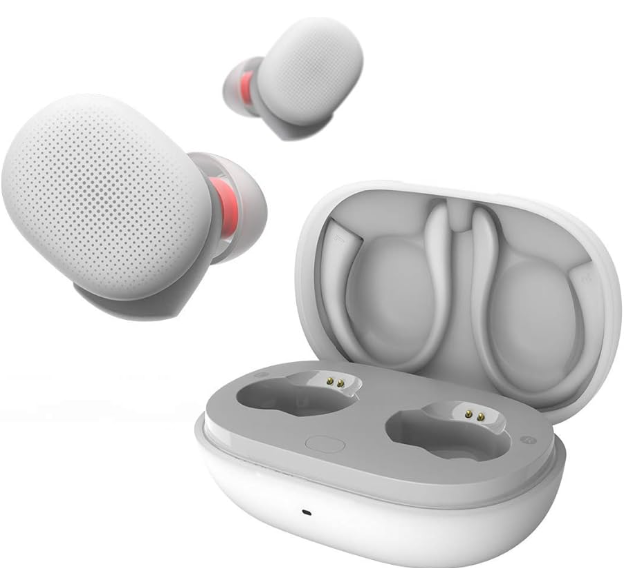
Meet the Amazfit PowerBuds Earbuds—your ultimate workout companion, engineered for athletes and fitness enthusiasts who demand more from their audio gear. Designed by Amazfit, a trusted name in wearable technology, these true wireless earbuds stand out with their integrated PPG heart rate monitoring, delivering real-time feedback to help you train smarter and safer. Whether you're hitting the gym, running outdoors, or cycling, the Amazfit PowerBuds Earbuds keep you in tune with your body and your music.
Key benefits include a sporty, secure fit thanks to the magnetic split ear hook design, which can be removed for everyday use, and up to 24 hours of total playtime (8 hours per charge plus 16 from the case) to power through even the longest training sessions. Voice notifications alert you when your heart rate exceeds preset limits, adding an extra layer of safety during intense workouts. The earbuds also feature powerful bass, customizable EQ via the companion app, and simple touch controls making them a versatile choice for both exercise and daily listening.
Targeted at active users who want performance tracking without sacrificing audio quality, the Amazfit PowerBuds Earbuds are ideal for runners, gym-goers, and anyone seeking a reliable, all-in-one solution for music and metrics. With an estimated price range in the mid-tier segment, they offer standout value compared to premium brands, making advanced fitness features accessible to more users. Widely available through major electronics retailers and online stores, the Amazfit PowerBuds Earbuds are ready to elevate your active lifestyle.
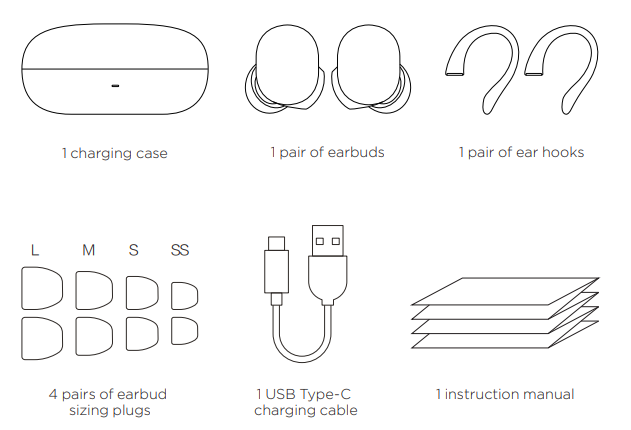
Package Contents
Specifications
Key Features & Performance
- Heart Rate Monitoring: Built-in PPG sensor in the right earbud for precise, real-time heart rate tracking during workouts
- Battery Life: Up to 8 hours of playback per charge; 16 additional hours with the charging case (total 24 hours)
- Audio Drivers: 9mm dynamic drivers deliver powerful bass and clear treble (20Hz–20,000Hz frequency range)
- Bluetooth Codecs: Supports SBC, AAC, and mSBC for stable wireless connectivity
- Touch Controls: Intuitive touch gestures for play/pause, track skipping, and activating Thru Mode (environmental noise passthrough)
- Design: Magnetic split ear hooks for secure fit; removable for casual use; smooth, sporty shell
- Microphone: Built-in mic for calls; voice notifications for heart rate alerts
- Water Resistance: Designed for sweat and light rain (exact IP rating not specified)
- Weight: Approx. 6g per earbud (slightly heavier than some competitors, but comfort is maintained)
- Charging Case: 450mAh capacity; earbuds 55mAh each
Basic Specifications
- Model: Earbuds A1965; Charging case A1967
- Battery capacity: Earbuds 55mAh;
- Charging case: 450mAh
- Input: Earbuds: 5V 0.12A
- Charging case: 5V 0.5A
- System requirements: Android 5.0 or iOS 10.0 and above
- Wireless connection: BT5.0, BLE
- Water & dust resistance rating: Earbuds IP55
- Output: 5V 0.25A
- Functional ambient temperature: 0°C-45°C
- HVIN: A1965-Left, A1965-Right
Notes:
- Amazfit PowerBuds are resistant to sweat, water,, and dust, and are suitable for a variety of non-water sports and activities. The product is tested under controlled laboratory conditions and is rated as IP55 water & dust resistance under GB 4208-2008 and IEC 60529.
- Do not immerse Amazfit PowerBuds in water.
- Do not charge Amazfit PowerBuds if wet. If the Amazfit PowerBuds accidentally get wet, dry them by cleaning them properly with a dry, lint-free soft cloth.
- The charging case is not waterproof, so ensure that the openings are not exposed to moisture or any liquid. Keep them clean.
Comparison with Similar Products
Unlike most wireless earbuds, the Amazfit PowerBuds Earbuds offer in-ear heart rate monitoring—a rare feature typically found only in premium sports models. They provide longer battery life than many fitness-focused competitors and include customizable sound profiles, though they lack advanced features like active noise cancellation or wireless charging found in higher-end models. The secure, adjustable fit and robust build make them a practical alternative to bulkier sports headphones.
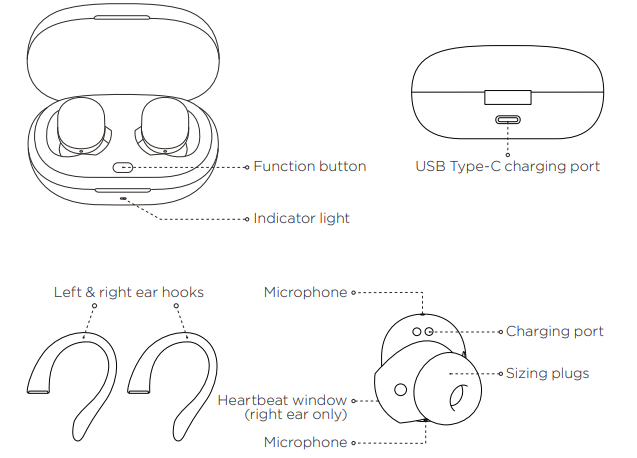
About your Amazfit PowerBuds
Usage
Installing app
Installing the app helps you get more out of your Amazfit PowerBuds. Use your phone to scan the QR code on the right to download the latest version of the app.
Notes:
- For a better user experience, follow the prompts and upgrade your app to the latest version.
- System requirements are Android 5.0 or iOS 10.0 and above.
Pairing Amazfit PowerBuds
- Open the app on your phone and register a new account or log in to an existing account.
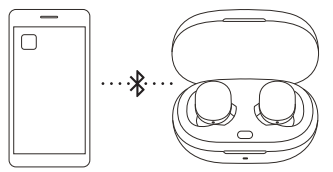
- Select "Add Device" under "Profile > My Devices" in the app to add the Amazfit PowerBuds. If you are connecting your device for the first time: open the charging box cover, after which the charging case indicator light will flash white, then complete pairing according to the prompts in the app.
- If you are not connecting for the first time, open the charging case, press and hold the button inside the case until the indicator light flashes white, then complete the connection according to the prompts in the app. Make sure that the headset is in the charging case when connecting.
Notes:
- When the device is connected and the Amazfit PowerBuds are in use, keep your phone's Bluetooth connection turned on.
- Charging the Amazfit PowerBuds before use is recommended.
Charging
Charging the Amazfit PowerBuds: when the Amazfit PowerBuds are placed in the charging case, they will begin charging automatically.
Charging the charging case: Charge the charging case with the USB Type-C charging cable provided in the package. The power indicator will flash red when the case is charging. When the device is fully charged, the red light will stop flashing.
Checking battery level
- Checking earbud battery level: You can check the battery level for your Amazfit PowerBuds in your app once they are connected to your phone.
- Checking charging case battery level: after connecting the Amazfit PowerBuds to your phone, you can check the battery level for the charging case and your Amazfit PowerBuds in the app.
- When you open the cover or press the function button on the charging case, the indicator light on the case will begin to flash white. This indicates that the battery is fully charged. If the light flashes red, the battery is low and the case needs to be charged.
Wearing
Please select a plug of the appropriate size and adjust the angle of the Amazfit PowerBuds to a comfortable position to ensure the best sound experience and continuous heart rate monitoring.
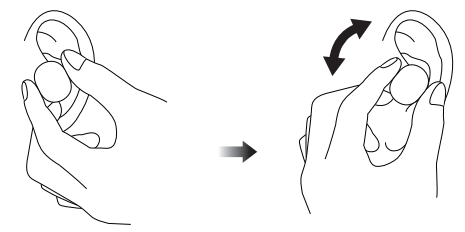
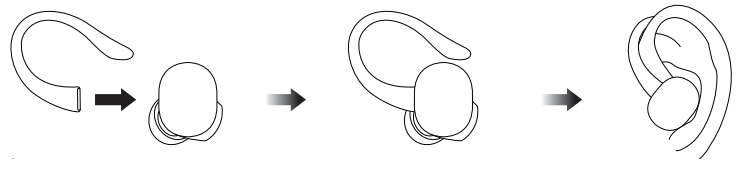
The ear hooks enhance earbud stability while wearing, and can be used if necessary.
Notes:
- Enable the motion detection function through the app.
- After use, place the Amazfit PowerBuds back into the charging case to prolong service life and prevent loss.
- If heart rate detection during exercise does not work, try replacing your sizing plugs with a bigger size and wearing ear-hooks.
Safety Information
Read and follow the following safety precautions before using and operating this product to ensure optimal performance and to avoid dangerous or illegal situations. Usage scenarios and operating environment considerations:
Safe usage
- Please select a power adapter thathas passed mandatory certification and whthateets standard charging requirements.
- This product and its accessories are small in size and contain small parts. Keep these out of the reach of children. Children may inadvertently damage the product and its accessories, or swallow small components, resulting in suffocation or other hazards. When not in use, store the
- Amazfit PowerBuds in the charging case and keep the product away from children and pets.
- This product is not a toy. Children should only use this product under adult supervision. Do not use earbuds and charging cases that have been damaged or modified. Damaged or modified batteries can cause unpredictable hazards such as fire, explosion, or injury. Keep the Amazfit PowerBuds and the charging case away from direct sunlight, fire, etc. Do not use this product in places where the use of wireless devices is prohibited, as this may interfere with other electronic devices or cause other hazards.
- Some components included with this product generate electromagnetic fields that may interfere with pacemakers, defibrillators, hearing aids, and other medical devices, so keep them at a safe distance from all medical equipment. Consult your medical device manufacturer for medical device user restrictions. If you suspect that this product interferes with your pacemaker, defibrillator, hearing aid, or other medical device, immediately stop using them.
- Only use accessories that are approved by the product manufacturer and compatible with this model. If you use any other types of accessories, this product's warranty conditions and the regulations of the country where the product is used may be violated. This could also pose a safety hazard.
Health & safety
- Some people may suffer from skin allergies ftoplastics, cortex, fiber, and other materials. Areas in long-term contact with these substances may exhibit redness, inflammation, and other symptoms. If you experience any such symptoms, stop using the product and consult a doctor immediately.
- Unclean earbuds may cause infection. Clean your headphones regularly with a dry, dust-free, soft cloth. Do not use water, sprays, solvent,,s or abrasive agents to clean your earbuds. If you begin to experience skin problems, stop using the product immediately. If the problem still persists, please consult your physician.
When listening to music or talking on earbuds, it is recommended to use the minimum volume required for music or calls to avoid hearing damage. Prolonged exposure to high volume may result in permanent hearing loss.
Special Instructions
- This manual is based on existing information. The company reserves the right to make changes and improvements to the product specifications and functions, and to modify and improve any of the contents described in this manual in the spirit of continuous improvement and sustainable development.
- The contents of this manual are provided at the time of manufacture of the product, and no warranty of any kind, express or implied, is made as to the accuracy, reliability, or content of the document, unless otherwise required by applicable laws. Therefore, any claim for compensation based on the data, pictures, or text descriptions of this manual will not be accepted.
- This product is not a medical device. The data and information provided are for reference only.
- If you disassemble the outer casing of this product, the product repair warranty will be voided.
- The pictures in this manual are intended to guide user operation and are for reference only. For specific operational details, refer to the actual product.
Operating environment
- Do not use this product in places that are dusty, damp, dirty, or near to magnetic fields, as this may cause internal circuit failure.
- When storing the product, keep it away from appliances with strong magnetic fields or strong electric fields such as microwave ovens and refrigerators.
- Do not use this product during thunderstorms. Thunderstorms can cause equipment failure or risk of electric shock.
- The use of this product is strictly forbidden in and around gas stations, fuel depots, chemical plants, fuel or chemical samples transportation or storage facilities, as it may cause explosion or fire.
- Please use this product within a temperature range of 0°C-45°C and store the product and its accessories within a temperature range of -40°C-70°C.
- An ambient temperature that is too high or too low may cause product failure. Do not place the product in direct sunlight, such as on a car dashboard or window sill. Do not place this product near heat sources or bare ignition sources, such as electric heaters, microwave ovens, water heaters, ovens, stoves, candles, or other places where high temperatures may occur.
- Do not place sharp metal objects, such as pins, near the receiver or speaker of the device, to prevent metal objects from becoming embedded and causing injury.
Care and maintenance
- Please keep this product and its accessories dry. Do not use an external heating device, such as a microwave or hair dryer, to dry it.
- Do not place this product or its accessories in excessively hot or cold areas, as this may cause the product to malfunction, catch fire, or explode.
- Before cleaning and maintenance, please stop the use of the product, close all applications, and disconnect the product from all other devices.
- Do not use harsh chemicals, detergents,, or strong detergents to clean the product or its accessories. Wipe the product or its accessories with a clean, dry, soft cloth.
- Do not maintain prolonged contact with magnetic stripe cards (such as bacardsard, SIM cards, etc.). Otherwise, the magnetic stripe card may be damaged by the product's magnetic field.
Troubleshooting: Quick Fixes for Common Amazfit PowerBuds Earbuds Issues
Common Problems & Solutions
- Earbuds Not Connecting: Ensure Bluetooth is enabled on your device; resethe t the earbuds by placing them in the case and holding the button for 10 seconds.
- Poor Audio Quality: Check for debris in the earbud grille; adjust EQ settings in the companion app for optimal sound.
- Touch Controls Unresponsive: Clean the earbud surface; ensure firmware is up to date via the app.
- Short Battery Life: Fully charge the case and earbuds; avoid exposing them to extreme temperatures.
- Heart Rate Not Detected: Ensure the earbud is positioned correctly in your ear during a workout session; only active during tracked activities.
Preventive Measures
Regularly clean your earbuds and case; avoid exposing them to water beyond light sweat; keep firmware updated for best performance and new features.
Warranty & Support
Amazfit PowerBuds Earbuds typically come with a 1-year limited warranty. For assistance, contact Amazfit customer support through their official website or authorized retailers. Keep your purchase receipt for warranty claims.
Contact for Help: Visit the Amazfit support page or use the contact form on their official website for prompt assistance.
Warranty and Return Policy
The Amazfit Limited Warranty covers production defects for Amazfit products beginning on the initial purchase date. The warranty period is 12 months and is subject to consumer law in the country where the consumer is located. Our warranty is in addition to the rights granted under applicable consumer laws.
- Official website: en.amazfit.com
- Support Center website: support.amazfit.com
Pros & Cons: Balanced Assessment of Amazfit PowerBuds Earbuds
Strengths
- Integrated Heart Rate Monitoring: Rare in-ear PPG sensor for real-time workout tracking
- Long Battery Life: Up to 24 hours total with the charging case—exceeds many rivals
- Powerful Bass: 9mm drivers deliver energetic, workout-friendly sound
- Secure, Customizable Fit: Magnetic ear hooks are optional for intense activity; comfortable for daily use
- Value for Money: Affordable for the feature set, especially compared to premium sports earbuds
Weaknesses
- Bulky Design: Slightly larger and heavier than some competitors, though comfort is generally good
- Average Microphone Quality: Call clarity is acceptable but not exceptional
- No Active Noise Cancellation: Lacks ANC, which is common in pricier models
- No Wireless Charging: Case charges via USB-C only
- Bass Can Be Muddy: While powerful, bass may lack precision for audiophiles
Overall, the Amazfit PowerBuds Earbuds are a strong choice for fitness enthusiasts seeking reliable performance tracking and energetic sound at a reasonable price. They may not satisfy users seeking audiophile-grade clarity or the latest premium conveniences, but they excel as a dedicated workout partner.
Customer Reviews: Real User Experiences with Amazfit PowerBuds Earbuds
Users praise the Amazfit PowerBuds Earbuds for their impressive battery life and secure fit during workouts—many highlight the convenience of in-ear heart rate monitoring, a feature rarely found in this price range. The powerful bass and customizable sound profiles via the app are also frequently mentioned as positives, making them a favorite for gym sessions and runs.
Common complaints include the slightly bulky design and lack of advanced features like noise cancellation or wireless charging, which are available in more expensive models. Some users note that while the touch controls are functional, they can be less responsive than expected. The microphone quality is deemed adequate for calls but not exceptional.
On average, the Amazfit PowerBuds Earbuds earn a 4-star rating from verified buyers, with particular recommendation for fitness-focused users who prioritize tracking and durability over luxury features. Frequent buyers suggest these earbuds for anyone seeking a reliable, feature-rich workout companion without breaking the bank.
Faqs
How do I set up amazfit PowerBuds Earbuds for the first time?
What should I do if amazfit PowerBuds Earbuds are not pairing?
Can I use amazfit PowerBuds Earbuds with an Android device?
What are the key features that make amazfit PowerBuds Earbuds different?
How often should I maintain amazfit PowerBuds Earbuds?
Can I customize the gesture controls on amazfit PowerBuds Earbuds?
Why is heart rate detection not working on my amazfit PowerBuds Earbuds?
How do I optimize the sound quality of amazfit PowerBuds Earbuds?
More amazfit manuals
Leave a Comment