
Pairing & Setup: Amazfit Bip Smartwatch User Manual
Content
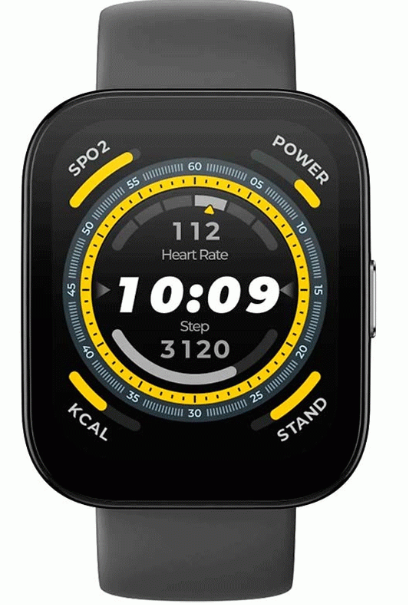
Amazfit Bip Smartwatch
Introduction
The Amazfit Bip Smartwatch is a budget-friendly wearable that blends essential smart features with impressive battery life and fitness tracking capabilities. Designed for users seeking reliable activity monitoring without the premium price tag, the amazfit Bip stands out with its always-on transflective color display, built-in GPS, and heart rate monitoring—features rarely found in this price segment. Its lightweight, water-resistant design makes it suitable for daily wear, workouts, and outdoor activities, though it’s not recommended for swimming.
Key benefits include up to 45 days of battery life on a single charge, making it a top choice for users who dislike frequent charging. The device tracks steps, distance, calories, sleep, and heart rate, while GPS enhances workout accuracy. Notifications for calls, messages, and apps keep you connected, and the companion Mi Fit app delivers deeper insights and weather updates.
Targeting fitness enthusiasts, casual athletes, and budget-conscious consumers, the Amazfit Bip Smartwatch is ideal for tracking daily activity, monitoring health metrics, and staying connected without smartphone dependency. Its estimated price range is typically under $100, widely available online and through major electronics retailers.
With its unique combination of long battery life, essential smart features, and affordable pricing, the amazfit Bip Smartwatch offers exceptional value for everyday health and fitness tracking.
Specifications
- Display: 1.28-inch transflective color display, 176 x 176 resolution, 2.5D glass
- Operating System: Proprietary OS (no third-party app support)
- Sensors: Heart rate monitor, GPS, barometer, geomagnetic sensor, accelerometer
- Activity Tracking: Steps, distance, calories, sleep, heart rate (continuous or periodic), workout modes for walking, running, treadmill, cycling
- GPS: Built-in GPS for workout tracking (no navigation)
- Water Resistance: Splash-proof, not suitable for swimming
- Battery Life: Up to 45 days (typical use), ~22 hours with continuous GPS tracking
- Connectivity: Bluetooth for smartphone notifications (calls, messages, apps)
- Other Features: Timer, compass, weather (via Mi Fit app), customizable watch faces
- Compatibility: Android and iOS devices
Performance Benchmarks: The amazfit Bip delivers reliable fitness tracking and notification support, with GPS accuracy on par with more expensive wearables. Its transflective display ensures readability in sunlight, a rare feature at this price. Battery life far exceeds most competitors, though advanced features like third-party app support and swimming tracking are absent.
Comparison: Compared to similar budget smartwatches, the Amazfit Bip offers superior battery life and a sunlight-readable display. However, it lacks the app ecosystem of Wear OS or watchOS devices and advanced sports modes found in newer models like the Bip 5 or Bip 6.
Dial Function Navigation
You can navigate the screen by swiping up, down, left,, and right. The watch displays the dial interface by default.
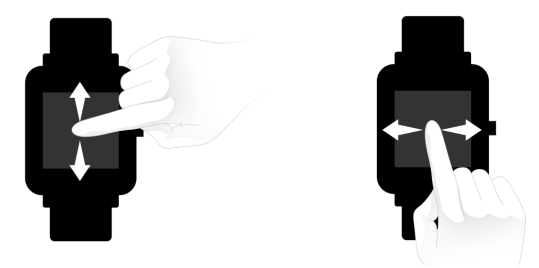
- Swipe up to view the notifications history.
- Swipe down to access DND (Do Not Disturb) Mode setting and check the battery power and watch connection status.
- Swipe left and right to view all APP features.
Keys Instruction
Short Press:
- Wake up the watch screen when the watch is locked
- Return to the dial interface when the watch is on the sub-interface
- Return to the previous screen when the watch is on other interfaces
- View the activity details when the watch is on the sports interface
Long Press:
- Turn on the watch
- Quickly start the activity if “Long press the button” is turned on
- Help reset the watch after you click “Factory reset.”
- Pause the activity when the watch is on the sports interface
Wrist Placement and Charging
All-day Wearing
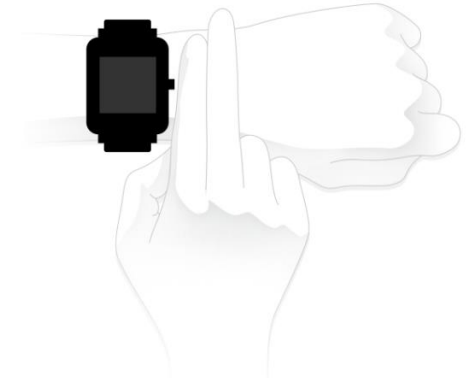
Please wear your watch two fingers' width below your wrist bone to ensure that the optical heart rate monitor can monitor the data properly during all-day wearing.
Wearing in Sports
Please DO NOT wear your watch too tightly, and it should also be slightly tighter (snug, but not constricting) during exercise than during all-day wearing.
Charging
To charge your Amazfit Bip:
- Please attach the USB end of the charger to your PC or a normal charging adapter.
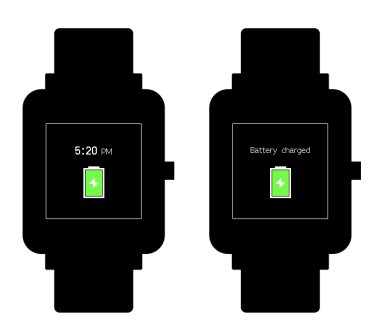
- Insert the watch into its charging base and make sure to align the two charging pins on the backside of the watch with the ones on the charging base.
- Once clipped in, the watch face will light up and show that the watch is “charging”.
Note: The charger adapter output values are DC 5.0V/500mA. We suggest you use brand phone power adapters or charge the watch by connecting it to a computer.
Settings
From the home screen of the watch, swipe left, you can access “Watch face”, “Long press the button”, “Adjust brightness”, “Find device”, “About”, “Factory reset”, and “Turn off” in watch Watch “Watch Settings” section.
- Watch face: There are 10 watch faces, which can be applied according to your preferences.
- Long-press the button: Tap the check mark next to the activity to make it a quick start by long-pressing. You can set to quick start outdoor running, treadmill, cycling, and walking. And you can tap the check mark next to “Turn off” to disable this function.
- Adjust brightness: You can adjust the brightness by tapping the add or subtract buttons on the brightness scale.
- Find device: Your phone will ring when the watch is connected to your phone via Bluetooth.
- About: You can check the firmware version and Bluetooth address.
- Turn off: You can turn off your watch.
- Factory reset: All the data in the watch will be removed after a factory reset. And in this case, you need to re-pair the watch with the phone.
GPS and A-GPS
Tap outdoor running, the watch will automatically initiate the search for a GPS signal,, but you can skip this step at that moment by clicking on the “Skip” button; however, it will still search for GPS during your activity.
- If the GPS option is initiated and started, the watch will offer a three-second countdown before tracking begins. You can long-press the physical button to “pause” and tap “continue” to continue or tap “end” to stop.
- After you finish and sync, you can view the GPS route and details in the watch and Mi Fit App.
- GPS signal is better in an open space. After getting the location successfully, you can start the activity. If you are in a crowd, please raise your arm to your chest, which can speed up the GPS positioning. Assisted GPS (A-GPS) is a system allowing global positioning system (GPS) receivers to obtain information from network resources to assist in satellite location. An A-GPS system is especially useful when the receiver is in a location where it is difficult for the satellite signals to penetrate. AGPS will help your watch find your precise position quickly and improve accuracy. The A-GPS data updates once a day. The latest A-GPS data is automatically updated each time you sync it with the Mi Fit App. Note: If the watch hasn’t synced with your Mi Fit App for 7 days, A-GPS data will expire. The positioning speed may be affected when AGPS expires.
Maintenance
Amazfit Bip is water-resistant, but NOT waterproof.
- Please clean the watch and strap periodically with clean water, and then use a dry soft cloth to dry up the watch.
- Please DO NOT use shampoo, soaps,, and other chemicals to wipe the dirt to avoid of irritating skin or corrosion of the watch.
- Please wipe your wrist and watch with a dry cloth or tissue after a workout. Sweat may interfere and cause inaccuracy.
Troubleshooting
Common Problems & Solutions
- Device Not Syncing: Ensure Bluetooth is enabled on your phone; restart both devices if issues persist.
- GPS Not Activating: Start a workout from the watch itself; GPS only activates during activities.
- Battery Drains Quickly: Disable continuous heart rate monitoring or GPS if not needed; update firmware via the Mi Fit app.
- Display Issues: Clean the screen; avoid exposing it to extreme temperatures.
- Notifications Not Showing: Check app permissions and Bluetooth connection; re-pair if necessary.
Error Codes & Fixes
No specific error codes are documented for the Amazfit Bip. Most issues can be resolved by restarting the device, updating firmware, or re-pairing with your smartphone.
Preventive Measures
- Regularly update the device via the Mi Fit app.
- Avoid exposing the watch to water beyond light splashes.
- Charge using the provided magnetic cable to prevent port damage.
Warranty & Support
The Amazfit Bip typically comes with a 12-month manufacturer's warranty. For support, contact Amazfit customer service through their official website. Always keep your proof of purchase for warranty claims.
Pros & Cons
Pros
- Exceptional Battery Life: Up to 45 days on a single charge, far beyond most smartwatches.
- Sunlight-Readable Display: The Transflective screen is clear even in bright conditions.
- Essential Fitness Tracking: Accurate step, heart rate, sleep, and GPS workout tracking.
- Affordable Price: Packed with features at a budget-friendly price point.
- Lightweight and Comfortable: Ideal for all-day wear.
Cons
- Limited App Ecosystem: No third-party app support or advanced smart features.
- Basic GPS Functionality: No navigation or route history, only distance tracking.
- No Swimming Tracking: Only splash-proof, not suitable for swimming.
- Basic Notifications: Can view notifications but not interact or respond.
Value for Money: The Amazfit Bip Smartwatch delivers outstanding value for users prioritizing battery life and basic fitness tracking over advanced smart features. It outperforms many budget rivals but falls short for those needing app versatility or swimming metrics.
Customer Reviews
User feedback for the Amazfit Bip Smartwatch highlights its impressive battery life, easy-to-read display, and accurate fitness tracking as major strengths. Many praise its affordability and reliability for daily activity monitoring. Common complaints include the lack of advanced features like app support, limited GPS functionality, and basic notification handling. The device earns consistently high star ratings for its value proposition, with most users recommending it for casual fitness tracking and budget-conscious buyers.
Testimonials often mention the device’s comfort and durability, though some note the desire for more sports modes and better water resistance. Overall, the Amazfit Bip is a top pick for users seeking a no-frills, long-lasting fitness wearable with essential smart features.
More amazfit manuals
Leave a Comment