
Pairing & Setup: Amazfit Up Wireless Earbuds User Manual
Content
Amazfit Up Wireless Earbuds
Introduction
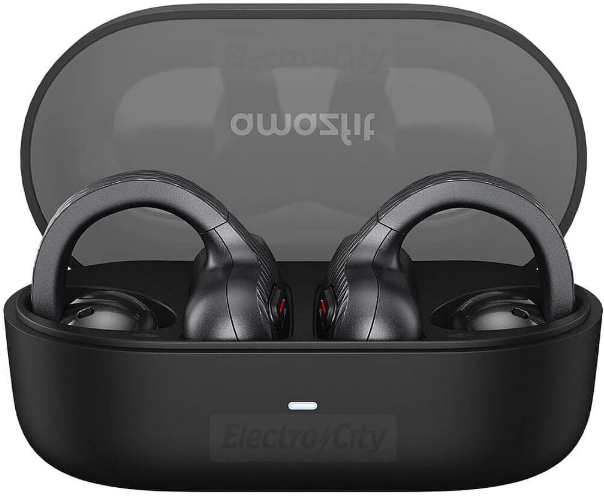
The Amazfit Up Wireless Earbuds are a fresh take on true wireless audio, designed for those who value comfort, awareness, and freedom during their daily routines and workouts. These open-ear earbuds feature a unique clip-on design that keeps your ear canal unobstructed, allowing you to enjoy your music while staying fully aware of your surroundings—ideal for outdoor activities, commuting, and fitness sessions where situational awareness is key.
Powered by Bluetooth 5.3 and offering seamless connectivity, the amazfit Up Wireless Earbuds deliver up to 6 hours of continuous playback per charge, with the compact USB-C charging case extending total battery life to a full 24 hours. The earbuds are lightweight (5g per bud), IPX4 splash-resistant, and equipped with physical touch controls for intuitive music and call management. Advanced AI algorithms enhance call quality by reducing wind and background noise, making them a solid choice for hands-free conversations on the go.
Targeted at active users, commuters, and fitness enthusiasts, the amazfit Up Wireless Earbuds are especially suited for those who find traditional in-ear buds uncomfortable or unsafe for outdoor use. They integrate smoothly with Amazfit smartwatches, enabling features like voice assistant activation, music playback from the watch, and hands-free smartwatch control via Zepp Flow™.
Priced at an accessible $49.99 in select markets, the amazfit Up Wireless Earbuds offer strong value, especially considering features like multipoint Bluetooth pairing—a rarity in this price range. Available in black, these earbuds can be purchased directly from the Amazfit website and select retailers.
Whether you’re running, cycling, or just going about your day, the amazfit Up Wireless Earbuds combine safety, comfort, and convenience in a budget-friendly package—making them a compelling choice for open-ear wireless audio.
Basic Specifications
- Model number: A2427
- Battery capacity: Earbuds 50 mAh;
- Charging case: 440 mAh
- Charging case input: 5 V DC 0.8 A
- Charging case output: 5 V DC 0.3 A
- Charging case power: 4 W
- Wireless connection: Bluetooth 5.3
- Bluetooth frequency: 2402–2480 MHz
- Bluetooth output power: 3 dBm
- Waterproof and dustproof rating: earbuds IPX4
- Operating temperature: 0°C to 45°C
- HVIN: A2427-L, A2427-R
- Device requirements: Devices installed with Android 7.0 or iOS 14.0 or above OS versions
How To Use
Controlling Earbuds
Safety Notice
Before using and operating this product, please read and follow the precautions below to ensure optimal product performance and avoid dangerous or illegal situations.
- Please use a power adapter that complies with regulations for charging.
- Choking hazard: Keep the product away from children and pets.
- Allergy notice: If any symptoms occur, stop using the product and consult a doctor.
- Some components and radios in this product may generate electromagnetic fields. Maintain a safe distance from medical devices.
- Comply with relevant regulations in your area or country, and use this product with caution while driving.
Battery Safety
- This device is equipped with a built-in battery that cannot be removed or replaced. Do not disassemble or modify the battery by yourself.
- Disposal of a battery into fire or a hot oven, or mechanically crushing or cutting of a battery, that can result in an explosion.
- Leaving a battery in an extremely high temperature surrounding environment can result in an explosion or the leakage of flammable liquid or gas.
- A battery subjected to extremely low air pressure may result in an explosion or the leakage of flammable liquid or gas.
- In case of prolonged product inactivity, to prevent battery damage from over-discharge, it is advisable to fully charge every six months before storing.
Troubleshooting: Common Issues and Solutions
Common Problems and Fixes
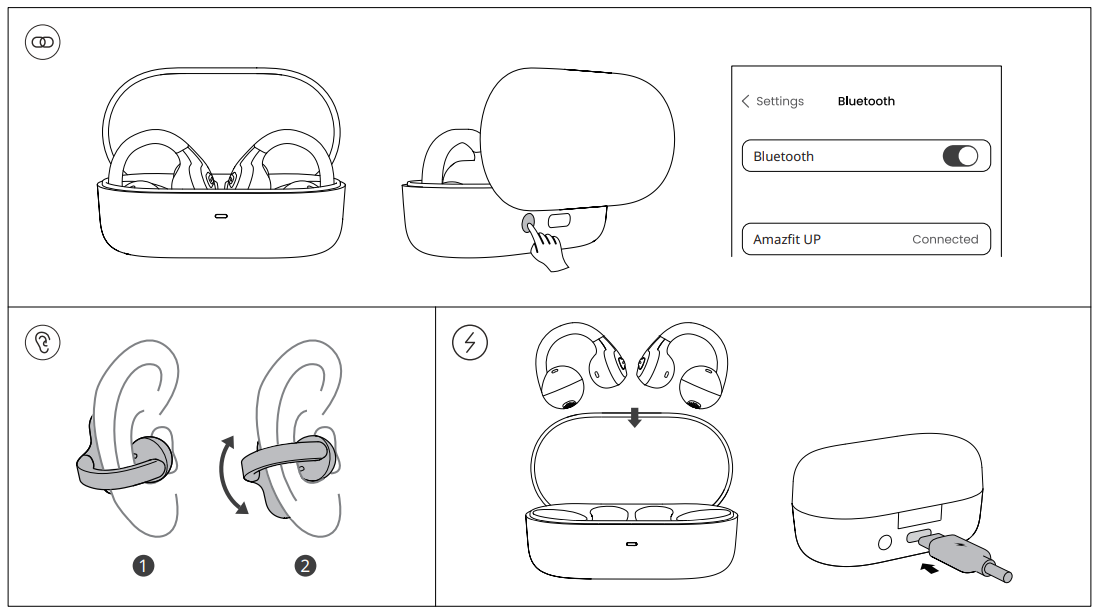
- Pairing Issues: Ensure Bluetooth is enabled on your device. Place both earbuds in the charging case, close the lid for 5 seconds, then open it to reset. Re-pair by holding the earbud button until the LED flashes rapidly.
- No Sound/Charging: Clean the charging contacts on the earbuds and case. Ensure the case is charged. If the earbuds still won’t charge, try a different USB-C cable and power source.
- Connectivity Drops: Move closer to the paired device. Avoid interference from other wireless devices. If using multipoint, ensure both devices are within range.
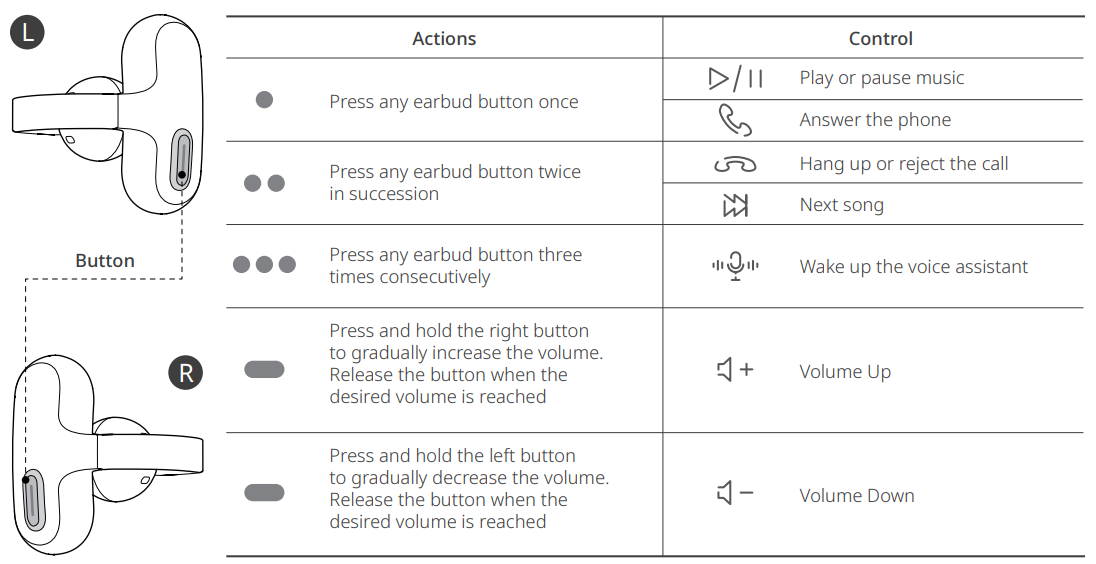
- Touch Controls Unresponsive: Ensure your fingers are dry. Refer to the user manual for correct control gestures. If issues persist, reset the earbuds as above.
Error Codes and Preventive Measures
Amazfit Up Wireless Earbuds do not display error codes on the earbuds themselves. Most issues can be resolved by resetting, re-pairing, or updating firmware via the Zepp App. To prevent problems, keep the earbuds and case clean, avoid exposure to excessive moisture, and store them in a dry place when not in use.
Warranty and Support
Amazfit products typically come with a 12-month limited warranty. For warranty claims or technical support, contact Amazfit customer service through the official website or the Zepp App. Retain your proof of purchase for warranty validation.
Warranty and Return Policy
The Amazfit Limited Warranty covers Amazfit products against manufacturing defects beginning on the original purchase date. The warranty period is 12 months or another specified period as the applicable consumer laws in the consumer’s country of purchase require. Our warranty is in addition to the rights provided by applicable consumer laws.
- Official website: www.amazfit.com
- Please check the FAQ on the website for troubleshooting: support.amazfit.com/en/product-list
Contact Information
For additional help, visit the Amazfit support page or use the contact form on the official website. Customer service is also accessible via the Zepp App for quick troubleshooting and live chat options.
Pros and Cons: Honest Assessment of Amazfit Up Wireless Earbuds
Pros
- Open-Ear Comfort: Lightweight, unobtrusive fit ideal for extended wear and active use.
- Awareness and Safety: Lets you hear ambient sounds, perfect for outdoor activities and commuting.
- Secure Clip-On Design: Stays in place during workouts and movement.
- Multipoint Connectivity: Connects to two devices simultaneously—a rare feature at this price point.
- Intuitive Controls: Physical touch buttons for easy music, call, and assistant management.
- Smartwatch Integration: Seamless pairing with Amazfit watches for enhanced functionality.
- Value for Money: Affordable compared to premium open-ear alternatives.
Cons
- No Active Noise Cancellation (ANC): Not suitable for noisy environments; ambient sound is always present.
- Average Call Quality: Microphone performance is decent but may sound muffled to callers in windy conditions.
- Battery Life: 6 hours per charge is good, but the total 24 hours lags behind some competitors.
- Limited Customization: Basic app features with essential EQ and button remapping, but lacks advanced settings.
Value for Money: The amazfit Up Wireless Earbuds deliver a unique open-ear experience with solid features for the price, but those needing stronger microphone performance or longer battery life may want to consider premium alternatives like Bose Ultra Open or Shokz OpenFit.
Customer Reviews: Real User Feedback
Users praise the Amazfit Up Wireless Earbuds for their comfortable, secure fit and the ability to stay aware of their surroundings—especially during workouts and outdoor activities. Many highlight the ease of use, intuitive controls, and seamless integration with Amazfit smartwatches as standout features. The multipoint connectivity is frequently mentioned as a valuable addition for a budget-friendly product.
Common complaints include average call quality in noisy environments and a lack of advanced features like ANC. Some users wish for longer battery life and more customization options in the companion app. Despite these minor drawbacks, most reviews recommend the Amazfit Up Wireless Earbuds for active users seeking affordable, awareness-focused wireless audio.
Star Ratings: The product generally receives 4 out of 5 stars, with users appreciating comfort, safety, and value, while noting room for improvement in microphone performance and battery longevity.
Purchase Recommendation: If you prioritize situational awareness, comfort, and value, the Amazfit Up Wireless Earbuds are a smart choice. For those needing premium call quality or noise isolation, consider higher-end alternatives.
Faqs
How do I set up amazfit Up Wireless Earbuds for the first time?
What are the key features that make amazfit Up Wireless Earbuds different?
Can I use amazfit Up Wireless Earbuds with multiple devices at once?
How do I troubleshoot if my amazfit Up Wireless Earbuds are not connecting to my device?
What Bluetooth version and codecs do amazfit Up Wireless Earbuds support?
How often should I maintain my amazfit Up Wireless Earbuds?
Can I customize the button controls on my amazfit Up Wireless Earbuds?
What are some common issues with amazfit Up Wireless Earbuds and how can I resolve them?
More amazfit manuals
Leave a Comment