
Pairing: Amazfit UP Earbuds User Manual
Content
Amazfit UP Earbuds
Introduction
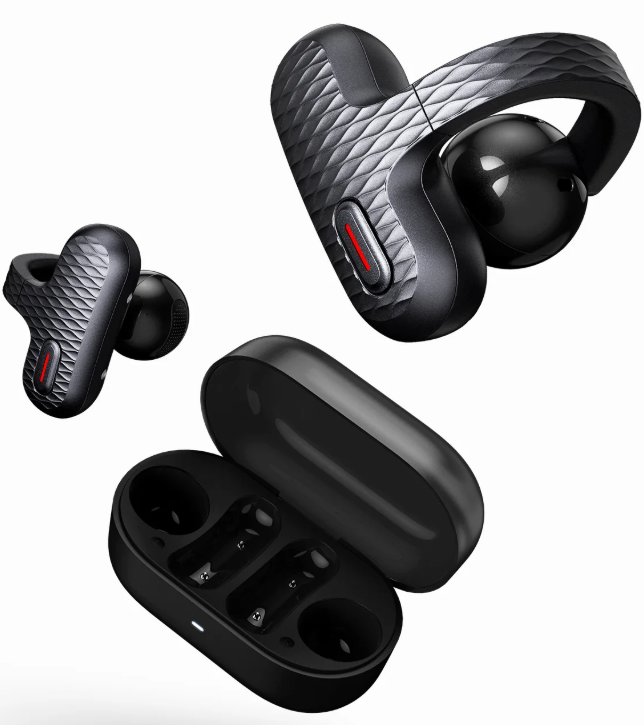
The amazfit UP Earbuds redefine open-ear audio technology, combining comfort, safety, and smart functionality into a sleek, lightweight design. These earbuds are engineered with an innovative open-ear clip-on style that keeps your ear canal unobstructed, allowing you to stay aware of your surroundings while enjoying high-quality sound. Ideal for fitness enthusiasts, commuters, and outdoor adventurers, they provide a secure fit for dynamic workouts without sacrificing situational awareness.
Equipped with Bluetooth 5.3 connectivity, AI noise reduction for clear calls, and intuitive touch controls, the amazfit UP Earbuds easily integrate with Amazfit smartwatches via the Zepp Flow app for enhanced customization. Their IPX4 sweat and splash-resistant rating makes them durable for active lifestyles. With up to 6 hours of continuous playback and an additional 18 hours provided by the compact charging case, these earbuds ensure long-lasting use throughout the day.
Available primarily in black, the amazfit UP Earbuds typically retail in the mid-range price segment, offering an affordable alternative to premium open-ear options. Their blend of performance, comfort, and smart features makes them a compelling choice for anyone seeking wireless earbuds that prioritize both audio experience and safety.
Technical Specifications and Features of amazfit UP Earbuds
- Design: Open-ear clip-on style, ergonomically crafted for a secure fit during exercise.
- Weight: 5 grams per earbud; 33 grams for charging case
- Materials: Polymer, TPU, and Titanium-nickel alloy for durability and lightweight comfort
- Dimensions: Earbuds 29.4mm × 24.6mm × 27.4mm; Charging case 66.5mm × 36mm × 35mm
- Connectivity: Bluetooth 5.3 with AAC and SBC codec support; multipoint pairing for two devices
- Battery Life: 6 hours continuous playback per charge; 18 additional hours via USB-C charging case
- Water Resistance: IPX4 rating for sweat and splash protection
- Audio Features: Open-ear design for ambient awareness; AI noise reduction for improved call clarity
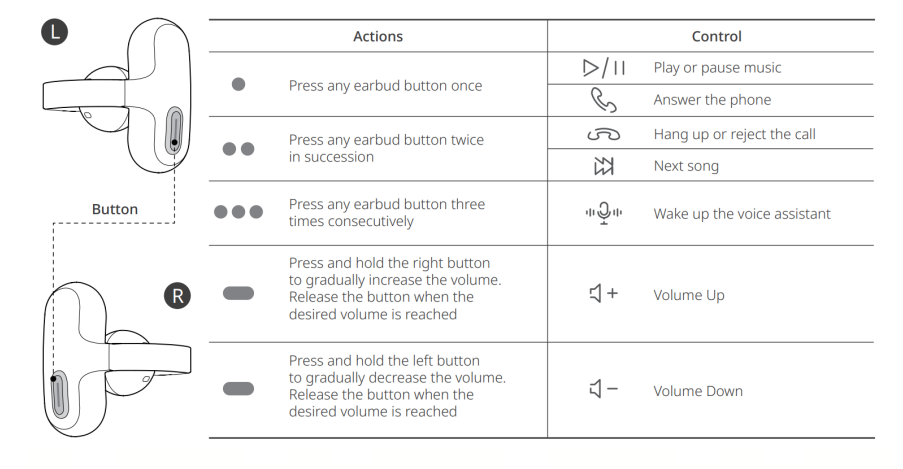
- Controls: Responsive touch buttons for play/pause, track changes, volume adjustment, and voice assistant activation
- Smartwatch Integration: Compatible with Amazfit watches and Zepp Flow app for EQ and control customization
Compared to similar open-ear earbuds like the Shokz OpenFit or Bose Ultra Open buds, the Amazfit UP offers competitive multipoint connectivity and integration with Amazfit ecosystems but has slightly lower battery life (6 vs. 7+ hours per charge).
Pairing
First-time Pairing
Open the charging case, search for "Amazfit UP" in your phone's Bluetooth list, and click to complete the Bluetooth pairing.
Repairing
- Place the earbuds into the charging case and keep the case open.
- Press and hold the button on the back of the charging case for 2 seconds until the indicator light starts flashing.
- Go to the Bluetooth settings on your phone, find and select "Amazfit UP" to connect.
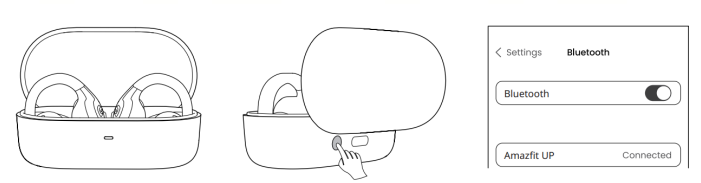
TIPS: Amazfit UP can connect to up to two devices simultaneously.
Charging
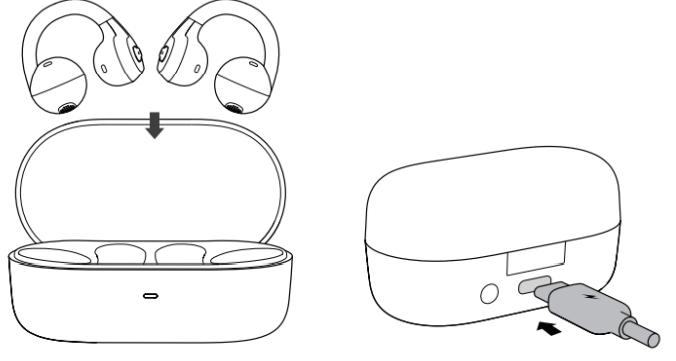
Please use a Type-C cable for charging.
- Charging case charging: After the charging case is connected to the power supply, when the indicator light on the charging case turns orange, and the orange light will remain on during charging, the white light will remain on for 10 seconds after being fully charged, and then turn off.
- Charging the earphones: Put the earphones into the charging case and cover the lid to start charging. The indicator light flashes once and goes out after 5 seconds. When the battery is sufficient, it shows a white light, and when the battery is below 20%, it shows an orange light.
Controlling
Zepp Flow
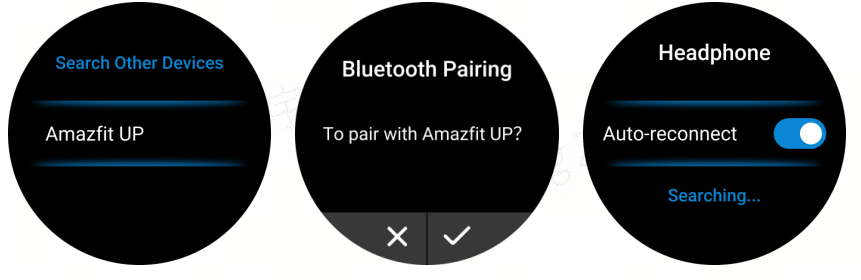
Connect the smartwatch
- Press the button on the charging case to put the earbuds into pairing mode.
- Search for "Amazfit UP" in the watch's Bluetooth settings and connect.
- Enable the Auto-reconnect feature to allow the watch to connect with the earbuds at any time.
Common Troubleshooting for amazfit UP Earbuds
- No sound or poor audio quality: Ensure earbuds are properly clipped and Bluetooth is connected. Restart earbuds or reset via the Zepp app if needed.
- Bluetooth connection issues: Clear the paired devices list and re-pair. Confirm Bluetooth 5.3 compatibility and range (up to 10 meters).
- Charging problems: Use the provided USB-C cable; clean charging contacts if earbuds fail to charge. The charging case fully charges in about 2 hours.
- Touch controls unresponsive: Make sure fingers are dry and contacts are clean. Restart earbuds or update firmware through the Zepp app.
- Call quality issues: Use in quiet environments for best results; AI noise reduction helps, but may struggle in very windy conditions.
To prevent issues, store earbuds in the charging case when not in use, avoid extreme temperatures, and update firmware regularly via the Zepp app. The product includes a standard manufacturer's warranty and customer support through Amazfit's official website and authorized retailers.
Pros & Cons of Amazfit UP Earbuds
- Pros:
- Open-ear design promotes safety by maintaining environmental awareness.
- Lightweight and ergonomic clip-on fit is ideal for active use.
- Multipoint Bluetooth pairing allows seamless switching between devices.
- AI noise reduction improves call clarity compared to typical budget earbuds.
- Integrates well with Amazfit smartwatches and the Zepp app for customization.
- Affordable price point for open-ear technology and features.
- Cons:
- Battery life (6 hours per charge) is less than some competitors.
- Call quality can sound muffled in very windy outdoor environments.
- No active noise cancellation or full ear sealing, limiting bass response.
- Limited color options (only black currently).
Customer Reviews and Feedback on amazfit UP Earbuds
Users frequently praise the Amazfit UP Earbuds for their comfortable open-ear fit that stays secure during workouts and outdoor activities. Many appreciate the safety aspect of ambient sound awareness, especially for runners and cyclists. The intuitive touch controls and integration with Amazfit watches receive positive remarks for ease of use.
Common complaints include the somewhat average call quality in noisy or windy settings and the moderate battery life compared to premium models. Overall, customers rate the earbuds around 4 out of 5 stars, recommending them as a budget-friendly option for people seeking open-ear design and reliable Bluetooth connectivity.
Several users highlight the value for money and the practical multipoint pairing feature, which is rare in this price category. Some suggest improvements in microphone performance for clearer calls and desire additional color choices.
More amazfit manuals
Leave a Comment