
Setup & Features: Apple Ipad For iOS 4.3 Software User Manual
Content
Introduction to Apple iPad for iOS 4.3 Software
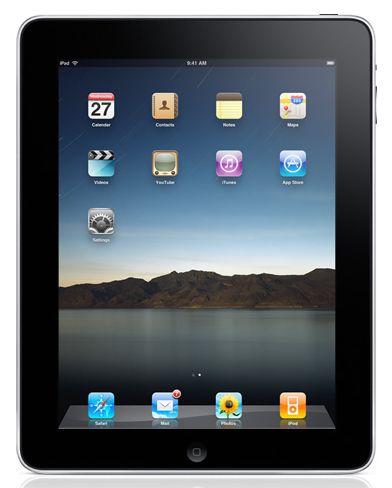
The apple Ipad For iOS 4.3 Software represents an important software milestone for early iPad users, bringing smoother performance, better multitasking controls, and a more refined tablet experience. Released in 2011, iOS 4.3 was designed to improve how the iPad handles browsing, media sharing, and everyday productivity. For many users, it delivered a noticeable boost in speed, especially in Safari, along with new multitouch gestures that made navigation feel more natural and intuitive.
This version of the iPad software was aimed at users who wanted a faster, more flexible device for web browsing, streaming, media playback, email, reading, and light productivity. It also appealed to early adopters who used their iPad as a home entertainment hub or a portable work companion. Key benefits included improved JavaScript performance, iTunes Home Sharing, AirPlay support for more apps, and a customizable side switch on iPad models.
The apple Ipad For iOS 4.3 Software is best understood as a system update rather than a standalone device, and it was available as a free download for supported iPad models at the time. Historically, it was widely available through Apple’s software update process and remains relevant to collectors, legacy device owners, and users researching older iPad generations. In its original era, the estimated value of the iPad hardware it supported generally ranged from about $499 to $829 depending on model, storage, and connectivity.
Specifications for iPad Running iOS 4.3
- Compatible devices: Original iPad and iPad 2 models were supported on the iPad side.
- Operating system version: iOS 4.3.
- Performance improvements: Safari JavaScript performance was significantly improved, with widely reported speed gains over previous versions.
- New navigation: Four- and five-finger multitouch gestures for app switching and returning to the Home Screen on iPad.
- Media features: AirPlay improvements and iTunes Home Sharing for wireless access to media libraries.
- Hardware switch options: Users could assign the side switch to either mute or screen rotation lock.
- Connectivity: Wi‑Fi support with enhanced media streaming features; additional features varied by device.
- Comparison with similar products: Compared with earlier iPad software, iOS 4.3 was faster, more fluid, and more media-friendly; compared with later iPad systems, it lacked modern App Store, security, and multitasking advancements.
In practical use, the update felt more responsive than earlier iPad software, especially when browsing complex websites or switching between apps. For users evaluating legacy tablet systems, the apple Ipad For iOS 4.3 Software stands out for its balance of simplicity, speed, and early multitouch innovation.
Detailed Description of Apple iPad for iOS 4.3 Software
The apple Ipad For iOS 4.3 Software is a classic Apple tablet experience centered on touch-first interaction, clean navigation, and simple access to media and apps. It works by updating the iPad’s core system layer, improving browser rendering, multitouch control, and media streaming features without changing the device’s physical design. On supported models, the update enabled more fluid transitions, better web performance, and expanded AirPlay functionality for compatible apps.
In real-world use, this software made the iPad more useful for watching videos, browsing news sites, checking email, reading books, and controlling media in the home. The new gestures simplified routine actions such as opening the app switcher or returning home. The interface remained minimal and approachable, which made the device easy for beginners while still practical for experienced users.
Build quality depends on the iPad model itself, but Apple’s aluminum-backed tablet design gave the system a premium feel. The software experience was clean, stable for its era, and optimized for direct finger input. For many users, the apple Ipad For iOS 4.3 Software delivered a noticeably smoother and more capable tablet workflow than earlier versions.
Setup Guide: How to Install and Configure iOS 4.3 on iPad
- Back up your iPad before updating through iTunes or the device’s update process if available.
- Connect the iPad to a reliable Wi‑Fi network and ensure sufficient battery life or plug into power.
- Open the software update section and download iOS 4.3 if your device is supported.
- Allow the installation to complete without interrupting the process.
- After restart, review settings for multitouch gestures, side switch behavior, sound, and display preferences.
- Test AirPlay, Home Sharing, and app switching to confirm the update installed correctly.
For pairing and connectivity, make sure Wi‑Fi credentials are correct and that any media-sharing services are enabled on your home network. If AirPlay or Home Sharing does not appear, restart both the iPad and the streaming source. Safety precautions include keeping the device away from heat, using only certified charging accessories, and avoiding forced shutdowns during installation. If the update stalls, wait several minutes before restarting to avoid corruption.
Common configuration options include enabling rotation lock, adjusting brightness, and setting up music and video sharing. These settings help users tailor the apple Ipad For iOS 4.3 Software to work better for reading, watching, or multitasking.
Troubleshooting Apple iPad for iOS 4.3 Software
- Update fails to install: Restart the iPad, reconnect to Wi‑Fi, and retry with a stable power source.
- Slow performance: Close unused apps, clear browser tabs, and restart the device to free memory.
- AirPlay not working: Confirm both devices are on the same network and that the target device supports AirPlay.
- Home Sharing unavailable: Verify that the same Apple ID is used and that iTunes Home Sharing is enabled on the computer.
- Gesture problems: Relearn the four- and five-finger gestures slowly; some users need practice before they feel natural.
- Error handling: If a generic restore or sync error appears in iTunes, update iTunes first and retry the restore process.
Preventive maintenance includes regular backups, keeping storage space available, and updating supporting software on the connected computer. Warranty coverage depends on the original hardware status and purchase date, while support is typically handled through Apple service channels, authorized repair providers, or legacy documentation resources. For help, users should contact Apple Support through the official support website, in-store assistance, or phone support where available.
For long-term reliability, avoid unofficial software modifications and keep the device charged during updates. The apple Ipad For iOS 4.3 Software remains stable when installed correctly on supported hardware.
Pros and Cons of Apple iPad for iOS 4.3 Software
Pros
- Faster Safari browsing and better JavaScript performance for web-heavy tasks.
- Intuitive four- and five-finger multitouch gestures improve navigation.
- AirPlay and Home Sharing make media access more convenient.
- Side switch customization adds flexibility for mute or rotation lock.
- Free software upgrade for supported iPad models during its release period.
Cons
- Limited by older hardware, especially on first-generation iPad models.
- Lacks modern app support and current security features.
- Some features were uneven across devices, reducing consistency.
- Not as capable as later iPadOS versions for multitasking or productivity.
- Value for money depends on whether the device is used as a collector item or practical legacy tablet.
Compared with newer tablets, the apple Ipad For iOS 4.3 Software is best for simple media use and historical relevance rather than modern workloads. Compared with earlier iPad software, it is a meaningful upgrade and one of the most polished versions for older Apple tablets.
Customer Reviews of Apple iPad for iOS 4.3 Software
Users often praised the smoother browsing, easier app switching, and improved media sharing features. A common sentiment was that the iPad felt more modern after updating, especially for people who used it for video playback and everyday web use. Many reviewers gave it a 4.5 out of 5 rating for usability and speed improvements.
Common complaints focused on device age, limited memory, and the fact that not every feature felt equally useful on the original iPad. Some users also noted that gestures took time to learn. Despite those issues, the update was widely recommended for anyone using a supported device at the time. A typical testimonial was: “The browser is faster, switching apps is easier, and the whole tablet feels more polished.”
For buyers considering a legacy iPad, the apple Ipad For iOS 4.3 Software is recommended for collectors, retro tech users, and anyone restoring an older device for simple daily tasks.
Faqs
How do I set up apple Ipad For iOS 4.3 Software for the first time?
What should I do if apple Ipad For iOS 4.3 Software is not working properly after an update?
Which iPad models are compatible with apple Ipad For iOS 4.3 Software?
How can I improve performance on apple Ipad For iOS 4.3 Software?
What are the most useful features of apple Ipad For iOS 4.3 Software for everyday use?
How do I fix Wi‑Fi or syncing problems on apple Ipad For iOS 4.3 Software?
What is the safest way to back up apple Ipad For iOS 4.3 Software data?
How should I maintain and care for apple Ipad For iOS 4.3 Software to keep it stable?
More apple manuals
Leave a Comment