
Features & Specs: Apple Iphone OS 3.1 User Manual
Content
Apple iPhone OS 3.1 Product Manual: Features, Specs, and User Guide
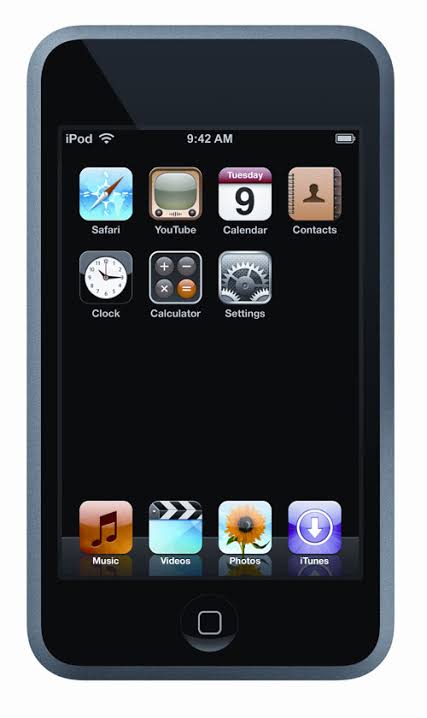
Introduction: What Apple iPhone OS 3.1 Offers
Apple iPhone OS 3.1 is a major software update for the original iPhone line, iPhone 3G, iPhone 3GS, and iPod touch models supported at the time. Released in September 2009, it refined the mobile experience with practical upgrades such as better Wi-Fi performance on iPhone 3G, improved syncing for media, stronger phishing protection in Safari, and expanded Voice Control options. For users who wanted a smoother, safer, and more capable mobile operating system, apple Iphone OS 3.1 delivered meaningful improvements without changing the familiar iPhone interface.
This update was especially useful for everyday consumers, early smartphone adopters, and business users relying on Exchange calendars, MobileMe services, and media management. It also appealed to users who wanted better video handling, faster device responsiveness, and more convenient App Store and iTunes Store features. Apple positioned the release as a free software update for iPhone owners, while iPod touch owners could obtain it through the software update path available at the time, with availability varying by device generation and purchase date.
In practical terms, apple Iphone OS 3.1 improved day-to-day usability. It added video-saving options, remote device locking, anti-phishing alerts, and expanded support for app recommendations through Genius. Estimated historical pricing for the software update ranged from free for iPhone users to a small paid update for some iPod touch owners, while today it is primarily of interest to collectors, legacy device users, and reviewers documenting the evolution of iPhone software.
Specifications: Apple iPhone OS 3.1 Technical Details and Key Features
- Platform: Mobile operating system for iPhone and iPod touch devices supported in 2009.
- Release window: September 2009, following the earlier iPhone OS 3.0 launch.
- Core improvements: Better media syncing for music, movies, TV shows, podcasts, and photos.
- Media tools: Save videos from Mail and MMS to Camera Roll; “Save as new clip” when trimming video on iPhone 3GS.
- Wireless performance: Improved iPhone 3G Wi-Fi performance when Bluetooth is enabled.
- Security: Safari fraud warning and improved anti-phishing protection.
- Messaging and productivity: Improved Exchange calendar syncing and invitation handling.
- Accessibility: Home button shortcut for accessibility features on iPhone 3GS.
- Voice features: Voice Control support over Bluetooth headsets on iPhone 3GS.
- Store features: Redeem iTunes gift cards, codes, and certificates in the App Store; display account credit balances.
- Extra functionality: Remote passcode lock through MobileMe; paste phone numbers into the keypad.
- Performance notes: Reported faster boot times and general interface refinements on supported hardware.
Compared with iPhone OS 3.0, version 3.1 focused less on headline-new apps and more on polish, security, and workflow upgrades. Compared with later iOS generations, it was more limited in depth, but it set a strong foundation for mobile multitasking-era software and early App Store growth. For legacy devices, apple Iphone OS 3.1 remains a representative example of Apple’s early software refinement strategy.
Pros and Cons of Apple iPhone OS 3.1
Pros
- Practical usability gains: Video saving, improved media syncing, and easier dialpad input made daily tasks faster.
- Better security: Safari fraud warnings helped users avoid suspicious websites, a valuable upgrade for mobile browsing.
- Helpful for business users: Improved Exchange calendar syncing and invitation handling supported work email environments.
- Stronger device control: Remote passcode lock through MobileMe added peace of mind for lost devices.
- Good value for the time: iPhone owners received a free upgrade with meaningful refinements to an already popular platform.
Cons
- Hardware-dependent features: Some benefits, such as Bluetooth Voice Control and accessibility shortcuts, were limited to iPhone 3GS.
- Incremental update: Users expecting major visual changes or transformative new apps may have found it modest.
- Legacy ecosystem limits: Compatibility was tied to older Apple devices, making it irrelevant for modern smartphones.
- Mixed alternative value: Compared with later iOS releases, it lacked deeper notification, app management, and system automation features.
Overall, apple Iphone OS 3.1 was a smart maintenance release rather than a dramatic reinvention. It offered real-world improvements for reliability, security, and media management, but its benefits were strongest on supported Apple hardware and less compelling when compared with later iOS versions.
Customer Reviews: What Users Thought About Apple iPhone OS 3.1
User feedback at the time was generally positive, with many reviewers giving the update around 4 out of 5 stars for usefulness and stability. Users praised the smoother syncing, safer Safari browsing, and the ability to save videos directly from messages and Mail. One common sentiment was that the update “made everyday tasks feel cleaner and faster,” especially on the iPhone 3G.
Frequent complaints centered on the fact that some standout features were reserved for the iPhone 3GS, leaving older models with fewer visible gains. A few users also noted that performance improvements varied depending on carrier settings and device condition. For buyers or collectors using legacy devices, apple Iphone OS 3.1 is still recommended as an important milestone release, especially if the goal is to understand the evolution of Apple’s early mobile software.
Frequently Asked Questions About Apple iPhone OS 3.1
What is Apple iPhone OS 3.1? It is an early iPhone software update that improved security, media handling, syncing, and wireless performance on supported devices.
Is Apple iPhone OS 3.1 still useful today? It is mainly useful for legacy devices, historical review, and software comparison rather than modern daily use.
Was Apple iPhone OS 3.1 a free update? It was free for iPhone users, while some iPod touch users historically paid a small fee depending on device and purchase timing.
Faqs
How do I set up apple Iphone OS 3.1 for the first time after an update or restore?
What should I do if apple Iphone OS 3.1 keeps freezing, crashing, or running slowly?
Which features in apple Iphone OS 3.1 help improve everyday iPhone use?
Is apple Iphone OS 3.1 compatible with older iPhone models and accessories?
Why is apple Iphone OS 3.1 not installing properly through iTunes?
How can I improve battery life after upgrading to apple Iphone OS 3.1?
What backup and recovery steps should I use with apple Iphone OS 3.1?
How should I maintain and care for a device running apple Iphone OS 3.1?
Tags
More apple manuals
Leave a Comment