
Asus P4C800-E Deluxe Computer Motherboard User Manual
Content
ASUS P4C800-E Deluxe Computer Motherboard Overview
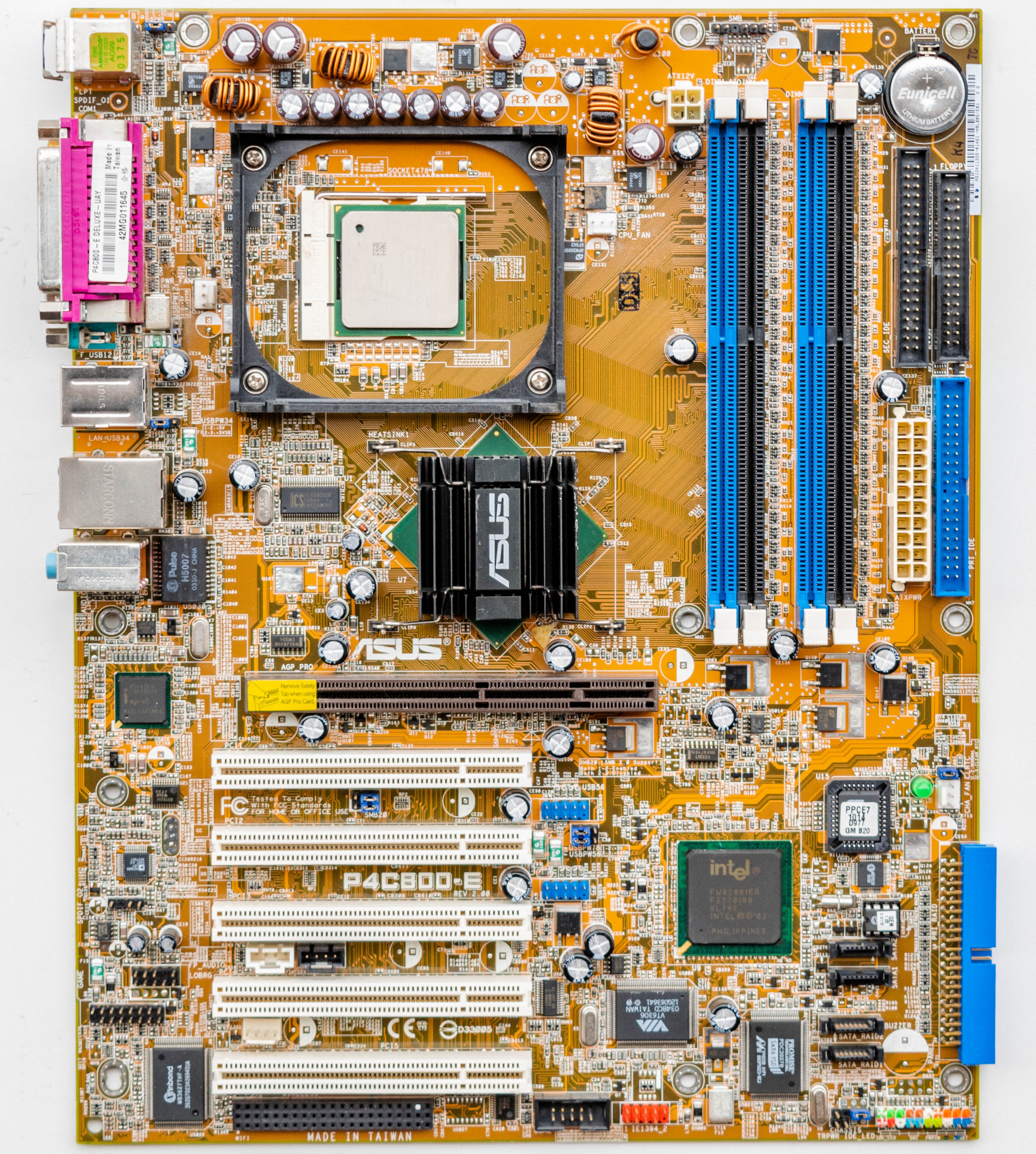
The ASUS P4C800-E Deluxe Computer Motherboard is a classic Socket 478 ATX board built for Intel Pentium 4 and Celeron processors, with support for speeds up to 3.2+ GHz and Hyper-Threading. Based on the Intel 875P chipset, it was designed for high-performance desktop systems and remains notable for its dual-channel DDR memory architecture, AGP 8X graphics support, and Intel ICH5R southbridge with RAID functionality. For users restoring a retro gaming PC, building a legacy workstation, or maintaining older Intel hardware, this motherboard offers a strong blend of stability, expansion, and enthusiast-grade features. It supports up to 4GB of DDR400/333/266 memory, making it practical for demanding legacy software and period-correct builds.
One of the main benefits of the ASUS P4C800-E Deluxe Computer Motherboard is its rich connectivity. It includes Serial ATA, Parallel ATA, USB 2.0, Gigabit Ethernet, IEEE 1394, and six-channel audio, which made it a premium choice in its era. The board also includes ASUS performance and reliability features, plus broad BIOS and CPU support for compatible Socket 478 processors. Since this is a discontinued model, availability is mostly limited to second-hand marketplaces, surplus sellers, and collector stock. Typical pricing varies widely by condition and included accessories, but used units often fall in the low-to-mid three-digit range depending on rarity, completeness, and working status.
How to Fix Common Problems on the ASUS P4C800-E Deluxe Motherboard
Common issues on the ASUS P4C800-E Deluxe motherboard often involve boot failures, memory detection problems, or SATA/IDE drive recognition errors. If the system powers on but does not post, check the 20-pin ATX connector, the 4-pin 12V CPU power plug, and the CPU seating. For memory errors such as no display or repeated beeps, reseat the DDR DIMMs, test one module at a time, and confirm the RAM is PC3200, PC2700, or PC2100 and properly supported. If drives are missing in BIOS, verify SATA cabling, RAID settings, and legacy IDE jumper configuration.
Typical motherboard POST beep patterns can indicate RAM, GPU, or CPU initialization issues, though exact codes depend on the BIOS revision. If the board reports CMOS or BIOS-related errors, replace the CMOS battery and clear the CMOS using the jumper before reconfiguring settings. Preventive care includes using a quality power supply, keeping the BIOS updated, and cleaning dust from the socket and capacitor area. Because this model is discontinued, warranty coverage is usually unavailable from retail channels, so support typically comes from ASUS legacy documentation, community forums, and reseller assistance. For help, check ASUS support resources or contact the retailer where the board was purchased if any return policy still applies.
Pros and Cons of the ASUS P4C800-E Deluxe Computer Motherboard
Pros
- Excellent legacy performance for Socket 478 systems, especially with Pentium 4 Hyper-Threading CPUs.
- Dual-channel DDR support up to 4GB helps maximize memory bandwidth in older applications.
- Strong connectivity for its generation, including SATA, RAID, USB 2.0, Gigabit LAN, and IEEE 1394.
- Reliable ATX layout with five PCI slots and AGP 8X support for expansion and retro graphics cards.
- Still valued by enthusiasts rebuilding classic Intel systems and retro gaming PCs.
Cons
- Discontinued platform with limited new-stock availability and aging components.
- Uses older Socket 478 CPUs and DDR memory, which are harder to source today.
- No PCIe support, making it unsuitable for modern graphics or upgrade paths.
- Value for money depends heavily on second-hand condition and included accessories.
- Compared with later Intel chipsets, it lacks the flexibility and efficiency of newer motherboard platforms.
For buyers choosing between retro Intel motherboards, the ASUS P4C800-E Deluxe Computer Motherboard is often considered one of the best premium options for its era, but only if legacy compatibility matters more than modern expandability.
Customer Reviews and User Feedback for the ASUS P4C800-E Deluxe Computer Motherboard
Buyer feedback is generally positive among enthusiasts, with many users praising the board’s stability, BIOS options, and strong feature set for a Socket 478 motherboard. Typical ratings from retro PC communities often cluster around 4 to 5 stars for performance and reliability in legacy builds. One common testimonial is that it “delivers dependable performance and excellent expansion for an old-school Intel rig.”
Frequent complaints focus on aging hardware risk, scarce replacement parts, and the difficulty of finding fully working units. Some users also mention capacitor wear or BIOS battery issues after long storage. Overall, the board is recommended for collectors, retro gamers, and technicians restoring vintage desktop systems. It is best purchased from sellers who provide clear photos, tested functionality, and a return policy.
Faqs
How do I set up the asus P4C800-E Deluxe Computer Motherboard for the first time?
What CPU and memory compatibility should I check before using the asus P4C800-E Deluxe Computer Motherboard?
Why won’t the asus P4C800-E Deluxe Computer Motherboard power on after installation?
How do I enter BIOS and adjust settings on the asus P4C800-E Deluxe Computer Motherboard?
What are the best performance settings for the asus P4C800-E Deluxe Computer Motherboard?
Why is the asus P4C800-E Deluxe Computer Motherboard not detecting my hard drive or optical drive?
How can I troubleshoot random freezes or blue screens on the asus P4C800-E Deluxe Computer Motherboard?
How should I maintain and care for the asus P4C800-E Deluxe Computer Motherboard over time?
More asus manuals
- Asus 4G-AC68U Dual-Band Wireless-AC1900 LTE Modem Router User Manual
- Setup: Asus M5A78L-M LX3 Series Motherboard User Manual
- Asus A1 ProArt LED Projector User Manual
- Setup: Asus PRIME X470-PRO Motherboard User Manual
- Asus Zen AiO Z272SD Desktop Computer User Manual
- Asus AC1700 Wireless Gigabit Router RT-ACRH17 User Guide
Leave a Comment