
Setup: Asus M5A78L-M LX3 Series Motherboard User Manual
Content
Asus M5A78L-M LX3 Series Motherboard
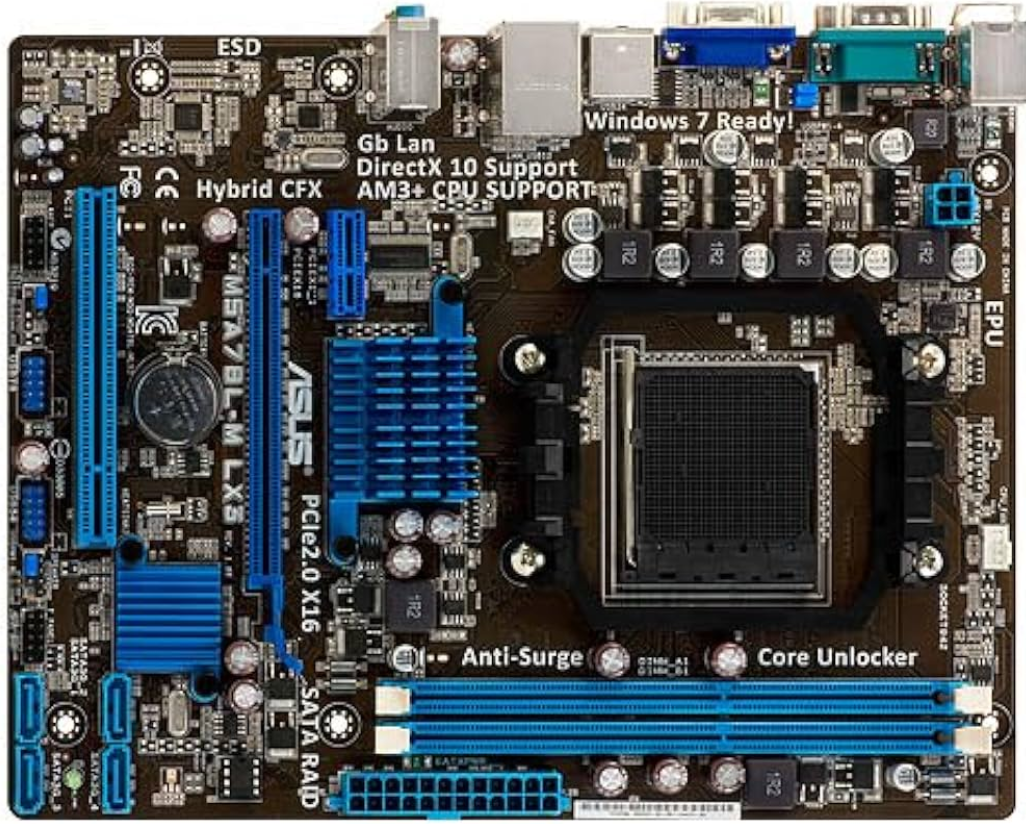
Introduction
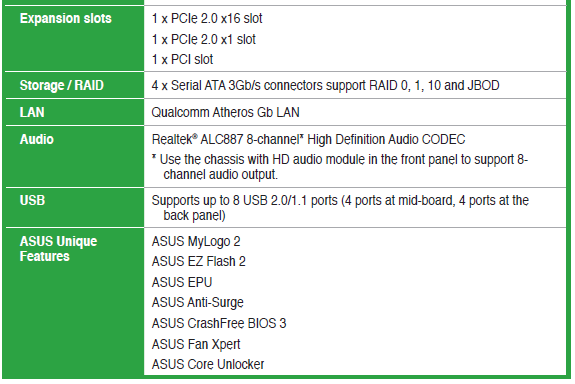
The Asus M5A78L-M LX3 Series Motherboard is a cost-effective solution for AMD enthusiasts, offering support for AMD FX, Phenom II, Athlon II, and Sempron 100 series processors in the AM3+ socket. This micro ATX motherboard is designed to provide a robust platform for gaming and office applications, featuring dual-channel DDR3 memory support up to 16GB and HyperTransport 3.0 interface for fast data transfer rates up to 5200 MT/s. The motherboard also includes an integrated ATI Radeon HD 3000 GPU, 4 SATA 3Gb/s ports, and Gigabit LAN connectivity, making it suitable for both beginners and experienced users looking for a reliable build.
Targeted at DIY enthusiasts and budget-conscious buyers, the Asus M5A78L-M LX3 offers a compelling balance of performance and affordability. The estimated price range is generally under $100, making it highly accessible to those building or upgrading their PCs. The motherboard is widely available on platforms like Newegg and Amazon.
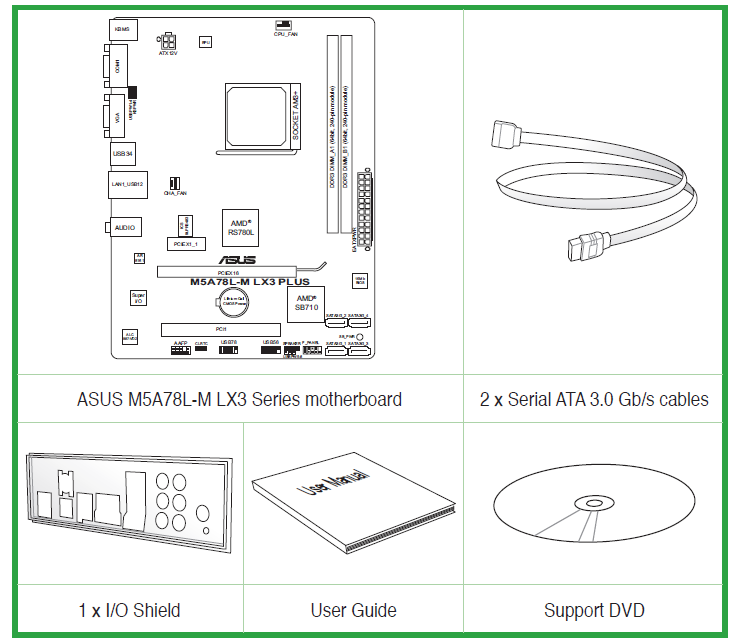
M5A78L-M LX3 Series specifications summary
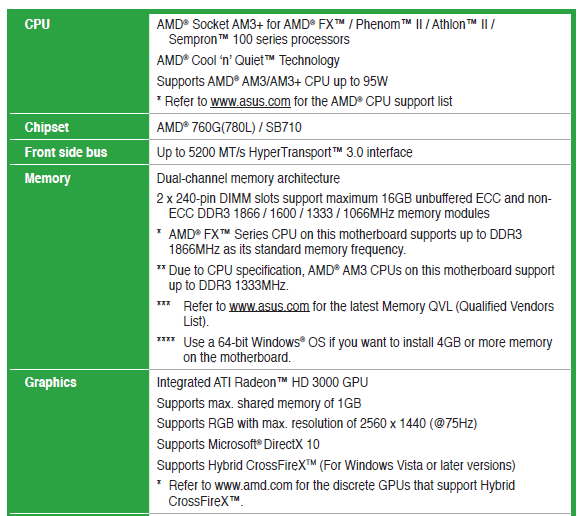
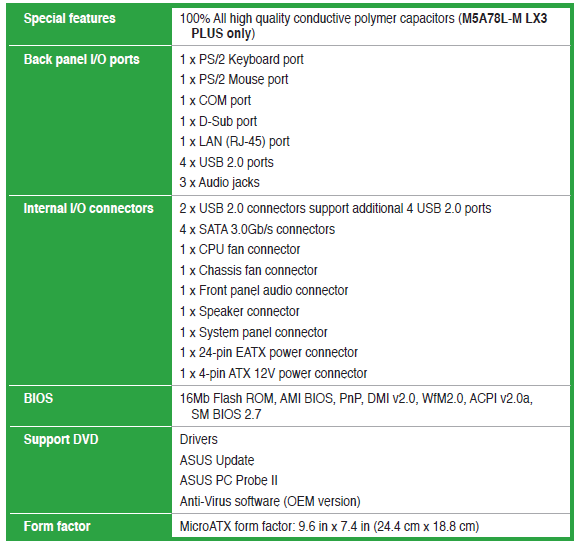
Package contents
Check your motherboard package for the following items.
Special features
- AMD® FX™ / Phenom™ II / Athlon™ II / Sempron™ 100 series CPU supportThis motherboard supports AMD® Socket AM3+ multi-core processors with unique L3 cache and delivers better overclocking capabilities with less power consumption. It features dual-channel DDR3 memory support and accelerates data transfer rate up to 5200MT/s via
- HyperTransport™ 3.0-based system bus. This motherboard also supports AMD® CPUs in the new 32nm manufacturing process.
- HyperTransport™ 3.0 support
- HyperTransport™ 3.0 technology provides 2.6 times more bandwidth than HT1.0 that radically improves system efficiency for a smoother and faster computing environment.
- AMD® Cool ‘n’ Quiet Technology
- This motherboard supports the AMD® Cool ‘n’ Quiet technology which monitors system operation and automatically adjusts CPU voltage and frequency for a cool and quiet operating environment.
- Dual-Channel DDR3 1866 support
- This motherboard supports DDR3 memory that features data transfer rates of 1866 /1600 /1333/1066 MHz to meet the higher bandwidth requirements of the latest operating system, 3D graphics, multimedia, and Internet applications.
- Hybrid CrossFireX™ support
- ATI Hybrid CrossFireX™ technology greatly boosts graphics performance with an onboard GPU and a discrete GPU.
- Hybrid CrossFireX™ is supported by Windows® Vista or later versions only.
- Gigabit LAN solution
- The onboard LAN controller is a highly integrated Gb LAN controller. It is enhanced with an ACPI management function to provide efficient power management for advanced operating systems.
- Serial ATA 3Gb/s technology and RAID support
- This motherboard supports hard drives based on the Serial ATA (SATA) 3Gb/s storage specification, delivering enhanced scalability and doubling the bus bandwidth for high-speed data retrieval and save. It also supports RAID 0, RAID 1, and RAID 0+1 configurations for Serial ATA hard drives. enhanced thermal capacity.
ASUS Exclusive Features
Core Unlocker
- ASUS Core Unlocker simplifies the activation of a latent AMD® CPU-with just pressing a key. Enjoy an instant performance boost by simply unlocking the extra cores, without performing complicated BIOS changes.
ASUS Anti-Surge Protection
- This special design protects expensive devices and the motherboard from damage caused by power surges from switching power supply unit (PSU).
ASUS EPU
- ASUS EPU is a unique power saving technology that detects the current system loadings and adjusts the power consumption in real time.
- ASUS EZ Flash 2ASUS EZ Flash 2 is a user-friendly utility that allows you to update the BIOS without using a bootable floppy disk or an OS-based utility.
- ASUS MyLogo2™This feature allows you to convert your favorite photo into a 256-color boot logo for a more colorful and vivid image on your screen.
ASUS CrashFree
BIOS 3
- ASUS CrashFree BIOS 3 is an auto-recovery tool that allows you to restore a corrupted BIOS file using the bundled support DVD or a USB flash disk that contains the BIOS file.
ErP ready
- The motherboard is European Union´s Energy-related Products (ErP) ready, and ErP requires products to meet certain energy efficiency requirements in regards to energy consumptions. This is in line with ASUS vision of creating environment-friendly and energy-efficient products through product design and innovation to reduce carbon footprint of the product and thus mitigate environmental impacts.
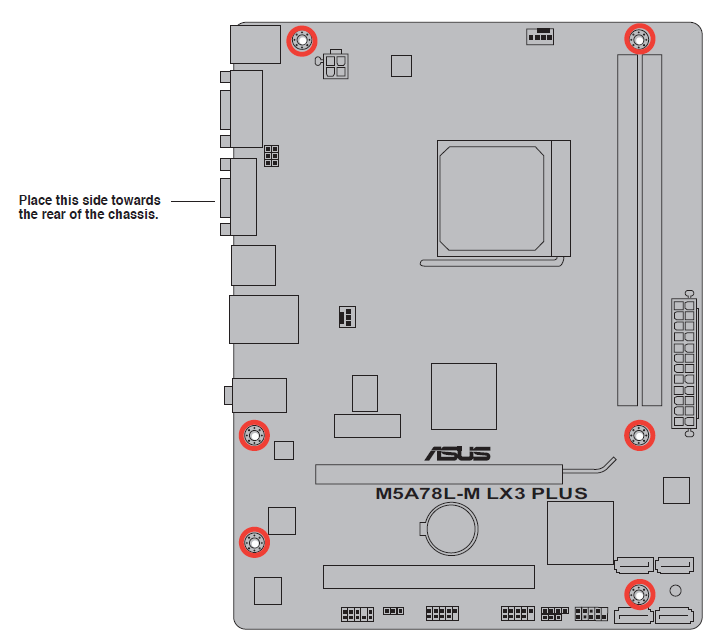
Motherboard overview
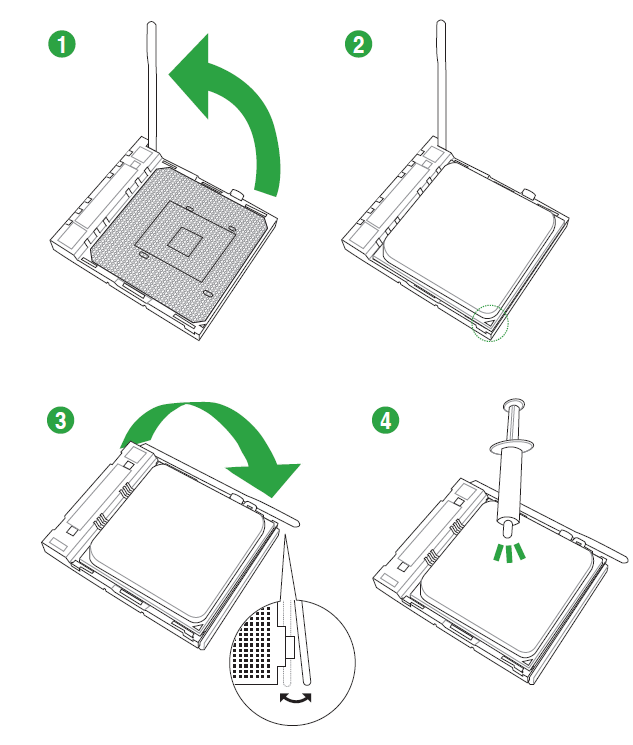
CPU installation
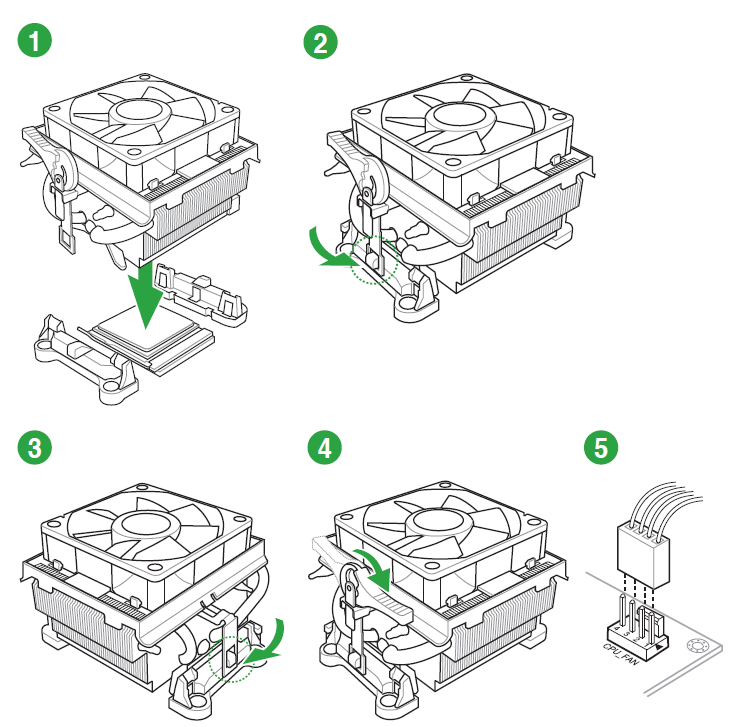
CPU heatsink and fan assembly installation
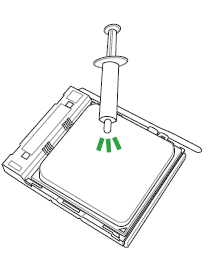
Apply the Thermal Interface Material to the CPU heatsink and CPU before you install the heatsink and fan if necessary.
To install the CPU heatsink and fan assembly
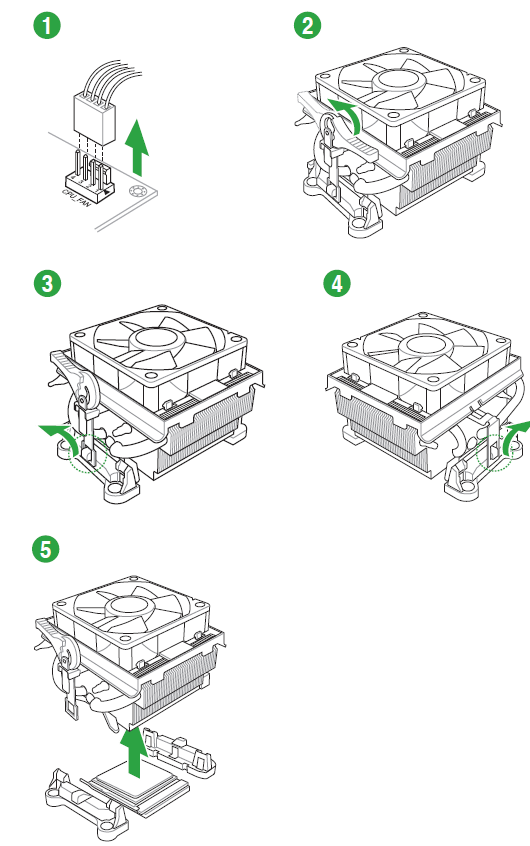
To uninstall the CPU heatsink and fan assembly
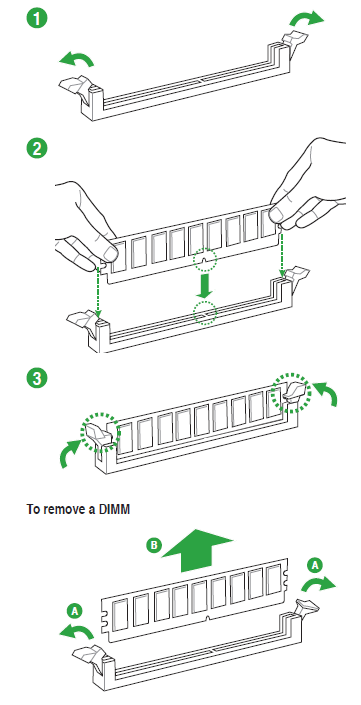
Installing a DIMM
BIOS setup program
Use the BIOS Setup program to update the BIOS or configure its parameters. The BIOS screens include navigation keys and brief online help to guide you in using the BIOS Setup program.
Entering BIOS Setup at startup
To enter BIOS Setup at startup:
- Press <Delete> during the Power-On Self-Test (POST). If you do not press <Delete>, POST continues with its routines.
Entering BIOS Setup after POST
To enter BIOS Setup after POST:
- Press <Ctrl>+<Alt>+<Delete> simultaneously.
- Press the reset button on the system chassis.
- Press the power button to turn the system off then back on. Do this option only if you failed to enter BIOS Setup using the first two options.
- Using the power button, reset button, or the <Ctrl>+<Alt>+<Del> keys to force reset from a running operating system can cause damage to your data or system. We recommend that you always shut down the system properly from the operating system.
- The default BIOS settings for this motherboard apply to most conditions to ensure optimum performance. If the system becomes unstable after changing any BIOS settings, load the default settings to ensure system compatibility and stability. Select the Load Setup Defaults item under the Exit menu. See section 2.8 Exit Menu.
- The BIOS setup screens in this chapter are for reference only. They may not exactly match what you see on your screen.
BIOS menu screen
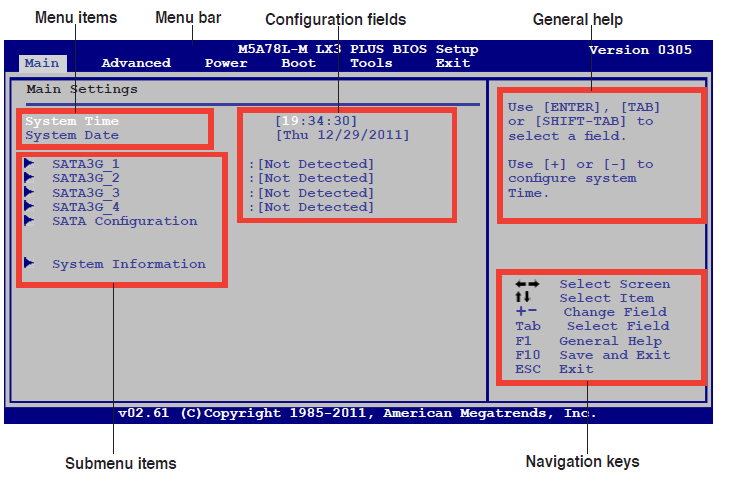
Menu bar
- The menu bar on top of the screen has the following main items:
- Main For changing the basic system configuration
- Advanced For changing the advanced system settings
- Power For changing the advanced power management (APM) configuration
- Boot For changing the system boot configuration
- Tools For configuring options for special functions
- Exit For selecting the exit options and loading default settings.
- To select an item on the menu bar, press the right or left arrow key on the keyboard until the desired item is highlighted.
Navigation keys
At the bottom right corner of a menu screen are the navigation keys for that particular menu. Use the navigation keys to select items in the menu and change the settings.
Menu items
The highlighted item on the menu bar displays the specific items for that menu. For example, selecting Main shows the Main menu items.
The other items (Advanced, Power, Boot, Tools, and Exit) on the menu bar have their respective menu items.
Submenu items
A solid triangle before each item on a menu screen means that the item has a submenu. To display the submenu, select the item and press <Enter>.
Configuration fields
These fields show the values for the menu items. If an item is user- configurable, you can change the value of the field opposite the item. You cannot select an item that is not
user-configurable.
A configurable field is enclosed in brackets, and is highlighted when selected. To change the value of a field, select it then press <Enter> to display a list of options. Refer to 2.2.7 Pop-up window.
Pop-up window
Select a menu item then press <Enter> to display a pop-up window with the configuration options for that item.
Scroll bar
A scroll bar appears on the right side of a menu screen when there are items that do not fit on the screen. Press the <Up> / <Down> arrow keys or <Page Up> /<Page Down> keys to display the other items on the screen.
General help
At the top right corner of the menu screen is a brief description of the selected item.
Troubleshooting and Support
Common issues with the Asus M5A78L-M LX3 include memory compatibility problems, boot failures, and network connectivity issues. Solutions typically involve checking memory compatibility with the QVL list, ensuring proper BIOS settings, and updating network drivers. Preventive measures include using a 64-bit OS for memory above 4GB and regularly updating BIOS and drivers.
For assistance, users can contact ASUS support via phone at 1-888-678-3688 or visit their website for FAQs and forums. The motherboard comes with a standard warranty, allowing returns within 30 days.
Pros and Cons of the Asus M5A78L-M LX3 Series Motherboard
Pros:
- Cost-Effective: Offers a budget-friendly option for AMD platform builds.
- Performance: Supports up to DDR3 1866MHz memory for enhanced performance.
- Reliability: Features anti-surge protection and low EMI design for system stability.
Cons:
- Legacy Support: Uses older SATA 3Gb/s ports, which may not be ideal for modern storage needs.
- Limited Connectivity: Lacks USB 3.0 ports, which could be a drawback for some users.
Customer Reviews and Recommendations
Users praise the Asus M5A78L-M LX3 for its ease of installation, stable performance, and excellent value for money. However, some users have noted the lack of USB 3.0 ports and outdated SATA speeds as significant drawbacks. Overall, the motherboard is rated highly for its cost-effectiveness and reliability. If you're looking for a budget motherboard with solid performance, the Asus M5A78L-M LX3 is a good choice, especially for those who already have compatible components.
Faqs
How do I properly set up the asus M5A78L-M LX3 Series Motherboard for the first time?
What should I do if my asus M5A78L-M LX3 Series Motherboard does not boot or shows no display?
Can the asus M5A78L-M LX3 Series Motherboard support DDR3 memory speeds up to 1866MHz?
How can I optimize the performance of my asus M5A78L-M LX3 Series Motherboard?
What expansion and storage options does the asus M5A78L-M LX3 Series Motherboard provide?
What are the key energy-saving features included in the asus M5A78L-M LX3 Series Motherboard?
Is the asus M5A78L-M LX3 Series Motherboard compatible with Windows 10 or Windows 11 operating systems?
How often should I perform maintenance on the asus M5A78L-M LX3 Series Motherboard to ensure longevity?
More asus manuals
- Asus P4C800-E Deluxe Computer Motherboard User Manual
- Setup: Asus PRIME X470-PRO Motherboard User Manual
- Asus AC1700 Wireless Gigabit Router RT-ACRH17 User Guide
- Configuration: Asus Motherboard Prime Z390-A User Manual
- Asus 24 Inches LCD Monitor VS248 User Guide
- Asus Prime Motherboard Z590-A User Manual | Installation Instruction
Leave a Comment