
Audio-Technica 3000 Series UHF Receiver ATW-R3100b User Manual
Content
Audio-Technica 3000 Series UHF Receiver ATW-R3100b Manual and Product Overview
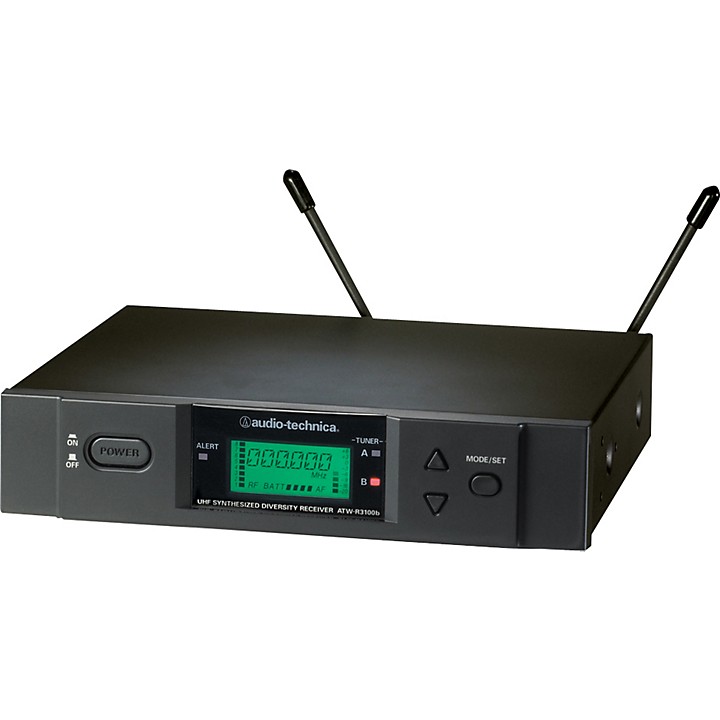
The Audio-Technica 3000 Series UHF Receiver ATW-R3100b is a professional wireless receiver designed for reliable audio performance in live sound, installed sound, houses of worship, educational facilities, and corporate presentation setups. As part of the 3000 Series wireless microphone ecosystem, it delivers true diversity reception, stable UHF operation, and clean signal handling for demanding environments where dropouts and interference must be minimized.
This receiver is valued for its long operating range, flexible frequency agility, and strong audio output options. It supports both balanced XLR and unbalanced 1/4-inch outputs, making it easy to integrate with mixers, powered speakers, recording interfaces, and installed audio systems. The ATW-R3100b is especially useful for users who need dependable wireless microphone reception without moving into higher-priced digital systems.
Typical use cases include keynote presentations, stage performances, fitness instruction, classroom demonstrations, conference rooms, and worship services. The estimated price range for the Audio-Technica 3000 Series UHF Receiver ATW-R3100b is generally in the mid-range professional category, often found as part of complete wireless systems or on the used and legacy market rather than as a current standalone retail item. Availability may vary by region because some frequency bands are discontinued or restricted in certain markets.
Specifications for Audio-Technica 3000 Series UHF Receiver ATW-R3100b
- Receiving system: True diversity for improved signal stability and reduced dropouts.
- Operating frequencies: UHF bands with selectable frequency-agile operation, including 25 kHz spacing in supported bands.
- Frequency response: 70 Hz to 15 kHz, suitable for speech and vocal applications.
- Dynamic range: Greater than 110 dB, typical, supporting clean and quiet audio reproduction.
- Total harmonic distortion: Less than 1% at 1 kHz under standard test conditions.
- RF sensitivity: 20 dBuV at 60 dBA S/N ratio with 50 ohm termination.
- Image rejection: 60 dB nominal for better resistance to unwanted signals.
- Audio outputs: Balanced XLR and unbalanced 1/4-inch output connections.
- Maximum output level: Balanced XLR up to +9 dBV and unbalanced 1/4-inch up to +7 dBV in legacy configurations.
- Antenna input: BNC-type, 50 ohms.
- Power requirements: 12 to 18V DC external power input, depending on system version and region.
- Compared with entry-level wireless receivers, the ATW-R3100b offers stronger RF performance, better diversity reception, and more professional output options.
Setup Guide: How to Install and Configure the ATW-R3100b Receiver
Start by placing the receiver in a stable, well-ventilated location away from strong RF noise sources, metal obstructions, and Wi-Fi routers. Connect the supplied antennas firmly to the BNC antenna inputs, then attach the power adapter and verify that the unit powers on correctly.
Next, connect the audio output to your mixer, amplifier, or powered speaker. Use the balanced XLR output for the cleanest long-distance connection, or the 1/4-inch output for simple short-run setups. If your transmitter and receiver are part of a matched system, set both units to the same compatible frequency or channel group before testing audio.
For best results, scan for an open frequency and avoid overlapping wireless systems in the same room. Keep transmitters at a reasonable distance from the receiver during initial pairing, then perform a range check. Safety warning: do not operate with damaged antennas, improper power supplies, or blocked ventilation openings. If audio is noisy or weak, confirm that squelch, output gain, and frequency settings are correct before moving the receiver.
Troubleshooting the Audio-Technica 3000 Series UHF Receiver ATW-R3100b
Common issues usually involve RF interference, weak audio, poor antenna placement, or mismatched frequencies. If there is no sound, confirm that the transmitter is powered on, the receiver and transmitter are on the same frequency, and the output cable is connected to the correct mixer input.
- No RF signal: Reposition antennas, move away from metal racks, and check that the transmitter is within range.
- Intermittent dropouts: Reduce distance, avoid obstacles, and select a cleaner frequency group.
- Distorted audio: Lower transmitter gain or receiver output level, then retest.
- Low audio level: Verify mixer gain staging and confirm the correct output connection is being used.
- Noise or hiss: Inspect antenna placement, check for RF congestion, and replace worn cables.
The ATW-R3100b does not typically use consumer-style error codes, so troubleshooting is done through RF indicators, audio meters, and frequency verification. Preventive maintenance includes keeping antennas upright, powering the unit with the correct adapter, and storing transmitters with fresh batteries. For service support, check the original Audio-Technica documentation, local authorized dealers, or regional product support channels. Warranty coverage depends on the market and the original purchase terms.
Pros and Cons of the ATW-R3100b Wireless Receiver
Pros
- True diversity reception improves reliability in challenging RF environments.
- Professional XLR and 1/4-inch outputs offer flexible system integration.
- Strong frequency agility helps reduce interference in crowded venues.
- Well-suited for speech, vocals, and presentation use.
- Solid value for users who need dependable analog wireless performance.
Cons
- Legacy model availability may be limited, especially as a new retail product.
- Some frequency bands are discontinued or region-specific.
- Not as feature-rich as modern digital wireless receivers.
- May require more manual frequency management than newer systems.
For buyers comparing the ATW-R3100b to newer alternatives, it remains a practical choice if analog UHF reliability and compatibility matter more than advanced digital features. It offers strong value for money on the used market or in existing 3000 Series installations.
Customer Reviews of the Audio-Technica 3000 Series UHF Receiver ATW-R3100b
User feedback for the Audio-Technica 3000 Series UHF Receiver ATW-R3100b is generally positive, with many customers rating it around 4 out of 5 stars for dependable performance and easy integration. Praise often focuses on stable reception, clear vocal sound, and durable construction. One common testimonial is: “It has been reliable in our church setup for years and rarely drops signal.”
Frequent complaints include limited modern availability, the need to match frequencies carefully, and the fact that it lacks the convenience of newer digital systems. Some users mention that it performs best when antennas are positioned correctly and the operating band is chosen carefully. For buyers who want a proven UHF receiver for legacy wireless systems, it remains a recommended option, especially for installations where consistency matters more than newest-generation features.
Frequently Asked Questions About the ATW-R3100b
What is the Audio-Technica 3000 Series UHF Receiver ATW-R3100b used for?
It is used to receive wireless microphone signals in professional audio setups, including live events, presentations, worship services, and installed sound systems.
Does the ATW-R3100b support balanced audio output?
Yes. It includes a balanced XLR output for cleaner long-distance audio connections, along with an unbalanced 1/4-inch output.
Is the ATW-R3100b still worth buying?
Yes, if you need a reliable analog UHF receiver for an existing 3000 Series system or a budget-friendly professional wireless setup. It is less ideal if you want the newest digital features.
Faqs
How do I set up the Audio-Technica 3000 Series UHF Receiver ATW-R3100b for the first time?
What should I do if the Audio-Technica 3000 Series UHF Receiver ATW-R3100b keeps dropping signal?
Which transmitter types work with the Audio-Technica 3000 Series UHF Receiver ATW-R3100b?
How many frequencies does the Audio-Technica 3000 Series UHF Receiver ATW-R3100b support?
How do I connect the Audio-Technica 3000 Series UHF Receiver ATW-R3100b to a mixer or PA system?
What are the main features that make the Audio-Technica 3000 Series UHF Receiver ATW-R3100b reliable?
How should I maintain and care for the Audio-Technica 3000 Series UHF Receiver ATW-R3100b?
What is the best way to troubleshoot setup problems on the Audio-Technica 3000 Series UHF Receiver ATW-R3100b?
More audio-technica manuals
- Audio-Technica 3000 Series UHF Wireless System ATW-R3100 User Manual
- Audio-Technica System 10 Digital Wireless System ATW-1101 User Manual
- Audio-Technica AT2020USB-X USB Microphone User Manual
- Audio-Technica ATH-MSR7NC Noise-Cancelling Headphones User Manual
- Audio-Technica AT-LP70XBT Automatic Wireless Turntable User Manual
- Audio-Technica 3000 Series Professional UHF Wireless System User Manual
Leave a Comment