
Audio-Technica 3000 Series Professional UHF Wireless System User Manual
Content
Audio-Technica 3000 Series Professional UHF Wireless System: Complete Product Manual
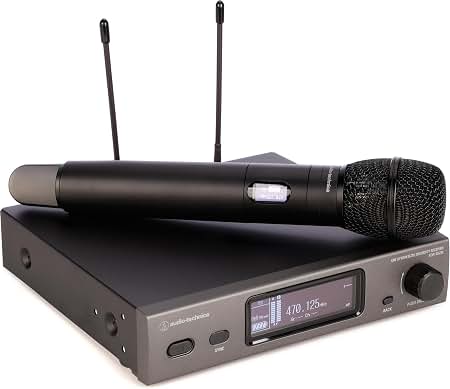
Introduction
The Audio-Technica 3000 Series Professional UHF Wireless System is a frequency-agile wireless solution designed for dependable live sound, speech reinforcement, worship services, theater, broadcast, and corporate presentations. Built around a true diversity UHF receiver and flexible transmitter options, it delivers strong RF stability, clear audio, and the convenience of cable-free operation in demanding environments.
This system is especially well suited for users who need reliable wireless performance in crowded RF spaces. Features such as frequency scan, infrared sync, wide tuning bandwidth, and selectable RF output make it easy to configure for different venues and production needs. The 3000 Series is also known for its practical range, low noise performance, and compatibility with a variety of microphone capsules and bodypack accessories, making it a versatile choice for both vocalists and presenters.
For buyers searching for a professional-grade UHF microphone system, the Audio-Technica 3000 Series Professional UHF Wireless System typically falls in the mid-range to upper-mid-range price category. Estimated pricing commonly starts around $549 and can rise to about $799 or more depending on the transmitter type, capsule, and regional configuration. Availability is generally strong through pro audio retailers, musical instrument stores, and online marketplaces, though specific frequency bands and models vary by country.
Specifications: Audio-Technica 3000 Series UHF Wireless Microphone System
- System type: Professional UHF wireless microphone system with true diversity reception.
- Operating frequencies: Multiple regional UHF bands, including wide tuning ranges such as 470.125 to 699.875 MHz depending on model and territory.
- Frequency agility: Up to 1,996 to 2,400+ selectable frequencies depending on band and version.
- Operating range: Up to 328 feet in open, interference-free conditions.
- RF output power: Typically selectable between 10 mW and 30 mW on compatible transmitters.
- Audio performance: Wide frequency response with low distortion for speech and vocal reproduction.
- Receiver design: True diversity architecture to help reduce dropouts and improve signal stability.
- Setup features: Frequency scan, IR sync, auto squelch, and channel memory on supported models.
- Best use cases: Live performance, lecture halls, houses of worship, events, and broadcast applications.
Compared with entry-level wireless systems, the 3000 Series offers more channel flexibility, stronger RF handling, and better long-distance reliability. Against higher-end systems, it remains cost-effective while still providing professional-grade features and dependable sound quality.
Setup Guide: How to Install and Configure the Audio-Technica 3000 Series
Start by placing the receiver in a rack or on a stable surface with clear airflow and unobstructed antenna placement. Connect the receiver’s audio output to your mixer, powered speaker, amplifier, or recording interface using balanced XLR or 1/4-inch connections where available. Then connect the antennas securely and power on the receiver.
Next, choose an open frequency using the scan function if supported. Match the transmitter to the receiver by using infrared sync or manual frequency selection. After pairing, confirm that the RF and AF meters show stable signal activity. Set transmitter gain or sensitivity to avoid distortion, then perform a sound check at the intended speaking or performance volume.
For best results, keep antennas away from metal obstructions, Wi-Fi routers, and other RF-heavy equipment. Avoid placing the receiver inside enclosed cabinets. Safety precautions include using the correct power adapter, keeping transmitters dry, and not operating the system with damaged antennas or cables. If interference occurs, re-scan for a clearer channel, reduce RF power only if appropriate, or relocate the receiver for improved line of sight.
Troubleshooting: Common Problems and Fixes
- No audio output: Check receiver output level, mixer input selection, mute settings, and cable connections. Confirm the transmitter is powered on and paired correctly.
- Weak or intermittent RF signal: Reposition antennas, increase line of sight, move away from interference sources, or scan for a cleaner frequency.
- Distorted sound: Lower transmitter gain or sensitivity and verify that the input source is not overdriving the capsule or bodypack.
- Dropouts during use: Reduce distance, avoid blocked antenna paths, and check whether nearby wireless devices are operating on conflicting frequencies.
- Battery drain: Replace batteries or recharge packs more frequently, and power down transmitters when not in use.
Some models display status indicators instead of detailed error codes, so RF, AF, and battery icons should be monitored closely. Preventive maintenance includes regular frequency checks, fresh batteries before critical events, and routine inspection of antennas, connectors, and microphone elements. Warranty coverage and support vary by region, so users should contact their local Audio-Technica distributor, authorized dealer, or regional service center for assistance with repairs, parts, or frequency coordination. If immediate help is needed, authorized pro audio retailers can often provide setup guidance and replacement accessories.
Pros & Cons of the Audio-Technica 3000 Series Professional UHF Wireless System
Pros
- Reliable true diversity design helps reduce dropouts in busy RF environments.
- Wide tuning options make it practical for different regions and venues.
- Strong value for money compared with many premium wireless systems.
- Easy pairing with scan and IR sync simplifies setup for fast-paced events.
- Good sound clarity for speech, worship, and vocal performance applications.
Cons
- Regional frequency availability can limit certain models in some countries.
- Advanced coordination may still be needed in congested wireless venues.
- Price is higher than basic entry-level wireless microphone kits.
- Some users may prefer more display features or app-based control found in newer alternatives.
For users comparing wireless microphone systems, the 3000 Series sits in a strong middle ground: more robust than budget options, but more affordable than many flagship rack systems. It is a smart buy for organizations that want dependable performance without moving into premium pricing.
Customer Reviews: What Users Say About the Audio-Technica 3000 Series
Average user sentiment for the Audio-Technica 3000 Series Professional UHF Wireless System is generally positive, often landing around 4.4 out of 5 stars in retail feedback. Users frequently praise the clean audio, stable signal, and easy setup process, especially in churches, schools, and small-to-medium venues. One reviewer noted that the system “locks in quickly and stays solid through an entire service,” while another said the sound “feels clear and natural right out of the box.”
Common complaints usually focus on price, regional frequency limitations, and the need to manage batteries carefully during long events. A few buyers mention that performance depends heavily on proper antenna placement and channel selection. Overall, the system is widely recommended for buyers who want a professional wireless microphone setup with dependable sound quality and straightforward operation.
Frequently Asked Questions
What is the Audio-Technica 3000 Series Professional UHF Wireless System used for?
It is used for live sound, presentations, worship, theater, broadcasting, and any application that needs reliable wireless microphone performance.
How far can the system operate?
In open, interference-free conditions, it can reach up to 328 feet depending on the model and environment.
Is the Audio-Technica 3000 Series good for professional use?
Yes. It is designed for professional audio applications and offers stable UHF performance, flexible frequency selection, and reliable audio clarity.
Does it work with different microphone types?
Yes. Depending on the system configuration, it supports handheld transmitters, bodypack transmitters, and compatible microphone capsules or headworn mics.
Faqs
How do I set up the audio-technica 3000 Series Professional UHF Wireless System for the first time?
What should I check if the audio-technica 3000 Series Professional UHF Wireless System has no sound?
Why is the audio-technica 3000 Series Professional UHF Wireless System picking up interference or static?
Can I use the audio-technica 3000 Series Professional UHF Wireless System in a venue with multiple wireless systems?
How do I get the best range and signal quality from the audio-technica 3000 Series Professional UHF Wireless System?
What devices are compatible with the audio-technica 3000 Series Professional UHF Wireless System?
How do I use RF scan and IR sync on the audio-technica 3000 Series Professional UHF Wireless System?
How should I maintain and store the audio-technica 3000 Series Professional UHF Wireless System?
More audio-technica manuals
- Audio-Technica ATH-MSR7NC Noise-Cancelling Headphones User Manual
- Audio-Technica ATH-CK3TW Wireless Headphones User Manual
- Audio-Technica System 10 Digital Wireless System ATW-1101 User Manual
- Audio-Technica ATH-WB2022 Wireless Headphones User Manual
- Audio-Technica 3000 Series UHF Receiver ATW-R3100b User Manual
- Audio-Technica AT-LP3 Fully Automatic Belt-Drive Turntable User Manual
Leave a Comment