
Audio-Technica ATH-WB2022 Wireless Headphones User Manual
Content
audio-technica ATH-WB2022 Wireless Headphones: Comprehensive Product Manual
Introduction: What Makes the ATH-WB2022 Stand Out?
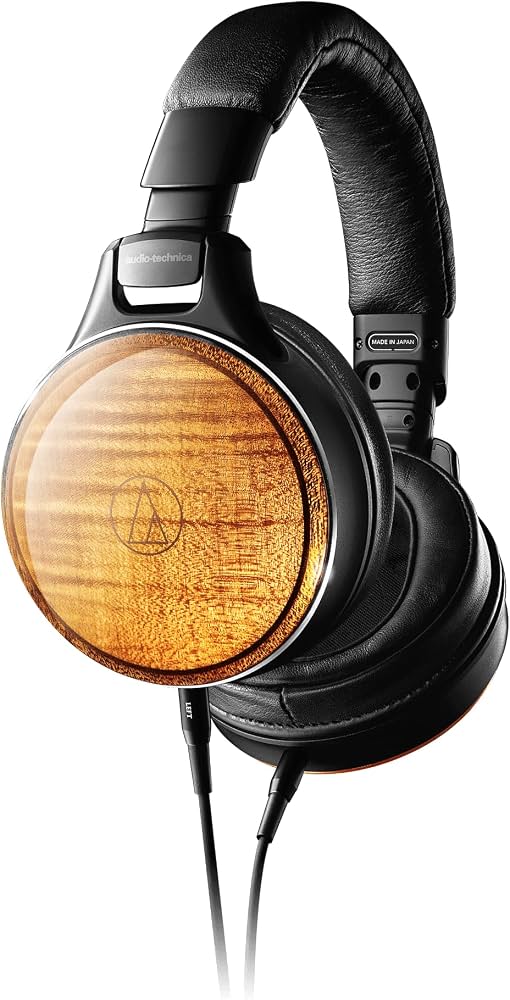
The audio-technica ATH-WB2022 Wireless Headphones are a limited-edition flagship model built for listeners who want premium wireless audio with a luxury design. As part of Audio-Technica’s 60th anniversary collection, these over-ear wireless headphones combine high-resolution sound, elegant wood housing, and advanced Bluetooth connectivity in one standout package. They are designed for audiophiles, collectors, and professionals who value detailed playback, refined craftsmanship, and versatile use across music, calls, and desktop listening.
One of the biggest strengths of the ATH-WB2022 is its dual wireless and USB audio capability, which supports up to 24-bit/96 kHz playback for high-resolution listening. It also includes Bluetooth 5.1, LDAC, AAC, and SBC support, plus multipoint pairing for connecting to two devices at once. The closed-back dynamic design, 45 mm drivers, and integrated independent DAC and amplifier architecture help deliver clear channel separation and a highly immersive soundstage.
This model is best suited for users who want a premium wireless headphone experience with a unique handcrafted feel. It is ideal for home listening, critical music sessions, and users who appreciate limited-edition audio gear. The estimated price range is in the ultra-premium category, with a launch price around $2,700 and a Japanese market price of approximately ¥396,000. Availability is limited and may vary by region, with stock often appearing through specialty audio retailers and selected online marketplaces.
Specifications: audio-technica ATH-WB2022 Wireless Headphones Technical Details
- Type: Closed-back dynamic wireless headphones
- Driver size: 45 mm
- Sensitivity: 106 dB/mW
- Frequency response: 5 Hz to 45,000 Hz
- Impedance: 47 ohms
- Bluetooth version: 5.1
- Supported codecs: LDAC, AAC, SBC
- Wireless range: Approximately 10 m line of sight
- Maximum RF output: 10 mW EIRP
- Battery life: Up to 9 hours of continuous music playback
- Charging time: About 2.5 hours
- Weight: Approximately 350 g
- Microphone: Electret condenser, omnidirectional
- Mic sensitivity: -35 dB
- Mic frequency response: 60 Hz to 20,000 Hz
- USB audio support: Up to 24-bit/96 kHz playback
- Compatible profiles: A2DP, AVRCP, HFP
Compared with many premium wireless headphones, the ATH-WB2022 focuses more on high-fidelity playback and craftsmanship than on noise cancellation or long battery endurance. Its sound profile and high-resolution wireless support make it a strong alternative to mainstream luxury headphones that prioritize ANC features over audio detail.
Setup Guide: How to Set Up the ATH-WB2022 Wireless Headphones
1. Fully charge the headphones before first use with the supplied USB cable. Allow roughly 2.5 hours for a full charge.
2. Power on the headphones and activate Bluetooth pairing mode according to the button sequence in the user manual.
3. Open Bluetooth settings on your phone, tablet, or computer and select ATH-WB2022 from the available devices list.
4. For the best sound quality, enable LDAC on compatible Android devices or use USB audio mode with a compatible computer or mobile device.
5. To connect a second device, use the multipoint pairing feature and confirm both devices are paired before use.
6. Test playback, microphone input, and volume controls before extended listening.
If pairing fails, reset Bluetooth on the source device, move closer to the headphones, and make sure no other paired device is actively connected. Avoid exposing the headphones to heat, moisture, or physical pressure during setup and charging. Never use damaged cables or charge in unsafe environments.
Troubleshooting: Common ATH-WB2022 Problems and Solutions
- Headphones will not pair: Remove the device from Bluetooth settings, restart both devices, and pair again in a quiet wireless environment.
- Low volume or weak sound: Check the source volume, confirm the correct codec is active, and ensure the ear cups seal properly.
- Battery drains too quickly: Reduce wireless codec load when possible, lower volume, and fully recharge before each long session.
- USB audio not detected: Verify that the connected device supports USB 2.0 audio and that the correct cable is being used.
- Mic not working on calls: Confirm HFP mode is active and check app permissions for microphone access.
- Connection drops: Stay within about 10 meters of the source device and avoid interference from routers or crowded wireless signals.
There are no widely published error codes for general consumer troubleshooting, so most issues are resolved through reset, re-pairing, or cable replacement. To prevent future problems, keep firmware-compatible devices updated, store the headphones in their case, and clean the ear pads and ports regularly. Warranty support may vary by region, but Audio-Technica typically provides product support through its regional customer service channels and authorized retailers.
Pros & Cons: Is the ATH-WB2022 Worth It?
Pros
- Exceptional sound quality with high-resolution wireless and USB playback
- Premium handcrafted design with a distinctive wood finish
- Bluetooth 5.1 with LDAC, AAC, and SBC support
- Multipoint pairing for two-device convenience
- Closed-back design helps improve focus and isolation in quiet environments
- Strong value for collectors and audiophiles seeking a luxury statement piece
Cons
- Very expensive compared with standard wireless headphones
- Battery life is modest at around 9 hours
- No active noise cancellation
- Heavier than many modern portable models
- Availability is limited and may be difficult to find at retail
For users comparing premium options, the ATH-WB2022 is less about everyday commuting and more about high-end home listening. It is a stronger fit than many mainstream wireless models if sound fidelity and craftsmanship matter more than portability or ANC. For the price, it appeals most to buyers who want a collector-grade product rather than a budget-conscious purchase.
Customer Reviews: What Users Say About the ATH-WB2022
Average user sentiment trends very positive, with many buyers rating the headphones around 4.5 out of 5 stars for sound quality, design, and build craftsmanship. Enthusiasts frequently praise the clear separation, rich tonal balance, and premium materials. One common comment is that the headphones feel like a “museum-grade audio product” rather than a typical wireless accessory.
Frequent complaints focus on the price, short battery life, and lack of noise canceling. Some users also note that the headphones are best used in calm listening spaces rather than travel or gym settings. Most reviewers recommend them for serious listeners, collectors, and Audio-Technica fans who want a luxury wireless headphone with distinctive character. If those priorities match your needs, the audio-technica ATH-WB2022 Wireless Headphones are often described as a rewarding long-term purchase.
Faqs
How do I set up audio-technica ATH-WB2022 Wireless Headphones for the first time?
Why are my audio-technica ATH-WB2022 Wireless Headphones not connecting to Bluetooth?
What devices are compatible with audio-technica ATH-WB2022 Wireless Headphones?
How do I get the best sound quality from audio-technica ATH-WB2022 Wireless Headphones?
Does audio-technica ATH-WB2022 Wireless Headphones support wired listening, and when should I use it?
How do I use multipoint pairing on audio-technica ATH-WB2022 Wireless Headphones?
What should I do if the battery on audio-technica ATH-WB2022 Wireless Headphones drains too fast?
How should I clean and maintain audio-technica ATH-WB2022 Wireless Headphones?
More audio-technica manuals
- Audio-Technica ATH-CK3TW Wireless Headphones User Manual
- Audio-Technica AT-LP3 Fully Automatic Belt-Drive Turntable User Manual
- Audio-Technica 3000 Series Professional UHF Wireless System User Manual
- Audio-Technica ATH-SR30BT Wireless Headphones User Manual
- Audio-Technica ATH-MSR7NC Noise-Cancelling Headphones User Manual
- Audio-Technica AT-LP60XBT-USB Automatic Wireless Turntable User Manual
Leave a Comment