
Audio-Technica AT-LP60XBT-USB Automatic Wireless Turntable User Manual
Content
Introduction to the Audio-Technica AT-LP60XBT-USB Automatic Wireless Turntable
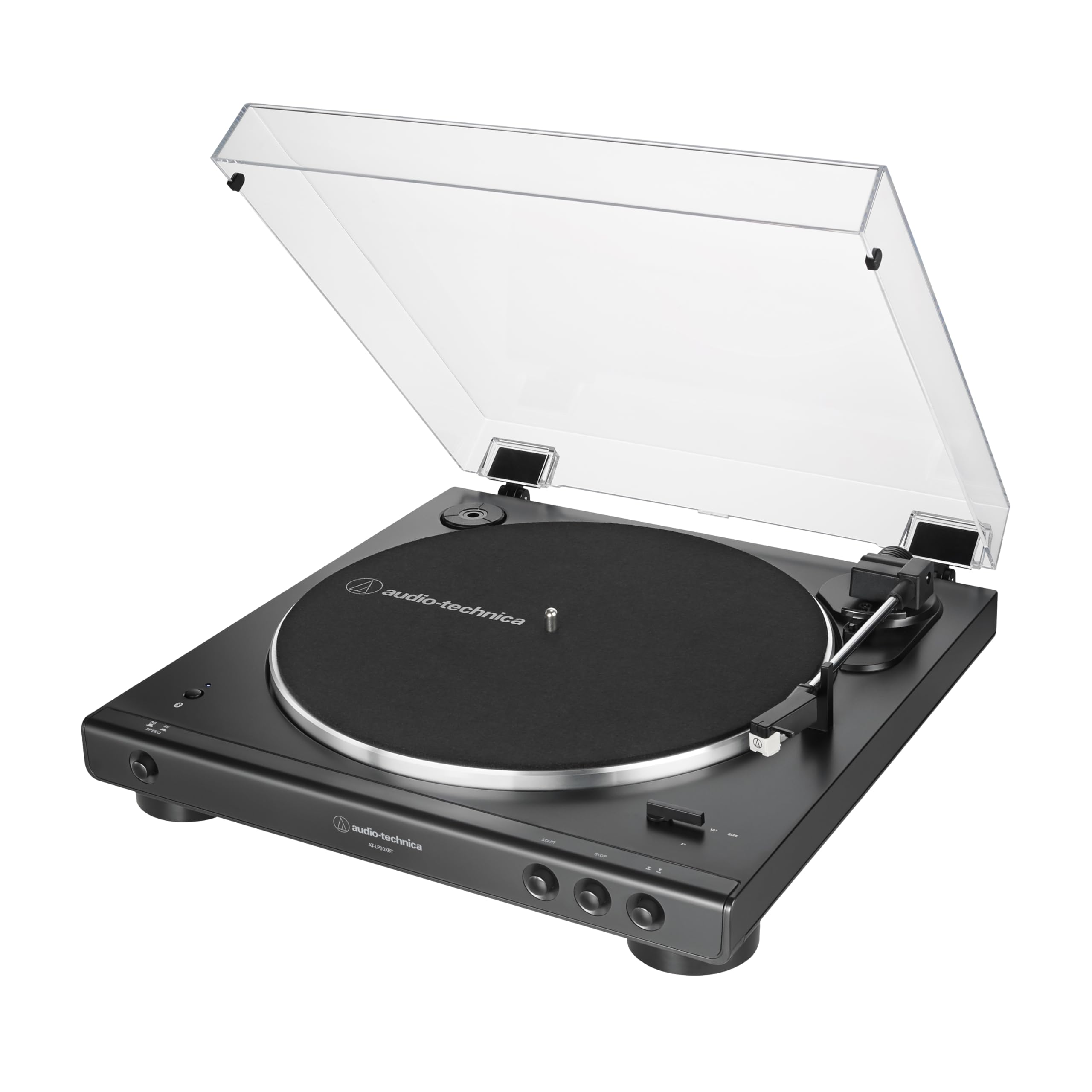
The audio-technica AT-LP60XBT-USB Automatic Wireless Turntable is a versatile entry-level record player designed for listeners who want the convenience of Bluetooth, USB digitization, and simple fully automatic operation in one package. It combines classic vinyl playback with modern connectivity, making it a strong choice for beginners, casual collectors, and anyone looking to archive records to a computer without complex setup. The fully automatic belt-drive design starts and stops with a button press, while the selectable Bluetooth and USB outputs add flexibility for home listening and digital conversion. For users who want an easy way to enjoy 33-1/3 and 45 RPM records, this model delivers a practical and approachable experience.
One of its biggest selling points is the ability to play records wirelessly to Bluetooth speakers or headphones while also supporting wired playback through its built-in phono preamp. The USB output makes it especially useful for converting vinyl into digital files for personal libraries, podcasts, or archival projects. The audio-technica AT-LP60XBT-USB Automatic Wireless Turntable is also compact, lightweight, and available in a price range that typically sits around the mid-$300 range, depending on retailer availability and promotions. It is commonly sold through major electronics stores and the official brand store, making it easy to find for most shoppers.
This turntable is best suited for first-time vinyl users, apartment setups, and home audio systems where convenience matters more than manual customization. It offers a balanced mix of simplicity, sound quality, and modern connectivity, making it a practical all-in-one turntable for everyday use.
Specifications for the Audio-Technica AT-LP60XBT-USB Automatic Wireless Turntable
- Drive type: Belt-drive, fully automatic turntable
- Speeds: 33-1/3 RPM and 45 RPM
- Bluetooth: Bluetooth 5.0 with A2DP support and aptX audio compatibility
- USB output: USB 2.0-compliant digital output for computer recording
- Digital conversion: 16-bit, 44.1 kHz or 48 kHz selectable
- Platter: Aluminum platter for stable rotation
- Wow and flutter: Less than 0.25% WTD at 3 kHz
- Signal-to-noise ratio: Greater than 50 dB
- Built-in phono preamp: Yes, with selectable line/phono output
- Cartridge: Dual Magnet cartridge with replaceable ATN3600L stylus
- Power: 12V AC adapter, low power consumption around 1.5W
- Dimensions: About 14.15 x 14.70 x 3.84 inches
- Weight: About 5.73 lbs
Compared with basic budget turntables, this model stands out because it adds Bluetooth wireless playback and USB recording in the same unit. Against more advanced turntables, it offers less manual control and fewer upgrade options, but it remains appealing for users who want plug-and-play convenience and reliable everyday performance.
Setup Guide: How to Set Up the Audio-Technica AT-LP60XBT-USB Automatic Wireless Turntable
Start by placing the turntable on a flat, stable surface away from speakers, heat sources, and direct sunlight. Attach the platter, slip on the belt if needed, and install the felt mat. Connect the AC adapter supplied with the unit before powering on. If you plan to use wired speakers or a receiver, set the output switch to phono or line depending on whether your audio system includes a phono input.
For Bluetooth use, power on the turntable and pair it with headphones or speakers by following the Bluetooth pairing process on your audio device. If you want to digitize vinyl, connect the USB cable to your computer and use recording software that supports USB audio input. Select the preferred sample rate if your software allows it. A short test recording is recommended before transferring an entire album.
Keep the dust cover open only when necessary, handle records by the edges, and avoid touching the stylus. Never move the turntable while a record is spinning, and do not use unapproved power supplies. If playback sounds distorted, confirm that the output mode matches your system and that the stylus is seated properly. For best results, clean records and the stylus regularly.
Troubleshooting the Audio-Technica AT-LP60XBT-USB Automatic Wireless Turntable
If the turntable does not start, check the power connection, confirm the AC adapter is securely plugged in, and make sure the tonearm lock is released. If Bluetooth playback fails, remove the paired device from your speaker or headphones and re-pair from the beginning. Weak or distorted sound often points to the wrong output setting, a dirty stylus, or low-quality Bluetooth signal quality.
If USB recording is not recognized by your computer, try another USB port, restart the recording software, and verify that the turntable is selected as the input device. Some operating systems may require an updated audio driver or permission for microphone/input access. There are no common error codes on this model, so problems are usually resolved through connection checks, output-mode changes, or software settings.
Preventive care helps avoid most issues. Store the turntable in a dust-free area, keep records clean, and replace the stylus when wear becomes noticeable. If the problem continues, use the manufacturer’s support resources or contact the retailer where you purchased the unit. The product is commonly backed by a limited warranty, and support is typically available through official customer service channels and authorized dealers.
Pros and Cons of the Audio-Technica AT-LP60XBT-USB Automatic Wireless Turntable
Pros
- Fully automatic operation makes it easy for beginners and casual vinyl listeners.
- Bluetooth connectivity adds convenient wireless listening with compatible speakers and headphones.
- USB output is ideal for digitizing vinyl records to a computer.
- Built-in phono preamp simplifies setup with receivers, powered speakers, and computer systems.
- Replaceable stylus improves long-term value and maintenance flexibility.
- Strong value for money for users who want wireless, analog, and USB playback in one device.
Cons
- Limited manual controls compared with higher-end audiophile turntables.
- Fixed tracking force and basic cartridge design reduce upgrade potential.
- Bluetooth audio is convenient, but wired playback still delivers better fidelity.
- Not ideal for users who want advanced tonearm adjustments or heavy customization.
- Some alternatives in a similar price range may offer stronger analog sound performance without wireless features.
For shoppers who want the easiest path into vinyl, the audio-technica AT-LP60XBT-USB Automatic Wireless Turntable offers an excellent balance of convenience and features. Users looking for more audiophile-grade upgrades may prefer a more manual model, but those buyers will usually spend more and sacrifice simplicity.
Customer Reviews of the Audio-Technica AT-LP60XBT-USB Automatic Wireless Turntable
Customer feedback is generally positive, with many buyers giving it around 4 to 4.5 stars out of 5 for ease of use, Bluetooth flexibility, and reliable automatic operation. A common praise is that it works well straight out of the box, especially for users who want a first turntable without technical complexity. Many reviewers also appreciate the USB feature for transferring favorite records into digital format.
Frequent complaints include the limited upgrade path, the plastic construction, and sound quality that is good for the price but not at audiophile level. Some users note that Bluetooth convenience is excellent for casual listening, though wired output sounds fuller and more detailed. A typical buyer testimonial might say, “Perfect for my apartment setup and easy to use every day,” while a critical review may mention, “Great starter turntable, but I wish there were more manual controls.”
For most beginners and everyday vinyl listeners, this model is a smart purchase. It is especially recommended for users who value convenience, wireless playback, and USB recording over advanced audio tuning.
Faqs
How do I set up the audio-technica AT-LP60XBT-USB Automatic Wireless Turntable for the first time?
Why is my audio-technica AT-LP60XBT-USB Automatic Wireless Turntable not connecting to Bluetooth speakers?
Can the audio-technica AT-LP60XBT-USB Automatic Wireless Turntable work with a computer for vinyl recording?
Do I need a phono preamp for the audio-technica AT-LP60XBT-USB Automatic Wireless Turntable?
What records can I play on the audio-technica AT-LP60XBT-USB Automatic Wireless Turntable?
How do I get better sound quality from the audio-technica AT-LP60XBT-USB Automatic Wireless Turntable?
How do I maintain the audio-technica AT-LP60XBT-USB Automatic Wireless Turntable to avoid skips and wear?
What should I do if the audio-technica AT-LP60XBT-USB Automatic Wireless Turntable sounds too quiet or distorted?
More audio-technica manuals
- Audio-Technica ATH-SR30BT Wireless Headphones User Manual
- Audio-Technica ATH-M20xBT Wireless Headphones User Manual
- Audio-Technica AT-LP3 Fully Automatic Belt-Drive Turntable User Manual
- Audio-Technica AT-LP140XP Direct-Drive Professional Turntable User Manual
- Audio-Technica ATH-WB2022 Wireless Headphones User Manual
- Audio-Technica AT-LPW30TK Belt-Drive Turntables User Manual
Leave a Comment